ZuluIDE firmware: a cartridge where the LED blink count is your diagnostic
ZuluIDE is an ATAPI/ATA CD-ROM emulator that can also emulate rigid PATA HDDs, as well as ATA Zip/Removable (read and write) media
At a glance
- What is it?
- Firmware that puts an SD card on an IDE bus as a CD-ROM, Zip drive, removable device or rigid hard disk, on a cartridge built around an RP2350B. There is no display and no serial console, so boot state, missing images and a missing card are all reported by counting blinks, and a crash is reported in morse code.
- Who is it for?
- ZuluIDE firmware fits anyone reviving a machine whose optical drive has failed and who wants a CD-ROM the host OS cannot tell from a real one, since it emulates at the ATA level rather than translating anything. Leave it if you need a GUI, since there is no display and the configuration is a filename prefix or a line in an ini file.
- Can I use it commercially?
- Check first. The repository uses a licence we do not classify automatically, so read its LICENSE file before any commercial use.
- Is it still maintained?
- Yes. The repository last received commits 20 days ago.
- What is it written in?
- Mainly C++, according to GitHub's language statistics.
Answers come from the project's GitHub data, last synced on October 4, 2026, and from our analysis. They are not legal advice.
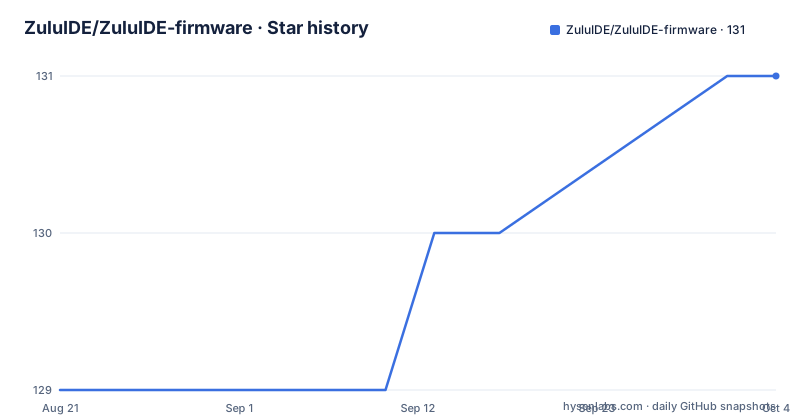
Star history
- ZuluIDE/ZuluIDE-firmware131 ★ · +2
| Repository | 2026-08-21 | 2026-10-04 |
|---|---|---|
| ZuluIDE/ZuluIDE-firmware | 129 | 131 |
2 Stars in the last 44 days, measured from the daily GitHub snapshot. Compare with other projects
Editorial analysis
Four emulated device types, and CD-ROM is the silent default
The device type is chosen three ways, and the order of precedence is the thing to get right.
The first is an image filename prefix: CDRM for a CD-ROM, HDDR for a hard drive, ZIPD for a Zip Drive 100, and REMV for a generic ATAPI removable device.
The second is the ini file, where a Device setting under the IDE section takes a value of CDROM, Zip100 or Removable.
The third is what happens when you do neither. If no prefix and no Device setting are present, the drive defaults to CD-ROM. That default is the one to be aware of, because a hard drive image with a plain filename will be offered to the host as a CD-ROM, and the host will report a device it cannot mount rather than a configuration error.
The images themselves are loose on a FAT32 or exFAT card. CD-ROM emulation takes .iso files and .bin/.cue pairs, loaded in alphabetical order but with prefixed files preferred if any are present. Zip and removable images may carry any extension at all except the CD-ROM ones and anything on the ignore list, which is convenient for tape-style naming.
One constraint catches people out: if you use a prefix to specify the drive, then every file you want to insert and eject into that drive must carry the same prefix. The device switches through its images alphabetically, and mixing prefixed and unprefixed files means the unprefixed ones are never reached.
Rename the update file and the bootloader will not find it
The update path is an SD card bootloader, and it has one hard requirement that is stated as a warning rather than a preference.
For the RP2040-based boards, USB programming uses a .uf2 file copied to the virtual USB drive that appears in bootloader mode, and bootloader mode is entered with a DIP switch. For updating, there is a custom SD-card bootloader that loads new firmware from the card on boot.
The requirement is that the firmware file name must not be changed or renamed when copying the binary to the card. Renaming it causes the bootloader to fail to detect the file. That is an unusual failure mode, because nothing is wrong with the content, the card or the board, and the symptom is simply that nothing happens.
The rest of the sequence is reassuring. An update takes about three seconds, during which the LED flashes rapidly. On success the bootloader removes the update file and continues to the main firmware, which means the card is left in a clean state rather than re-flashing the same firmware on every boot.
Three DIP switches configure the board. CABLE SEL enables cable selection of the IDE drive ID. PRI/SEC, when cable select is off, determines the drive ID, with OFF for primary and ON for secondary. DEBUG turns on the debug log. Those three switches are the entire physical configuration surface.
One blink, three blinks, five blinks, morse
With no display and no serial console, the indicator LED is the entire diagnostic interface, and the blink counts are a real protocol.
In normal operation the LED reports disk access. The status conditions are: one fast blink on boot means an image file loaded successfully. Three fast blinks means no images were found on the SD card. Five fast blinks means the SD card was not detected at all. A continuous morse pattern means the firmware crashed, and the morse code indicates where.
That last one is the clever part. A crash code in morse is a way of getting a stack location out of a device with no output channel, and it means a crash report is available without attaching a debugger. On a crash the firmware also attempts to save information into a separate error file.
The log file complements the LED. Messages go to a log file that is cleared on every boot, and normally only basic initialisation information is written. Switching on the DEBUG DIP switch causes every IDE command to be logged, once the board has been power cycled, which is how you capture the command-level conversation between the host and the device.
Hot-plugging is supported, and it has its own LED behaviour: the status LED blinks continuously while no card is present, and blinks once when a card is reinserted successfully. Swapping SD cards on a running machine is a supported operation rather than a reboot.
Hard disk images are raw files, and the extension does not matter
Hard drive emulation is the least constrained part of the format story, and that is deliberate.
For rigid hard disks, any raw file format works regardless of the file suffix, with .img, .ima, .hda and .hfs named as examples. Later firmware versions also support Virtual Hard Disk Version 1 image files, and the documentation is explicit that version 2 is not supported.
There is also a convenience for first boot. Alongside a hard drive image you can create a text file with a specific naming pattern and the firmware will create an empty image for you on the first boot, which saves having to image a drive before you can partition it.
The multi-track CD case has its own convention and it is worth reading twice. A .bin/.cue pair with a single .bin data file goes directly in the root of the card, and both files must have the same name, with the name given inside the .cue text file ignored. A .cue with multiple .bin files has to go in a subfolder instead, because the .bin is located by the name recorded in the .cue, and the folder name is what appears when switching between images in alphabetical order.
So the root folder is for single-track images with matching names, and subfolders are for multi-track sets. Mixing the two conventions is the way to get a listing that does not match what you expect.
Dual device mode ignores the DIP switches entirely
The second generation board can present as two devices at once, and the configuration for that is a set of naming conventions that run against the intuition the DIP switches teach you.
In dual device mode a single unit presents as both primary and secondary on the IDE bus. The hard drive has to be the dual device, while the main device can be any type, so a CD-ROM or a Zip drive. Any eject button actions and the DIP switch configuration apply to the main device.
The naming sets the roles, and it inverts as you might expect. Save the hard drive image as a name beginning HD followed by a zero and it becomes primary, with the CD-ROM secondary. Name it with a one instead and the hard drive becomes secondary and the CD drive primary. A CD image can carry any filename you like, since it is the only one of its kind.
The consequence to plan for is stated plainly: the DIP switch settings for primary, secondary and cable selection are ignored when in dual drive mode. So the switches that let you set the drive ID on a single-device board do nothing on a dual-device board, and the filename is the only control you have. Anyone setting up a dual drive after configuring a single one should expect the switches to appear to work and change nothing.
Image cycling is otherwise available from two directions. Every V2 board and the later compact RP2040 revisions have a hardware eject button, plus a pin header for attaching a switch that simulates an eject and advances to the next image alphabetically. The same advance can be triggered from within the host operating system.
Audio, USB access, and a licence with a hardware exception
Three things sit outside the core emulation story and are worth knowing about separately.
CD audio playback emulation works on both generations. The RP2350 generates digital i2s audio, which goes to an on-board DAC on the 2.5-inch Hybrid board or to an optional plug-in hat board, using a PCM5100A converter to produce stereo line-level audio through a standard MPC-2 CD-ROM audio connector. That is Red Book audio working at the level a real drive would, rather than simulated.
USB mass storage can be enabled with an ini directive, and the documentation is explicit about the limitation: access to the inserted card's contents is non-simultaneous. The card is either mounted as a drive or serving IDE requests, not both at once, and the wiki page carries the details.
The licence is the detail that will matter to a commercial user, and it is unusual. The repository root contains a GPL-3.0 file and a separate GPL-3.0 licence file carrying a hardware system level exception. Software under the GPL is familiar; a hardware exception attached to it is a specific legal construction, and it is the file to read before you design a board around this firmware and sell it.
Two generations exist and the relationship is stated plainly. The original unit is powered by an RP2040 with a small field-programmable gate array, and the documentation says it is still supported while also saying the V2 has permanently succeeded it, being faster and cheaper to produce. The first generation is not deprecated, but it is not where new work goes.
Editorial conclusion
ZuluIDE firmware fits anyone reviving a machine whose optical drive has failed and who wants a CD-ROM the host OS cannot tell from a real one, since it emulates at the ATA level rather than translating anything. Leave it if you need a GUI, since there is no display and the configuration is a filename prefix or a line in an ini file. Verify first which generation of board you have, because the first-generation RP2040 unit is still supported but the documentation states the V2 has permanently succeeded it, and check the log file after first boot, since the one blink that means success and the three that mean no images are easy to confuse when you are squinting at a cartridge in a dark machine.
Frequently asked questions
What device types can ZuluIDE firmware emulate?
Rigid hard drives, ATAPI and IDE CD-ROM drives, ATAPI and IDE Zip drives, and a generic ATAPI removable drive. A second-generation board can present two devices at once, with the hard drive as the dual device and the main device of any type.
How do I tell ZuluIDE what type of drive an image is?
Three ways: an image filename prefix of CDRM, HDDR, ZIPD or REMV; a Device setting in the zuluide.ini file under the IDE section taking CDROM, Zip100 or Removable; or nothing, in which case the drive defaults to CD-ROM.
What do the ZuluIDE LED blinks mean?
One fast blink on boot means an image loaded successfully, three fast blinks means no images were found on the SD card, and five fast blinks means the SD card was not detected. A continuous morse pattern means the firmware crashed, and the morse code indicates the crash location.
Why will my ZuluIDE firmware update not be detected?
The firmware file name must not be changed or renamed when copying the binary to the SD card, because the bootloader fails to detect a renamed file. An update takes about three seconds with rapid LED flashing, and on success the bootloader removes the update file.
How do I set up ZuluIDE dual device mode?
Save the hard drive image with a name beginning HD followed by a zero to make it primary, or a one to make it secondary, and add the CD-ROM image under any filename. The DIP switches for primary, secondary and cable selection are ignored in dual drive mode.
What licence does ZuluIDE firmware use?
The repository carries a GPL-3.0 file and a separate GPL-3.0 licence file carrying a hardware system level exception. Since the hardware exception is a specific legal construction, read that file before designing a board around the firmware for sale.
Official sources
Add this badge to your README
If you maintain this project, the badge below links readers to this analysis and shows its maintenance status from the daily GitHub snapshot. Paste the markdown into your README; add ?metric=license or ?metric=stars to the image URL for a different field.

[](https://hysenlabs.com/projects/zuluide-zuluide-firmware)Star history chart for your README
[](https://hysenlabs.com/projects/zuluide-zuluide-firmware)