Puck: a config-driven React editor with a commit-message release chain
The visual editor for React.
At a glance
- What is it?
- Puck gives React teams a drag-and-drop editor assembled from their own components, and the telling details sit in the repository plumbing: release numbers come from conventional commit prefixes, every workspace is version bumped whether or not its code changed, and the quick start leaves config and data unresolved in the render file.
- Who is it for?
- Puck fits teams that already own their components and their data model, and it fits badly if you want a hosted page builder with a fixed field catalogue, since plugins and custom fields live in a community repository.
- Can I use it commercially?
- Yes. MIT is a permissive licence: you can use, modify and sell software built on it, as long as you keep its copyright and licence notices.
- Is it still maintained?
- Yes. The repository last received commits 1 day ago.
- What is it written in?
- Mainly TypeScript, according to GitHub's language statistics.
Answers come from the project's GitHub data, last synced on November 15, 2026, and from our analysis. They are not legal advice.
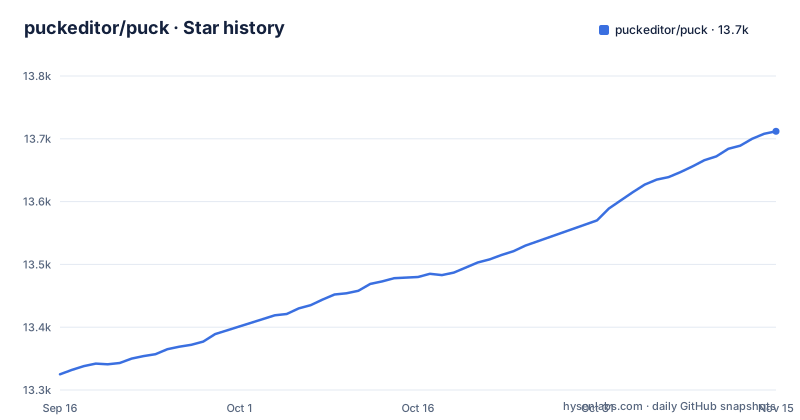
Star history
- puckeditor/puck13,712 ★ · +387
| Repository | 2026-09-16 | 2026-11-15 |
|---|---|---|
| puckeditor/puck | 13.3k | 13.7k |
387 Stars in the last 60 days, measured from the daily GitHub snapshot. Compare with other projects
Editorial analysis
The quick start's Page.jsx has neither config nor data in scope
The quick start spans two files and only one of them is self contained. Editor.jsx builds the config, sets `const initialData = {};`, stubs `const save = (data) => {};`, and renders the editor as `<Puck config={config} data={initialData} onPublish={save} />`. Page.jsx then imports a different export and asks for different variables:
// Page.jsx
import { Render } from "@puckeditor/core";

export function Page() {
  return <Render config={config} data={data} />;
}
Neither `config` nor `data` is defined or imported in that snippet, and the editor was handed `initialData`, not `data`. Copy both files as printed and the render path stays unresolved, and that gap is exactly where a real application lives: the editor emits a payload through onPublish and the page needs it back. The save stub is an empty arrow function, so nothing persists until you replace it.
Every workspace is version bumped on each release, changed or not
Release numbers are computed from commit messages. The chain is `pnpm release:prepare && pnpm changelog && pnpm release-commit`, and the prepare step runs `git fetch --tags && conventional-recommended-bump -p angular`, piping that recommendation into `pnpm version:auto`. Under the angular convention the prefix on your commit decides whether consumers receive a patch or a minor bump. The version script then calls `lerna version --force-publish -y --no-push --no-changelog --no-git-tag-version $npm_package_version`, and `--force-publish` is the flag that rewrites every workspace version regardless of whether its files moved. The published history shows the pattern: v0.22.4 on 2026-07-29, v0.23.0 on 2026-08-07, v0.24.0 on 2026-10-29. A version diff between releases therefore includes noise, and a mistyped commit prefix can ship a breaking change inside a patch number.
The release commit stages with git add -u and leaves new files out
One line of the release tooling deserves a closer read: `git add -u && git commit -m "release: v${npm_package_version}"`. The `-u` flag stages modifications and deletions to files git already tracks and deliberately skips untracked files. If a file added for a release is not already tracked, it stays out of the release commit even though the changelog step and the version bump have both already run. This is a narrow failure, and it is invisible in the tag diff because version numbers move regardless of content. For a consumer it surfaces as a published version whose build expects a file the tarball does not carry, which appears at install or build time rather than in review, so pinning an exact version and installing it once is the only cheap check.
Canary builds are versioned with tags and tree checks switched off
Canary builds exist, and they deliberately bypass git. `release:canary` runs the same prepare step first, then `node scripts/get-unstable-version canary | xargs pnpm version:auto $1`, while `version:auto` expands to `pnpm version --no-git-tag-version --no-git-checks $1`. Both flags remove git from the loop: no tag is written and a dirty working tree is allowed. A canary install therefore cannot be resolved back to a commit by tag lookup, and the version it carries comes from whatever conventional-recommended-bump decided about the commits in range. For readers choosing what to ship, the git tags are the only stable identifiers this repository produces, and a canary number on its own tells you nothing about which source it was built from or how far ahead of the last release it sits.
Node 24 and pnpm 11 for the repo, npm on the install line
The repository declares its toolchain twice, and the two declarations serve different audiences. Root package.json names [email protected] as its packageManager and requires node >=24.0.0 with pnpm >=11.0.0 under engines, the lockfile is pnpm-lock.yaml inside a pnpm workspace, and a .nvmrc sits at the top level. Consumers are pointed somewhere else:
npm i @puckeditor/core --save # or npx create-puck-app my-appBoth statements hold at once, because the engines floor governs cloning and building this monorepo while npm installs the published package. The trap is for contributors who reach for npm on an older Node runtime that their base image still ships. The single line also fuses a package install with a scaffolding command, which reads as two equivalent starting points when one adds a dependency and the other generates a project around `create-puck-app`.
The prettier glob skips JavaScript while two ESLint configs share the root
Formatting and linting disagree about which files exist. The format scripts run prettier over a fixed glob:
"format:check": "prettier --check \"**/*.{ts,tsx,md,mdx,css}\"",There is no .js, .jsx or .json in that list, so a JavaScript file or a package manifest can land unformatted without the check reacting, which matters in a root that still carries a legacy `.eslintrc.js` beside `eslint.config.mjs` while devDependencies pin eslint at ^9.0.0. Two ESLint configuration files in one root means a contributor has to know which one the tool actually reads, and editing the ignored one produces a clean check with no effect on the code. Same for prettier, pinned at ^2.5.1 with .prettierrc.json and .prettierignore governing what it rewrites. Run the format check before opening a pull request rather than after review.
The Puppeteer smoke script is not wired into the test task
Browser level verification sits outside the test task. `test` is `turbo run test`, which fans out to whatever each workspace declares, and the browser script is a separate entry:
"smoke": "node scripts/e2e/smoke.mjs"That script drives Puppeteer, pinned at ^24.8.2 in devDependencies, and nothing in the test script references it, so a plain `pnpm test` starts no browser and downloads no Chromium. The dev script is narrower still, `turbo run dev --filter=demo`, so only the workspace named demo comes up locally. There is also a two-tool build story in the root, with build and test running through turbo while versioning runs through lerna under lerna.json, which means a release can carry versions that no task in the graph has built. For readers judging what a green pipeline proves, browser checks are something you invoke by name.
Plugins live in a community repo and the sample carries no data version
Extensions and paid help both sit outside this repository. Plugins and custom fields are gathered in a community repository called awesome-puck, so the field types people actually use are maintained by third parties, and the quick start shows a single built in field, `children` with `type: "text"`, inside a components map whose entries carry `fields` and `render`. Nothing in that sample carries a data version field or a migration step, so persisted payloads have no declared shape to migrate against when your config changes. Support has three doors: a GitHub issue, the Discord server, and a booked discovery call described as hands-on support and consultancy. Two Discord invite codes appear in the README, one in the header links and a different one in the community and support sections, so a stale invite is a real possibility.
Editorial conclusion
Puck fits teams that already own their components and their data model, and it fits badly if you want a hosted page builder with a fixed field catalogue, since plugins and custom fields live in a community repository. Before you commit, read the quick start closely enough to fix its missing config and data wiring yourself, pin an exact version because the release line is still 0.x, and confirm whether your Node and pnpm match the >=24.0.0 and >=11.0.0 floor the repository declares.
Frequently asked questions
How do I install Puck and add the editor to a React app?
Run `npm i @puckeditor/core --save`, or scaffold a project with `npx create-puck-app my-app`. Then build a config object whose components each declare `fields` and a `render` function, and pass it to `<Puck config={config} data={initialData} onPublish={save} />`. The package is MIT licensed, so it suits internal systems and commercial applications.
Does Puck work with Next.js, and which router recipes are included?
Puck is a React component, so it runs in React environments including Next.js, and two recipes ship in the repository: next, using the App Router with static page generation, and react-router, a React Router v7 app using dynamic routes to create pages at any level. A separate `Render` export from @puckeditor/core handles reading the stored payload back.
Where do Puck plugins, custom fields, and support come from?
Plugins and custom fields are collected in the awesome-puck community repository, while the core package supplies the config object and the Puck and Render components. Support runs through a GitHub issue or the Discord server, and the project additionally offers booked discovery calls described as hands-on support and consultancy.
Official sources
Add this badge to your README
If you maintain this project, the badge below links readers to this analysis and shows its maintenance status from the daily GitHub snapshot. Paste the markdown into your README; add ?metric=license or ?metric=stars to the image URL for a different field.

[](https://hysenlabs.com/projects/puckeditor-puck)Star history chart for your README
[](https://hysenlabs.com/projects/puckeditor-puck)Was this useful?