Horusec Static Analysis and CI Vulnerability Scanning
Horusec is an open source tool that improves identification of vulnerabilities in your project with just one command.
At a glance
- What is it?
- Horusec is an open source Go CLI for static code analysis across many languages, with Docker-based analysis, Git history checks, and CI/CD usage. Its breadth is useful for teams seeking one scan entry point, while dependency and upgrade details require attention.
- Who is it for?
- Horusec fits teams that want a single CLI covering several languages and Git history, but it is a poor fit for Docker-free environments that need the full documented analysis set. Verify first whether the supported analyzers, Docker dependency, `.horusec` handling, and current release match your repository before adoption.
- Can I use it commercially?
- Yes. Apache-2.0 is a permissive licence: you can use, modify and sell software built on it, as long as you keep its copyright and licence notices.
- Is it still maintained?
- Yes. The repository last received commits 2 days ago.
- What is it written in?
- Mainly Go, according to GitHub's language statistics.
Answers come from the project's GitHub data, last synced on November 6, 2026, and from our analysis. They are not legal advice.
Star history
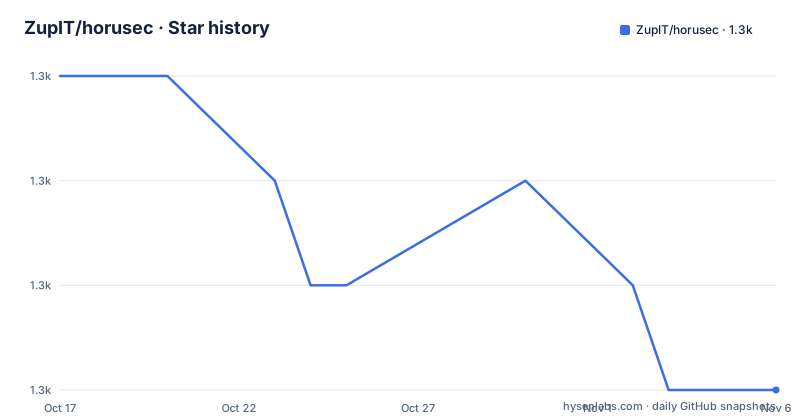
- ZupIT/horusec1,344 ★ · -3
| Repository | 2026-10-17 | 2026-11-06 |
|---|---|---|
| ZupIT/horusec | 1.3k | 1.3k |
-3 Stars in the last 20 days, measured from the daily GitHub snapshot. Compare with other projects
Editorial analysis
Horusec's Static Analysis Scope
Horusec addresses the problem of finding security flaws while a project is being developed, rather than waiting for a later security review. The README positions it for two groups: developers who want a command-line check during development, and DevSecOps teams that want the same analysis in CI/CD pipelines. The repository is primarily written in Go, but the scanner is intended for projects written in several other languages. The documented analysis targets are C#, Java, Kotlin, Python, Ruby, Golang, Terraform, Javascript, Typescript, Kubernetes, PHP, C, HTML, JSON, Dart, Elixir, Shell, and Nginx.
That scope is the project's main practical distinction. A project does not need to translate its code into Go or adopt a Go-specific service to use the CLI. The repository contains Go command and internal packages, while the README describes language coverage as part of the analysis engine. It also searches for key leaks and security flaws in project files and Git history. Git history inspection is a meaningful addition for codebases where a secret or insecure pattern was removed from the current working tree but remains in prior commits.
Horusec is therefore a static analysis scanner, not a runtime application-security monitor. The README does not describe tracing live requests, inspecting deployed services, or detecting vulnerabilities through execution. Its output concerns source, configuration, and history. That boundary matters when selecting a tool: a source scanner can help locate patterns early, but it does not by itself establish that every finding is exploitable or that an application is secure at runtime.
How Horusec Processes a Project
The documented entry point is the CLI. A scan starts with a project path, and Horusec creates a `.horusec` directory when analysis begins. The README describes that directory as the basis for keeping generated analysis data separate from the source code, which is why it recommends adding `.horusec` to `.gitignore`. The analysis can examine files in the project and, when enabled, inspect Git history.
Docker supplies the tools used by Horusec. The repository's `go.mod` shows that the application depends on `github.com/ZupIT/horusec-engine`, `github.com/ZupIT/horusec-devkit`, Docker client packages, Cobra, Viper, logging, CSV output, and other Go libraries. The README's architecture image indicates a larger tool-based analysis system, but it does not publish a complete rule-by-rule execution trace. Based on the documented CLI flags, the project path, dependency settings, and optional Git setting form the main control surface.
There are two operational paths. A local installation invokes the `horusec` binary directly. The Docker image runs the CLI inside `horuszup/horusec-cli:latest`, mounts the current project at `/src`, and maps that container path back to the host directory with `-P $(pwd)`. The separate paths are intentional: `-p /src` identifies the project inside the container, while `-P $(pwd)` preserves the host path for result handling.
Commit-author analysis is optional. The README says that enabling `-G true` also requires `git`. This makes the feature useful for history-oriented review, but it also adds a dependency and changes the prerequisites. The README does not specify the full rule catalogue, severity model, output schema, or exact behavior of every analyzer, so those details should be checked in the linked documentation before an organization depends on them.
Installing Horusec and Running the First Scan
The documented prerequisite is Docker. On Mac or Linux, the repository provides a Makefile target for installation. A source checkout is needed for that command because the README presents `make install` as the first option. The command installs the project through the repository workflow rather than downloading a package from a language registry.
make installAfter installation, check that the CLI is available and reports its version. The README uses `horusec version` for this verification. A successful installation should make that command available from the shell's executable path.
horusec versionThe first real scan starts at the current directory. The `-p .` argument tells the CLI to analyze the current project path. Horusec will create `.horusec` during analysis, so that directory should be added to `.gitignore` if the project does not already ignore it.
horusec start -p .For a host without Docker, the README documents `-D true` to disable dependencies. It explicitly warns that this setting loses much of the analysis power. The command remains available for environments where Docker cannot be used, but it should not be treated as equivalent to the Docker-backed scan without checking the documentation for the resulting coverage.
horusec start -p . -D trueIf commit authors are needed, `-G true` enables that option and requires `git`. The README does not show a complete example combining `-G true` with the other flags, so the exact analysis behavior should be confirmed before adding it to a pipeline.
Docker Execution and CI/CD Integration
For environments that already use containers, the README provides an image invocation. It mounts the host Docker socket and the current project directory. The socket mount allows the containerized command to interact with Docker, while the project mount exposes the source tree at `/src`.
docker run -v /var/run/docker.sock:/var/run/docker.sock -v $(pwd):/src horuszup/horusec-cli:latest horusec start -p /src -P $(pwd)This command is more involved than `horusec start -p .`. The volume declaration exposes the project, and `-p /src` tells Horusec where the project appears inside the container. `-P $(pwd)` identifies the corresponding path outside the container. The README explains both path values, which is useful because CI runners often operate inside a different filesystem layout from the host workspace.
The Docker approach also carries a security boundary. The command mounts `/var/run/docker.sock`, which can provide substantial control over the Docker daemon on systems where access is not restricted. The README does not describe a socketless mode for the image, so teams using this exact invocation should account for the permissions and isolation of their runner. That is an operational issue, not evidence that the scanner is unsafe by itself.
Horusec also documents use through a web application, Visual Studio Code, and pipelines. The README does not provide the corresponding configuration commands in its installation and usage sections. It therefore confirms several intended integration surfaces, but does not state a precise pipeline syntax, editor setting, or web application deployment procedure here. The linked Horusec documentation is the relevant source for those implementation details.
Dependency, Coverage, and Output Trade-offs
The clearest limitation is the relationship between Docker and analysis coverage. Docker is not merely a convenient packaging choice in the README. The project says that Docker is required to run Horusec with all the tools used, and `-D true` disables dependencies while losing much of the analysis power. This creates a direct trade-off for environments that restrict container access or cannot run Docker at all.
The documented language list is broad, but it should not be interpreted as equal rule depth across every language. The README points to external documentation for the complete list of tools and languages, while the repository text does not enumerate rules, severity levels, false-positive handling, or language-specific limitations. Engineers evaluating a particular stack need to inspect that documentation and compare it with their frameworks, generated files, configuration formats, and repository layout.
The CLI also creates `.horusec` during analysis. That is useful for separating analysis state from source, but it introduces a repository hygiene requirement. Ignoring the directory prevents generated files from being sent to a Git server. A CI system must also decide whether it retains, publishes, or discards the generated output after the scan. The README does not document retention policies, report formats, or a rollback mechanism for a failed scan.
A manual security review remains a real alternative, although it follows a different process. A reviewer examines code and configuration in context, can ask why a pattern is reachable, and can evaluate business-specific trust boundaries. Horusec automates pattern discovery across supported files and Git history, which is faster for broad repeatability but does not replace interpretation of each finding. The two approaches can complement each other: use Horusec for repeatable discovery, then review findings with knowledge of the application's behavior.
Releases, Maintenance Signals, and Apache-2.0
The repository is not archived. Its last push was on 2026-10-13, which provides a recent repository activity signal, but the listed recent releases are v2.9.0-beta.1, v2.9.0-beta.2, and v2.9.0-beta.3 from August 2023. The release labels are beta versions, and the README warns that the v1 endpoint will be deprecated and directs users to upgrade the CLI to v2. These facts answer different questions: one concerns repository activity, while the others concern the releases listed in the repository history.
The README points to the releases page for versioned binaries. That is preferable when a project needs reproducibility, because a moving `latest` image or installation endpoint can change independently of a CI configuration. The Docker tutorial uses `horuszup/horusec-cli:latest`, so a pipeline using that tag would not by itself record which scanner release produced a result. The repository layout includes `Makefile`, `go.mod`, `goreleaser.yml`, and deployment scripts, but these files do not establish a complete upgrade policy for every dependent configuration.
Horusec uses Apache-2.0. The badge and repository metadata identify that license, and the `LICENSE` file is present at the repository root. The license permits use under its terms, but redistribution, notices, patent provisions, and other obligations must be evaluated against the actual distribution and deployment context. This is a license identification, not legal advice.
Editorial conclusion
Horusec fits teams that want a single CLI covering several languages and Git history, but it is a poor fit for Docker-free environments that need the full documented analysis set. Verify first whether the supported analyzers, Docker dependency, `.horusec` handling, and current release match your repository before adoption.
Frequently asked questions
What does Horusec scan?
Horusec performs static code analysis for security flaws in supported project files and can search Git history. The README lists C#, Java, Kotlin, Python, Ruby, Golang, Terraform, Javascript, Typescript, Kubernetes, PHP, C, HTML, JSON, Dart, Elixir, Shell, and Nginx among its analysis targets.
Does Horusec require Docker?
Docker is the documented requirement for running Horusec with all the tools it uses. The `-D true` flag can disable dependencies, but the README warns that this loses much of the analysis power.
How do I run Horusec on a project?
The basic command is `horusec start -p .`, which starts analysis from the current project directory. Horusec creates a `.horusec` directory during the scan, and the README recommends adding it to `.gitignore`.
Can Horusec inspect Git history?
Yes. The README says Horusec can search for key leaks and security flaws in project files and in Git history. Enabling commit authors with `-G true` also requires the `git` dependency.
Official sources
Add this badge to your README
If you maintain this project, the badge below links readers to this analysis and shows its maintenance status from the daily GitHub snapshot. Paste the markdown into your README; add ?metric=license or ?metric=stars to the image URL for a different field.

[](https://hysenlabs.com/projects/zupit-horusec)Star history chart for your README
[](https://hysenlabs.com/projects/zupit-horusec)Was this useful?