my-tv-webview: a minimal Chinese TV live app with no settings at all
My TV: a minimalist live-TV app for watching Chinese domestic TV channels.
At a glance
- What is it?
- An Android app that wraps broadcasters' public live pages in a built-in browser engine, with no settings screen, no in-app links and a single release. The architecture choice has a specific reason worth knowing, since the author switched to embedding web pages because IPTV stream sources kept failing, and the project ships a declaration saying it stores and forwards nothing.
- Who is it for?
- This is a personal tool rather than a product, and the author is explicit about that, which makes it easier to judge. It suits someone who wants a television-shaped app on an Android box or a phone and does not want to configure anything.
- Can I use it commercially?
- Yes. MIT is a permissive licence: you can use, modify and sell software built on it, as long as you keep its copyright and licence notices.
- Is it still maintained?
- Yes. The repository last received commits 34 days ago.
- What is it written in?
- Mainly Kotlin, according to GitHub's language statistics.
Answers come from the project's GitHub data, last synced on October 23, 2026, and from our analysis. They are not legal advice.
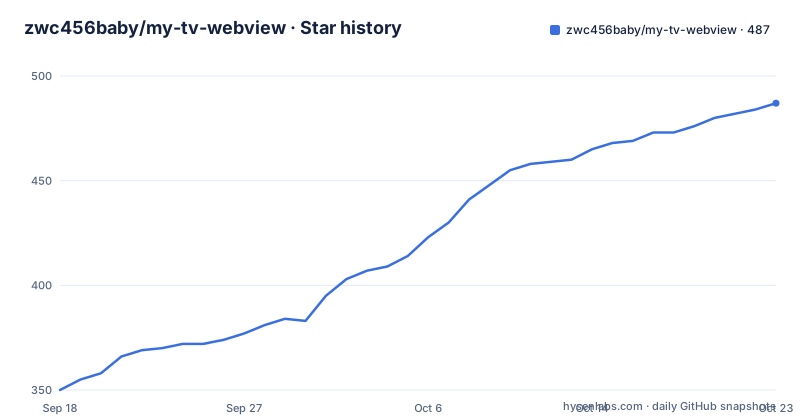
Star history
- zwc456baby/my-tv-webview487 ★ · +137
| Repository | 2026-09-18 | 2026-10-23 |
|---|---|---|
| zwc456baby/my-tv-webview | 350 | 487 |
137 Stars in the last 35 days, measured from the daily GitHub snapshot. Compare with other projects
Editorial analysis
No settings, and the author says that is deliberate
The defining characteristic of this app is an absence, and the documentation addresses it directly rather than leaving you to discover it. There is no settings screen. The stated reason is that this is purely a personal project, configured to one person's own habits, and the file is refreshingly balanced about whether that is a virtue: no settings page can be an advantage or a disadvantage, the mental load is extremely low, and you install it and use it without fiddling. The same minimalism extends to the interface. The documentation lists what has been hidden, including advertisements, the project address, update links and settings items, and it also hides every link inside the app. That last one has a consequence the author calls out directly: since there is nothing in the app to navigate back to, they ask for a star on the repository so the project can be found again, because the app itself is not a route back to its own source.
A built-in browser core removes the two usual Android TV problems
The reason the app ships a browser engine inside itself is worth understanding, because it is the decision that makes the app work on old televisions. The stable compatibility version bundles a Firefox v144 core, which means you do not have to upgrade the system WebView and you do not have to manually install the X5 core. Both of those are long-standing problems with WebView-based apps on Chinese Android television boxes and phone variants, where the system WebView is either outdated, disabled or replaced by a vendor build, and the usual workaround is a sideloaded browser core. Bundling one removes the variable entirely at the cost of app size and of not using whatever the system provides. The supported floor is Android 5.0, which is a very old target and consistent with the aim of running on whatever television hardware is to hand rather than on recent phones. The project states the app is for phones and televisions, and adds that in theory other devices work too.
The embedded page approach exists because stream sources keep dying
The architecture is a direct consequence of a maintenance problem, and the documentation names it. The interface design is referenced to one earlier project and the runtime core to another, both named in the file, and the reason for using an embedded browser rather than a stream player is stated in a single clause: because a large number of IPTV sources have stopped working. That is a real and recurring problem in this category. A stream URL that worked last year is frequently dead, requires a token, or is geo-restricted, and a player-based app has no way to survive that. An app that loads the broadcaster's own page does survive it, because whatever mechanism the broadcaster uses to gate the stream, the page is the one place it is meant to work. The cost is that you inherit the page's behaviour, which is consistent with a project that makes no claims about polishing the result and lists bug fixes and additional device compatibility as the only things it intends to do.
The remote control is the interface, because it is a television app
The feature list is short and shaped entirely by the target device. The remote's up and down keys change channel, and the menu key or centre key opens the programme list. On a programme, a right click marks it as a favourite or removes the favourite, which is a mouse gesture being used because televisions and set-top boxes can produce one through a long press or a context key. Number keys change channel as well, which is the behaviour people expect from a television and which almost no phone-first app implements. Beyond input, there is an automatically updating channel list and support for multiple live sources, with the documentation pointing at a source directory for custom or imported ones. The stated position on that directory is currently that built-in sources are supported, with importing third-party sources described as an idea rather than a shipped feature, and compatibility problems are invited through the issue tracker with the caveat that some features probably will not be added.
The version code is computed from the git tag by an awk expression
The build glue is a single Makefile target, and it does something mildly clever. The default target derives the version by asking git for the tag description, then splitting that string on the letter v, the dots and the dashes, and finally combining the four resulting numbers into a single integer with awk. The multipliers are the giveaway: 16777216 is two to the twenty-fourth power, 65536 is two to the sixteenth, and 256 is two to the eighth, so the expression is packing major, minor, patch and build into the four bytes Android expects for a version code. The whole target is three lines:
gen-version:
	git describe --tags --always
	git describe --tags --always | sed 's/v/ /g' | sed 's/\./ /g' | sed 's/-/ /g' | awk '{print ($$1*16777216)+($$2*65536)+($$3*256)+$$4}'
That is the standard trick for turning a semantic version into a monotonic integer, and doing it from the git tag means nobody has to remember to bump a number in two places. A second target that would write the version file as JSON is present but commented out, and it is a fossil of the upstream project this was based on, since it still hardcodes the other project's name and a download URL on a third-party code host.
An APK on a file host, and a netdisk link as a second route
Distribution is deliberately minimal, and it is the one place where the minimalism has a cost. There is no package repository, no release asset pipeline in the usual sense, and no in-app update mechanism, since update links are among the things the documentation says are hidden. Instead there is a direct link to the APK on a general file hosting service, plus a second copy on a domestic cloud storage network with an extraction code, and the note that using the mobile app for that service is more convenient. The project's own guidance for television installation is that you should look up how to install APKs on your own device, which leaves the one genuinely fiddly part of the experience undocumented. It is a reasonable division of labour for a personal project, and it does mean that anyone evaluating this is implicitly trusting a binary from a file host with no signature story, no checksum and no changelog in the usual places.
The declaration says it nests public pages and repairs nothing
The last section of the documentation is a four-point declaration, and it is more specific than most personal projects bother with. The app only nests and displays the live pages that broadcasters publish, with all content coming from the original sites and the copyright belonging to them. It provides no video resources itself, and neither stores nor forwards anything, and it is described as being for study and research. Third, it states that it does not crack or bypass any restrictions on the source sites, and that if an original site changes its content or restricts access, the app will not attempt any repair or circumvention. Fourth, and the part that matters most in practice, the official live addresses included were collected and submitted by other users, and the developer asks to be contacted for removal if any of them infringe a copyright holder's rights. Taken together that is a coherent position for an embedder rather than a streamer, and it is stated by the project rather than inferred by a reader.
Editorial conclusion
This is a personal tool rather than a product, and the author is explicit about that, which makes it easier to judge. It suits someone who wants a television-shaped app on an Android box or a phone and does not want to configure anything. Three things to weigh. There is no settings screen and the author states features may never be added, so do not expect a configuration surface. The app carries no links at all, so finding it again depends on the repository you already have. And the live streams come from third-party pages whose availability the author does not control and explicitly does not attempt to repair. It is MIT licensed, there is a single release, and the last push was on 2026-09-19.
Frequently asked questions
What is my-tv-webview?
It is a MIT licensed Kotlin Android app for watching Chinese television live streams on a phone or a television, with a minimum of Android 5.0. The stable version bundles a Firefox v144 core so you do not need to update the system WebView or install another browser core, and it has no settings screen and no links inside the app.
Why does my-tv-webview use an embedded browser?
The project states the reason directly: because a large number of IPTV sources have stopped working, the app loads the broadcasters' public live pages instead of playing a stream URL. The interface design is referenced to an earlier project and the runtime core to another, both named in the documentation.
Does my-tv-webview have a settings screen?
No, and that is deliberate. The documentation describes it as a purely personal project configured to one person's habits, and is balanced about the trade: no settings page can be an advantage or a disadvantage, the mental load is very low, and the goal is that you install it and use it without fiddling.
Which remote control keys work in my-tv-webview?
The remote's up and down keys change channel, the menu key or the centre key opens the programme list, number keys change channel, and a right click on a programme marks it as a favourite or removes that favourite. There is also an automatically updating channel list and support for multiple live sources.
How does my-tv-webview distribute the app?
As a direct APK link on a file hosting service, with a second copy on a domestic cloud storage network that needs an extraction code. There is no package repository and update links are hidden, and the documentation says to look up how to install APKs on your own television.
Official sources
Add this badge to your README
If you maintain this project, the badge below links readers to this analysis and shows its maintenance status from the daily GitHub snapshot. Paste the markdown into your README; add ?metric=license or ?metric=stars to the image URL for a different field.

[](https://hysenlabs.com/projects/zwc456baby-my-tv-webview)Star history chart for your README
[](https://hysenlabs.com/projects/zwc456baby-my-tv-webview)Was this useful?