Rig: a Rust LLM library that now ships its own Bevy-based coding agent
⚙️🦀 Build modular and scalable LLM Applications in Rust
At a glance
- What is it?
- 0xPlaygrounds/rig is two things in one repository: a Rust crate for building LLM applications across many providers and vector stores, and a terminal coding agent called rig whose every part is a Bevy plugin. Both are moving fast, and the library carries a serde_json change that can alter your JSON output without a compile error.
- Who is it for?
- Rig suits Rust developers who want one interface over many model providers and vector stores, and people who want a terminal coding agent they can rebuild piece by piece in Rust. It does not suit Windows users who want the agent, or teams that cannot absorb frequent pre-1.0 releases.
- Can I use it commercially?
- Yes. MIT is a permissive licence: you can use, modify and sell software built on it, as long as you keep its copyright and licence notices.
- Is it still maintained?
- Yes. The repository last received commits 1 day ago.
- What is it written in?
- Mainly Rust, according to GitHub's language statistics.
Answers come from the project's GitHub data, last synced on November 14, 2026, and from our analysis. They are not legal advice.
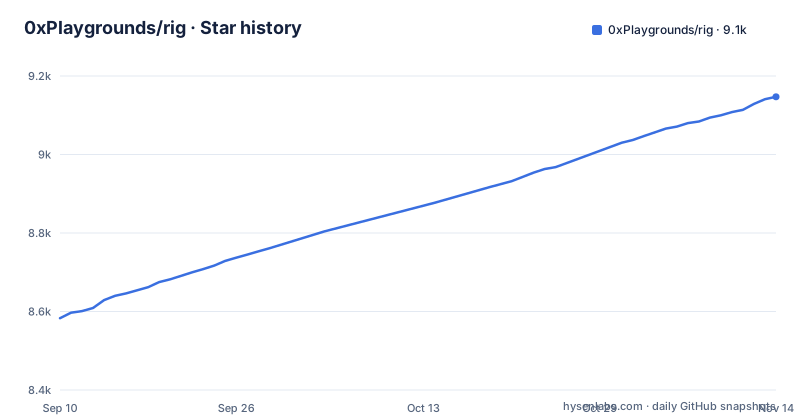
Star history
- 0xPlaygrounds/rig9,147 ★ · +564
| Repository | 2026-09-10 | 2026-11-14 |
|---|---|---|
| 0xPlaygrounds/rig | 8.6k | 9.1k |
564 Stars in the last 65 days, measured from the daily GitHub snapshot. Compare with other projects
Editorial analysis
One repository, a library crate and a coding agent sharing the name rig
Rig started as a Rust library for building LLM applications, and the repository now also produces `rig`, a terminal coding agent built on that library. Both are published under the same crate name, so the command you run decides which one you get:
cargo install rig
rigcargo add rigThe first pair installs and launches the agent. The second adds the library to an existing Cargo project. This matters when you search for help: a question about `rig` might be about prompting a model from your own Rust code, or about the slash commands of the agent. The `rig` crate itself is a facade. Its Cargo.toml says the facade's own source is one file of re-exports, and the crate re-exports the core and the agent runtime, with each companion crate behind a Cargo feature. The project is MIT licensed, the default branch is main, and the homepage is rig.rs, with API reference on docs.rs.
Every part of the agent is a Bevy plugin listed in plugins.toml
The coding agent is a Bevy app. Its tools, commands, sessions, sign-in and terminal view are each a plugin listed in `plugins.toml`, so any of them can be removed, replaced or added to. The crates that make this work are split out: `rig-ecs` is the agent kernel on Bevy's ECS, `rig-harness` is the harness the agent's plugins build on, `rig-tui` is the terminal view, and `rig-basics` holds the default plugins. A plugin guide at crates/rig-harness/PLUGINS.md shows how to write a tool, command or panel.
The `/reload` command rebuilds the agent with your plugin changes and restarts it in the same session. If the new build does not compile, the old build keeps running, so a typo in a plugin does not kill your session. The cost of this design is that extending the agent means writing Rust and compiling it. There is no scripting layer between you and the plugin API, and each change goes through a full Rust build before you see it.
Signing in, picking a model and pointing at a local server
Inside the agent, `/login` either signs in with a ChatGPT plan or saves a provider's API key. You can skip that by exporting the key, such as `OPENAI_API_KEY`, before starting. `/model` picks one of the models those credentials reach. Local models come from an Ollama or llama.cpp server once `OLLAMA_API_BASE_URL` or `LLAMACPP_API_BASE_URL` names it, or once its key is set. `/help` lists the remaining commands.
For non-interactive use, `rig -p "fix the failing test"` answers one prompt without the terminal view. `rig -p --json` and `rig --json` drive the agent over pipes, and `rig help-agents` prints the protocol for that. Subagents and checkpoints of what the `shell` tool changed are optional plugins rather than defaults, and the tools can work on remote hosts over ssh or any command. The MCP client (`rig-mcp-client`) is off by default and uses project servers only once they are approved. ACP support for editors such as Zed lives in `rig-acp`, also off by default, and runs as `rig acp`.
The agent asks for Rust 1.97.1 and names only Linux and macOS
The agent needs Rust 1.97.1 or newer and runs on Linux and macOS. Windows is not on that list. If you work on Windows, the coding agent is not something you can count on, and you should look elsewhere for a terminal agent rather than expect a native build to work. The repository also pins its own toolchain through a rust-toolchain.toml file at the top level.
The toolchain floor has a second consequence. Because the agent is installed with `cargo install rig` and rebuilt by `/reload`, you need a working Rust toolchain at that version on every machine where you run it, not just a binary. Teams whose machines sit on an older Rust release, for example because a distribution package lags behind, will have to upgrade the compiler before the agent installs. The library side does not state the same platform restriction, and it advertises browser WASM (`wasm32-unknown-unknown`) for the core and the agent runtime.
Agents, providers and vector stores behind one interface in the library
On the library side, the minimal program builds an OpenAI completion model from the environment and wraps it in an agent with a preamble:
use rig::prelude::*;
use rig::providers::openai::{self, OpenAI};

#[tokio::main]
async fn main() -> Result<(), anyhow::Error> {
    // The client reads `OPENAI_API_KEY` and builds the models it serves.
    let model = OpenAI::from_env()?.completion(openai::GPT_6_1_SOL);
    let comedian = AgentBuilder::new(model)
        .preamble("You are a comedian here to entertain the user using humour and jokes.")
        .build();

    let response = comedian.prompt("Entertain me!").await?;
    println!("{}", response.output());
    Ok(())
}
`#[tokio::main]` needs tokio's `macros` and `rt-multi-thread` features, which you add with:
cargo add tokio --features macros,rt-multi-threadThe library claims 20+ model providers and 10+ vector stores, each under one interface; agents with tools, multi-turn streaming and typed hooks; completion, embedding, transcription, audio and image generation; and OpenTelemetry output following the GenAI semantic conventions. Work is split across crates: `rig-core` holds provider-neutral messages, models, tool contracts and the providers, `rig-agent` holds the builder, hooks, tool registry and the serializable `AgentRun`, and `rig-memory` handles windows, compaction, and saving, resuming and forking conversations. Integrations are switched on as features, for example:
rig = { version = "0.46.0", features = ["lancedb", "fastembed"] }AWS Bedrock sits behind `bedrock`, AWS S3Vectors behind `s3vectors`, Candle local models behind `candle`, and Cloudflare Vectorize behind `vectorize`.
rig-core stopped forcing serde_json preserve_order, and JSON keys now sort
This is the change most able to break an existing application quietly. `rig-core` no longer forces serde_json's `preserve_order` or `float_roundtrip` features. Without them, JSON object keys sort by name, and that includes schema properties and JSON text embedded in prompts, embeddings and tool results. Parsing floating-point numbers can also change their low bits.
The consequence is that nothing fails to compile. Your prompts can reach the model with tool schema properties in a different order than you wrote them, embedded JSON can differ byte for byte from before, and any snapshot test or cache key built from that text can stop matching. To restore the previous behaviour, add this to your application's Cargo.toml dependencies:
serde_json = { version = "1", features = ["preserve_order", "float_roundtrip"] }Cargo unifies features across dependencies, so the outcome depends on what else you pull in. `rig-cassette` with `traffic` (and therefore `rig-traffic`) still enables both features. `rig-claude-cloak`, `rig-mcp-client` and `rig-mongodb` through BSON still enable `preserve_order`. Rig has no forwarding feature for this; it is an application-level serde_json choice you have to make yourself.
Recording and replaying agent effects with rig-cassette
`rig-cassette` records an agent's effects into effect logs and supports replay and checkpoints. `rig-traffic` is an opt-in plugin that records provider HTTP traffic in the session store using the same cassette engine. The provider cassettes themselves now live inside `crates/rig-cassette/fixtures/cassettes` rather than in the published `rig` tarball, according to the comments in the workspace Cargo.toml.
That same Cargo.toml explains a packaging decision worth knowing if you read the crate source on crates.io. The root manifest is both the workspace root and the `rig` facade package, so `cargo package` would otherwise sweep CI workflows, README artwork, the Nix flake and a `tests/` tree that cannot compile from the tarball, because its `rig-test-support` dev dependency is path-only. The project uses an include allowlist instead of an exclude list. The upshot for users is that the downloaded crate is not the whole repository: to run the test suite or the examples under `examples/`, clone the GitHub repository rather than unpacking the published crate.
Three tagged releases in two weeks and a MIGRATING.md to read first
The repository is not archived, and the last push landed on 2026-11-02. Recent tags are v0.45.0 on 2026-10-19, v0.46.0-rc.1 on 2026-10-23 and v0.46.0 on 2026-10-31. The version numbers are still below 1.0, and the repository carries a MIGRATING.md alongside CHANGELOG.md at the top level.
For users, that pace cuts both ways. Fixes and new integrations arrive quickly, but a crate at 0.x that tags a new minor version every couple of weeks gives you little room to upgrade lazily. Pin an exact `rig` version, read CHANGELOG.md and MIGRATING.md before bumping it, and rerun any tests that compare model inputs, given the serde_json ordering change above. The examples directory is a better guide to current APIs than older blog posts: it holds packages such as `agent_with_tools`, `agent_with_memory`, `agent_with_human_in_the_loop`, `agent_with_tools_otel` and `agent_no_tokio`.
Editorial conclusion
Rig suits Rust developers who want one interface over many model providers and vector stores, and people who want a terminal coding agent they can rebuild piece by piece in Rust. It does not suit Windows users who want the agent, or teams that cannot absorb frequent pre-1.0 releases. Before adopting the library, check whether your code depends on JSON key order or exact float round trips, and pin the rig version in Cargo.toml.
Frequently asked questions
How do I use Rig with a local Ollama model?
In the rig coding agent, set OLLAMA_API_BASE_URL to name your Ollama server (or set its key), then pick the model with /model. llama.cpp works the same way through LLAMACPP_API_BASE_URL.
What is the difference between rig and rig-core?
rig-core holds provider-neutral messages, completion and embedding models, tool contracts, vector-store contracts and the providers. The rig crate re-exports the core and the agent runtime, with each companion crate behind a feature.
Does the Rig coding agent run on Windows?
The agent is stated to run on Linux and macOS and needs Rust 1.97.1 or newer. Windows is not listed.
Official sources
Add this badge to your README
If you maintain this project, the badge below links readers to this analysis and shows its maintenance status from the daily GitHub snapshot. Paste the markdown into your README; add ?metric=license or ?metric=stars to the image URL for a different field.

[](https://hysenlabs.com/projects/0xplaygrounds-rig)Star history chart for your README
[](https://hysenlabs.com/projects/0xplaygrounds-rig)Was this useful?