11notes/docker-tinyauth: A rootless, distroless tinyauth image for security-focused Docker hosts
run tinyauth rootless and distroless.
At a glance
- What is it?
- This article reviews the 11notes/docker-tinyauth image, which packages the tinyauth authentication middleware as a rootless, distroless container. It focuses on the security posture, the build approach, and the practical trade-offs of using this image over the original tinyauth distribution.
- Who is it for?
- Adopt 11notes/docker-tinyauth if you run a Docker host that values rootless, distroless, read-only containers and you want a small, CVE-scanned image for tinyauth. Do not adopt it if you need a shell inside the container for debugging, or if you expect a :latest tag.
- Can I use it commercially?
- Yes. MIT is a permissive licence: you can use, modify and sell software built on it, as long as you keep its copyright and licence notices.
- Is it still maintained?
- Yes. The repository last received commits 19 days ago.
- What is it written in?
- Mainly Dockerfile, according to GitHub's language statistics.
Answers come from the project's GitHub data, last synced on October 4, 2026, and from our analysis. They are not legal advice.
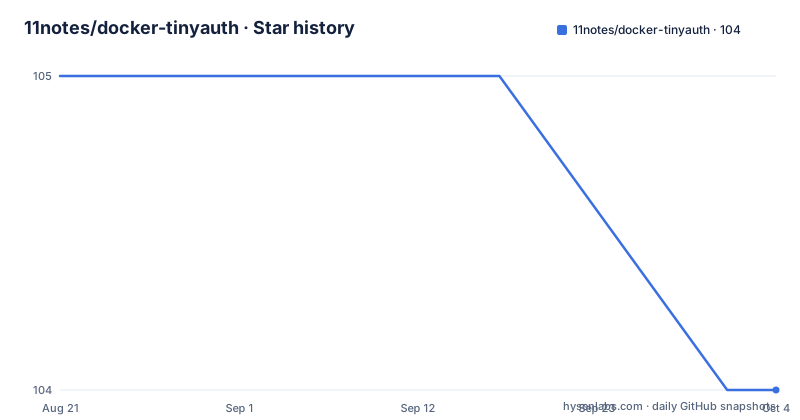
Star history
- 11notes/docker-tinyauth104 ★ · -1
| Repository | 2026-08-21 | 2026-10-04 |
|---|---|---|
| 11notes/docker-tinyauth | 105 | 104 |
-1 Stars in the last 44 days, measured from the daily GitHub snapshot. Compare with other projects
Editorial analysis
What tinyauth does and who this image is for
Tinyauth is an authentication middleware. It adds a login screen or OAuth (Google, GitHub, or any provider) in front of your Docker apps. It works with Traefik, Nginx, and Caddy. The 11notes/docker-tinyauth image packages that middleware in a specific way: it runs rootless as UID 1000:1000, it has no shell because it is distroless, it runs read-only, and it includes a health check. The intended audience is someone who already runs tinyauth or wants to, and who is willing to accept the constraints of a minimal container for the sake of a smaller attack surface. The README's comparison table lists the image at 25MB on disk, which is small for a middleware that includes a SQLite database and static assets. The image supports amd64 and arm64, which covers most Docker hosts.
The build mechanism: scratch, distroless layers, and pinned CI/CD
The image is not based on a general-purpose Linux distribution. It starts from scratch, which is an empty layer, and adds distroless layers from the 11notes/docker-distroless repository. Those layers contain users, timezones, and Root CA certificates, and nothing else. A second layer, 11notes/distroless:localhealth, provides a small executable that performs HTTP requests only on 127.0.0.1, used for the health check. The README states that the image is created via a secure and pinned CI/CD process and is automatically scanned for CVEs before and after publishing. It also claims that telemetry is disabled in code, referencing a line in arch.dockerfile. This build approach means the image has no shell, no package manager, and no debugging tools. If something goes wrong, you cannot exec into the container and run ps or curl. You must rely on logs and the health check. That is a real trade-off for the security gain.
Getting it running: compose file, environment, and volumes
The README provides a docker-compose example. It defines a service with the image 11notes/tinyauth:5.0.7, a read_only flag, and a security_opt of no-new-privileges=true. The environment variables include TINYAUTH_APPURL and TINYAUTH_AUTH_USERS. The latter takes a bcrypt hash for a user, for example admin:$2y$12$zzekhr74SUez9vo8TK2Be.mJ4EMX44k7whOogQo4F/2i84a6Rl6U6. The compose file also includes Traefik labels for routing. The image uses a volume at /tinyauth/var for the SQLite database and static assets. The default user is named docker with UID and GID 1000, and home directory /tinyauth. There is a TZ environment variable for timezone and a DEBUG variable that activates debug output for the container image and the app if available. The README warns that the example compose has a default user account, so you must replace it with your own. That is a concrete setup step.
Tagging policy: no latest, short semver, and rolling
The image has no :latest tag. The author explicitly discourages it, calling it a bad habit. Instead, you use a full semver tag like 5.0.7, or a short version like :5 or :5.0. Those short tags are updated on each new release. There is also a :rolling tag that always points to the latest version, with a warning that it may introduce breaking changes. This policy forces you to make an explicit choice about update cadence. If you pin to :5, you get minor updates within major version 5, which should not introduce breaking changes according to semver. If you use :rolling, you get the latest code immediately, with all the risk. For a security-focused image, this is a defensible approach, but it means you cannot rely on a simple pull latest. You must track releases manually or use a tool that reads the GitHub releases feed.
UID/GID variants: unraid and nobody tags
The image supports two special tag suffixes. Adding -unraid to any tag makes the container run as UID 99:100 instead of 1000:1000. Adding -nobody makes it run as 65534:65534. These are for hosts like Unraid that expect a specific user, or for running as the standard nobody user. The README notes that the -unraid tag works by default, meaning you do not need to reconfigure anything else. This is a practical touch for a niche audience. It also shows that the image is not strictly one-size-fits-all; the author has thought about specific deployment environments. For most users, the default 1000:1000 is fine, but if you have a host with a different UID mapping, you have an option without editing the image.
Security features and their limits
The image runs rootless, distroless, read-only, and with no-new-privileges in the example compose. It also has a health check, which is not always present in minimal images. The README claims the image is automatically scanned for CVEs before and after publishing. That is a meaningful assurance, but it does not guarantee zero vulnerabilities. The lack of a shell means that if a vulnerability requires a mitigation that involves running a command inside the container, you cannot do it. You would have to rebuild or replace the image. Also, the health check uses a localhost-only HTTP request, so it only verifies that the process is listening, not that the authentication flow works end-to-end. The read-only filesystem means the SQLite database must be on the mounted volume, which is /tinyauth/var. If you forget to mount that volume, the container may fail to persist data. The README does not mention a default volume, so you must create it.
Maintenance and upgrade cost
The image is auto-updated via CI/CD, meaning new versions of tinyauth are packaged and pushed automatically. The last push and release are from May 2026, so the project is actively maintained. However, the no-latest policy means you must manually update your compose file when you want a new major or minor version. The README advises checking the releases for breaking changes before updating. The image is provided at your own risk, and the author recommends making backups before updating. The license is MIT, which is permissive, but that applies to the Dockerfile and the image build scripts, not necessarily to tinyauth itself, which is a separate project. The image is based on scratch, so there is no base OS to patch; updates come only from tinyauth releases and the distroless layers. The maintenance cost is low in terms of upstream patching, but the operational cost is that you must stay aware of new releases and decide when to move from :5 to :6, for example.
Comparison with the original tinyauth image and alternatives
The README includes a comparison table with the original tinyauth image, but it does not name it explicitly. It says the 11notes image is 25MB, runs as 1000:1000, is distroless, and supports amd64 and arm64. The original image is likely larger and may run as root or with a shell. The key difference is the build philosophy: this image strips everything down to the minimum, while the original may include a full base image for convenience. There is also the alternative of running tinyauth from source or using a different authentication middleware like Authelia or Authentik. Those are heavier solutions with more features, but they are not drop-in replacements for a simple middleware. The 11notes image is specifically for tinyauth, so if you need more than login and OAuth, you would look elsewhere. The advantage of this image is its size and security posture; the disadvantage is the lack of debugging tools and the need to manage tags manually.
Editorial conclusion
Adopt 11notes/docker-tinyauth if you run a Docker host that values rootless, distroless, read-only containers and you want a small, CVE-scanned image for tinyauth. Do not adopt it if you need a shell inside the container for debugging, or if you expect a :latest tag. Before using, verify the current release version and its breaking changes, and replace the default admin user in the compose example with your own bcrypt hash. The image's reliance on a pinned CI/CD process and its no-latest tag policy means you must actively track releases and update your compose file manually.
Frequently asked questions
What user does the docker-tinyauth image run as?
By default it runs as user docker with uid 1000, gid 1000, and a home directory of /tinyauth. Appending -unraid to a tag runs it as 99:100, and appending -nobody runs it as 65534:65534.
Does docker-tinyauth have a latest tag?
No, and that is deliberate. The README argues against floating tags and suggests short semver instead, so :5 or :5.0 in place of :5.0.7. There is also a :rolling tag for the newest build, with a warning that it delivers breaking changes and security issues immediately.
How do I put Tinyauth in front of my apps with Traefik?
Run the Tinyauth service on port 3000, attach Traefik labels including traefik.http.middlewares.tinyauth.forwardauth.address pointing at http://tinyauth:3000/api/auth/traefik, and reference that middleware from the routers of the services you want protected. The example compose file shows the full set of labels.
Where does docker-tinyauth store its data?
In /tinyauth/var, which holds the SQLite database and the static assets. It has to be mounted as a volume or the accounts and session state are lost whenever the container is replaced.
Can I exec into the docker-tinyauth container for debugging?
There is no shell to exec into. The image is built from scratch with distroless layers added for users, timezones, root certificates and a localhealth helper, so debugging happens through the logs, the DEBUG environment variable and the health check rather than from inside the container.
Which registries can I pull the Tinyauth image from?
Three, all with the same tags: 11notes/tinyauth on Docker Hub, ghcr.io/11notes/tinyauth, and quay.io/11notes/tinyauth. Each also publishes a tag per commit and its shorthand sha256 value.
Official sources
Add this badge to your README
If you maintain this project, the badge below links readers to this analysis and shows its maintenance status from the daily GitHub snapshot. Paste the markdown into your README; add ?metric=license or ?metric=stars to the image URL for a different field.

[](https://hysenlabs.com/projects/11notes-docker-tinyauth)Star history chart for your README
[](https://hysenlabs.com/projects/11notes-docker-tinyauth)