Pi3 and Pi3X: reconstructing 3D geometry from unordered images, with torch 2.5.1 pinned and cuda as the default device
[ICLR 2026] π^3: Permutation-Equivariant Visual Geometry Learning
At a glance
- What is it?
- yyfz/Pi3 is the code for the ICLR 2026 paper on permutation-equivariant visual geometry learning. The main branch ships inference scripts, a Gradio demo and the newer Pi3X model, while training and evaluation sit on separate branches.
- Who is it for?
- Pi3 suits researchers and engineers who have images or a video and an NVIDIA GPU, and want a point cloud saved as .ply without choosing a reference frame. It is a weaker fit for CPU-only machines, because the README sets the default device to cuda, and for anyone who wants training or evaluation from main, since those live on the training and evaluation branches.
- Can I use it commercially?
- Yes. BSD-3-Clause is a permissive licence: you can use, modify and sell software built on it, as long as you keep its copyright and licence notices.
- Is it still maintained?
- Yes. The repository last received commits 7 days ago.
- What is it written in?
- Mainly Python, according to GitHub's language statistics.
Answers come from the project's GitHub data, last synced on November 24, 2026, and from our analysis. They are not legal advice.
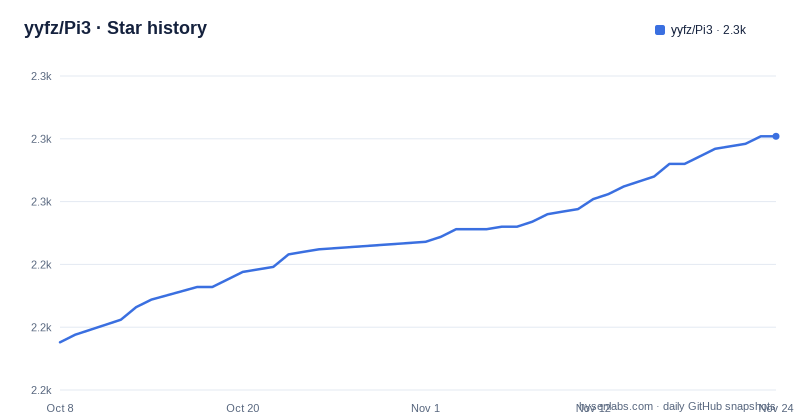
Star history
- yyfz/Pi32,276 ★ · +82
| Repository | 2026-10-08 | 2026-11-24 |
|---|---|---|
| yyfz/Pi3 | 2.2k | 2.3k |
82 Stars in the last 47 days, measured from the daily GitHub snapshot. Compare with other projects
Editorial analysis
Pi3 drops the reference view and takes its input as an unordered set of images
Most reconstruction methods pick one frame as the reference and express everything relative to it. The authors argue that a bad reference makes such methods unstable or makes them fail. Pi3, written as the Greek letter pi cubed, removes the reference frame.
The network is permutation-equivariant. From an unordered set of images it predicts affine-invariant camera poses and scale-invariant local point maps. Because no frame is special, shuffling the input images does not change what the model is solving, and the authors describe the design as inherently resistant to input ordering. They call it a feed-forward network with a simple, bias-free design, and say it learns a dense, structured latent representation of the camera pose manifold.
The tasks they list are camera pose estimation, monocular and video depth estimation, and dense point map estimation. The performance claims, including the state-of-the-art wording, come from the authors and are not backed by numbers in the README text. The paper is on arXiv as 2507.13347, and a Hugging Face Space hosts a demo.
Pi3X swaps the output head and adds conditioning on poses, intrinsics and depth
Pi3X, released on December 28, 2025, is an engineering update to the original model. Four changes are listed. A convolutional head replaces the original output head, which reduces grid-like artifacts and gives smoother point clouds. The model accepts optional camera poses, intrinsics and depth as extra inputs. Confidence is predicted as continuous quality levels, where the original approximated a binary mask, which the authors say makes the scores more reliable for filtering noise. And Pi3X supports approximate metric scale, where the original predicted only scale-invariant output.
The README summarizes the gain as slightly better reconstruction quality than the original Pi3 together with more kinds of input. The scripts reflect this: example_mm.py runs Pi3X and is marked recommended, while example.py runs the original Pi3. If you pass conditions, you get the point clouds that the metric scale and priors affect. Without any, Pi3X works from images alone.
Metric scale is described as approximate, so it should not be treated as a surveying measurement.
Setup pins torch 2.5.1, torchvision 0.20.1 and numpy 1.26.4
The quick start is three lines:
git clone https://github.com/yyfz/Pi3.git
cd Pi3
pip install -r requirements.txt
requirements.txt pins torch==2.5.1, torchvision==0.20.1 and numpy==1.26.4, and leaves pillow, opencv-python, plyfile, huggingface_hub and safetensors unpinned. Those exact versions are a constraint if your environment already carries a different torch build, since the file will try to replace it.
The repository also has a pyproject.toml that names the package pi3 at version 0.1 and requires Python 3.10 or newer. Its only listed dependency is safetensors, so installing the package through pyproject.toml alone does not bring in torch. The requirements file is the real setup path. The README does not state a CUDA version, a minimum GPU memory or a CPU fallback.
The pi3 directory holds the model code that the example scripts import, and setuptools packages it with all package data included.
The command line scripts default to the cuda device and write a .ply file
Inference runs through example_mm.py for Pi3X and example.py for the original model. The README gives these commands for the default example and for your own data:
# Run with the default example video
# python example.py    # Inference with Pi3 (Original)
python example_mm.py   # [New] Inference with Pi3X (Recommended)
The optional arguments are --data_path, --save_path, --interval, --ckpt and --device. --data_path takes an image directory or a video file and defaults to examples/skating.mp4. --save_path defaults to examples/result.ply. --interval is the frame sampling interval, 1 for images and 10 for video. --ckpt takes a custom checkpoint path. --device defaults to cuda.
The cuda default means a machine without an NVIDIA GPU needs --device set to something else, and the README does not say which values work or how slow a CPU run is. The output is a point cloud in .ply format, which you open in a viewer such as MeshLab. Long videos at interval 10 drop frames, so lower the interval if motion between frames is large.
Condition injection runs the same scene with and without priors
Only Pi3X takes extra modalities. The README tells you to read example_mm.py for the data format, then shows a with-and-without comparison on the bundled room example:
# 1. Inference WITH conditioning (poses, intrinsics, etc.)
python example_mm.py --data_path examples/room/rgb --conditions_path examples/room/condition.npz --save_path examples/room_with_conditions.ply

# 2. Inference WITHOUT conditioning (image only)
python example_mm.py --data_path examples/room/rgb --save_path examples/room_no_conditions.ply
The conditions arrive as a single condition.npz file through --conditions_path. The README does not list the array names inside that file, so the format of your own conditions has to be taken from example_mm.py, and a mismatch will only show up when you run it.
The point of the pair is to open both .ply files and compare. The authors present conditioning as useful when partial priors are available, such as known poses from another source. If you have no priors, run without --conditions_path.
Checkpoints download from Hugging Face, or you point --ckpt at a local file
Model weights come from Hugging Face automatically on the first run. If that download is slow, the README links the files directly: Pi3 at huggingface.co/yyfz233/Pi3/resolve/main/model.safetensors and Pi3X at huggingface.co/yyfz233/Pi3X/resolve/main/model.safetensors. Download one and pass its local path with --ckpt.
The pairing matters. A Pi3X checkpoint belongs with example_mm.py and a Pi3 checkpoint with example.py, and the README does not say what happens if they are mixed.
For an interactive session there is a Gradio demo. Install the extra requirements and launch it:
# Install demo-specific requirements
pip install -r requirements_demo.txt

# Launch the demo
python demo_gradio.py
The demo has its own file, requirements_demo.txt, so the base environment is not enough. A hosted copy runs as a Hugging Face Space at huggingface.co/spaces/yyfz233/Pi3, which avoids local setup entirely.
Training and evaluation code live on separate branches, not on main
The main branch is inference-only in practice. The update log says the Hugging Face demo and inference code came out on July 16, 2025, evaluation code on July 29, 2025 and training code on September 3, 2025. The README sends you to the evaluation branch and the training branch for those.
That split decides where to start. Someone who wants to retrain or reproduce benchmark tables should check out those branches, not main. The repository root also has benchmark_capacity.py, benchmark_pi3.json, benchmark_pi3x.json and example_vo.py, and the README text does not explain them, so their roles are unconfirmed.
The repository has no GitHub releases, so the code is used from the default branch. The license is BSD-3-Clause, the last push was on 2026-07-03, and the repository is not archived. The paper is credited to ICLR 2026, with authors from Shanghai AI Lab, ZJU and SII, and Yifan Wang and Jianjun Zhou marked as equal contributors.
Editorial conclusion
Pi3 suits researchers and engineers who have images or a video and an NVIDIA GPU, and want a point cloud saved as .ply without choosing a reference frame. It is a weaker fit for CPU-only machines, because the README sets the default device to cuda, and for anyone who wants training or evaluation from main, since those live on the training and evaluation branches. Before building on it, pin the torch 2.5.1 and numpy 1.26.4 versions from requirements.txt and run example_mm.py on one of the bundled examples.
Frequently asked questions
What is the difference between Pi3 and Pi3X?
Pi3X replaces the output head with a convolutional head, predicts continuous confidence, accepts optional pose, intrinsics and depth conditions, and supports approximate metric scale. Its script is example_mm.py, and the original uses example.py.
How do I run Pi3 on my own images or video?
Install with pip install -r requirements.txt, then run python example_mm.py --data_path <path/to/data> with an image folder or an .mp4 file. The result is saved as a .ply point cloud, by default examples/result.ply.
Where is the training and evaluation code for Pi3?
Evaluation code is on the evaluation branch and training code is on the training branch of yyfz/Pi3. The main branch carries the inference scripts and the Gradio demo.
Official sources
Add this badge to your README
If you maintain this project, the badge below links readers to this analysis and shows its maintenance status from the daily GitHub snapshot. Paste the markdown into your README; add ?metric=license or ?metric=stars to the image URL for a different field.

[](https://hysenlabs.com/projects/yyfz-pi3)Star history chart for your README
[](https://hysenlabs.com/projects/yyfz-pi3)Was this useful?