cursor2api: turning Cursor's docs chat endpoint into an Anthropic and OpenAI compatible proxy
A proxy service that converts Cursor Web Docs' free API into an OpenAI/Anthropic-compatible format. Provides Claude Code tool support and image support.
At a glance
- What is it?
- cursor2api wraps the free AI chat endpoint on Cursor's documentation pages and re-exposes it as /v1/messages and /v1/chat/completions. It is a translation layer with a long list of patch mechanisms, and the README itself notes the upstream model list has shrunk to a single Gemini model.
- Who is it for?
- Adopt cursor2api if you want a self-hosted translation layer in front of Cursor's docs chat endpoint and you accept that the upstream model list is outside your control; the README's own 2026-04-01 note says only gemini-3-flash remains there. Skip it if you need a contractual, stable model endpoint, since the whole service depends on an undocumented free endpoint that can change without notice.
- Can I use it commercially?
- Yes. MIT is a permissive licence: you can use, modify and sell software built on it, as long as you keep its copyright and licence notices.
- Is it still maintained?
- No. The owners have archived the repository on GitHub, so it is read-only and no longer receives changes.
- What is it written in?
- Mainly TypeScript, according to GitHub's language statistics.
Answers come from the project's GitHub data, last synced on November 15, 2026, and from our analysis. They are not legal advice.
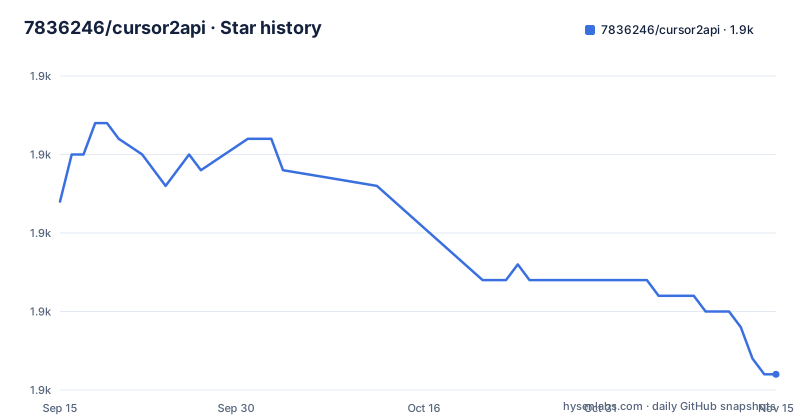
Star history
- 7836246/cursor2api1,881 ★ · -11
| Repository | 2026-09-15 | 2026-11-15 |
|---|---|---|
| 7836246/cursor2api | 1.9k | 1.9k |
-11 Stars in the last 61 days, measured from the daily GitHub snapshot. Compare with other projects
Editorial analysis
The problem cursor2api solves, and who it is aimed at
Cursor publishes a chat interface on its documentation pages that answers questions for free. That endpoint speaks its own request and response shape, and it is not the Anthropic Messages API or the OpenAI Chat Completions API. cursor2api sits in between. It accepts requests in either of those two standard shapes and rewrites them for Cursor's /api/chat, then converts the streamed answer back. The audience is narrow and specific: engineers who want Claude Code, ChatBox, LobeChat or Cursor IDE itself to talk to that free endpoint without writing their own adapter. The README's architecture diagram shows four clients feeding one proxy: Claude Code over Anthropic, Cursor IDE over /v1/responses, and OpenAI-compatible clients over /v1/chat/completions. That is the whole product. It is not a model, not a gateway with routing policy, and not a way to get a supported commercial API. It is a protocol translator bolted onto someone else's free documentation chat box, and the README is candid that the upstream side moves: the top of the file carries a dated note that as of 2026-04-01 only gemini-3-flash is left on the Cursor docs page.
How the proxy converts requests and where the patching happens
The data flow is a straight line: client to cursor2api to Cursor API and back, with conversion at both ends. The repository layout makes the split visible. src/cursor-client.ts holds the upstream client and the Chrome TLS fingerprint emulation; src/converter.ts does protocol conversion, prompt injection, context cleanup and the dynamic budget calculation; src/handler.ts handles the Anthropic path with identity protection, refusal interception and thinking; src/openai-handler.ts covers OpenAI compatibility plus response_format and thinking; src/tool-fixer.ts repairs tool arguments. What makes this more than a mapping table is the amount of repair work layered on top. Tool schemas are compressed from a full JSON Schema of roughly 135k characters down to a compact type signature of roughly 15k characters, which the README frames as a context saving. Tool arguments get field-name mapping (file_path to path), smart quote replacement and fuzzy matching before they are forwarded. Refusal text is matched against more than 50 regular expression patterns in Chinese and English, with retries and what the README calls cognitive restructuring. Responses can be scrubbed so Cursor identity references become Claude references, controlled by the sanitize_response flag. Each of these is a patch over a mismatch the project hit in practice. Together they also mean the proxy is opinionated about your traffic: it may rewrite tool arguments and response text on the way through, and you should read the flags before assuming a byte-for-byte passthrough.
Installing cursor2api and pointing Claude Code at it
The README's quick start is four steps. Dependencies install with npm, and the postinstall script in package.json does more than the usual: it changes into stealth-proxy, runs npm install there, and installs a Playwright Chromium build. Expect that first install to be heavy. The configuration file is copied from the example, then the service starts in either development or production mode.
npm install
cp config.yaml.example config.yaml
npm run dev
In development the entry point is tsx watch src/index.ts, so the service restarts on source changes. For a production run the README gives a build-then-start pair.
npm run build && npm startThe default port is 3010. To use it from Claude Code, the README exports the base URL and, when auth_tokens is configured, an API key as well.
export ANTHROPIC_BASE_URL=http://localhost:3010
export ANTHROPIC_API_KEY=sk-your-secret-token-1
claude
With those variables set, Claude Code sends its requests to the proxy rather than to Anthropic, and the proxy answers in Anthropic Messages format. Once running, the log viewer is served at http://localhost:3010/logs, and if auth_tokens is configured the page requires a login; the README also shows passing the token as a query parameter, http://localhost:3010/logs?token=sk-your-secret-token-1. The Docker path exists too: docker-compose.yml builds an image tagged cursor2api:latest, maps port 3010, mounts ./config.yaml at /app/config.yaml and ./logs at /app/logs, and sets NODE_ENV, PORT and TIMEOUT. Note that config.yaml is deliberately not baked into the image, so an unmodified deployment falls back to built-in defaults plus environment variables.
The truncation machinery, and why the defaults are all off
Version 2.7.8 adds three mechanisms aimed at one symptom: output that stops early because of max_output_token limits. Context Pressure Inflation inflates the reported input_tokens so that the client, specifically Claude Code, triggers its own automatic compaction earlier. Adaptive History Budget reserves more output room as the tool count grows; the README's figure is roughly 8K extra tokens at 90 tools. Smart Tool Result Truncation applies different head and tail ratios depending on tool type, so Read, Bash and Search results are cut differently. The README states plainly that all three are off by default and must be enabled on demand. That is the right default. Inflating a token count to manipulate a client's compaction heuristic is a side effect you want to opt into, not inherit, and the release notes for 2.7.7 and 2.7.6 show the same pattern of iterative repair around truncation recovery and tool passthrough. The related max_auto_continue setting defaults to 0, which disables automatic continuation on the Anthropic path and hands the problem back to the client; the README notes the OpenAI-compatible path still performs one internal recovery for long tool calls. If you enable the inflation mechanism, verify your client's compaction behaviour afterwards, because you are deliberately feeding it a number that is not the real one.
Vision, OCR and the fallback that is not a vision model
Image handling is where the design gets pragmatic rather than clever. vision.enabled defaults to true and vision.mode defaults to ocr, which means images are processed locally by tesseract.js on CPU and the extracted text is what gets forwarded. No API key, no external call. The alternative mode is api, which sends the image to a third-party vision model, and vision.proxy lets that traffic take a different network path from the main Cursor requests. The README describes the image API as going through its own proxy so the Cursor API connection stays direct. This matters for anyone expecting real multimodal behaviour: OCR extracts text from an image, it does not describe the image. A screenshot of a chart, a UI mockup or a photograph will not produce useful output under the default mode. If your workflow depends on visual understanding rather than text extraction, you are on the api path and you are now depending on a second external service. The Dockerfile reflects the cost of this choice: the runner stage is Debian slim rather than Alpine specifically because Playwright Chromium is not compatible with Alpine, and the image installs Chromium with system dependencies for the stealth proxy. A proxy that only moved JSON would not need a browser.
Where cursor2api breaks, and the honest limits of the README
The largest limitation is stated at the top of the README in the author's own words: as of 2026-04-01, the Cursor documentation page offers only gemini-3-flash. The config example and the compose file both set CURSOR_MODEL to google/gemini-3-flash. That means the model you get is whatever Cursor chooses to expose on a free documentation page, and the list can shrink again. Everything downstream, including the identity cleaning that rewrites Cursor references into Claude references, is cosmetic relative to that. Second, the Cursor IDE instructions carry three warnings that are easy to skim past: custom models and base URLs in Cursor IDE normally require a Pro membership, OPENAI_BASE_URL must be a publicly reachable domain rather than localhost or a LAN address, and Claude model names are preferred over GPT names for compatibility. Third, the README does not document rollback or a migration path between versions, and it does not state what happens when the upstream endpoint changes shape or disappears. The degraded status in the log viewer is the closest thing to a health signal, and it only flags specific failure shapes the project already knows about: tools that did not really run, max_tokens that did not recover, and models that announce they are still writing. A new failure mode would look like a normal response.
Alternatives: LiteLLM and a direct provider account
The closest functional alternative is LiteLLM, and the difference is in what sits upstream. LiteLLM is a router and translation layer across many providers that expose documented, authenticated APIs, with key management and spend tracking. cursor2api has one upstream: an undocumented free endpoint on Cursor's documentation site, reached with a session token and a spoofed Chrome TLS fingerprint. If you need provider failover, per-key budgets or a support contract, LiteLLM is the category you want and cursor2api is not in it. If you need to run Claude Code against something today without paying per token, cursor2api is the narrower tool that does that one thing. A third option is simply a direct provider account with ANTHROPIC_BASE_URL pointed at the vendor: zero moving parts, no translation layer, no truncation patches, and a bill. The decision is not about which proxy is better engineered. It is about whether you are willing to depend on a free endpoint whose model list the README already says has narrowed to one entry.
Maintenance cost, licence and what to check before you commit
The repository is now archived and read-only; the recorded last push was on 2026-06-01. The release cadence visible in the notes is dense: 2.7.6 on 2026-03-20, 2.7.7 on 2026-03-23, 2.7.8 on 2026-03-27, each one a repair around truncation, tool passthrough or logging. That cadence is a signal about the upstream, not a promise about the future: a proxy that needs frequent fixes is a proxy whose target keeps moving. The licence is MIT, which is permissive and places no copyleft obligation on your own code; the repository ships a LICENSE file. Note that MIT covers this project's source, not the Cursor endpoint it calls, and the README does not address terms of service for that endpoint, so treat that question as unresolved rather than settled. Operationally, plan for a Node 22 runtime, a first install that pulls a Chromium build, and memory headroom: the Dockerfile sets NODE_OPTIONS to --max-old-space-size=4096 and installs tesseract.js and js-tiktoken, both of which the comment cites as memory consumers. If you enable logging, prefer logging.db_enabled with SQLite over JSONL files, since the README describes the database option as the fix for large-file OOM. The upgrade cost is low in the mechanical sense (pull, rebuild, restart) and high in the diagnostic sense, because every version bump may change how truncation, refusal interception or identity cleaning behaves on your traffic.
Editorial conclusion
Adopt cursor2api if you want a self-hosted translation layer in front of Cursor's docs chat endpoint and you accept that the upstream model list is outside your control; the README's own 2026-04-01 note says only gemini-3-flash remains there. Skip it if you need a contractual, stable model endpoint, since the whole service depends on an undocumented free endpoint that can change without notice. Before deploying, verify three things against your own setup: that /v1/models returns the Claude model names Cursor IDE expects, that auth_tokens is set if the port is reachable from the internet, and that logging.db_enabled or logging.file_enabled is on if you intend to diagnose degraded requests later.
Frequently asked questions
What is cursor2api and what does it actually proxy?
It is a TypeScript service that converts Cursor's documentation-page chat endpoint into Anthropic Messages API and OpenAI Chat Completions API responses. The README describes it as a proxy and converter for use with Claude Code, Cursor IDE and OpenAI-compatible clients.
How do I install and start cursor2api?
Run npm install, copy config.yaml.example to config.yaml, then start with npm run dev for development or npm run build && npm start for production. The default port is 3010.
Which model does cursor2api use?
The config default and the compose file both set CURSOR_MODEL to google/gemini-3-flash, and the README carries a dated note that only gemini-3-flash remains available on the Cursor docs page. The model list is controlled upstream, not by this project.
Can I use cursor2api with Cursor IDE itself?
Yes, by setting OPENAI_BASE_URL to a publicly reachable domain pointing at the service and selecting a Claude model name. The README warns that Cursor IDE normally requires a Pro membership for custom models and base URLs, and that localhost or LAN addresses generally do not work.
Does cursor2api support images and vision?
It has a vision layer that defaults to local CPU OCR via tesseract.js, which extracts text from images rather than describing them. Setting vision.mode to api sends images to an external vision model instead.
How do I secure a publicly deployed cursor2api instance?
Configure auth_tokens in config.yaml, which enables Bearer token or x-api-key authentication and also puts the /logs viewer behind a login. The README recommends this for public deployments; without it, all requests are allowed through.
Official sources
Add this badge to your README
If you maintain this project, the badge below links readers to this analysis and shows its maintenance status from the daily GitHub snapshot. Paste the markdown into your README; add ?metric=license or ?metric=stars to the image URL for a different field.

[](https://hysenlabs.com/projects/7836246-cursor2api)Star history chart for your README
[](https://hysenlabs.com/projects/7836246-cursor2api)Was this useful?