Solo, a Java blog server that can also export a static site
🎸 B3log 分布式社区的 Java 博客端节点系统,欢迎加入下一代社区网络。B3log distributed community blog-end node based on Java, welcome to join the next generation community network.
At a glance
- What is it?
- Solo is a Java blog system built around a Maven web application, an npm-driven front end bundle, and a link to the B3log community. It runs as a resident process on a server or as a local tool that exports a static site.
- Who is it for?
- Solo suits a programmer who wants a self-hosted blog with a community feed, a Markdown editor and a static export path, and it is a poor fit for a team that needs a documented database migration path or a release cadence with tagged versions, since the last tagged release is v4.4.0 from 2022-01-22 even though the last push was on 2026-10-18.
- Can I use it commercially?
- Check first. The repository uses a licence we do not classify automatically, so read its LICENSE file before any commercial use.
- Is it still maintained?
- Yes. The repository last received commits 20 days ago.
- What is it written in?
- Mainly Java, according to GitHub's language statistics.
Answers come from the project's GitHub data, last synced on November 7, 2026, and from our analysis. They are not legal advice.
Star history
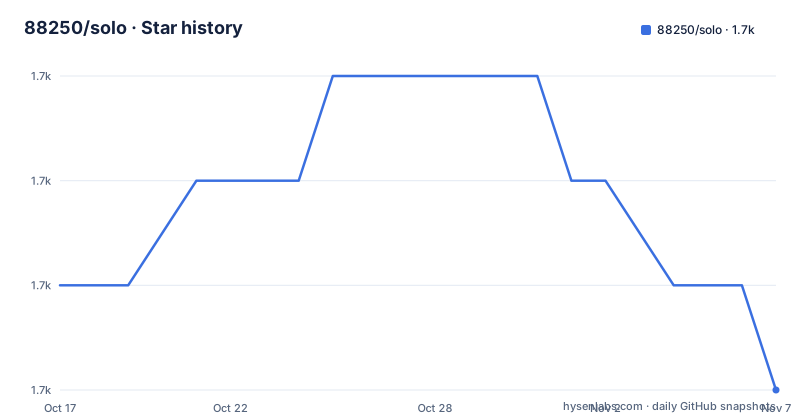
- 88250/solo1,744 ★ · -1
| Repository | 2026-10-17 | 2026-11-07 |
|---|---|---|
| 88250/solo | 1.7k | 1.7k |
-1 Stars in the last 21 days, measured from the daily GitHub snapshot. Compare with other projects
Editorial analysis
A blog end node, not a standalone publishing tool
Solo describes itself as the blog end node of the B3log distributed community. That framing matters, because it explains the odd half of the feature list. A post written in Solo can be pushed to the community as a thread, and replies that arrive in the community thread are fed back to the blog as comments on the article. The community lives at ld246.com, with a dedicated Solo tag, and the project points at an article describing the distributed community design for the details of that loop. There is no API key or webhook configuration documented, so the wiring between a Solo instance and a community account is not something the documentation spells out for a new operator.
Who it is for is fairly clear from the feature inventory. Multi-user writing for team blogs, tag aggregation, custom navigation links, random and related posts, pinning, update reminders, custom permalinks, signature blocks, friend link management, SEO parameters, announcements, footers, several skins, and multiple languages are all listed. The editor is Vditor, and the project also handles imports from Hexo, Jekyll and plain Markdown, exports to SQL, JSON and Markdown, and publishes Atom, RSS and Sitemap feeds. This is a blog platform with a social extension, not a general community forum where posts are the only content type.
Two front end build systems, one Maven artifact
The repository layout shows how the pieces fit together. There is a pom.xml, so the server side is a Maven project, and there are also package.json, pnpm-lock.yaml, webpack.config.js and gulpfile.js, so the front end assets are built with npm tooling and Webpack rather than by the Java build. The package.json scripts are minimal: a production bundle and a development build.
"scripts": {
  "build": "webpack --mode production",
  "dev": "webpack"
}
The runtime dependencies listed in package.json are small and tell you what the browser side actually loads: jquery, nprogress for the progress bar, uvstat, vcmt, and vditor. The editor dependency is pinned at vditor ^3.8.15, which is the component behind the three editing modes the README advertises, a what you see is what you get mode, an instant render mode, and a split screen preview. The same feature list mentions code highlighting, mathematical formulas, flowcharts and staff notation, which are rendering features of that editor rather than separate plugins. A webpack build also has less in the dev dependencies, so skins are stylesheet driven, and the listed skins (Bubble, Casper, Pinghsu, Jane, nijigen, Medium, yilia and others) are looked up with a skin query parameter, for example ?skin=Casper.
The Docker build compiles with Maven and runs on a bare JRE
The Dockerfile is a two stage build and it is the most concrete installation path the project publishes. The first stage takes a Maven image with Temurin 17, copies the tree, packages the project, and copies the resources under src/main/resources/docker into the output directory. The second stage drops the build toolchain entirely and runs on an Eclipse Temurin 17 JRE image, installing only ca-certificates and tzdata. The final image copies the packaged application into /opt/solo and sets the time zone.
FROM maven:3.9-eclipse-temurin-17 as MVN_BUILD

WORKDIR /opt/solo/
ADD . /tmp
RUN cd /tmp && mvn package -DskipTests -Pci -q && mv target/solo/* /opt/solo/ \
    && cp -f /tmp/src/main/resources/docker/* /opt/solo/
The runtime stage is equally explicit about what the container needs.
EXPOSE 8080

ENTRYPOINT [ "java", "-cp", "lib/*:.", "org.b3log.solo.Server" ]
Two things follow from that entrypoint. The classpath is a wildcard over lib/* plus the working directory, so the jar dependencies must sit in a lib folder beside the class files, and the process starts the main class org.b3log.solo.Server directly. Port 8080 is the only port the image declares, and the process has to be resident to serve requests, which is what the README means by a dynamic blog hosted on a server. The same documentation offers three video walkthroughs instead of a text install guide: local localhost setup, setup through IntelliJ IDEA, and Docker setup on a server. Local runs are described as being for trying the software out or for producing a static site.
Two deployment shapes, and the export path in between
The installation section states that Solo supports 动静两用, a dynamic mode and a static mode, and that these are different operating shapes rather than two packaging options for the same thing. In dynamic mode the process stays resident in server memory and serves the blog online. In static mode you run Solo on your own machine, write posts there, and then generate an exported static site. The README also lists support for publishing that output to GitHub Pages, and lists CDN separation of static assets with a configurable jsDelivr distribution option. There is also a built in HTTPS plus CDN file storage for uploaded files, and a feature to pull a GitHub repository and take automatic backups.
The static route is what makes Solo usable in a pipeline shaped deployment, and it is also the point of comparison with a conventional static site generator. The difference in approach is in the direction of travel. A generator such as Hexo or Jekyll is normally the only thing in the chain, and content is written in files. Solo inverts that: it starts as a full application with its own editor, its own console and its own community linkage, and can then produce static output as one of its supported targets. The listed import paths for Hexo, Jekyll and Markdown are migrations into Solo, and the export to SQL, JSON and Markdown is a data dump, not a site build. So Solo can be the destination for content arriving from a static generator, or the producer of a static site leaving the system, but at no point does it ask you to keep your posts in a file tree as the source of truth.
Comments are the community's job, and the release history shows the scars
The release notes record a deliberate change in how Solo handles comments. Version v4.3.0, tagged 2020-07-17, 彻底移除本地评论系统, which is to say the local comment system was removed outright. Version v4.3.1 on 2020-09-09 integrated the Gitalk comment system and renamed the community end node. The newest tag listed, v4.4.0 from 2022-01-22, is described as an editor upgrade and detail tuning. Taken together, the tags describe a project that stopped maintaining a comment stack of its own and pushed the social layer outward to GitHub and to the B3log community.
That history is a warning for anyone evaluating it today. The current documentation describes the round trip of a post pushed to the community and replies coming back as blog comments, but the local comment implementation that once existed is gone, and the reply path depends on a third party service and on the community remaining reachable. The repository is not archived and the last push was on 2026-10-18, so source changes continue to land on the master branch, but the published release tags stop in January 2022. The gap between a moving default branch and a stale release history is exactly the kind of thing a team has to decide about before deploying it in production, since there is no tagged build to pin.
What the published documentation leaves unsaid
Several operational details are simply absent. The README does not document a rollback procedure, a database migration path, a schema versioning scheme, or how to move an existing Solo instance to a different host. The description also does not list the database that the application talks to, so anyone sizing an instance or planning a backup is left to read the source under src/main/resources. The static site export is described in prose and pointed at a separate community article rather than shown as a command, so the exact invocation and its output layout are not in the documentation that ships with the repository.
Two further gaps matter for evaluation. First, the project is a single application with a console, so running a second instance or splitting duties between operators is a topology question the documentation does not answer. Second, the Docker image is built from source in the first stage, which means an operator who wants a fast first run has to run a Maven build inside the container rather than pull a ready made image, even though the badge in the README points at a published image on Docker Hub. The image build also assumes a network path to a Maven repository, and the build runs with -DskipTests, so the packaged artifact is not a tested one by the project's own gate. Treat that as a build you own end to end, and pin your own digest once you have one.
Choosing between Solo and a plain static generator
If your requirement is a blog that lives entirely in a Git repository and is built by a static site generator, Solo is the heavier choice. You would keep an application server, a container and a Java 17 runtime in the path, and you would still have to decide how the static export interacts with your Pages workflow, because the export mechanism is described in prose rather than a documented command. The gain you get in exchange is the live console, the Vditor editing experience with its formula and diagram support, multi-user writing for a team, and the community round trip that a static generator does not have.
The reverse is also worth stating plainly. Solo is a good fit when the writer wants a private editing environment with a real admin UI, wants tags and multiple languages in one install, wants other people to post without touching git, and wants the option to publish a static snapshot later. It is a bad fit when comments must live in the same database as the posts, when a stable tagged release matters more than a moving branch, or when a documented upgrade path is a condition of adoption. On the last point the honest answer is that the repository ships a LICENSE file and a CHANGE_LOGS.md at the top level, but the release history itself stops at v4.4.0 in 2022, and the project description notes a custom licence that GitHub cannot classify even though package.json names MulanPSL2. Read that file before you build on it.
Editorial conclusion
Solo suits a programmer who wants a self-hosted blog with a community feed, a Markdown editor and a static export path, and it is a poor fit for a team that needs a documented database migration path or a release cadence with tagged versions, since the last tagged release is v4.4.0 from 2022-01-22 even though the last push was on 2026-10-18. Before adopting it, check the MulanPSL2 terms in the LICENSE file, run the Docker build yourself to see whether the Java 17 toolchain fits your host, and confirm that the community integration at ld246.com matches the commenting model you want.
Frequently asked questions
How do I install Solo on a server using Docker?
The published Dockerfile is a two stage build: it packages the project with Maven on a Temurin 17 image and runs the result on a Temurin 17 JRE image. The container exposes port 8080 and starts the main class org.b3log.solo.Server with a classpath of lib/* plus the working directory. The README also links to a video walkthrough for Docker setup on a server.
Can Solo export a static site for GitHub Pages?
Yes. The feature list names support for generating and exporting a static site, and describes that output as usable for publishing to GitHub Pages, with CDN separation of static assets and a configurable jsDelivr distribution option. Running Solo locally is described as the way to do this, since local runs exist for trying the software out or for producing a static site.
Does Solo still have its own comment system?
No. The release notes for v4.3.0 on 2020-07-17 state that the local comment system was removed entirely, and v4.3.1 on 2020-09-09 integrated Gitalk. Comments now arrive from the B3log community, where replies to a pushed post are fed back to the blog as comments on the article.
Which editor and which front end build does Solo use?
The editor is Vditor, listed in package.json as vditor ^3.8.15, with what you see is what you get, instant render and split preview modes, plus code highlighting, formulas, flowcharts and staff notation. The front end assets are bundled with Webpack, through the build and dev scripts, and the project is a Maven application with pom.xml at the top level.
What licence does Solo use?
The package.json license field names MulanPSL2, and the README carries a MulanPSL2 badge. The repository also contains a LICENSE file, and the project listing marks the licence as a custom one that GitHub cannot classify, so the text of that file is the version to read.
Official sources
Add this badge to your README
If you maintain this project, the badge below links readers to this analysis and shows its maintenance status from the daily GitHub snapshot. Paste the markdown into your README; add ?metric=license or ?metric=stars to the image URL for a different field.

[](https://hysenlabs.com/projects/88250-solo)Star history chart for your README
[](https://hysenlabs.com/projects/88250-solo)Was this useful?