ACE: Incremental Context Adaptation for Language Agents
Evolve your language agent with Agentic Context Engineering (ACE)
At a glance
- What is it?
- ACE is a Python framework that adapts a language agent through an evolving playbook. It suits developers working on offline or online context learning, provided they supply task data, model access, and workload-specific evaluation.
- Who is it for?
- ACE is a reasonable adoption candidate for Python developers who need an inspectable context-adaptation layer and already have representative task data, compatible model access, and a way to measure playbook quality. It is less suitable for teams seeking a finished agent runtime, a ready-made tool-calling system, or independent evidence that the README's reported improvements apply to their workload.
- Can I use it commercially?
- Yes. Apache-2.0 is a permissive licence: you can use, modify and sell software built on it, as long as you keep its copyright and licence notices.
- Is it still maintained?
- Yes. The repository last received commits 75 days ago.
- What is it written in?
- Mainly Python, according to GitHub's language statistics.
Answers come from the project's GitHub data, last synced on November 7, 2026, and from our analysis. They are not legal advice.
Star history
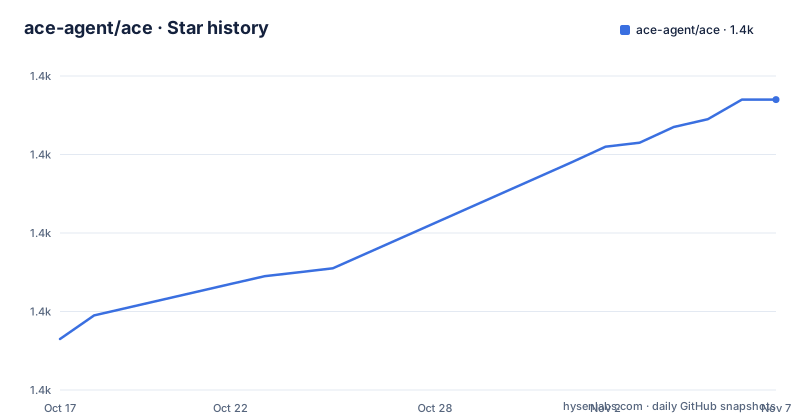
- ace-agent/ace1,434 ★ · +61
| Repository | 2026-10-17 | 2026-11-07 |
|---|---|---|
| ace-agent/ace | 1.4k | 1.4k |
61 Stars in the last 21 days, measured from the daily GitHub snapshot. Compare with other projects
Editorial analysis
ACE's Target Problem and Adoption Boundary
ACE addresses a specific failure mode in adaptive language agents: useful context can erode as an application repeatedly rewrites it. The README describes this as context collapse, alongside brevity bias, where accumulated guidance becomes too compressed to support later tasks. ACE instead treats the agent's context as an evolving playbook that can accumulate, refine, and organize strategies.
The framework is intended for developers building agents that learn from natural execution feedback without labeled supervision. It is not presented as a finished agent application. Callers must provide task samples, a data processor, model configuration, and an evaluation setup. The agent implementation that generates trajectories remains outside the central context-adaptation mechanism.
This boundary affects adoption. ACE can coordinate model calls and maintain learned guidance, but it cannot guarantee that a supplied task exposes useful feedback or that its playbook contains accurate instructions. The README reports average gains of 10.6 percent on agent tasks and 8.6 percent on domain-specific benchmarks. These are project-reported figures based on AppWorld, FiNER, and XBRL Formula, not independent measurements of an arbitrary application.
Generator, Reflector, and Curator Responsibilities
The workflow has three explicit roles. The Generator produces reasoning trajectories for new queries. According to the README, those trajectories can expose effective strategies and recurring pitfalls. The Reflector evaluates the trajectories and extracts insights, separating evaluation and lesson extraction from the step that changes the stored context.
The Curator converts the resulting lessons into structured delta updates. It tracks helpful and harmful counters, then uses deterministic merging, de-duplication, and pruning. The stated purpose is localized editing. Instead of replacing the entire playbook after each batch, ACE can add a lesson or revise a relevant entry while preserving material that the newest evidence does not address.
The playbook has a configured token budget, represented by `playbook_token_budget` in the example configuration. That limit creates an explicit capacity constraint. As the playbook grows, the Curator must decide which material remains useful. The documentation names pruning and counters as mechanisms, but it does not describe the exact ranking policy or guarantee that a harmful item disappears after one update. Adopters should inspect the resulting playbook rather than treating a successful API call as sufficient validation.
The separation has an operational cost as well. Each role can use separate models in the documented `ACE` constructor, but that configuration increases the number of providers, credentials, and failure points to manage. The README does not state that all modes require every role under every circumstance.
Offline, Online, and Evaluation-Only Modes
The `ACE.run` interface exposes three operating modes. Offline adaptation receives `train_samples`, `val_samples`, and optionally `test_samples`. This is the closest match to a conventional training workflow: the framework adapts the playbook, evaluates it during or after adaptation, and can test the resulting state.
Online adaptation receives `test_samples` directly and is intended for adaptation as execution proceeds. Evaluation-only mode tests samples without adapting the playbook. These modes are useful because they separate context learning from measurement. A team can compare an initial playbook with a trained playbook, or observe online changes separately from offline updates.
The example configuration includes `num_epochs`, `max_num_rounds`, `curator_frequency`, evaluation frequencies, save settings, and a token budget. The parameters imply that adaptation is scheduled and periodic. `curator_frequency` controls when context curation occurs, while `eval_steps` and `online_eval_frequency` control measurement. The README does not define the exact behavior of every frequency when rounds, steps, and dataset sizes do not align, so that boundary should be tested with the chosen dataset.
The finance interface provides a command-line path to the same modes. It accepts `--num_epochs`, `--eval_steps`, and `--max_tokens`, which makes repeated finance runs easier to configure without changing Python code.
Installing ACE and Running the First Finance Task
The README uses `git` to obtain the repository and `uv` to install the declared Python environment. The commands below reproduce that setup. The final step starts offline adaptation for the `finer` task and writes results to `results`.
Use these commands in a shell with `git`, `curl`, and `uv` available. The repository's `pyproject.toml` requires Python `>=3.10`.
git clone https://github.com/ace-agent/ace.git
cd ace
curl -LsSf https://astral.sh/uv/install.sh | sh
uv sync
cp .env.example .env
After copying the environment file, edit `.env` and set the API key for the provider selected by the application. The repository lists `OPENAI_API_KEY`, `SAMBANOVA_API_KEY`, `TOGETHER_API_KEY`, and `COMMONSTACK_API_KEY` in `.env.example`. The README's quick start selects `sambanova` as the provider, so that key is the one required for the first documented configuration.
The first documented command is an offline finance run. It should create results under the `results` directory, with the exact generated filenames controlled by the application.
uv run python -m eval.finance.run \
  --task_name finer \
  --mode offline \
  --save_path results
If an existing playbook is available, the README documents evaluating it with `--initial_playbook_path`. The path in the example is `results/ace_run_TIMESTAMP_finer_offline/best_playbook.txt`, where `TIMESTAMP` is a generated placeholder in the command rather than a literal filename.
uv run python -m eval.finance.run \
  --task_name finer \
  --mode eval_only \
  --initial_playbook_path results/ace_run_TIMESTAMP_finer_offline/best_playbook.txt \
  --save_path test_results
The finance task and the Python example are domain-specific integrations, not a generic zero-configuration agent setup.
Dependencies, Configuration, and Upgrade Cost
The `pyproject.toml` file identifies the package as `ace` version `0.1.0` and requires Python `>=3.10`. Its dependencies include model-provider SDKs, `faiss-cpu`, `python-dotenv`, `scikit-learn`, `sentence-transformers`, and `tiktoken`. Installing all declared dependencies can therefore cost more disk space and setup time than a minimal prompt library.
The application configuration controls both learning and output. `playbook_token_budget` limits context size. `max_tokens` limits model output. `curator_frequency`, `eval_steps`, and `online_eval_frequency` determine when updates and measurements occur. `save_dir` and `save_steps` control result persistence. These settings are meaningful operational choices because a task that requires detailed guidance may compete with the same budget for outdated or redundant entries.
The repository includes a Python version file, `uv.lock`, an `ace/` package, evaluation code, utility modules, and task-specific directories such as `ace-appworld`. It also includes `EXTENDING_ACE.md` and tutorials. The README says a tutorial for extending ACE for tool calling is coming soon, so the published material does not establish a completed general tool-calling extension.
The project uses the Apache-2.0 license. That identifier indicates the repository's stated licensing model, but adopters must review `LICENSE.txt` and their own distribution obligations rather than treating this review as legal advice.
Alternatives, Failure Modes, and Maintenance Status
The relevant alternative is full-playbook rewriting without ACE's role separation and delta mechanism. In that approach, a model receives the current context and the latest experiences, then produces a replacement context. The implementation can be simpler because it does not need a dedicated Reflector or Curator, but it has a different failure profile: each rewrite can remove details that were not repeated in the current batch.
ACE takes a more stateful route. It records structured lessons, tracks helpful and harmful evidence, and merges updates deterministically. That is useful when retaining prior knowledge matters. It also introduces more moving parts, including role-specific model configuration, curation frequency, playbook budgets, and inspection of accumulated state. A fixed prompt with an external retrieval store is another approach, but the README does not claim that ACE replaces retrieval or general memory infrastructure.
ACE has clear failure risks. Weak trajectory quality can produce weak lessons. A finite playbook budget can force pruning. An agent whose procedures change quickly may retain stale guidance. The absence of GitHub releases also limits release-by-release upgrade information. The repository is not archived, and the last push was on 2026-08-24. That is evidence of recent repository activity, not evidence of a stable release policy or backward compatibility between versions.
Editorial conclusion
ACE is a reasonable adoption candidate for Python developers who need an inspectable context-adaptation layer and already have representative task data, compatible model access, and a way to measure playbook quality. It is less suitable for teams seeking a finished agent runtime, a ready-made tool-calling system, or independent evidence that the README's reported improvements apply to their workload. Before adoption, verify the current APIs, inspect how `ace/` represents tasks and feedback, reproduce a documented finance run, and confirm that updates improve held-out results without preserving harmful lessons. A controlled `finer` run and inspection of its saved playbook should be the first acceptance check.
Frequently asked questions
How do I install ACE?
The README instructs users to clone the repository, install `uv`, run `uv sync`, and copy `.env.example` to `.env`. The project requires Python `>=3.10` according to `pyproject.toml`.
What are the three roles used by ACE?
ACE uses a Generator for reasoning trajectories, a Reflector for evaluation and insight extraction, and a Curator for structured context updates. The Curator applies helpful and harmful counters, merging, de-duplication, and pruning.
Does ACE support online adaptation and evaluation-only mode?
Yes. The documented `ACE.run` examples include `mode='online'` and `mode='eval_only'`. The finance CLI also documents corresponding `--mode online` and `--mode eval_only` commands.
Official sources
Add this badge to your README
If you maintain this project, the badge below links readers to this analysis and shows its maintenance status from the daily GitHub snapshot. Paste the markdown into your README; add ?metric=license or ?metric=stars to the image URL for a different field.

[](https://hysenlabs.com/projects/ace-agent-ace)Star history chart for your README
[](https://hysenlabs.com/projects/ace-agent-ace)Was this useful?