create-github-app-token: minting an installation token inside a workflow
GitHub Action for creating a GitHub App Installation Access Token
At a glance
- What is it?
- This GitHub Action turns an App client ID and private key into a short lived installation access token that other steps can consume, scoped to one repository, several repositories, a whole owner installation or an enterprise. It is for teams whose automation needs a token that the built-in GITHUB_TOKEN cannot provide.
- Who is it for?
- create-github-app-token is the right choice when a workflow needs an installation access token rather than the built-in GITHUB_TOKEN, in particular when one job must reach several repositories or an owner wide installation, and it is a comfortable fit for teams already running the App registration, because the action assumes you have done that work.
- Can I use it commercially?
- Yes. MIT is a permissive licence: you can use, modify and sell software built on it, as long as you keep its copyright and licence notices.
- Is it still maintained?
- Yes. The repository last received commits 7 days ago.
- What is it written in?
- Mainly JavaScript, according to GitHub's language statistics.
Answers come from the project's GitHub data, last synced on November 7, 2026, and from our analysis. They are not legal advice.
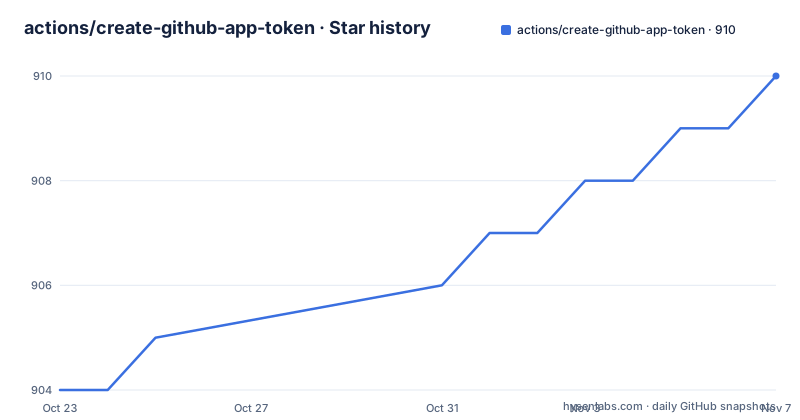
Star history
- actions/create-github-app-token910 ★ · +6
| Repository | 2026-10-23 | 2026-11-07 |
|---|---|---|
| actions/create-github-app-token | 904 | 910 |
6 Stars in the last 15 days, measured from the daily GitHub snapshot. Compare with other projects
Editorial analysis
Why a workflow needs a second kind of token
The action exists because the token GitHub gives a workflow for free is not always the token a workflow needs. A GitHub App installation access token is minted at run time from the App's own credentials, and it carries the permissions the App installation was granted rather than the permissions the workflow file declares. That difference matters in two directions: a workflow can reach repositories the default token cannot touch, and a workflow can hold a token whose permissions are narrower than what the repository role would allow. The cost of that flexibility is expiry. The README states plainly that an installation access token expires after 1 hour, and points to a specific comment in issue 121 for alternative approaches if you have long-running processes. That constraint is the single most important fact about this action, and it should shape the design of the workflow before the action is added. A job that finishes in minutes and a job that runs for hours are not the same problem, and this action is built for the first case.
Three inputs come from repository variables and secrets
The setup is short. The documentation lists three prerequisites: register a new GitHub App, store the App's Client ID in your repository variables with the example name APP_CLIENT_ID, and store the App's private key in your repository secrets with the example name APP_PRIVATE_KEY. The split between a variable and a secret is deliberate. The client ID is not sensitive, so it belongs in the variables area where it can be referenced by name across workflows without being pasted into every file. The private key is a credential, so it belongs in secrets. Keeping them apart means you can rotate the key without touching the client ID, and it means the workflow file itself never contains a credential value. From that point the action is referenced by version tag and given both values:
      - uses: actions/create-github-app-token@v3
        id: app-token
        with:
          # required
          client-id: ${{ vars.APP_CLIENT_ID }}
          private-key: ${{ secrets.APP_PRIVATE_KEY }}
The id on the step is what makes the result addressable later. Steps that follow reference the token through steps.app-token.outputs.token, so a single action call can feed several downstream steps.
The token output is a step output, not an environment variable
The token is exposed as a step output, and the pattern of use is the same everywhere in the documentation. A step that needs a token takes it as an input, which is the case for actions/checkout:
      - uses: actions/checkout@v6
        with:
          token: ${{ steps.app-token.outputs.token }}
          ref: ${{ github.head_ref }}
The ref line in that example matters for a pull request workflow, since the default checkout of a pull request is a merge commit rather than the head branch, and the example deliberately points at the head ref. The example also sets persist-credentials: false, with a comment in the workflow explaining why, that the value of GITHUB_TOKEN will not be persisted in the repo's config. That is a small piece of hygiene worth copying: a token written into the local git config by checkout survives in the runner workspace and in any later step, and a token that expires in an hour is not worth persisting at all. The same output feeds API tools, as the peter-evans/create-or-update-comment example shows, where the token is passed as the token input of the comment action.
Scoping the token: one repository, a list, an owner, an enterprise
The scope inputs are where the action earns its place, because this is where the default workflow token has nothing to offer. Leaving the scope off gives a token for the current repository. Adding owner: ${{ github.repository_owner }} with no repositories list gives a token for all repositories in that owner's installation, and adding a repositories list narrows it to named repositories:
          owner: ${{ github.repository_owner }}
          repositories: |
            repo1
            repo2
The current repository can be included in that list by name:
repositories: ${{ github.repository }},repo2The owner value can also name a different owner than the one running the workflow, which is how a workflow in one repository reaches an installation in another account, and there is a separate section for an enterprise installation. Permissions are requested with inputs in the same style, with permission-contents: write shown in the example that configures the Git CLI for the bot user. The App's own permission set still constrains what the token can do, so the inputs are a request rather than a grant.
The bot identity behind the token and the committer string it needs
Commits made with an installation token are attributed to the App's bot user, and the README shows the two steps needed to give git a usable identity. First, look up the numeric user ID of the bot account:
      - name: Get GitHub App User ID
        id: get-user-id
        run: echo "user-id=$(gh api "/users/${{ steps.app-token.outputs.app-slug }}[bot]" --jq .id)" >> "$GITHUB_OUTPUT"
        env:
          GH_TOKEN: ${{ steps.app-token.outputs.token }}
The app-slug output is the App's short name, and the [bot] suffix is how the bot account is named. The numeric ID matters because a commit needs a name and an email, and the email form used is the ID, a plus sign, the app slug and the bot suffix at users.noreply.github.com. The documentation gives a concrete worked case, checking the user ID of dependabot[bot] at a specific URL and finding 49699333, and notes that the octokit/request-action can be used instead to get the ID. The App's own bot ID is what appears in the commit author line, so the commit reads as coming from the App rather than from a person with a PAT, which is the point of the whole exercise.
Configuring the Git CLI so the bot can commit and push
For a workflow that commits, the token has to be wired into git itself, and the README gives the sequence: set the global user name and email, then run gh auth setup-git so the gh command uses the token as its credential helper.
      - run: |
          git config --global user.name '${{ steps.app-token.outputs.app-slug }}[bot]'
          git config --global user.email '${{ steps.get-user-id.outputs.user-id }}+${{ steps.app-token.outputs.app-slug }}[bot]@users.noreply.github.com'
          gh auth setup-git
        env:
          GH_TOKEN: ${{ steps.app-token.outputs.token }}
After that, ordinary git commands work with the bot identity, and the example that follows runs git add, git commit with the message Auto-generated changes, and git push. The token is passed to the step through the GH_TOKEN environment variable rather than written into the git config, so it stays in the step environment. The permission-contents: write input on the token step is what makes the push possible, and it is a reminder that a token only carries what the App installation was granted, so a push that fails with a permission error is usually an App permission problem rather than a workflow problem.
A bundled action with a node floor and release please tagging
The repository layout explains how the action is shipped. There is an action.yml, which is the manifest GitHub reads, a main.js and a post.js, and a dist/ directory. The build script in package.json shows how the shipped code is produced: esbuild bundles main.js and post.js into dist with the .cjs extension for the node platform, with dependencies bundled in. That is the standard pattern for JavaScript actions, and it means the action runs from the committed dist directory rather than installing anything at run time, which is why the action can be pinned to a tag and still work offline from the runner's perspective. The runtime requirement is stated in package.json as node >=24.4.0, with npm 10.9.4 as the package manager, and the package is marked private and type module, so it is not published to a registry. The repository also holds release-please configuration files, a release-please manifest and a CHANGELOG.md, and the releases follow that scheme: v3.3.0 on 2026-10-12, v3.2.0 on 2026-05-12 and v3.1.1 on 2026-04-11, with the last push on 2026-10-14. The licence field on the repository says MIT, and the package.json carries the same licence identifier.
Editorial conclusion
create-github-app-token is the right choice when a workflow needs an installation access token rather than the built-in GITHUB_TOKEN, in particular when one job must reach several repositories or an owner wide installation, and it is a comfortable fit for teams already running the App registration, because the action assumes you have done that work. It is the wrong tool for a simple single repository checkout, where the token that actions/checkout already uses is simpler, and it is the wrong tool for a long running job, since the README states that an installation access token expires after 1 hour and points to a discussion for alternative approaches. Before adopting it, register the App and store the client ID as a repository variable and the private key as a repository secret, pin the action to a release tag such as v3 rather than a branch, and confirm your Node runtime meets the >=24.4.0 requirement stated in package.json.
Frequently asked questions
What does the create-github-app-token action need to run?
Three things: a registered GitHub App, the App's Client ID stored in repository variables such as APP_CLIENT_ID, and the App's private key stored in repository secrets such as APP_PRIVATE_KEY. The action is then referenced as actions/create-github-app-token@v3 with those two values passed as the client-id and private-key inputs.
How long does a GitHub App installation access token live?
The documentation states that an installation access token expires after 1 hour, and points to a comment in issue 121 for alternative approaches if you have long-running processes. That limit applies to the token this action creates, so long jobs need a different design.
Can create-github-app-token give access to more than one repository?
Yes. Setting owner to a repository owner without a repositories list covers all repositories in that owner's installation, and adding a repositories list narrows it to named repositories, with the current repository includable through ${{ github.repository }}. The App's own granted permissions still bound what the token can do.
How do I make git commits as the app's bot user?
Look up the bot's numeric user ID, set git config --global user.name and user.email using the app-slug output and that ID, then run gh auth setup-git with GH_TOKEN set to the token output. The README example then uses plain git add, git commit and git push.
What Node version does the create-github-app-token action require?
The package.json for the action declares the engines field as node >=24.4.0, with npm 10.9.4 as the package manager. The shipped code is bundled into the dist directory with esbuild so that it runs without installing dependencies at run time.
Official sources
Add this badge to your README
If you maintain this project, the badge below links readers to this analysis and shows its maintenance status from the daily GitHub snapshot. Paste the markdown into your README; add ?metric=license or ?metric=stars to the image URL for a different field.

[](https://hysenlabs.com/projects/actions-create-github-app-token)Star history chart for your README
[](https://hysenlabs.com/projects/actions-create-github-app-token)Was this useful?