threat-dragon: an OWASP modeler whose Docker section names two image repositories
An open source threat modeling tool from OWASP. [ ][build] [ ][latest] [ ][practices] OWASP Threat Dragon [OWASP][owasp] [Threat Dragon][project] is a free, open-source, cross-platform threat modeling application.
At a glance
- What is it?
- A cross-platform threat modeling tool that draws data flow diagrams and lists threats per element, storing models on the local filesystem or in GitHub, Bitbucket, GitLab or GitHub Enterprise. Version 1.x sits on an archive branch after the AngularJS rewrite to Vue, and the container instructions use two different image names.
- Who is it for?
- Threat Dragon suits a team that wants a threat model as a diagram plus a threat list rather than a document, and the fact that both the web and desktop forms keep files on the local filesystem by default is a reasonable default for a security tool. Two things to sort out before you deploy it.
- Can I use it commercially?
- Yes. Apache-2.0 is a permissive licence: you can use, modify and sell software built on it, as long as you keep its copyright and licence notices.
- Is it still maintained?
- Yes. The repository received new commits within the last day.
- What is it written in?
- Mainly JavaScript, according to GitHub's language statistics.
Answers come from the project's GitHub data, last synced on November 14, 2026, and from our analysis. They are not legal advice.
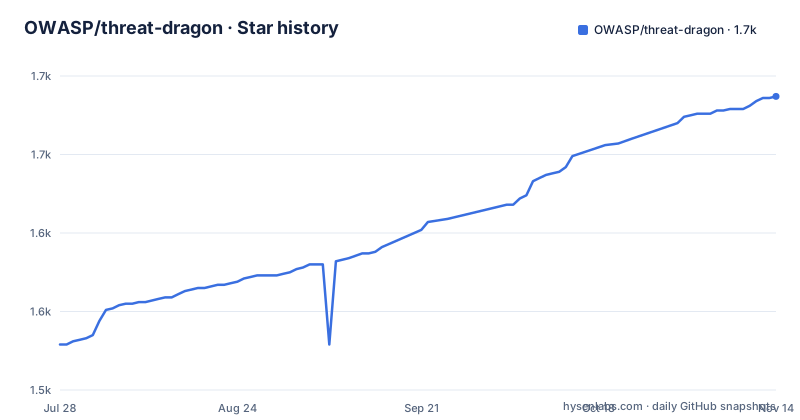
Star history
- OWASP/threat-dragon1,687 ★ · +158
| Repository | 2026-07-28 | 2026-11-14 |
|---|---|---|
| OWASP/threat-dragon | 1.5k | 1.7k |
158 Stars in the last 109 days, measured from the daily GitHub snapshot. Compare with other projects
Editorial analysis
Version 1.x lives on a branch because AngularJS reached end of life
The project has two implementations and says why in one paragraph. Threat Dragon was originally written with AngularJS version 1.x, and that version of Angular reached end of life, so the 1.x line is described as no longer maintained and 2.x has been rewritten in Vue.js. The old code has not been deleted: building and running 1.x is documented against a branch called archive-legacy-v1.x, and end-user help exists for both the current 2.x documentation pages and the previous 1.x site. Releases tell the same story from the other direction, with the release area holding versions from 1.3 up to the current 2.x and everything before that sitting in Mike Goodwin's original repository, since this repository was migrated from it and carries its issues and pull requests from October 2015 through June 2020. The project itself has OWASP Production status and follows a threat modeling manifesto.
Two image repositories in one Docker section
The container instructions name two different images. The version-pinned pull uses the OWASP organisation:
docker pull owasp/threat-dragon:v2.2.0The stable-tag pull and both run commands use a differently named repository:
docker pull threatdragon/owasp-threat-dragon:stable
docker run -it --rm -p 8080:3000 -v $(pwd)/.env:/app/.env threatdragon/owasp-threat-dragon:v2.2.0
Nothing in the file says whether that is a rename, a second organisation, or a mirror, which means a reader has to try one and fall back to the other. Two other things in those commands matter. The default tag is warned about explicitly: the latest tag, which is the default, may be a development version, so the stable tag is the one to use. And the run maps host port 8080 to container port 3000 while mounting an env file from the current working directory into the container, so the file has to exist on the host before the run or the mount is empty. A Windows form of the same command is given, using the current directory variable instead of the shell substitution.
npm start builds the application before it serves it
The run instructions split by operating system, and the reason is the build step. On Windows, and during development generally, the front end and the back end can be started separately in watch mode using npm run dev:server and npm run dev:vue. On Linux and macOS the instruction is to start both from the top directory with npm start. What the manifest shows is why the two paths differ: start is not a start, it is a chain that runs build:vue, build:server, start:server and start:site in order. So npm start compiles a production front end and server before anything serves, which is a reasonable thing for a first run on a laptop and a surprising thing in a loop where you expected a watcher. Stopping has the same shape, with npm stop from the top directory, or breaking out of both processes if you started them by hand. Either way the browser target is http://localhost:8080/. The file also points at a demo website for the latest version and at a video series, so the fastest way to judge whether the tool fits is to open a hosted copy and draw one diagram before installing anything.
One npm install at the root triggers three
The repository is a root package plus two sub-projects, td.server for the back end and td.vue for the front end, and almost every root script is a delegation into one of them. The install script shows the cost of that arrangement: postinstall changes into td.server, runs npm install there, then changes into td.vue and runs npm install again. So the single npm install the build instructions ask for sets up three dependency trees, and a failure in either sub-install is reported as a failure of the root install. The same three-level shape appears inside the image build, where clean-install runs at the root and then in each sub-directory. The audit chain is also delegated in parallel halves, with audit:server and audit:site each descending into their own package, and the lint script follows the identical pattern with lint:server and lint:vue.
The build pins a digest, a package manager, and generates an SBOM
The Dockerfile is more careful about supply chain than most application builds, and it says so in comments. The base image is node 24.21.0 on alpine, pinned by digest rather than by tag. The repository's own npm configuration is copied in first and forced through an environment variable so every npm call in the build uses it, with a comment noting that it contains configuration regarding supply chain. The package manager itself is pinned too, installing npm 11.18.0 globally with the stated reason of keeping npm aligned with GitHub Actions, which means the build does not silently drift when the base image's bundled npm changes. Dependencies are installed with clean-install at all three levels, from the lockfiles. Then two details worth noting: Electron is downloaded in its own step because, in the comment, the build also wants Electron for some reason, and the server package generates a software bill of materials into a boms directory before the final image is assembled.
Repository access starts with registering an application
The web application can keep threat model files on the local filesystem, and access to external repositories can be configured for GitHub, Bitbucket, GitLab and GitHub Enterprise. Turning that on is not a setting. The file says you need to go to your repository account and register the application, and it links step-by-step guides for each of the three hosted providers. So the practical cost of storing models in a repository is that your organisation ends up with an OAuth application that somebody owns, whose token grants read access to wherever your models live. The desktop versions take the other path entirely: they store the threat model files on the local filesystem and do not access external repositories at all, with installers for Windows, macOS and Linux. The web variant additionally requires environment variables, documented separately, and the repository ships two templates for them, example.env and minimal.env.
A markdown linter fetched at its latest version
One line in the manifest is worth reading twice. The markdown:lint script does not call a local binary; it fetches the latest published version on demand, then lints a specific list of files: AGENTS.md, the scripts README, and two globs over the docs directory. A lint rule that changes between runs is a lint rule that fails on someone else's commit rather than on yours, and the @latest tag means the tool version is not recorded anywhere in the lockfile. The rest of the repository is quietly thorough about the same kind of thing: a markdownlint configuration, a spellcheck configuration with its own word list, a lychee ignore file for the link checker, a release note template, and a release-process document. There is also a spell checker, a link checker and a release template, which is more tooling attention than the average threat modeling project attracts.
The manifest has said 2.6.2 since May
The root manifest declares version 2.6.2 and an application bundle identifier of org.owasp.threatdragon, which is what the desktop installers are signed under. The newest release is v2.6.2 from 2026-05-10, with v2.6.2-RC1 published earlier the same day and v2.6.1 five days before that. The last commit on the default branch is dated 2026-09-23, so four months of commits sit on a manifest that still says the May version, and there is no nightly or edge release in the history to explain where that work would be published. Two top-level directories remain unexplained by any visible document: ThreatDragonModels/, which is where a repository of example models would sit and which the file never mentions, and cupcake/, whose purpose the file never states at all. The tree also carries AGENTS.md, a code of conduct, a security policy and a contributor guide, so the project housekeeping is complete even where the internals are not described.
Editorial conclusion
Threat Dragon suits a team that wants a threat model as a diagram plus a threat list rather than a document, and the fact that both the web and desktop forms keep files on the local filesystem by default is a reasonable default for a security tool. Two things to sort out before you deploy it. The Docker instructions mix two image repositories and warn that the default latest tag can be a development build, so pin an explicit version tag rather than following the default. And external repository access is not free of setup: the web application has to be registered in your GitHub, Bitbucket or GitLab account before it can read models from there, which is an OAuth application in your organisation that someone will have to own. The supply chain work in the image build is unusually thorough for a project of this size. Apache 2.0, newest release v2.6.2 from 2026-05-10, last push 2026-09-23.
Frequently asked questions
Is OWASP Threat Dragon free?
Yes. It is described as a free, open-source, cross-platform threat modeling application, and the file states that it is free software you can redistribute and modify under the terms of the Apache 2.0 licence. The licence text is in license.txt at the repository root.
How do I run OWASP Threat Dragon from Docker?
Pull the stable tag rather than latest, because the file warns the default latest tag may be a development version. Then run the container with host port 8080 mapped to the container's 3000 and a .env file mounted from your current directory to /app/.env, then browse to http://localhost:8080/. Note that the file names two image repositories for these steps.
How do I build and run Threat Dragon 2.x from source?
Install git and node.js, clone the repository, and run npm install from the top directory; the application code is in two sub-folders, td.server for the back end and td.vue for the front end. On Linux or macOS start both with npm start, on Windows or during development use npm run dev:server and npm run dev:vue in watch mode, and open http://localhost:8080/.
Can Threat Dragon store models in GitHub or GitLab?
The web application can, with access configured for GitHub, Bitbucket, GitLab and GitHub Enterprise, but you have to register the application in your repository account first, with step-by-step guides provided for each provider. The desktop versions store threat model files on the local filesystem and do not access external repositories at all.
What happened to version 1.x of Threat Dragon?
It was originally written with AngularJS version 1.x, which reached end of life, so the file states that 1.x is no longer maintained and that 2.x was rewritten in Vue.js. The 1.x code is kept on a branch called archive-legacy-v1.x, older releases from version 1.3 onward are in the GitHub release area, and anything before that lives in the original repository.
Official sources
Add this badge to your README
If you maintain this project, the badge below links readers to this analysis and shows its maintenance status from the daily GitHub snapshot. Paste the markdown into your README; add ?metric=license or ?metric=stars to the image URL for a different field.

[](https://hysenlabs.com/projects/owasp-threat-dragon)Star history chart for your README
[](https://hysenlabs.com/projects/owasp-threat-dragon)Was this useful?