webcmd: a browser CLI that keeps a sitemap of the sites your agents already visited
Self-learning agent browser
At a glance
- What is it?
- AgentR's webcmd wraps live browser control in a local memory layer that records pages, states, actions and pitfalls as agents work. The README claims up to 90% lower token spend and a BU Bench V1 accuracy lead, but the memory model is the part worth examining.
- Who is it for?
- Adopt webcmd if your agents repeatedly hit the same authenticated sites and you want that navigation context stored locally rather than re-derived per run; the profile and session model in the README is the piece to build around. Skip it if your tasks are one-off, unauthenticated, or spread across sites you will never revisit, because the learning layer has nothing to accumulate and you are paying the install and skill overhead for a browser driver.
- Can I use it commercially?
- Yes. Apache-2.0 is a permissive licence: you can use, modify and sell software built on it, as long as you keep its copyright and licence notices.
- Is it still maintained?
- Yes. The repository last received commits 33 days ago.
- What is it written in?
- Mainly TypeScript, according to GitHub's language statistics.
Answers come from the project's GitHub data, last synced on November 22, 2026, and from our analysis. They are not legal advice.
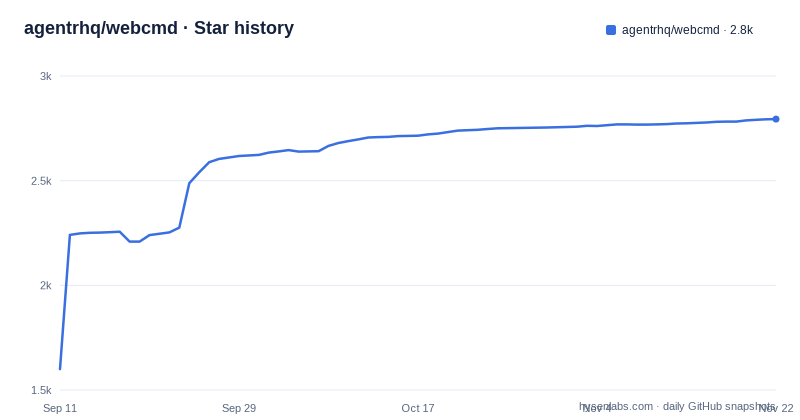
Star history
- agentrhq/webcmd2,794 ★ · +1,194
| Repository | 2026-09-11 | 2026-11-22 |
|---|---|---|
| agentrhq/webcmd | 1.6k | 2.8k |
1,194 Stars in the last 72 days, measured from the daily GitHub snapshot. Compare with other projects
Editorial analysis
The repeated-exploration cost webcmd is built to remove
Most browser agents start every run blind. The agent loads a page, reads the DOM or a screenshot, guesses which element opens the inbox, fails, retries, and burns tokens on the same discovery sequence it performed yesterday. The README frames this as the problem directly: stop making agents rediscover the same sites on every run. Webcmd's answer is a memory layer that captures an agent-facing sitemap of observed pages, states, actions, workflows, APIs, pitfalls, and fallback paths, then serves that sitemap back to the next agent. The target user is not someone automating a single scrape. It is a team running agents against a stable set of authenticated products, the README lists X/Twitter, LinkedIn, ChatGPT, Amazon, Grainger, SAP Ariba, where the same navigation problem recurs daily. The value proposition only holds when the site is revisited. A one-off task against an unfamiliar domain has nothing to learn from.
Layer 0 and layer 1: live control versus stored sitemap
The README splits the system into two layers, and the split is the clearest description of the architecture available. Layer 0 is live browser control: the site is unfamiliar, so the agent uses webcmd browser to inspect, click, type, extract, capture network calls, and finish the task in a real browser. Layer 1 is sitemap memory: the site is familiar but the action space is not fully known, so webcmd supplies the captured map of pages, states, actions, workflows, APIs, pitfalls, and fallback paths. The stated design rules matter more than the diagram. Learning stays quiet and selective. The live browser is always truth. Webcmd never explores just to learn. A memory failure never blocks the task. That last rule is the one that determines whether the tool is safe to put in a production loop: if the memory layer is wrong or unavailable, the agent falls back to ordinary live browsing rather than failing. First access may use a Webcmd Cloud seed, and subsequent learning stays local, which is a meaningful boundary for teams that cannot send browsing context to a third party after the initial seed.
Profiles are cookie jars, sessions are windows
The README draws a distinction that is easy to skim past and expensive to get wrong. Profiles are cookie jars. Sessions are independent browser windows within a profile. Session IDs are immutable, Profile-scoped, and safe to reuse for that Session's lifetime, and parallel agents should create separate Sessions. Raw browser commands require an explicit readable Session ID. In practice this means authentication state lives at the profile level, so a logged-in work profile can back several concurrent sessions without them sharing a window or a tab. The concurrency guidance is explicit rather than implied: if you run two agents in parallel, give each its own session. The cost of ignoring that is not documented, but the constraint itself is stated plainly, and the requirement for an explicit readable session ID on raw browser commands removes the ambiguity about which window a command targets.
Getting it running: install, skill, session commands
Webcmd requires Node.js 20.6 or newer. The manual path is two commands: npm install -g @agentrhq/webcmd, then webcmd skills add. The second command prompts for a harness (Claude, Codex, another supported harness, or a custom skills path) and installs exactly one skill, webcmd-browser. The README is specific about when that skill should be loaded: only for live browser work, and installation and setup commands do not require it. That is a narrower activation rule than most agent tooling uses, and it keeps the skill out of context for tasks that do not touch a browser. The README also offers an agent-driven setup, a prompt that tells the agent to fetch and follow start.md from the repository to set up Webcmd end to end. For multi-step exploration, the documented pattern creates a session, lists tabs, runs a Playwright-style program from a file or from stdin, then closes the session. The stdin form pipes a snippet such as return await page.title(); into webcmd browser run. Note what the example does not show: there is no output shown for those commands, so the exact response shape of browser tabs or browser run is something you will need to observe on your own machine.
The benchmark claim and what it does not settle
The README states that on BU Bench V1, a 100-task browser automation benchmark, Webcmd recorded the highest accuracy and lowest estimated controller cost per completed task, and fewest agent turns per completed task in this comparison. The accompanying chart reports 67% accuracy, $0.255 per completed task, and 9.8 agent turns. The README also discloses the harness: all tools used the same Pi controller, controller model, Codex gpt-5.4 judge, and CloakBrowser engine, and it notes that this is a stronger judge than the original BU Bench setup, whose current runner uses Gemini 2.5 Flash. That disclosure is more than most projects provide, and it is the reason the numbers are worth reading at all. It is also the reason to treat them as a single controlled comparison rather than a general accuracy figure. A 67% success rate on 100 tasks means roughly one in three tasks failed under those conditions. If your workflow needs higher reliability than that, the benchmark is telling you the tool is not there yet, not that it is fast.
Where the memory layer is the wrong tool
The self-learning design has a failure mode built into its premise. Learning is selective and never triggered by exploration, which is good for token spend, but it means the sitemap only accumulates what agents actually did. A site whose layout changes frequently will produce a memory layer that drifts behind the live browser, and the README's own rule that the live browser is always truth is what keeps that drift from becoming a correctness problem. The cost shows up as wasted turns, not wrong answers. There is a second boundary: Webcmd operates through authenticated browser sessions, so tasks that need no login and never repeat gain nothing from the memory layer and inherit the install, the skill, and the session lifecycle anyway. And the README's supported-surfaces table is explicitly illustrative, which means the list of research, social, AI, shopping and booking products is not a compatibility guarantee. If your target site is not on it, you are on the same live-browsing path as any other Playwright-driven agent until the memory layer has something to store.
How this differs from plain Playwright and from browser-use
The closest comparison is browser-use, and the difference is concrete rather than philosophical. Browser-use supplies an agent that drives a browser; its benchmark is the one Webcmd chose to report against, and the BU Bench runner linked from the README uses Gemini 2.5 Flash as judge. Webcmd's distinction is the persistence layer: a local sitemap of pages, states, actions, workflows, APIs, pitfalls and fallback paths that survives between runs, plus a profile model where cookie jars and browser windows are separate concepts. Against raw Playwright the difference is starker. Playwright gives you deterministic control and no agent loop, no memory, and no token cost, because you write the selectors yourself. Webcmd trades that determinism for an agent that can handle unfamiliar pages and remember them. If your target sites are stable and few, hand-written Playwright scripts remain cheaper and more predictable than any agent loop, and nothing in the README argues otherwise.
Release cadence, licence, and what to check before adopting
The repository shows three releases in the four days before the last recorded push: webcmd-v0.8.2 on 2026-09-07, v0.8.3 on 2026-09-08, and v0.8.4 on 2026-09-09. That cadence is a maintenance signal in both directions. It suggests active development, and it also means the CLI surface can move between minor versions, so pinning a version in CI is the practical choice rather than tracking latest. The licence is Apache-2.0, which permits commercial use and modification and includes an explicit patent grant; the repository carries a LICENSE file, and the exact terms are in that file rather than in this article. Nothing here is legal advice. The homepage points to webcmd.dev/docs for documentation beyond the README, and the README itself is the only material this review had access to. Two things are worth verifying before you build on it: the actual output format of browser run and browser tabs, which the README does not show, and whether the Cloud seed on first access is acceptable for the sites your agents touch.
Editorial conclusion
Adopt webcmd if your agents repeatedly hit the same authenticated sites and you want that navigation context stored locally rather than re-derived per run; the profile and session model in the README is the piece to build around. Skip it if your tasks are one-off, unauthenticated, or spread across sites you will never revisit, because the learning layer has nothing to accumulate and you are paying the install and skill overhead for a browser driver. Before committing, verify three things yourself: that Node.js 20.6 or newer is what your environment runs, that the BU Bench V1 numbers reproduce under the Pi controller and Codex gpt-5.4 judge the README names, and that the Apache-2.0 licence text in the repository's LICENSE file is the one your legal review expects. The memory layer is the product. If your workload does not repeat, the product does nothing for you.
Frequently asked questions
What does Webcmd actually learn about a website?
It records a sitemap of what it observed, covering pages, states, actions, workflows, APIs, pitfalls and fallback paths, and makes that available to later agents. Nothing is trained. The live browser stays the source of truth, Webcmd does not explore extra pages only to learn, and a memory failure is not allowed to block the task.
How do I install Webcmd, and what does it require?
Node.js 20.6 or newer, then npm install -g @agentrhq/webcmd followed by webcmd skills add. The second command asks whether you want Claude, Codex, another supported harness, or a custom skills path, and installs exactly one skill, webcmd-browser.
Does each agent need its own browser session in Webcmd?
Yes. Profiles are cookie jars, and Sessions are independent browser windows inside a profile. Session IDs are immutable and profile scoped, parallel agents are told to create separate Sessions, and raw browser commands require an explicit readable Session ID.
Is the 90 percent token saving claim backed by numbers in the project?
Not in the README. The opening text claims browser-agent token spend can be cut by up to 90%, and the benchmark section reports a ranking on BU Bench V1 without any figures, pointing instead to benchmarks/README.md. It does define the metrics: accuracy is passed tasks out of 100, cost and agent turns are averaged over completed tasks, and cost excludes judge usage.
Is Webcmd Cloud something to depend on today?
The file marks Webcmd Cloud as in active development and not yet stable. First access may use a Webcmd Cloud seed, and subsequent learning stays local, so a site's map can begin as hosted content before diverging on your own machine.
Official sources
Add this badge to your README
If you maintain this project, the badge below links readers to this analysis and shows its maintenance status from the daily GitHub snapshot. Paste the markdown into your README; add ?metric=license or ?metric=stars to the image URL for a different field.

[](https://hysenlabs.com/projects/agentrhq-webcmd)Star history chart for your README
[](https://hysenlabs.com/projects/agentrhq-webcmd)Was this useful?