cph: a VS Code judge loop with local testcases and separate submit extensions
Makes judging, compiling, and downloading problems for competitive programming easy.
At a glance
- What is it?
- Competitive Programming Helper is a VS Code extension that compiles a solution, runs it against testcases pulled from the browser, and judges the output locally, with Python custom checkers for problems that have several valid answers. Submitting is partly somebody else's job, because Codeforces submission lives in a second extension and Kattis needs its own client.
- Who is it for?
- cph suits a competitive programmer who wants compile, run and local judging inside VS Code instead of a browser tab, and who can accept a two extension setup for Codeforces submissions. It does not suit a team that needs shared testcases, a web judge, or a single tool that covers submission on every platform, and the request the extension sends to its server every few seconds is a decision to make deliberately rather than by default.
- Can I use it commercially?
- Yes, with conditions. GPL-3.0 is a copyleft licence: if you distribute software that includes it, you must release that software's source code under the same licence. Running it internally without distributing it does not trigger that obligation.
- Is it still maintained?
- Yes. The repository last received commits 22 days ago.
- What is it written in?
- Mainly TypeScript, according to GitHub's language statistics.
Answers come from the project's GitHub data, last synced on November 7, 2026, and from our analysis. They are not legal advice.
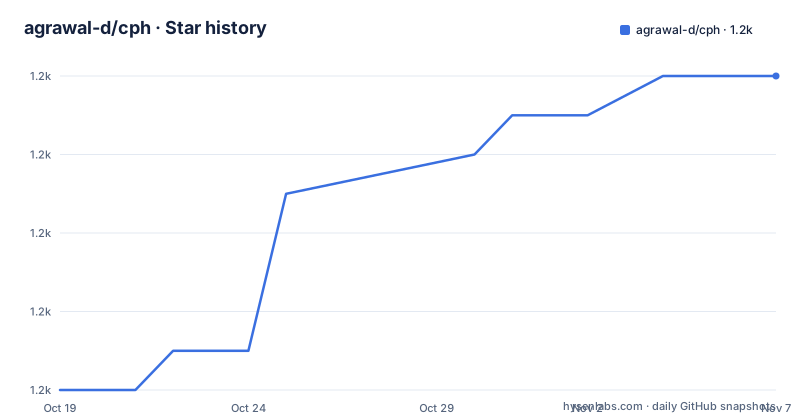
Star history
- agrawal-d/cph1,166 ★ · +8
| Repository | 2026-10-19 | 2026-11-07 |
|---|---|---|
| agrawal-d/cph | 1.2k | 1.2k |
8 Stars in the last 19 days, measured from the daily GitHub snapshot. Compare with other projects
Editorial analysis
The gap cph closes: writing a solution, then rebuilding the test harness by hand
The usual competitive programming loop is a browser tab, a local editor, and a mental checklist of sample cases. Grabbing testcases means copying input and expected output by hand or by writing a script that scrapes the problem page, and every language change means rewriting the compile and run commands. cph exists to collapse that into one loop: the project describes itself as making judging, compiling and downloading problems for competitive programming easy. The user is a contest participant or someone preparing for contests, working alone in an editor, who wants the local feedback loop to match what the platform will do. The extension targets VS Code specifically, and its package manifest requires a VS Code engine of ^1.52.0, so it is not a standalone judge you can call from a terminal or from another editor.
The data path runs through a browser extension, not through the editor alone
cph does not scrape problem statements itself. The documented flow starts with Competitive Companion, a separate browser extension, which the user triggers with a green plus button in the browser toolbar while on a problem page. That step hands the problem to VS Code, and the file opens with the testcases already preloaded. From there cph takes over: it compiles the file, shows compilation errors, and runs the testcases through a judge that understands signals, timeouts and runtime errors. The architecture is a pipe rather than a monolith, browser extension to editor, and that split has a consequence worth stating plainly. If the browser half is missing or the page layout confuses Competitive Companion, there is no testcase data to judge against. The project also documents the fallback path, opening any supported file and pressing Run Testcases to enter testcases manually, and it works locally on problems you wrote yourself, where no platform page exists at all.
Installing the extension and the browser half, then pressing the shortcut
The documented quick start has three install steps and one action. cph itself is installed from the VS Code marketplace, and a manual path exists for people who prefer a .vsix file, published as a release tagged latest-vsix. Competitive Companion is installed separately in the browser, and the file has to be opened in VS Code after that. The action is a keyboard shortcut, Ctrl+Alt+B, which runs the preloaded testcases. The same command exists in the panel as a named VS Code command, and the manifest contributes three commands in total, including one that compiles without running, which is useful when the solution is still a work in progress. The command identifiers are stable enough to bind to your own keymap.
"commands": [
    {
        "command": "cph.runTestCases",
        "title": "%cph.runTestCases.title%",
        "icon": "dist/static/play.png"
    },
    {
        "command": "cph.submitToCodeForces",
        "title": "%cph.submitToCodeForces.title%",
        "icon": "dist/static/play.png"
    },
    {
        "command": "cph.compileWithoutRunning",
        "title": "%cph.compileWithoutRunning.title%"
    }
]
Twelve languages behind one command, and the guides for adding a thirteenth
The same run and judge path covers C++, C, C#, Rust, Go, Haskell, Python, Ruby, Java, Kotlin, JavaScript under Node.js and Cangjie. The design consequence is that the extension, not your build system, decides how a language is compiled and run, so a custom Makefile or a toolchain version of your own choosing is not part of the documented workflow. Adding a language is a supported activity rather than a patch, and the project points contributors at a developer guide section for it. The display layer is localized separately from the compiler layer, with the interface available in English, Simplified Chinese, Traditional Chinese, Korean and Japanese, and the manifest carries the matching package.nls files. A contributor adding a translation is pointed at a translation guide, which keeps the two kinds of change apart.
Custom checkers handle the problems where a plain string compare is wrong
Many contest problems have several valid outputs, or require a numeric answer to a stated precision, and the standard approach of comparing your output to the expected output character by character fails on them. cph addresses that with a custom checker, a special judge implemented as a Python script that the extension uses to evaluate the case. This is the part of the tool that a plain compile and run setup cannot copy, and it is the feature to test first on a problem set that mixes output only tasks with scoring tasks. The checker mechanism also imposes its own constraint: it lives in Python, so a Python interpreter has to be present and the checker script has to be written against the platform's own checker conventions.
Submission is a separate tool, and the split differs by platform
Compiling and judging are cph's own work, but submitting a solution is only partly. The manifest contributes a command named cph.submitToCodeForces, and the feature list links Codeforces auto-submit to a separate project, cph-submit, described as an optional browser extension to install for that purpose. Kattis is handled a different way, by installing the submit client and its config file from the Kattis help page after logging in. So the platform story is not uniform inside cph: one platform is a companion extension, another is an external client with a config file. What all of this buys is that the local loop stays inside the editor, while the actual upload and the platform's own judgement are handled by the tools each site expects.
The extension phones home every few seconds, and the project says so
The telemetry section is short and worth reading before installing anything. To show a live user count, the extension sends a request to the server every few seconds, and the documentation states that no information is sent with the request. That is a claim about payload, not about the request itself, since the request still reveals that the extension is running, from which address, and when. For a tool used during timed contests, that is the kind of behaviour a reader should decide about rather than accept, and the extension can also be used entirely locally on your own problems, where the network path is not needed. The extension also declares sponsorship metadata pointing at a shortened sponsor URL, which is normal for a marketplace extension but is another outbound element in the same package.
Maintenance signals: a rolling vsix release and an unusual version number
The repository is a TypeScript project built with webpack, with separate backend and frontend bundles configured through webpack.config.js and webpack.frontend.config.js, a Jest setup in jest.config.js, and separate src/ and server/ directories. The release history is unusual: the only published release is a rolling build tagged latest-vsix, dated 2026-06-02, while the manifest version field reads 2077.0.0, a joke value rather than a semantic version anyone can use for pinning. That combination means the marketplace is the update channel in practice, and a user who wants a fixed artifact has to record the vsix they installed. The last push to the repository was on 2026-10-16, and the project is not archived. The licence is GPL-3.0-or-later, and the contributing guide asks that an issue be opened before a pull request so the approach can be discussed first, which is a reasonable signal for how much scrutiny a change receives.
Editorial conclusion
cph suits a competitive programmer who wants compile, run and local judging inside VS Code instead of a browser tab, and who can accept a two extension setup for Codeforces submissions. It does not suit a team that needs shared testcases, a web judge, or a single tool that covers submission on every platform, and the request the extension sends to its server every few seconds is a decision to make deliberately rather than by default. Before adopting it, read the telemetry section of the extension documentation, decide whether you want the Competitive Companion browser extension in the loop, and confirm your judging setup works for problems with multiple valid outputs, where the Python custom checker path matters more than the standard compare.
Frequently asked questions
How do I install cph and run the testcases?
Install cph from the VS Code marketplace, or install the .vsix from the latest-vsix release, and install the Competitive Companion browser extension separately. Open a problem with the green plus button in the browser toolbar, and the file opens in VS Code with testcases preloaded, then press Ctrl+Alt+B to run them.
Which languages does cph support?
The documented list is C++, C, C#, Rust, Go, Haskell, Python, Ruby, Java, Kotlin, JavaScript under Node.js and Cangjie. The interface itself is localized into English, Simplified Chinese, Traditional Chinese, Korean and Japanese, and guides exist for adding a new language or a new translation.
Does cph submit solutions to Codeforces and Kattis itself?
For Codeforces, auto-submit is provided by a separate optional browser extension called cph-submit, although the cph manifest also contributes a cph.submitToCodeForces command. For Kattis, the documentation points to installing the submit client and its config file from the Kattis help page after logging in.
How does cph handle problems with multiple valid answers?
It supports a custom checker, a special judge written as a Python script, which the extension uses to evaluate cases where a plain comparison against the expected output would be wrong, including problems with specific precision requirements.
Does cph send any data while I use it?
The documentation states that to show a live user count the extension sends a request to the server every few seconds, and that no information is sent with the request. The extension can also be used locally on your own problems without needing a platform page.
Official sources
Add this badge to your README
If you maintain this project, the badge below links readers to this analysis and shows its maintenance status from the daily GitHub snapshot. Paste the markdown into your README; add ?metric=license or ?metric=stars to the image URL for a different field.

[](https://hysenlabs.com/projects/agrawal-d-cph)Star history chart for your README
[](https://hysenlabs.com/projects/agrawal-d-cph)Was this useful?