AIProxySwift: Swift clients for 17 AI providers, with an optional abuse-protection backend
Swift clients for AI providers. You can make requests straight to the provider or proxied through our abuse protection backend
At a glance
- What is it?
- AIProxySwift wraps OpenAI, Gemini, Anthropic and fourteen other AI APIs in typed Swift clients, and lets one line of initialization decide whether requests go straight to the provider or through the AIProxy backend. The library is easy to adopt; the backend and its rate limits are the part you have to plan for.
- Who is it for?
- Adopt AIProxySwift if you are shipping a Swift or SwiftUI app that calls several AI providers and you want one typed surface for all of them, especially if you would rather pay for the AIProxy backend than build key-splitting and per-user rate limiting yourself. Skip it if you are not on Apple platforms, or if you already have a server-side proxy and do not want a second dependency in the request path.
- Can I use it commercially?
- Yes. MIT is a permissive licence: you can use, modify and sell software built on it, as long as you keep its copyright and licence notices.
- Is it still maintained?
- Yes. The repository last received commits 8 days ago.
- What is it written in?
- Mainly Swift, according to GitHub's language statistics.
Answers come from the project's GitHub data, last synced on November 15, 2026, and from our analysis. They are not legal advice.
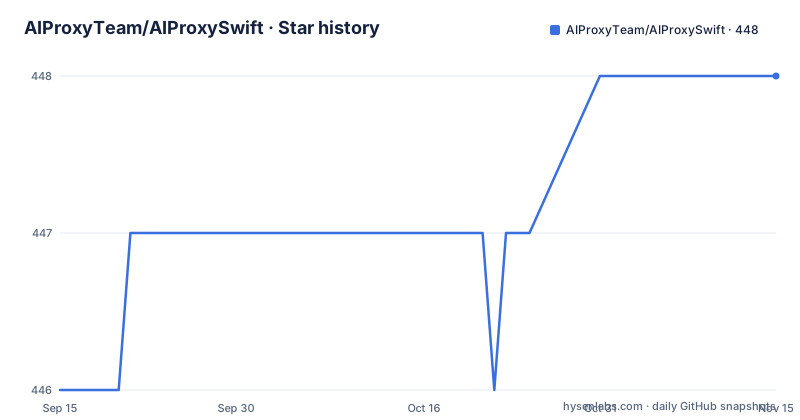
Star history
- AIProxyTeam/AIProxySwift448 ★ · +2
| Repository | 2026-09-15 | 2026-11-15 |
|---|---|---|
| AIProxyTeam/AIProxySwift | 446 | 448 |
2 Stars in the last 61 days, measured from the daily GitHub snapshot. Compare with other projects
Editorial analysis
The problem AIProxySwift solves: seventeen provider SDKs, one app
A Swift app that talks to more than one AI provider usually ends up with a folder of hand-written URLSession code: one file for OpenAI's chat completions, another for Anthropic's messages format, another for Stability AI's image endpoints. Each has its own request shape, its own error envelope, and its own retry quirks. AIProxySwift replaces that with a single Swift package that ships typed clients for OpenAI, Gemini, Anthropic, Stability AI, DeepL, Together AI, Replicate, ElevenLabs, Fal, Groq, Perplexity, Mistral, EachAI, OpenRouter, DeepSeek, Fireworks AI and Brave.
The audience is narrow and specific: iOS, macOS and other Apple-platform developers writing in Swift. The package ships as a Swift Package and a CocoaPod, so it fits both SwiftUI and UIKit projects. If your backend is Python or Node, this library is not for you.
The second problem it addresses is the API key. The README states that requests protected through AIProxy have five levels of security applied: certificate pinning, DeviceCheck verification, split key encryption, per user rate limits and per IP rate limits. That is a backend product, not a library feature, and the README is explicit that the AIProxy backend setup is not required if you are shipping an app where customers supply their own keys.
How the direct and proxied paths diverge at initialization
There is no separate networking mode to configure. The service object you construct decides the path. The README's OpenAI example shows two commented-out constructors: AIProxy.openAIDirectService(unprotectedAPIKey:) for BYOK and prototyping, and AIProxy.openAIService(partialKey:serviceURL:) for what the README calls all other production use cases. The direct service holds a complete provider key on the device. The proxied service holds a partial key and a service URL, both taken from a developer dashboard, and the AIProxy backend holds the rest.
The README's own recommendation is unambiguous: direct requests are recommended only during prototyping and for BYOK use-cases. That is a real constraint on how you ship, not a stylistic preference. If your app bills users for AI usage against your own key, the proxied path is the intended one.
Rate limiting lives on the backend side of that split. The five protections listed above are applied to requests that go through AIProxy, which means per-user and per-IP limits are a property of your AIProxy configuration rather than something you implement in Swift. The library's job is to attach the right identity to the request so the backend can count it, which is where the useStableID option comes in: the README says it exists to rate limit usage across an App Store user's account on multiple devices.
Installing AIProxySwift and making a first OpenAI request
Two install paths are documented. In Xcode, use File > Add Package Dependencies and enter the package URL, choosing either the main branch as the dependency rule or specific releases for finer control over when the dependency updates. For CocoaPods, add this line to your Podfile:
pod "AIProxy"Then run `pod install` in the shell.
Before any request, call AIProxy.configure once at launch. In SwiftUI the README puts it in the app's composition root; in UIKit, in applicationDidFinishLaunching. The configuration below enables DNS resolution over TLS and stable identifiers, both of which the README marks as recommended:
import SwiftUI
import AIProxy

@main
struct MyApp: App {
    init() {
        AIProxy.configure(
            logLevel: .debug,
            printRequestBodies: false,
            printResponseBodies: false,
            resolveDNSOverTLS: true,
            useStableID: true
        )
    }

    var body: some Scene {
        WindowGroup { Text("Hello") }
    }
}
If you set useStableID to true, the README requires preparation first: add the iCloud capability to your target, then check the Key-Value storage checkbox under Signing & Capabilities. Without that, the stable identifier has no store to read from.
With configuration done, a first request means building a service object and a typed body. The README's OpenAI example uses the direct constructor for BYOK and the proxied constructor for production, then calls chatCompletionRequest with a secondsToWait value of 120:
// For BYOK or prototyping; do not embed your own production key in an app.
let openAIService = AIProxy.openAIDirectService(unprotectedAPIKey: userSuppliedKey)
let requestBody = OpenAIChatCompletionRequestBody(
    model: "gpt-5.2",
    messages: [
        .system(content: .text("You are a friendly assistant")),
        .user(content: .text("hello world"))
    ],
    reasoningEffort: .noReasoning
)

let response = try await openAIService.chatCompletionRequest(
    body: requestBody,
    secondsToWait: 120
)
print(response.choices.first?.message)
What you should see is a decoded response object rather than raw JSON, which is the main ergonomic gain over hand-rolled URLSession calls. The README also documents a gRPC section and an Advanced Settings section, so the chat completion example is a starting point rather than the whole surface.
Where AIProxySwift stops being the right tool
The library is Apple-platform only. There is no documented server-side Swift target, no Linux build instructions, and no Android or web client. If your AI calls originate from a backend service, this package adds nothing.
The bigger limitation is the coupling between the library and the AIProxy backend. The README frames AIProxy as an alternative to building, monitoring and maintaining your own backend, which is a fair description, but it also means your rate limits, your key-splitting and your DeviceCheck verification are configured in someone else's dashboard and enforced on someone else's servers. The README does not document a self-hosted deployment of that backend. If your requirements include running the proxy yourself, the documentation is silent on how.
There is also a versioning cost that the README treats as a feature. Choosing the main branch as your dependency rule means you track the library continuously; the release history shows frequent version bumps, so a main-branch dependency is a moving target. The README offers version-based rules as the alternative and describes how to update the package afterward, but it does not document rollback if a new release breaks your build.
Finally, streaming and error semantics per provider are not covered in the README excerpt. The example shows a non-streaming chat completion. If your product depends on token-by-token streaming from a specific provider, treat that as something to verify in the source before adopting.
AIProxySwift versus writing your own URLSession client
The realistic alternative is not another Swift AI package; it is the code you would write yourself. A hand-rolled client gives you exact control over the request body, the retry policy, the caching layer and the error types, and it adds no third-party dependency to your app binary. For a single provider with a handful of endpoints, that is often less total work than learning this library's service constructors and configuration surface.
The difference in approach shows up at the second provider. AIProxySwift's value is proportional to how many of the seventeen listed providers you touch, because the typed request and response models are the part you would otherwise rewrite for each one. A team using OpenAI and Anthropic in the same app gets two clients behind one configuration call.
The other axis is the backend. Writing your own client does not solve key security; you would still need to build or buy a proxy to keep a production key off the device. AIProxySwift bundles that decision into the constructor you pick, which is convenient if you accept the AIProxy service and irrelevant if you already run your own proxy.
Maintenance, releases and what the MIT licence covers
The repository is not archived, and the last push was on 2026-08-28. Releases are frequent: 0.155.0 on 2026-08-04, 0.156.0 on 2026-08-22 and 0.157.0 on 2026-08-28. The version numbers are still in the 0.x range, which in practice means the API can change between minor releases, and the README's update instructions assume you will be pulling new versions rather than freezing one.
Upgrade cost depends on the dependency rule you chose at install time. With a main-branch rule, updates arrive when you right-click the package and select Update Package, so a breaking change can land without a version decision on your side. With a version-based rule, you inspect the rule in the Package Dependencies section of your project settings and Xcode updates the package once the rule admits the release you want. The README also notes that if Xcode does not update automatically, you can right-click the package in the project tree and select Update Package.
Licensing is MIT for the library, which permits commercial and closed-source use. That covers the Swift package only. The AIProxy backend is a separate hosted service with its own commercial terms, and the README does not describe them; the homepage and the integration guide video are where that lives. Nothing here is legal advice, and the terms of the backend service are worth reading separately from the licence file.
Editorial conclusion
Adopt AIProxySwift if you are shipping a Swift or SwiftUI app that calls several AI providers and you want one typed surface for all of them, especially if you would rather pay for the AIProxy backend than build key-splitting and per-user rate limiting yourself. Skip it if you are not on Apple platforms, or if you already have a server-side proxy and do not want a second dependency in the request path. Before you commit, verify three things: which providers you actually need are covered by the README's list, whether your app can add the iCloud Key-Value storage capability that useStableID depends on, and what the per-user and per-IP rate limits on your AIProxy plan are, because those numbers shape your product's behaviour more than any Swift API in this package.
Frequently asked questions
How do I install AIProxySwift in an Xcode project?
Use File > Add Package Dependencies, enter the package URL, and select either the main branch or specific releases as the dependency rule. The README notes that the release-based rule gives you finer control over when the dependency updates.
Does AIProxySwift require the AIProxy backend?
No. The README states that the backend setup is not required if you are shipping an app where customers provide their own API keys. For apps using a personal or company key, the README recommends the AIProxy backend instead.
What is the difference between openAIDirectService and openAIService in AIProxySwift?
openAIDirectService takes an unprotected API key and sends requests straight to the provider, which the README recommends only for prototyping and BYOK use-cases. openAIService takes a partial key and a service URL from your developer dashboard and routes requests through the AIProxy backend.
Which AI providers does AIProxySwift support?
The README lists OpenAI, Gemini, Anthropic, Stability AI, DeepL, Together AI, Replicate, ElevenLabs, Fal, Groq, Perplexity, Mistral, EachAI, OpenRouter, DeepSeek, Fireworks AI and Brave, plus a gRPC section.
How do I update the AIProxySwift package?
If you set the dependency rule to main, right-click the package and select Update Package. If you used a version-based rule, inspect the rule in the Package Dependencies section of your project settings and let Xcode update it, or right-click the package and select Update Package.
What does useStableID do in AIProxySwift?
The README says it rate limits usage across an App Store user's account on multiple devices, and marks it as recommended. Enabling it requires adding the iCloud capability and checking the Key-Value storage checkbox in Xcode.
Official sources
Add this badge to your README
If you maintain this project, the badge below links readers to this analysis and shows its maintenance status from the daily GitHub snapshot. Paste the markdown into your README; add ?metric=license or ?metric=stars to the image URL for a different field.

[](https://hysenlabs.com/projects/aiproxyteam-aiproxyswift)Star history chart for your README
[](https://hysenlabs.com/projects/aiproxyteam-aiproxyswift)Was this useful?