Root My Pixel: One-Tap Root for Pixel Phones via CVE-2026-43499
Jailbreak supported Google Pixel phones with CVE-2026-43499
At a glance
- What is it?
- Root My Pixel is a Kotlin Android app that chains the NebuSec IonStack exploit with ReSukiSU and KernelSU to give supported Pixel devices temporary root. Here is how the chain works, what the supported-build table actually constrains, and where it fails.
- Who is it for?
- Adopt Root My Pixel if you own a Pixel whose exact build number appears in the README table and you accept a temporary root that may need many attempts. Do not adopt it if your build is unlisted, if you rely on Google Wallet or RCS, or if you want a permanent bootloader-level root.
- Can I use it commercially?
- Not without permission. GitHub finds no licence file in the repository, and without a licence all rights are reserved by default: you may read the code but not reuse it. Check the README, or ask the authors, before using it.
- Is it still maintained?
- Yes. The repository last received commits 39 days ago.
- What is it written in?
- Mainly Kotlin, according to GitHub's language statistics.
Answers come from the project's GitHub data, last synced on October 22, 2026, and from our analysis. They are not legal advice.
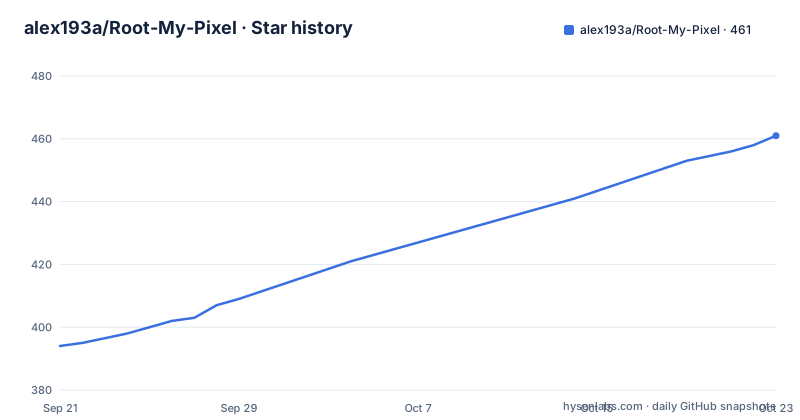
Star history
- alex193a/Root-My-Pixel458 ★ · +64
| Repository | 2026-09-21 | 2026-10-22 |
|---|---|---|
| alex193a/Root-My-Pixel | 394 | 458 |
64 Stars in the last 31 days, measured from the daily GitHub snapshot. Compare with other projects
Editorial analysis
The problem Root My Pixel solves: rooting a Pixel without unlocking the bootloader
Traditional Pixel rooting means unlocking the bootloader, flashing a patched boot image, and wiping the device. That path is permanent, trips the hardware-backed key attestation that banking and payment apps check, and is not available at all on carrier-locked units. Root My Pixel takes a different route. It is an Android application, written in Kotlin, that runs an exploit against the kernel to obtain root at runtime, without touching the bootloader.
The audience is narrow and specific. You need a Google Pixel whose codename and build number appear in the project's supported table, and you need to be comfortable running an exploit that the README itself describes as unreliable. This is not a general-purpose rooting tool. It is a build-targeted exploit wrapper, and the README's device table is the boundary of what it will attempt.
How the exploit chain works: from device profiling to a root daemon socket
At startup the app profiles the device through native JNI code called NativeProbe, queries /proc/version, and reads system properties. It collects the device codename, kernel version, CPU ABI, memory page size, and build display ID. A component named ResolveTargetUseCase matches those details against target profiles stored in assets/profiles.json. If nothing matches, there is no target and the chain stops there.
The second stage depends on Shizuku. Running as UID 2000, Shizuku gives the app ADB shell privileges without pre-existing root, which is what allows it to stage and execute payload binaries in /data/local/tmp. A managed ExploitService is bound over Binder IPC so exploit output streams to the UI as it happens.
The third stage extracts precompiled .so payloads matching the resolved build, plus a native helper named libcve43499root.so, from APK assets into /data/local/tmp. The IonStack exploit, tracked as CVE-2026-43499, then runs and establishes a local root daemon socket called temp_su.sock, which is the point at which the process holds root.
The fourth stage installs the persistent layer. The app stages a ksud binary matching the device's Kernel Module Interface, for example android15-6.6, and triggers the KernelSU late-load mechanism with ksud late-load --kmi <kmi>. It verifies KernelSU through its UAPI, falling back to ksud debug info and /proc/modules. Only after validating the production APK signature of the ReSukiSU Manager does it register that manager. The signature check is a sensible gate: it prevents a substituted manager APK from being wired in.
Installing Root My Pixel and running the first exploit attempt
The README does not publish a prebuilt APK. It documents a source build, and the repository ships a build-all.sh script that compiles the native helper, the exploit payloads for all targets, and a debug APK. The stated host requirements are Android NDK r25 or newer with ANDROID_NDK_HOME set or present in the Android SDK, a macOS arm64 or x86_64 host or a Linux x86_64 host, Java 17 or newer, and the Gradle wrapper.
Run the build from the repository root:
./build-all.shThe README states the compiled APK lands at app/build/outputs/apk/debug/app-debug.apk. Install it over ADB with:
adb install -r app/build/outputs/apk/debug/app-debug.apkBefore any of that, Shizuku must be installed and running. The README gives this ADB command as one way to start it:
adb shell sh /sdcard/Android/data/rikka.shizuku/starter.shWireless Debugging is listed as the alternative. You also need the ReSukiSU Manager installed on the device to manage the root permissions the app grants. Once Shizuku is up and the app is installed, open it and start the exploit. The UI shows a live log. Expect the first attempt to fail; the README says the exploit does not have a 100% success rate and that many users have had to try more than 20 times.
The supported-build table is the real constraint, not the device list
It is tempting to read the README's device table as a list of supported phones. It is really a list of supported build numbers. A Pixel 10 Pro XL shows two accepted builds, CP2A.260705.006 and CP2A.260805.005. A Pixel 9 shows CP2A.260705.006 and AD1A.240905.004. A Pixel 7 accepts CP2A.260705.006 or BP2A.250705.008. If your phone is on a build that is not in that row, the profile match in ResolveTargetUseCase has nothing to bind to, and the payload extraction has no matching .so to pull from assets.
That is a hard failure mode, and it is not a bug you can work around by retrying. The exploit payloads are precompiled per target. There is no documented option to point the app at your own kernel build or to supply a custom payload. The repository does include a Root-My-Pixel-Payloads submodule, which suggests payloads are built separately and vendored in, but the README does not document a workflow for adding a new target profile to assets/profiles.json.
The second constraint is timing. The README notes that many users report higher success opening the app immediately after a reboot, while others find better results 10 to 40 minutes after rebooting. Those two pieces of advice point in opposite directions, which tells you the exploit's reliability is sensitive to system state in a way the documentation does not pin down.
Temporary root, Wallet, and RCS: what the README warns about
The root this tool grants is temporary. The README describes it that way in the first line of the how-it-works section, and the mechanism explains why: the IonStack exploit establishes a local root daemon socket rather than modifying the boot image. The KernelSU late-load step layers a module on top, but the underlying access came from a runtime exploit against a kernel vulnerability, not from a persistent boot-time change.
The practical consequence is documented in a warning. Rooting the phone may cause trouble making payments with Google Wallet and using RCS messages. Unrooting does not restore things immediately; the README says you have to wait a couple of days before everything works properly again. If Google Wallet or RCS is part of how you use the phone, that is a real cost, and it is not something the app can configure away.
The licence is another open question. The repository has no licence file listed among its top-level entries, and the README does not state one. The exploit itself is credited to NebuSec IonStack, and the app architecture is described as inspired by and adapted from Root My Galaxy. If you plan to redistribute a build or ship it inside another product, the absence of an explicit licence is a problem you have to resolve with the authors, not something to assume.
Root My Pixel compared with Magisk on an unlocked bootloader
The obvious alternative for a Pixel owner is the conventional route: unlock the bootloader, patch the boot image with Magisk, and flash it. The difference in approach is fundamental. Magisk modifies the boot image so root is present from the first boot, and the unlock is a one-time operation that Google's own flashing tools support. Root My Pixel never touches the bootloader and never wipes the device, but it depends on a specific kernel vulnerability being present and unpatched on your exact build.
That dependency cuts both ways. A Magisk install survives reboots by design; a runtime exploit does not, which is consistent with the README calling the root temporary. On the other hand, an unlocked bootloader is detectable by apps that check attestation, while a runtime exploit leaves the boot state intact. The trade-off is reliability and persistence against boot-state cleanliness.
There is also a difference in who can use each. Magisk works on a much wider range of Android devices and does not require a per-build payload. Root My Pixel requires Shizuku running, a matching build profile, and a payload compiled for that target. If your build is not in the table, Magisk on an unlocked bootloader is the path the project's own constraints push you toward.
Maintenance and upgrade cost
The last push to the default branch was on 2026-09-13, and the most recent release listed is v1.5 on 2026-09-07, with v1.4 on 2026-08-29 and v1.3 on 2026-08-21. The release cadence over that window is roughly weekly, and the repository is not archived. That tells you the project is moving, but it also tells you the maintenance model: each supported build number is a target that has to be kept in step with Google's monthly security releases.
For a user, the upgrade cost is concrete. A Pixel update that changes your build display ID can move you off a supported profile, and the fix is a new release from the project, not something you can patch locally, because the payloads are precompiled. You should check the README table against your current build after every OTA. The build requirements also impose a cost on anyone compiling from source: NDK r25 or newer, Java 17 or newer, and a macOS or Linux x86_64 host. The README does not list Windows as a supported build host.
Editorial conclusion
Adopt Root My Pixel if you own a Pixel whose exact build number appears in the README table and you accept a temporary root that may need many attempts. Do not adopt it if your build is unlisted, if you rely on Google Wallet or RCS, or if you want a permanent bootloader-level root. Before flashing anything, verify your build display ID, confirm Shizuku is running, and check that the ReSukiSU Manager APK signature validates in the app's log output.
Frequently asked questions
How do I root my Google Pixel 10 with Root My Pixel?
Your Pixel 10 must be on build CP2A.260705.006, the only build listed for the frankel codename. Install and start Shizuku, install the ReSukiSU Manager, then build or obtain the app and run the exploit from its UI, expecting multiple attempts.
How do I root my Pixel 9a?
The README lists the Pixel 9a under codename tegu with build CP2A.260705.006 and Kernel KMI android14-6.1. If your device is on a different build number, the profile match in ResolveTargetUseCase will not find a target.
How do I root my Pixel 7?
The Pixel 7, codename panther, is listed with two supported builds: CP2A.260705.006 and BP2A.250705.008, both on Kernel KMI android14-6.1. Shizuku must be installed and running before the app can stage payloads in /data/local/tmp.
How do I tell if my Pixel is rooted?
The README describes verification through the KernelSU UAPI, with ksud debug info and /proc/modules as compatibility fallbacks. The app also registers the ReSukiSU Manager after validating its production APK signature, so a registered manager is one sign the chain completed.
Is rooting a phone illegal?
The README does not address legality, and the repository carries no licence file. What it does document is the operational cost: Google Wallet and RCS may stop working after rooting, and unrooting can take a couple of days to restore them.
Official sources
Add this badge to your README
If you maintain this project, the badge below links readers to this analysis and shows its maintenance status from the daily GitHub snapshot. Paste the markdown into your README; add ?metric=license or ?metric=stars to the image URL for a different field.

[](https://hysenlabs.com/projects/alex193a-root-my-pixel)Star history chart for your README
[](https://hysenlabs.com/projects/alex193a-root-my-pixel)