Tookie-OSINT: username discovery across social platforms, rebuilt in Python 3.12
Tookie is a advanced OSINT information gathering tool that finds social media accounts based on inputs.
At a glance
- What is it?
- A username enumeration tool that checks a handle against a large list of sites, packaged for Kali and installable from a script anywhere else.
- Who is it for?
- Tookie-OSINT earns its place on a Kali box or a throwaway VM, where a username is your starting point and you want a fast list of accounts to triage by hand. It is strong on breadth of sites and on output plumbing: CSV export, threading, headless mode, webhooks in beta and a restore file all exist in the roadmap as shipped.
- Can I use it commercially?
- Yes. MIT is a permissive licence: you can use, modify and sell software built on it, as long as you keep its copyright and licence notices.
- Is it still maintained?
- Yes. The repository last received commits 9 days ago.
- What is it written in?
- Mainly Python, according to GitHub's language statistics.
Answers come from the project's GitHub data, last synced on October 23, 2026, and from our analysis. They are not legal advice.
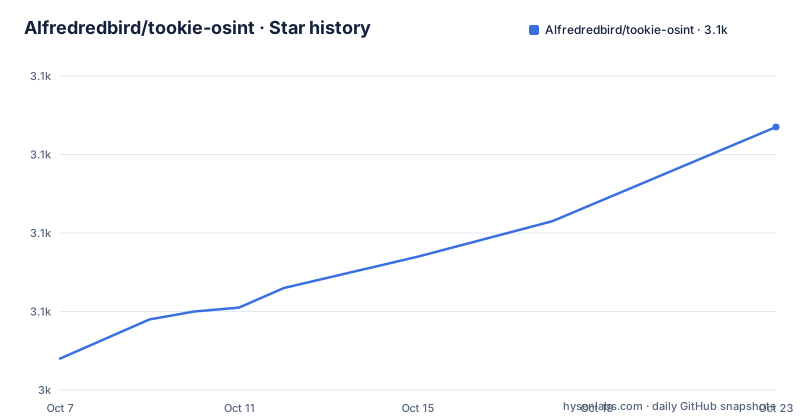
Star history
- Alfredredbird/tookie-osint3,107 ★ · +59
| Repository | 2026-10-07 | 2026-10-23 |
|---|---|---|
| Alfredredbird/tookie-osint | 3k | 3.1k |
59 Stars in the last 16 days, measured from the daily GitHub snapshot. Compare with other projects
Editorial analysis
Username enumeration as the whole product
Tookie-OSINT does one thing: given a username, it reports which sites have an account with that name. The README is direct about this, describing it as discovering usernames requested from an input and comparing it to Sherlock, the better-known tool in the same category. It also states an accuracy figure, claiming success at the task almost 80% of the time. That number is the project's own claim and comes with no methodology attached, so treat it as a rough expectation rather than something to plan around.
The design decision that follows from this narrow scope is that accuracy comes from volume and freshness rather than cleverness. The repository keeps a `sites/` directory for the site definitions, a `config/` directory, `modules/` for the scanning logic and `lang/` for interface translations. A tool shaped this way can be corrected quickly: when a site changes its profile URL pattern, you update a data file rather than fight an anti-bot flow.
The tree also contains `brib.py` as the entry point, which is an unusual name for the file you launch and worth knowing about before you go looking for `main.py`. There are install and uninstall scripts for both Unix and Windows (`install.sh`, `windows_install.ps1` and their uninstall counterparts), and a `SECURITY.md` alongside `CONTRIBUTING.md` and `CODE_OF_CONDUCT.md`.
Installing on Kali versus running it from a clone
The shortest path is the Kali package, since the project is in the Kali Linux package repository:
sudo apt install tookie-osintThe general path is the clone-and-run script, which the README says installs the requirements automatically:
git clone https://github.com/alfredredbird/tookie-osint.git
cd tookie-osint
chmod +x install.sh
sudo ./install.sh
If you would rather not run a script with sudo, the manual route creates a virtual environment and installs from `requirements.txt` yourself:
python3 -m venv venv
source venv/bin/activate
pip3 install -r requirements.txt
python3 brib.py
There is also a Debian package built from the releases page and installed with `dpkg -i`, which matters if you are on Ubuntu or Debian proper rather than a penetration-testing distribution.
The dependency list is short and explains a lot about how the tool works. `requirements.txt` names colorama, requests, argparse, selenium, webdriver-manager and flask. The first four are a console UI, HTTP requests, argument parsing and browser automation. Selenium plus webdriver-manager is the notable one: it means parts of the scan drive a real browser, which is how it handles sites that answer plain requests with a challenge. That also means a working browser and driver on your machine, not just a Python environment. The README says the tool is optimized for Python 3.12.
What the v4 rewrite and the v4.1 fix actually changed
The README's opening line is a version announcement: V4 is here, rewritten one hundred percent from scratch for performance, with translations and wiki still catching up. That is a big change and it explains why the roadmap in the README looks like a mixture of finished work and aspiration.
The v4.1 changelog is short and specific. Webscraper can now scrape from websites, Turkish language support arrived through a contributor pull request, and a separate contribution improved CLI robustness and prevented header-randomization crashes. The header-randomization crash is the interesting one, because it implies the tool varies request headers to avoid looking like a single scripted client, and that code path had a failure mode.
Then there is the tag `v4.1fix`, published on 2026-04-24, two days after v4.1. Its release body says it fixes a security advisory and links the advisory identifier directly. The project published a patch release specifically to close an advisory rather than folding the fix into a feature release, which is the right way to handle it. The practical consequence for you is narrow but real: if you pin a version, pin `v4.1fix` or later rather than `v4.1`. The repository is not archived and the last push was on 2026-09-22. The licence is MIT.
The roadmap read as a feature list
The README keeps an upcoming-features checklist with checkboxes, and reading it tells you more about the tool's current shape than the overview does. Marked done are scripting support, the webscraper and data webscrapping, CSV export, restore file, headless mode, automation, threading, more accurate results and scripting.
Still open are Tor searching, a web UI, phone number OSINT, custom plugins, detailed reports, email OSINT, a GUI and auto-opening discovered URLs. Three of those carry an in-beta marker: detailed reports, email OSINT and webhooks.
That split is the useful reading. Threading and headless mode being finished means the tool is built to run at volume in an automated pipeline, and CSV export plus the restore file means you can persist a run and pick it back up rather than losing results to a terminal close. The beta markers on reports, email and webhooks are the ones to treat carefully, since beta in a solo-maintained project usually means implemented and unpolished.
The interface itself is a text UI driven by argparse, and the README notes that passing `-h` shows the help menu. Fifteen interface languages are listed as translated, with Turkish arriving in 4.1, and the repository carries a `lang/` directory to hold them. The operating system list in the README spans macOS, Windows 10 and 11, Termux, Kali, Parrot OS, Ubuntu, Debian, Alpine, Fedora, Arch, Manjaro and Void.
Where this breaks down, starting with the 80% claim
The central limitation is that username enumeration has a hard ceiling, and this project is honest enough to say so indirectly. A site can be added to the list and still fail, because the profile URL pattern changes, the site starts rate-limiting, or the platform puts a login wall in front of existence checks. A false positive is equally likely: usernames get reused and sold, so a hit may be a different person entirely. Nothing in the tool resolves that ambiguity, because resolving it is the expensive part that OSINT tools usually defer.
The Selenium dependency creates a second set of problems. Browser automation is slower than a plain HTTP request by a wide margin, it needs a working driver, and headless browsers get fingerprinted and blocked in ways that a plain request does not. The header-randomization crash fixed in 4.1 is a reminder that the evasive parts of the tool are also the fragile parts.
And the ethical framing is unsettled. The README includes a disclaimer that the author takes no responsibility for malicious use and says the tool was created to help new programmers and pentesters enter OSINT. That is a statement of intent, not a safeguard. A username enumeration tool has legitimate uses in brand monitoring, incident response and self-audit, and it is equally usable for stalking someone, and the code cannot tell the difference. The tool also has no rate limiting, no target allowlist and no logging of who ran it against whom, so the responsibility for how it is pointed sits entirely with the operator.
Sherlock, Maigret and the rest of the category
The README names Sherlock as the comparison, and the difference is mostly one of scope and output. Sherlock is a leaner script with a small site list and fast text output, which is why it remains the default choice for a quick check on one handle. Tookie-OSINT is the heavier option: a web scraper, threading, headless mode, CSV output, a restore file and seventeen interface languages, with a Kali package that makes installation a single command.
Maigret is the other name in this space and takes a different approach entirely, querying hundreds of search engines by name and email rather than testing a fixed list of profile URL patterns. Where Tookie asks each known site directly, Maigret asks search engines. That means Tookie gives you breadth on sites it has hard-coded, while Maigret gives you discovery of sites nobody hard-coded, at the cost of rate limits and search-engine noise.
Neither approach is strictly better, and the practical question is which failure mode annoys you less. A site that changed its URL structure silently produces a false negative in a direct checker, while a search-engine method produces noise you have to filter. For an investigator who already knows the target runs on specific platforms, direct checking is faster and cleaner. For someone starting from a name with no context, the search-engine approach surfaces more. Tookie's plan for Tor searching and a web UI are both marked planned, which suggests the author is aware of the gap between a CLI tool and a fuller OSINT toolkit.
Editorial conclusion
Tookie-OSINT earns its place on a Kali box or a throwaway VM, where a username is your starting point and you want a fast list of accounts to triage by hand. It is strong on breadth of sites and on output plumbing: CSV export, threading, headless mode, webhooks in beta and a restore file all exist in the roadmap as shipped. It is not a people-search engine, it carries no account graph or enrichment, and the README's own accuracy claim is a rate rather than a guarantee. The v4 line was rewritten from scratch and shipped a security advisory fix within two weeks of v4.1, so treat the tag you install as the thing to pin. Start with `sudo apt install tookie-osint`, run it with `-h` to see the flags, and judge it against Sherlock on the handles you already know.
Frequently asked questions
What is the most powerful OSINT tool available?
There is no single answer, because OSINT tools specialise. Tookie-OSINT is strong in one narrow area: given a username, it checks a large list of site definitions and reports which accounts exist, with CSV output and threading for bulk runs. It does not resolve real names, enrich records or build an account graph, so for those you need a different category of tool entirely.
Are OSINT tools like Tookie legal?
Legality depends on what you point the tool at and why, and Tookie-OSINT itself carries a disclaimer saying the author takes no responsibility for malicious use. Enumerating public profile URLs for yourself, for a client security audit, or for your own brand monitoring is a normal use. Running it against another person to assemble a profile, or against a service you have no authorisation for, is a different matter and the tool has no rate limiting or logging to stop you.
What is the best OSINT tool in 2026?
For username enumeration specifically, Tookie-OSINT is a reasonable pick on a Kali box, because it is packaged there and installs with `sudo apt install tookie-osint`. The v4 line was rewritten from scratch, versions up to v4.1fix exist, and it adds threading, headless mode and CSV output that leaner scripts such as Sherlock do not offer. Judge it against the alternatives on one specific handle before committing.
What is the best OSINT tool for finding people?
Tookie-OSINT does not do that. It starts from a username and reports sites where that username is taken, so it finds accounts rather than people, and it cannot tell you who behind an account is. Finding people by name requires records-based or people-search tooling rather than username enumeration.
Official sources
Add this badge to your README
If you maintain this project, the badge below links readers to this analysis and shows its maintenance status from the daily GitHub snapshot. Paste the markdown into your README; add ?metric=license or ?metric=stars to the image URL for a different field.

[](https://hysenlabs.com/projects/alfredredbird-tookie-osint)Star history chart for your README
[](https://hysenlabs.com/projects/alfredredbird-tookie-osint)Was this useful?