Android Jetpack's androidx/androidx: The Source Repository Behind the androidx.* Libraries
Development environment for Android Jetpack extension libraries under the androidx namespace. Synchronized with Android Jetpack's primary development branch on AOSP.
At a glance
- What is it?
- The androidx/androidx repository is the development home for Android Jetpack's unbundled libraries. This review covers what it is, how contributions work, and the practical constraints for anyone considering working with it.
- Who is it for?
- Adopt this repository if you need to build or contribute to Android Jetpack libraries like Room, Lifecycle, or Compose Runtime. Do not use it if you just want to consume Jetpack; use Google Maven instead.
- Can I use it commercially?
- Yes. Apache-2.0 is a permissive licence: you can use, modify and sell software built on it, as long as you keep its copyright and licence notices.
- Is it still maintained?
- Yes. The repository received new commits within the last day.
- What is it written in?
- Mainly Kotlin, according to GitHub's language statistics.
Answers come from the project's GitHub data, last synced on November 13, 2026, and from our analysis. They are not legal advice.
Star history
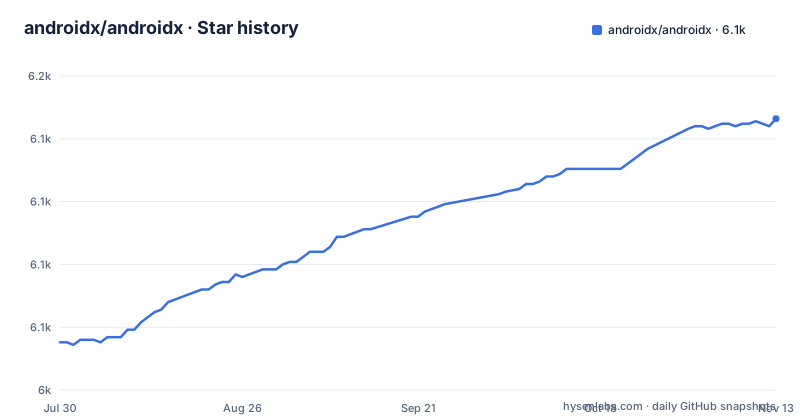
- androidx/androidx6,133 ★ · +89
| Repository | 2026-07-30 | 2026-11-13 |
|---|---|---|
| androidx/androidx | 6k | 6.1k |
89 Stars in the last 106 days, measured from the daily GitHub snapshot. Compare with other projects
Editorial analysis
What This Repository Actually Is
The androidx/androidx repository is the development environment for Android Jetpack libraries under the androidx namespace. It is a mirror of the primary development branch on AOSP, specifically the androidx-main branch. The README describes Jetpack as a suite of libraries, tools, and guidance, but this repository is not the distribution channel. Official binaries go out through Google Maven. The repository is where source code, tests, and documentation live before those binaries are built and published. For an engineer, this distinction matters: you do not clone this repo to get the libraries; you clone it to work on the libraries themselves.
The Unbundling Mechanism and Why It Matters
Jetpack libraries are unbundled from the Android platform APIs. That is the core architectural point. Because they are not tied to a specific Android OS release, they can be updated more frequently and offer backward compatibility. The README states this explicitly: it gives you access to the latest versions of components without waiting for a platform update. The practical effect is that a library like Room or WorkManager can ship new features and fixes to older Android versions. For a developer evaluating the repository, this means the code you see here is the source of those frequent updates. The versioning and release cadence are managed elsewhere, but the source of truth is this branch.
How the Contribution Workflow Is Gated
Contributions go through a specific process, and it is not a typical GitHub pull request flow. The README says the GitHub workflow is experimental and only accepts contributions to a short list of projects: Activity, AppCompat, Biometric, Collection, Compose Runtime, Core, DataStore, Fragment, Lifecycle, Navigation, Paging, Room, and WorkManager. Everything else is off limits unless you go through AOSP. Before any contribution, you must generate an HTTPS password and agree to the Google Contributor License Agreement. Reviews happen on r.android.com, not on GitHub. You add reviewers based on git log or OWNERS files. The repository also states it is not accepting new modules. That is a hard boundary. If you want to add a new library, this is the wrong place.
Getting the Code and Building: The Onboarding Path
The README points to docs/onboarding.md for setup details, but it does not include the commands directly. What is visible is that the repository uses git and a tool called repo, given the instruction to run repo upload. The README also reveals a key detail: binary dependencies are stored in git under prebuilts/androidx/internal and prebuilts/androidx/external. This is for hermetic builds. The importMaven tool, located at development/importMaven/README.md, is the way to pull in a new dependency. That is a concrete command path, but the actual invocation is not in the README. You will need to read the onboarding docs and the importMaven README to get exact commands.
The Contribution Rules: Tests, Bugs, and Approval
The accepted contribution types are narrow. Bug fixes require a corresponding bug report in the Android Issue Tracker, and each bug fix is expected to come with tests. Spelling fixes and documentation updates are accepted without a bug report. New features are only accepted if the feature request bug has been approved by an AndroidX team member. This is a strong gate. It means you cannot just submit a feature you think is useful. The approval must come first. Also, adding tests to uncovered areas is accepted, which is a good entry point for new contributors. The README says the CI system builds all in-progress libraries as changes are merged, and you can manually download those AARs and JARs for experimentation. That is useful for testing your changes before release.
Limitations and Failure Modes to Consider
The most obvious limitation is the experimental GitHub workflow. Only 13 projects are accepted, so if you work on, say, CameraX, you cannot contribute via GitHub. You must use the AOSP Gerrit flow, which the README references but does not fully document. Another failure mode is the binary dependency storage. Because dependencies are stored in git, the repository is large, and any change to a dependency requires using importMaven. That adds overhead compared to a normal Gradle setup. Also, the README warns that the CI builds in-progress libraries that may be unstable. If you download a snapshot AAR for testing, you cannot assume it is production-ready. The repository is not for end users; it is for contributors and those who need to build from source.
Alternative Approaches and How They Differ
The direct alternative is to consume Jetpack from Google Maven. That is the official distribution channel for AARs and JARs. The difference is fundamental: you get prebuilt, stable binaries with version numbers, instead of a source checkout that may be mid-development. For most app developers, Google Maven is the right choice. Another alternative is building from the AOSP mirror directly at android.googlesource.com, which is the same code but without the GitHub interface. The GitHub repo is a convenience mirror with an experimental contribution path. If you need to contribute to a library not on the accepted list, the AOSP Gerrit route is the only way. So the choice is not between different codebases; it is between source-level work and binary consumption.
Maintenance Cost and License Implications
Maintaining a checkout of this repository is heavy. You need to handle the repo tool, sync with the androidx-main branch, and manage prebuilt binaries. The README mentions hermetic builds, which is good for reproducibility but means you must track internal and external prebuilts. Upgrades to dependencies are not just a Gradle file change; they involve importMaven. The license is Apache-2.0, which is permissive for use and modification. That is a positive for adoption. However, the contribution agreement with Google is separate from the license. You must agree to the CLA before contributing, which has its own legal implications. The README does not detail those, so you should read the agreement yourself. The repository is not archived, and the last push was on 2026-11-02.
Editorial conclusion
Adopt this repository if you need to build or contribute to Android Jetpack libraries like Room, Lifecycle, or Compose Runtime. Do not use it if you just want to consume Jetpack; use Google Maven instead. Before contributing, verify that your target library is on the accepted list, set up the Gerrit workflow, and check the onboarding docs for the exact repo tool commands. The repository is not open to new modules, so plan for existing-library work only.
Frequently asked questions
What is AndroidX used for?
Jetpack is described as a suite of libraries, tools and guidance that free you from writing boilerplate code and simplify complex tasks. In this repository the `androidx.*` package libraries are unbundled from the platform APIs, which is what delivers backward compatibility and a release cadence more frequent than the platform's.
What is the difference between Android and AndroidX?
The platform APIs and the `androidx.*` packages are separate here. Jetpack's libraries are unbundled from the platform APIs, ship as their own AAR and JAR binaries through Google Maven, and are updated more frequently than the Android platform while keeping backward compatibility. The Jetpack landing page on the developer site is where using them is explained.
How do I add an AndroidX library in Android Studio?
No command for that appears in this repository. The distribution statement is that official AAR and JAR binaries travel through Google Maven. For the development workflow instead, the contributing notes hand you to the onboarding document at docs/onboarding.md.
What is androidx Room?
Room appears here as a top-level module directory, and it is one of the thirteen projects named in the list that currently accept contributions through the experimental GitHub workflow. The README does not describe what the library itself does; it covers contribution mechanics rather than individual libraries.
What is the current version of Jetpack Compose?
This repository publishes no GitHub releases, so it lists no release version for Compose. The binaries are distributed through Google Maven, while the CI system builds in-progress libraries whose AAR and JAR files can be downloaded for experimentation.
Official sources
Add this badge to your README
If you maintain this project, the badge below links readers to this analysis and shows its maintenance status from the daily GitHub snapshot. Paste the markdown into your README; add ?metric=license or ?metric=stars to the image URL for a different field.

[](https://hysenlabs.com/projects/androidx-androidx)Star history chart for your README
[](https://hysenlabs.com/projects/androidx-androidx)Was this useful?