AniJS: Declarative Web Animations Without Writing a Line of JavaScript
GitHub describes it as A Library to Raise your Web Design without Coding.. The repository metadata lists JavaScript as its primary language. The metadata lists the MIT license. This article stays within the project description and details documented in the GitHub repository README.
At a glance
- What is it?
- AniJS is a compact MIT-licensed library that lets designers and coders add animations through HTML attributes. This review looks at how it works, how to get started, and why its 2015-era design still matters for simple projects.
- Who is it for?
- Adopt AniJS if you are a designer or a front-end developer who wants quick, declarative animations without writing JavaScript and without pulling in a heavy dependency. Skip it if you need complex, state-driven animation timelines, modern framework integration, or active maintenance.
- Can I use it commercially?
- Yes. MIT is a permissive licence: you can use, modify and sell software built on it, as long as you keep its copyright and licence notices.
- Is it still maintained?
- Probably not. The repository last received commits 73 months ago, on October 21, 2020.
- What is it written in?
- Mainly JavaScript, according to GitHub's language statistics.
Answers come from the project's GitHub data, last synced on October 22, 2026, and from our analysis. They are not legal advice.
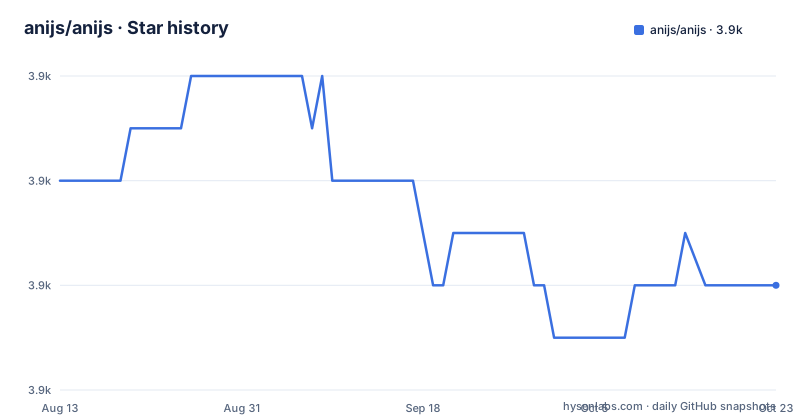
Star history
- anijs/anijs3,900 ★ · -2
| Repository | 2026-08-13 | 2026-10-22 |
|---|---|---|
| anijs/anijs | 3.9k | 3.9k |
-2 Stars in the last 70 days, measured from the daily GitHub snapshot. Compare with other projects
Editorial analysis
What AniJS Actually Solves
AniJS targets a specific pain: web designers who know HTML and CSS but do not want to write JavaScript to get animations on a page. The README pitches it as a way to "Raise your Web Design without Coding," and the selling point is that you declare animations in the markup itself. That means a designer can add a bounce or a fade to an element by writing an attribute, and the library does the rest. It also promises better collaboration between coders and designers, because the animation intent lives in the HTML where both can see it. For a small site or a prototype, that removes the need for a developer to hand-code every transition. The library is small, around 7.7kb after gzipping, and it has no third-party dependencies, so it does not bloat a page. This is not a tool for building complex interactive experiences; it is for making static pages feel alive with minimal effort.
How AniJS Works Under the Hood
The repository does not include a detailed architecture document, but the usage model is visible from the README and the wiki references. AniJS works by scanning the DOM for elements that carry a data-anijs attribute. That attribute holds a declarative sentence that describes an event, a condition, and an action. For example, you might write something like "if click on this button, then animate the target with a fadeIn." The library parses that string, attaches the appropriate event listeners, and triggers the animation when the condition is met. The animation itself is applied through CSS classes or inline styles, depending on what the library decides. Because there is no JavaScript code to write, the logic is entirely in the HTML, which is the core design choice. The README mentions that it works on iPad, iPhone, Android, and modern browsers, which suggests the library uses standard DOM APIs and CSS transitions that those platforms support. The exact parsing and execution flow is not documented in the README, but the wiki pages are the place to look for the details. What is clear is that AniJS is a declarative layer on top of the browser's animation capabilities, not a new animation engine.
Getting Started with AniJS
The README points to the project homepage at anijs.github.io for installation and usage instructions, so the exact commands are not in the repository itself. However, the typical pattern for a library like this is to include the script from a CDN, and the README links to the AniJS entry on cdnjs, which means you can add it with a single script tag. The usage section on the homepage would show the data-anijs attribute syntax, and the examples section gives live demonstrations. For a quick start, you would load the JavaScript file, then add attributes to your HTML elements. The README stresses that there is no need for third-party libraries, so you do not need jQuery or anything else. The installation page likely offers a download link or a CDN URL, and the using page would show the attribute format. Since the last release was in 2015, the installation steps are old but still functional for plain HTML sites. If you are using a modern build system, you would need to vendor the file manually, because the repository does not show any npm or package manager setup.
The Limitation of a Declarative Approach
The biggest limitation of AniJS is that it trades flexibility for simplicity. Declaring animations in HTML attributes works well for straightforward triggers like click or hover, but it becomes unwieldy when you need to coordinate multiple animations, chain them with delays, or respond to complex application state. The README does not mention any support for timeline-based animation or sequencing beyond what a single attribute can express. If you try to build a multi-step animation where one element moves, then another fades, and then a third scales, you will likely end up with a tangle of attributes that are hard to read and maintain. Also, because the library has not been updated since 2015, it does not know about modern JavaScript features like modules or frameworks like React or Vue. In a component-based architecture, putting animation logic in HTML attributes fights the framework's own rendering model. For a plain static site, that is fine, but for a single-page application, it is the wrong tool. The README's claim of working on "modern browsers" from 2015 is now dated, and you should check the compatibility table on the wiki before relying on it for a current audience.
A Real Alternative: CSS Animations and Transitions
The closest alternative to AniJS is not another JavaScript library; it is the native CSS animations and transitions that are built into every modern browser. With CSS, you can define keyframes and apply them with classes, and you can trigger them with :hover or :focus pseudo-classes, or by toggling a class with a small script. The difference in approach is fundamental: AniJS puts the trigger and the animation in the HTML attribute, while CSS puts the animation in a stylesheet and the trigger in the markup or a script. If you are comfortable writing a bit of CSS, you can get the same visual results without any JavaScript at all for simple hover effects. For click-triggered animations, you would need a few lines of JavaScript to toggle a class, which is trivial. The advantage of CSS is that it is part of the platform, so it is maintained by browser vendors and has no dependency risk. AniJS's advantage is that it abstracts away even that small script, which matters if the person writing the page does not write any code. But for a developer, CSS is likely simpler and more future-proof.
Maintenance and Licensing Considerations
The repository's last push was in March 2015, and the most recent release is 0.9.3 from the same month. That means the library has been effectively abandoned for years, with no commits, no releases, and no community activity visible in the repository data. The README invites contributions and lists a contributing guide, but the lack of recent activity suggests that no one is maintaining it. For a production project, that is a real risk: if you find a bug or need a feature, you will have to fix it yourself. The license is MIT, which gives you the freedom to fork, modify, and redistribute the code, even commercially, as long as you keep the copyright notice. That is permissive, so you could take the source and fix it, but you would be on your own. The README also mentions a wiki and a browser compatibility table, but those are not part of the repository, so their current state is unknown. Before adopting AniJS, you should verify that the wiki still exists and that the examples still work in your target browsers. The library is small enough that a fork is feasible, but the maintenance cost is entirely on you.
Editorial conclusion
Adopt AniJS if you are a designer or a front-end developer who wants quick, declarative animations without writing JavaScript and without pulling in a heavy dependency. Skip it if you need complex, state-driven animation timelines, modern framework integration, or active maintenance. Before adopting, verify that your target browsers are in the compatibility table on the wiki, and check the release history to confirm that the 2015 version still meets your needs. The library is MIT-licensed, so you can fork it, but you will be on your own for fixes and feature work.
Frequently asked questions
What is AniJS?
A MIT licensed JavaScript library for raising a page's design with animation, without writing the animation code. Its stated advantages are ease of use, a size of around 7.7kb after gzipping, no need for third party libraries, development speed, and better integration between coders and designers.
How do I install AniJS?
The README does not contain an install command. Its Installation, Usage and Examples sections are all links to anchors on the project's GitHub Pages site, and the library is also listed on cdnjs. The repository's own manifest is a build file, carrying four grunt devDependencies and the spm main pointer, with no runtime dependencies at all.
Which browsers does AniJS claim to support?
The README says it works well on iPad, iPhone, Android and the modern browsers, and points to a wiki page holding a browser compatibility table. The link it gives for what counts as a modern browser goes to browsehappy.com, which no longer resolves.
What is the current version of AniJS?
The package manifest declares 0.9.3, which matches the newest release tag, published 2015-03-17. The two tags before it are v0.9.2 and v0.9.1 from February 2015, and the most recent commit on the branch is dated 2020-10-21. The tagging is inconsistent, since the newest release drops the v prefix the older two carry.
How do I contribute to AniJS?
The README gives five steps: fork the repository, create a branch with `git checkout -b my-new-feature`, commit with `git commit -am 'Add some feature'`, push the branch, and open a pull request. Note that the commit step stages tracked modifications only, so a new file has to be added to the index separately. A separate CONTRIBUTING.md in the repository covers the same ground.
Official sources
Add this badge to your README
If you maintain this project, the badge below links readers to this analysis and shows its maintenance status from the daily GitHub snapshot. Paste the markdown into your README; add ?metric=license or ?metric=stars to the image URL for a different field.

[](https://hysenlabs.com/projects/anijs-anijs)Star history chart for your README
[](https://hysenlabs.com/projects/anijs-anijs)