ansible/workshops: the training material behind the Ansible Automation Platform courses
Training Course for Ansible Automation Platform
At a glance
- What is it?
- The ansible workshops repository is the source for the Ansible Automation Platform training catalogue, published as a static site with search and filtering, and it holds more than twenty workshop and event formats from ninety minute labs to six hour courses plus a product demo sandbox. It is MIT licensed, its default branch is `devel`, and its content is heavily localised through gettext with po4a and a set of Makefile targets.
- Who is it for?
- Adopt the workshops repository if you run Ansible Automation Platform training and want to fork the course material rather than write it, since the catalogue, the lab environments, the execution environment and the translation pipeline are all here. Do not adopt it as a source of automation patterns for your own playbooks, because the content is written for a classroom with an instructor and a lab provisioner.
- Can I use it commercially?
- Yes. MIT is a permissive licence: you can use, modify and sell software built on it, as long as you keep its copyright and licence notices.
- Is it still maintained?
- Yes. The repository last received commits 1 day ago.
- What is it written in?
- Mainly Jinja, according to GitHub's language statistics.
Answers come from the project's GitHub data, last synced on November 7, 2026, and from our analysis. They are not legal advice.
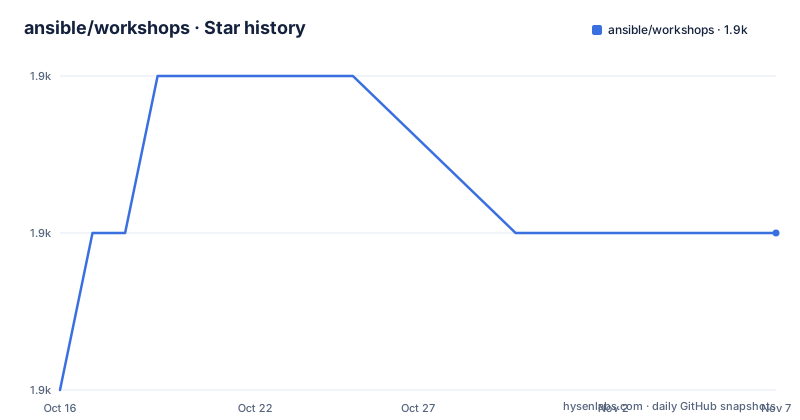
Star history
- ansible/workshops1,872 ★ · +1
| Repository | 2026-10-16 | 2026-11-07 |
|---|---|---|
| ansible/workshops | 1.9k | 1.9k |
1 Stars in the last 22 days, measured from the daily GitHub snapshot. Compare with other projects
Editorial analysis
A training catalogue published as a static site
The repository is the source for the live site at ansible.github.io/workshops, and the README's first instruction is to visit it, or your fork, to browse the full workshop catalog with filtering and search.
That framing is the key to the project. It is not a collection of playbooks and not a documentation site. It is the content repository for a training catalogue, with a small static site in front of it, and the catalogue is organised by format and by topic rather than by lesson.
The tree explains the shape. There is an `exercises/` directory where each workshop lives, a `_site/` directory with the generated output, `_layouts/`, `_includes/` and `_config.yml` for the site, and `webpages/` and `decks/` for presentation material. The `docs/` directory holds the operational documentation for the project itself, the attendance site, how to contribute, the AWS lab provisioner, a FAQ and a release process document. There is a `collections/` directory for Ansible content, `roles/` for the roles the labs use, an `execution_environment/` directory, a `demos/` directory, and `files/`, `assets/` and `images/` for the supporting material.
The project is MIT licensed with the licence file at the root, the primary language is recorded as Jinja, which is the templating language the labs and the site are built from, and the default branch is `devel`. The last push was on 2026-10-16 and the repository is not archived, so the catalogue is being worked on.
The release history is less regular, with 1.0.19 from 2024-06-28, 1.0.18 from 2023-05-15 and an AnsibleFest 2020 release from 2020-10-08, which matches how training material tends to be versioned against the platform rather than on a schedule.
The ninety minute workshops
The bulk of the catalogue is a set of ninety minute workshops, and the list is a good map of what an organisation asks its platform team to build.
There is AI + Ansible, an introduction to AI-driven Ansible automation and AIOps. There is Day 2 Ops, automation with OpenShift Virtualization. There is Event-Driven Ansible, covering the fundamentals of sources, rules and actions. There is Cloud Automation, to orchestrate, operationalize and govern hybrid cloud environments. There is Ansible Lightspeed, a development technical workshop. There is Network Automation, a getting started session. There is RHEL Automation for Red Hat Enterprise Linux. There is ServiceNow automation, and there is Windows automation.
Two of these are worth pausing on as content decisions rather than product decisions.
Event-driven Ansible is the one that has moved furthest in the last few years in the platform's own direction, and the catalogue reflects it with a second event-driven workshop at four hours, the extended EDA and ServiceNow session. The Mission-Critical Automation workshop is described as a 3.5-hour automation journey with EDA, which is the format for the kind of architecture conversation an automation team has with a business unit.
Windows and RHEL are the two that show the breadth: the same platform, taught against two operating systems that historically needed different automation approaches, one Windows with WinRM and one RHEL with SSH.
The topics on the repository also include cisco, cisco-ios, juniper-networks and vyos, which are the network vendors whose images and automation are used in the labs, and there is a `find_cisco_ami.yml` playbook at the root, which is what an AWS lab provisioner would use to find the right image for a network device.
Events, longer courses and the demo sandbox
Beyond the ninety minute labs, the catalogue separates out formats that are not really courses at all.
The Events category contains Ansible Automates, a full-day regional AnsibleFest-style conference, and Ansible Automates Events, the in-person and virtual event kits. Then there are three event formats aimed at different audiences: Automation Connection, a three-hour account expansion event, Automation Everywhere, a three-hour decision-maker nurturing event, and Automation Roundtable, an executive peer-to-peer roundtable.
That division is a design decision about who the material is for. A workshop teaches an engineer to do something. An account expansion event walks a champion through expanding usage. A roundtable gives executives a reason to keep the conversation going. A catalogue that mixes those into one list is a list of links; a catalogue that separates them is an argument about the platform's audience.
The four hour tier holds Mission-Critical Automation, the extended EDA and ServiceNow workshop, the extended Lightspeed and Development workshop, and Configuration as Code for the Ansible Automation Platform. The six hour tier is the platform and infrastructure training proper: RHEL, Network, Satellite, and RIPU, which is the RHEL in-place upgrade automation workshop.
There is also a Product Demos entry, described as a sandbox for demoing, development and experimentation, and a separate set of self-paced exercises at red.ht/ansible-labs, interactive learning scenarios of 15 to 30 minutes each, which is the format for people who cannot sit in a room for an hour and a half.
The Resources section points at a one-stop shop described as an IT automation workshops and events hub, and a full workshop catalog from Source, which is the upstream source the catalogue is drawn from.
The provisioner, the execution environment and the lab machinery
A workshop that runs against real infrastructure needs a way to create that infrastructure, and the `provisioner/` directory plus its README on the AWS Lab Provisioner is that mechanism. There is also an `execution_environment/` directory in the tree, and the `ansible-navigator.yml` file, which is the configuration for the developer workflow tool that the requirements pin.
The `docs/` directory carries the operational documentation, and its file names are a good summary of what running this catalogue involves: the workshop attendance website documentation, how to contribute, the AWS lab provisioner README, a FAQ, and a release process document.
The site build has a couple of interesting pieces. There is a `CNAME` file, which is what binds the custom domain, and a `404.html` at the root. There is a `manifest.zip.gpg` file, which is the signed manifest of the published collection, and a `galaxy.yml`, which is the metadata for the Ansible collection that the labs install. The `po4a.cfg` and `pooneliner.py` files are the localisation machinery, which is the subject of its own section below.
The `nginx-ssl-proxy-explanation.md` file at the root is a small human touch worth noting. A workshop site that a learner opens on a hotel network needs a secure connection, and rather than assuming the reader knows how to put a TLS terminating proxy in front of a local site, the project wrote the explanation down.
The `.devcontainer/` directory and the `Makefile` round out a repository that is trying to make the whole thing reproducible on a contributor's laptop, which is the right instinct for content that has to be run by dozens of instructors on different machines.
Localisation through po4a and five Makefile targets
The most distinctive engineering in the repository is the translation pipeline, and the Makefile documents it at the top of the file.
The targets are `show-translated-folder`, to show the list of exercises with localization enabled, `generate-po` to generate a language specific po file, `needs-translation` to generate a list of files with untranslated or fuzzy strings for a specific language, `apply-translation` to take a PO file as entry and generate a localized README file for the locale, and `clean-translation` to remove the locales folder in each exercise folder.
The mechanism underneath is gettext. The Makefile finds the translated folders by searching for `po4a.cfg` files and the existing catalogues by searching for `*.po` files, and then runs `po4a` over each one. The `pooneliner.py` script is used by the needs-translation target to find untranslated and fuzzy strings.
The structure of the targets tells you the workflow. The author writes the English README, a translator updates the PO catalogue, `apply-translation` generates the localised `README.<locale>.md`, and `needs-translation` is the check that says what is still missing. The `clean-translation` target removes the generated files, which is the standard way to make sure the localised output is regenerated from the catalogues rather than hand-edited and drifting.
The result is visible in the tree. There is a `README.ja.md` at the root, and the README opens with links to the English and Japanese versions, with the Japanese one linked through the japan.png image. The localised READMEs are generated per exercise, in the locales folder inside each exercise directory, and the `_site` build then publishes the catalogue with the translations in place.
For a training catalogue used across many countries and language communities, having the translation pipeline in the same repository as the content, rather than in a separate translation tool, is the difference between a translation that ships with a workshop and one that arrives a quarter later.
The dependency set, and the versions it implies
The `requirements.txt` file is short, and it is dated, which tells you what the labs were built against.
ansible-core>=2.11
ansible-navigator==2.2.0
paramiko==3.4.0
boto3==1.21.15
netaddr==0.8.0
passlib==1.7.4
requests==2.32.4
pywinrm==0.4.1
requests-credssp==1.2.0
ipaddr==2.2.0
petname==2.6
Three things are visible in that list. `ansible-navigator` is pinned exactly at 2.2.0, and it is the tool the `ansible-navigator.yml` file configures, so a lab that a learner runs will be driven by that version of the interface.
Second, the network libraries are all there: `paramiko` for SSH, `pywinrm` for Windows over WinRM, `requests-credssp` for WinRM with CredSSP, `netaddr` and `ipaddr` for address handling, and `boto3` for the AWS side of the provisioner. That is a workshop set that expects to drive both Linux and network devices and Windows machines, which matches the catalogue.
Third, `passlib` and `petname` are there for a reason that is worth noting. `petname` generates readable hostnames, which is how a lab can give a hundred instances readable names instead of a hundred identical hostnames, and `passlib` handles the credentials the lab provisioner creates.
The `ansible-core>=2.11` floor is a lower bound rather than a pin, which is reasonable for a teaching repository, but it means a learner on a current Ansible can get behaviour that differs from what the instructor sees. For a workshop, that is worth knowing before the session rather than during it.
Where the workshops repository is the wrong tool
There are three cases where this repository is the wrong place to look, and the first is the most common misunderstanding.
The first is that it is a source of automation patterns. It is not. The labs exist to be taught in a room with an instructor and a lab environment, and the playbooks in them assume that context, a provisioning step and a cleanup step. If you want good examples of idempotent playbooks for production, this is the wrong collection, and the upstream documentation and the collection ecosystem are the right ones.
The second is a team that wants a workshop but has no infrastructure to teach on. The material assumes a lab provisioner that can create real machines, and on AWS there is a provisioner in the repository, and elsewhere that is your problem to solve before the session. A workshop you cannot provision is a document.
The third is localisation into a language the project does not cover, at scale. The translation pipeline exists, and it is a manual, file-based workflow that depends on translators and on a maintainer running the Makefile targets. That is appropriate for a catalogue of two dozen workshops maintained by a small team, and it is not a translation management system with per-string review, per-locale quality gates and a schedule.
The alternative approach, and the one to weigh against, is to write your own internal training. The difference in approach is that this repository gives you a curriculum, a lab environment and a translation pipeline, while writing your own gives you content matched to your platform, your network and your internal review standards, at the cost of the lab machinery that makes the hands-on part work.
For a Red Hat customer with an existing Automation Platform subscription, the practical recommendation is to fork the catalogue rather than start from nothing, and to treat the `devel` branch, the pinned `ansible-navigator` version and the localisation status as the three things to check before you schedule a session.
Editorial conclusion
Adopt the workshops repository if you run Ansible Automation Platform training and want to fork the course material rather than write it, since the catalogue, the lab environments, the execution environment and the translation pipeline are all here. Do not adopt it as a source of automation patterns for your own playbooks, because the content is written for a classroom with an instructor and a lab provisioner. Verify three things first: that your platform version matches what the labs expect, since the pinned `ansible-navigator` and `ansible-core` versions in `requirements.txt` are old, that the lab environments in `provisioner/` provision against your own infrastructure, and that the localisations are current for the languages you intend to teach in, since the translation pipeline is a manual Makefile workflow rather than a service.
Frequently asked questions
What is the ansible/workshops repository?
It is the source for the Ansible Automation Platform training catalogue, published as a static site at ansible.github.io/workshops with filtering and search. It holds ninety minute workshops, three to six hour courses, event kits, a product demo sandbox and links to self-paced labs.
Which workshops does the ansible workshops catalogue include?
The ninety minute tier includes AI plus Ansible, Day 2 Ops with OpenShift Virtualization, Event-Driven Ansible, Cloud Automation, Ansible Lightspeed, Network Automation, RHEL Automation, ServiceNow and Windows. There are also four hour workshops such as Mission-Critical Automation and Configuration as Code, and six hour courses covering RHEL, Network, Satellite and in-place upgrade automation.
How does the ansible workshops repository handle translations?
With gettext and po4a, driven by Makefile targets: `generate-po` creates the catalogue, `needs-translation` lists untranslated and fuzzy strings, `apply-translation` produces the localised README for each locale, `clean-translation` removes the generated locale folders, and `show-translated-folder` lists the exercises with localisation enabled.
What does the AWS Lab Provisioner in the ansible workshops repository do?
It is documented in `provisioner/README.md` and is what creates the real infrastructure the labs run against, including finding the right device images, with a `find_cisco_ami.yml` playbook at the repository root used for the network device images.
Which dependencies do the ansible workshops labs need?
The requirements file pins `ansible-navigator` at 2.2.0 and requires `ansible-core` 2.11 or newer, with paramiko, pywinrm, requests-credssp, netaddr, ipaddr, boto3, passlib, petname and requests alongside, which covers SSH, Windows over WinRM and the AWS side of the lab provisioner.
Official sources
Add this badge to your README
If you maintain this project, the badge below links readers to this analysis and shows its maintenance status from the daily GitHub snapshot. Paste the markdown into your README; add ?metric=license or ?metric=stars to the image URL for a different field.

[](https://hysenlabs.com/projects/ansible-workshops)Star history chart for your README
[](https://hysenlabs.com/projects/ansible-workshops)Was this useful?