AnyCrawl: Turning Pages and SERPs into LLM-Ready Data
AnyCrawl 🚀: A Node.js/TypeScript crawler that turns websites into LLM-ready data and extracts structured SERP results from Google/Bing/Baidu/etc. Native multi-threading for bulk processing.
At a glance
- What is it?
- AnyCrawl is a TypeScript and Node.js toolkit that scrapes single pages, crawls whole sites and pulls structured SERP results, with cheerio, Playwright and Puppeteer engines behind one HTTP API. The design is sensible for bulk work, but the operational weight and the thin parts of the documentation deserve a look before you commit.
- Who is it for?
- Adopt AnyCrawl if you are already running Node.js and Redis, need one HTTP surface for both page scraping and multi-engine SERP collection, and are willing to read docs/cache.md and the request parameter reference before wiring it into a pipeline. Do not adopt it if you only need one page converted to Markdown once, or if you cannot run Redis and a browser runtime alongside the API.
- Can I use it commercially?
- Yes. MIT is a permissive licence: you can use, modify and sell software built on it, as long as you keep its copyright and licence notices.
- Is it still maintained?
- Yes. The repository last received commits 2 days ago.
- What is it written in?
- Mainly TypeScript, according to GitHub's language statistics.
Answers come from the project's GitHub data, last synced on November 13, 2026, and from our analysis. They are not legal advice.
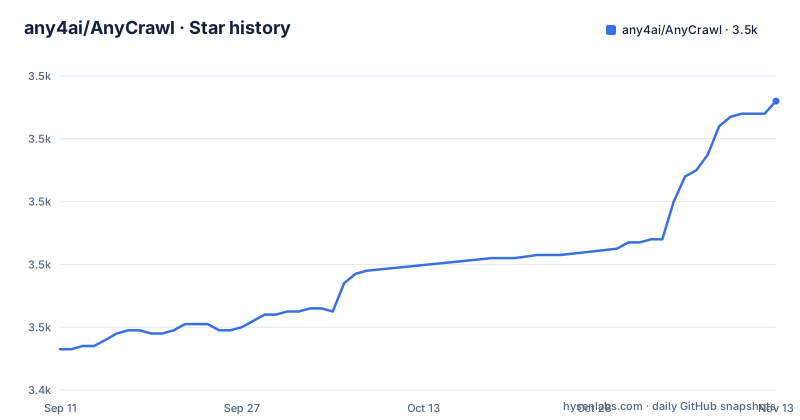
Star history
- any4ai/AnyCrawl3,532 ★ · +79
| Repository | 2026-09-11 | 2026-11-13 |
|---|---|---|
| any4ai/AnyCrawl | 3.5k | 3.5k |
79 Stars in the last 63 days, measured from the daily GitHub snapshot. Compare with other projects
Editorial analysis
The gap AnyCrawl is aiming at
Most scraping stacks stop at raw HTML. Feeding that into a language model means writing the same boilerplate again for each project: strip navigation, collapse whitespace, decide what counts as the main content, and hope the result fits a context window. AnyCrawl's stated purpose is to close that gap. The README describes it as a toolkit that turns websites into LLM-ready data, with the topics on the repository naming html-to-markdown and rag directly. The second half of the pitch is SERP collection. Instead of one scraper per search engine, the project exposes structured search results from Google, Bing and Baidu through the same API surface. That combination, page content plus search results, is the shape of a retrieval pipeline: search to find candidates, fetch to read them. Anyone building a RAG ingestion job or an agent that needs fresh web context is the intended user. The repository is TypeScript, MIT licensed, and the default branch is main.
One HTTP API over three scraping engines
The mechanism is an HTTP service. A POST to /v1/scrape takes a JSON body with a url and an engine field, and returns extracted content. The engine parameter decides how the page is fetched and parsed: cheerio for static HTML parsing, which the parameter table calls the fastest option, playwright for JavaScript rendering, and puppeteer for JavaScript rendering through Chrome. The default is cheerio, which matters because a JavaScript-heavy page scraped with the default will return whatever the server sent before scripts ran. The README also notes that for self-hosted browser engines, the public engine values remain cheerio, playwright and puppeteer, so the naming is stable across hosted and self-hosted use. Around the fetch step sit two cache controls. max_age is a number in milliseconds: 0 forces a refresh and skips the cache read, a positive value accepts cached content within that age, and omitting it uses the default. store_in_cache is a boolean that defaults to true, so results are written to cache unless you turn it off. That is a coherent data flow: request, engine selection, cache check, extraction, cache write. The README points to docs/cache.md for the self-host, S3 and map index details, which tells you the cache is pluggable rather than a single in-process map.
Running the API and issuing a key
The self-host path starts with authentication. If ANYCRAWL_API_AUTH_ENABLED is set to true, you generate a key with pnpm --filter api key:generate, optionally passing a name such as pnpm --filter api key:generate -- default. The command prints a uuid, a key and credits, and the printed key is used as a Bearer token. Inside Docker the same command runs through compose: docker compose exec api pnpm --filter api key:generate, or against a single container with docker exec -it <container_name_or_id> pnpm --filter api key:generate. A scrape request then looks like a POST to https://api.anycrawl.dev/v1/scrape with Content-Type: application/json, an Authorization: Bearer YOUR_ANYCRAWL_API_KEY header, and a body containing the url and engine. Self-hosters replace the api.anycrawl.dev host with their own server URL. The README names the Playground on anycrawl.dev as a way to test the APIs and generate client code, which is a reasonable first stop before writing your own wrapper. Redis appears in the badge row at the top of the README, so a Redis instance is part of the expected deployment even though the quick start does not spell out the connection variables.
What the README does not settle
The quick start is genuinely quick, and that is also where the gaps are. The scrape section documents url, engine, proxy, max_age and store_in_cache, then defers the rest to a request parameters page on docs.anycrawl.dev. The crawl and SERP endpoints are described in the overview. The proxy parameter accepts HTTP and SOCKS URLs in the form http://[username]:[password]@proxy:port, which is useful, but there is no guidance in the README on retry behaviour, rate limits or how the multi-threading and multi-process claims translate into concurrency settings you can tune. Redis is listed as a dependency but no configuration keys for it are shown. None of this makes the project unusable. It does mean the README is a front door, not a manual, and the docs site is where the real contract lives. Treat the parameter table as the authoritative list of what is stable today.
Caching is the decision that bites later
The cache controls are the most consequential part of the API for anyone running recurring jobs. store_in_cache defaults to true, so a scrape you fire today may be served from cache tomorrow unless you pass max_age=0. For a RAG pipeline that is a feature: re-crawling a documentation site does not hammer the origin. For anything that tracks prices, inventory or search rankings it is a hazard, because a positive max_age silently returns stale content within the window you set. The README directs self-hosters to docs/cache.md for the S3 and map index variants, which suggests the cache can be backed by object storage rather than process memory. That is the right design for multi-process deployments, but it also means cache behaviour depends on infrastructure you configure, not on the library alone. If you cannot state which backend you are running and what its eviction policy is, you cannot predict what a scrape returns. Set max_age explicitly on every request whose freshness matters and leave the default only where staleness is acceptable.
Where a single-page tool wins instead
AnyCrawl is a service with a queue, a cache and browser runtimes. If your task is one page to Markdown inside an existing script, that weight is unnecessary. A library such as Readability paired with Turndown does the extraction and conversion in-process, with no Redis, no API key and no HTTP hop. The difference in approach is architectural: AnyCrawl centralises fetching and caching so many callers can share it, while a library embeds the same logic in each caller. Centralisation pays off when you have several services, a shared cache budget and a need to switch engines per request. It costs you when you have one script and no intention of running a server. There is also a middle path worth naming: if you only need search results, a search API or a SERP provider gives you structured JSON without the crawling half of AnyCrawl. The reverse is not true, which is the argument for picking AnyCrawl when you need both halves and want them behind one endpoint.
Licence, maintenance and upgrade surface
The repository is MIT licensed, which is permissive and places few obligations on redistribution beyond keeping the licence notice. This is not legal advice; read the LICENSE file in the repository for the binding text. On maintenance, the release history shows v1.0.0-beta.36 in August 2026, v1.0.0-beta.37 two days before the 1.0.0 tag, and v1.0.0 on 2026-09-09, with the last push to main on the same day. A beta series that ran to at least thirty-seven iterations before the first stable tag tells you the API surface moved during development, so pinning a version is the safer default for production use. The upgrade cost concentrates in three places: the engine values you pass, the request parameters documented per endpoint, and the cache configuration described in docs/cache.md. Because the engines are named explicitly and the README states that self-hosted browser engine values remain cheerio, playwright and puppeteer, changes there should be visible in release notes. The bigger ongoing cost is operational rather than code: Redis, a browser runtime for Playwright or Puppeteer, and whatever cache backend you choose all need to keep running for the API to behave as documented.
Editorial conclusion
Adopt AnyCrawl if you are already running Node.js and Redis, need one HTTP surface for both page scraping and multi-engine SERP collection, and are willing to read docs/cache.md and the request parameter reference before wiring it into a pipeline. Do not adopt it if you only need one page converted to Markdown once, or if you cannot run Redis and a browser runtime alongside the API. Verify first that the scrape and crawl request parameters you depend on are documented for your engine, that the cache backend you intend to use is described in docs/cache.md, and that the MIT licence text in the repository matches what you redistribute.
Frequently asked questions
What does AnyCrawl do?
It is a crawling and scraping toolkit with four modes: search engine result pages across multiple engines, single page content extraction, full site traversal, and structured data extraction driven by a large language model. Performance work is done with multi threading and multi process execution for bulk tasks, and the project describes itself as producing data that is friendly to language models.
How do I scrape a page with AnyCrawl?
Send a POST to the scrape endpoint with a JSON body containing a URL, and the engine if you want something other than the default. Add an authorization header carrying your API key as a bearer token when authentication is enabled, and replace the hosted base URL with your own server when self-hosting. Other documented parameters cover a proxy, a cache age and whether the result should be cached.
Which scraping engines does AnyCrawl support?
Three public values: a static HTML parser, which is the default and described as the fastest, plus two JavaScript rendering engines, one described as a modern engine and one as driving Chrome. For self-hosted browser engines those two are launched through a separate browser runtime by default, and the documentation says callers should not send that runtime's name as an engine value.
What does the max_age cache parameter do in AnyCrawl?
It controls the cache in milliseconds. Zero forces a refresh and skips the cache read, a positive value accepts cached content within that age, and omitting the parameter uses the default. A separate boolean decides whether the result is written into the cache at all, and that one defaults to true.
How does AnyCrawl resolve browser region and timezone?
Through a GeoIP lookup that is enabled by default and runs when a browser starts, resolving timezone and locale via the selected proxy. The database is around seventy megabytes and is downloaded and cached on first use. If resolution fails the launch fails rather than continuing in an unknown region; you can set the timezone and locale explicitly to skip the lookup, or disable it.
How do I generate an AnyCrawl API key when self-hosting?
Enable the authentication flag, then run the key generation command scoped to the api workspace, optionally passing a name for the key. It prints an identifier, the key and a credit figure, and the key is then used as a bearer token in requests. The README gives equivalent commands for running it through Docker Compose and inside a single container.
Official sources
Add this badge to your README
If you maintain this project, the badge below links readers to this analysis and shows its maintenance status from the daily GitHub snapshot. Paste the markdown into your README; add ?metric=license or ?metric=stars to the image URL for a different field.

[](https://hysenlabs.com/projects/any4ai-anycrawl)Star history chart for your README
[](https://hysenlabs.com/projects/any4ai-anycrawl)Was this useful?