Apache Doris 4.1: A Real-Time Analytics Database That Also Does Hybrid Search
Apache Doris is a real-time analytics and hybrid search database for AI agents.
At a glance
- What is it?
- Apache Doris combines MPP-based SQL analytics with vector, text, and JSON search in one engine. This review covers its architecture, deployment modes, and where it fits for AI workloads.
- Who is it for?
- Adopt Apache Doris if you need sub-second SQL analytics on streaming data plus hybrid search over vectors and text in a single system, especially for customer-facing analytics or observability. Skip it if your workloads are purely transactional or if you already have a dedicated vector database and no need for unified SQL.
- Can I use it commercially?
- Yes. Apache-2.0 is a permissive licence: you can use, modify and sell software built on it, as long as you keep its copyright and licence notices.
- Is it still maintained?
- Yes. The repository received new commits within the last day.
- What is it written in?
- Mainly Java, according to GitHub's language statistics.
Answers come from the project's GitHub data, last synced on November 13, 2026, and from our analysis. They are not legal advice.
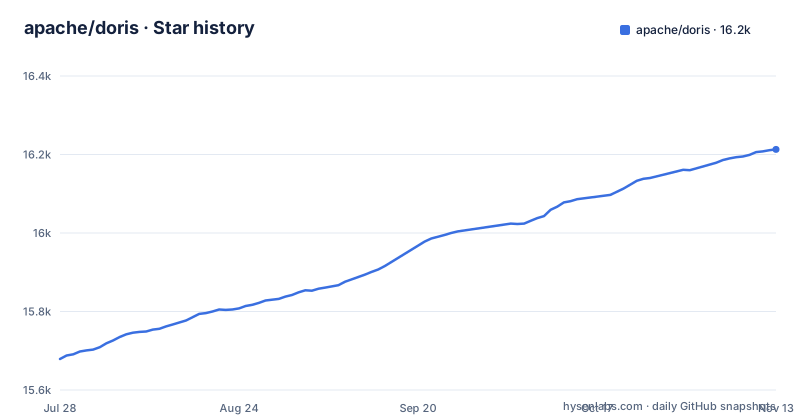
Star history
- apache/doris16,213 ★ · +534
| Repository | 2026-07-28 | 2026-11-13 |
|---|---|---|
| apache/doris | 15.7k | 16.2k |
534 Stars in the last 108 days, measured from the daily GitHub snapshot. Compare with other projects
Editorial analysis
The Problem: One Engine for Analytics, Lakehouse, and Vector Search
Most databases force a choice. You either get fast SQL analytics on structured data, or you get vector search for AI, or you get lakehouse query acceleration. Apache Doris tries to collapse that choice into a single MPP database. The README describes it as a real-time analytics and search database that provides fast SQL analytics, lakehouse query acceleration, and hybrid search across structured, text, and vector data. The target user is an engineering team building customer-facing analytics, a data warehouse, an observability platform, or an AI application that needs to search across multiple data types. The pitch is that you do not need to stitch together a separate OLAP engine, a vector database, and a full-text search tool. You write SQL and query everything.
How It Works: MPP Architecture with Two Deployment Modes
Doris is built on a massively parallel processing (MPP) architecture. The README describes two deployment modes. In compute-storage coupled mode, the database nodes hold both compute and storage. In decoupled mode, stateless compute groups run over shared object storage. That decoupled mode is the notable architectural shift. It allows you to scale compute on demand and isolate workloads, which matters when you have separate teams running BI queries and AI search on the same data. The hybrid search capability is SQL-native, meaning you can combine JSON, full-text, and vector predicates in a single query. The documentation is the source of truth for the exact syntax, but the README makes clear that the goal is to avoid moving data between systems.
Getting It Running: Download, Install, and Compile Options
The README points to a download page and an installation guide. You can also compile from source using Docker, which is common for Apache projects. The quick start guide is the entry point for a first deployment. The project provides a Kubernetes Operator for running Doris on Kubernetes, which is the most direct path for teams already on containers. For data integration, there are connectors for Flink, Spark, and Kafka, plus a dedicated Stream Loader tool. That set of connectors tells you that Doris expects to ingest from streaming pipelines, not just batch loads. The exact commands are not in the README, so you need to consult the installation docs for the current version. The release cadence is active, with 4.1.4 on 2026-09-07, 4.1.4.1 on 2026-09-29 and 4.1.5 on 2026-10-15, so you should pick the version that matches your support needs.
Use Cases That Fit: Customer-Facing Analytics and Observability
The README lists four use cases: customer-facing analytics, data warehousing, observability, and AI. The first and third are the most compelling because they demand sub-second query performance under high concurrency. Customer-facing analytics means your external users run queries directly, so latency and concurrency are hard requirements. Observability means high-throughput logs, events, and metrics, which Doris can analyze with SQL. The AI use case is newer and relies on hybrid search. The README claims that Doris can handle vector, text, JSON, and structured search in one SQL engine. That is a strong claim. If it works as documented, it could replace multiple systems in an AI agent stack.
Limitations and Wrong Tool Cases
Doris is not a transactional database. If your workload is OLTP, this is the wrong tool. For a team that only needs vector search on a small dataset, Doris is overkill. The infrastructure footprint is another consideration. An MPP database with optional decoupled storage is a serious piece of infrastructure. You need to operate it, monitor it, and tune it. The README mentions a Kubernetes Operator, which helps, but it does not remove the operational burden. If you already have a stable data warehouse and a separate vector database, migrating to Doris is a significant project with unclear immediate benefit.
The Alternative: Separate Systems vs. One Engine
The obvious alternative is to use a dedicated OLAP engine like ClickHouse for analytics and a separate vector database like Milvus or Qdrant for AI search. That approach gives you best-of-breed performance in each domain, but it forces you to build and maintain a data pipeline between the two systems. You also need to handle consistency: when a new row arrives, it must be written to both systems. Doris's approach is to keep the data in one place and let SQL span both analytics and search. The trade-off is that you are betting on a single engine to perform well at both jobs. The lakehouse support for Iceberg, Delta Lake, and Hudi is another differentiator.
Maintenance and Upgrade Cost
The project is under the Apache Software Foundation and licensed under Apache-2.0, which means you can use it commercially without licensing fees, but you still bear the operational cost. The release history shows a steady cadence: 4.1.4, 4.1.4.1 and 4.1.5 appeared between 2026-09-07 and 2026-10-15. That implies active development and frequent patches. Upgrading an MPP cluster is not trivial, especially in decoupled mode where compute groups are stateless. The README mentions a community report and a roadmap for 2026, which suggests that the project is transparent about its direction. Before adopting, you should check the release notes for the specific version you plan to run. The documentation site is the authoritative source for those details.
Who Should Adopt It and What to Verify First
Adopt Doris if you are building a real-time analytics platform that also needs to serve AI search queries, and you want to avoid operating multiple databases. The decoupled deployment mode is attractive if you have variable compute loads and want to scale on demand. Do not adopt it if you only need vector search or if you already have a mature OLAP setup and no requirement for hybrid queries. Before you commit, verify three things. First, confirm that the hybrid search syntax supports the query patterns you need, such as combining full-text filters with vector similarity. Second, test the lakehouse acceleration on your actual data formats and volumes. Third, evaluate the operational maturity of the Kubernetes Operator if you plan to deploy on containers. The project is active and the community is engaged, but the proof is in your workload, not in the README.
Editorial conclusion
Adopt Apache Doris if you need sub-second SQL analytics on streaming data plus hybrid search over vectors and text in a single system, especially for customer-facing analytics or observability. Skip it if your workloads are purely transactional or if you already have a dedicated vector database and no need for unified SQL. Before committing, verify the deployment mode that fits your scale: compute-storage coupled for simplicity, decoupled for elastic compute over object storage. Check the 4.1.5 release notes for any known issues, and confirm that your data lake formats (Iceberg, Delta Lake, Hudi) are supported in the version you plan to use.
Frequently asked questions
What is the Apache Doris database?
An open-source, real-time analytics and search database built on MPP architecture. It provides fast SQL analytics, lakehouse query acceleration over open table formats such as Iceberg, Delta Lake and Hudi, and hybrid search across structured, text and vector data.
How do I install Apache Doris?
The README's Get Started section points to a download page, an installation guide, a quick start document, and a separate page for compiling from source using Docker. Version specific release notes live at doris.apache.org/releases/all-release.
How is Apache Doris used in a data stack?
The Ecosystem section describes it as sitting at the center of the modern data stack, connecting upstream databases, streaming systems and lakehouse storage with downstream BI, AI, analytics and observability tools. The four use cases named are customer-facing analytics, data warehousing, observability, and Doris for AI.
Can Apache Doris scale compute separately from storage?
Yes, and it also supports the coupled alternative. Apache Doris supports both compute-storage coupled and compute-storage decoupled deployments, and in decoupled mode stateless compute groups run over shared object storage so compute can be scaled on demand and workloads isolated. The repository links a deployment guide and a deployment mode guide for the choice.
Official sources
Add this badge to your README
If you maintain this project, the badge below links readers to this analysis and shows its maintenance status from the daily GitHub snapshot. Paste the markdown into your README; add ?metric=license or ?metric=stars to the image URL for a different field.

[](https://hysenlabs.com/projects/apache-doris)Star history chart for your README
[](https://hysenlabs.com/projects/apache-doris)Was this useful?