Apache Zeppelin: A Web Notebook for Multi-Language Data Analytics
Web-based notebook that enables data-driven, interactive data analytics and collaborative documents with SQL, Scala and more.
At a glance
- What is it?
- Apache Zeppelin is a web-based notebook for interactive data analytics with SQL, Scala, and over 20 interpreters. This review covers its architecture, deployment options, and where it fits among notebook tools.
- Who is it for?
- Adopt Apache Zeppelin if your team needs a single notebook interface that spans multiple execution engines, especially Spark, Flink, and Python, and if you require process isolation between interpreters. Skip it if you only need a lightweight single-language notebook, where Jupyter or a dedicated SQL client might be simpler.
- Can I use it commercially?
- Yes. Apache-2.0 is a permissive licence: you can use, modify and sell software built on it, as long as you keep its copyright and licence notices.
- Is it still maintained?
- Yes. The repository last received commits 2 days ago.
- What is it written in?
- Mainly Java, according to GitHub's language statistics.
Answers come from the project's GitHub data, last synced on November 13, 2026, and from our analysis. They are not legal advice.
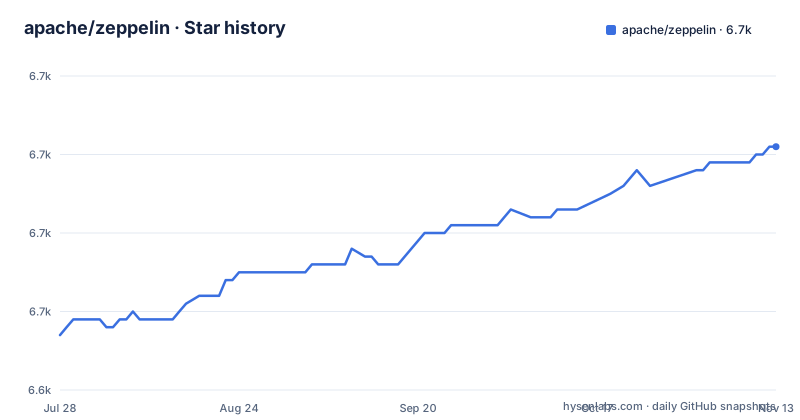
Star history
- apache/zeppelin6,671 ★ · +24
| Repository | 2026-07-28 | 2026-11-13 |
|---|---|---|
| apache/zeppelin | 6.6k | 6.7k |
24 Stars in the last 108 days, measured from the daily GitHub snapshot. Compare with other projects
Editorial analysis
The Problem Zeppelin Solves
The problem is real and persistent. Most notebooks lock you into one runtime. Zeppelin's pitch is that you can have a Spark paragraph, a Python paragraph, and a Shell paragraph in the same notebook, and each talks to its own process. That is useful for workflows where you need to pull data with SQL, clean it with Python, and run a distributed job with Scala. The README does not give a concrete example, but the architecture implies it. For teams that already live in Spark or Flink, Zeppelin offers a familiar notebook metaphor with those engines as first-class citizens.
Interpreter Architecture and Process Isolation
The core mechanism in Zeppelin is the interpreter. The README lists 'pluggable interpreter architecture with process isolation' as a key feature. That means each interpreter runs in its own process, separate from the notebook server and from other interpreters. If a Python interpreter crashes, your Spark session is not affected. This is a meaningful design choice. It contrasts with notebooks that run everything in a single kernel process, where one bad library can take down the whole session. Process isolation also allows different interpreters to use different language runtimes and dependencies without conflict.
Getting It Running
The README points to two paths for getting Zeppelin running. The simplest is to download a binary package from the install page and run it. The exact command is not in the README, but the documentation at zeppelin.apache.org/docs/latest/quickstart/install.html covers it. The second path is building from source, which is documented separately. The README does not list build prerequisites or commands, so you will need to consult the build guide. After installation, you access the notebook UI through a web browser. The README does not mention default ports or configuration files, so you will need to check the docs for those details. The presence of Docker, Kubernetes, and YARN deployment options means you can run Zeppelin in a container or on a cluster, but the README does not provide those commands. You will need the deployment documentation for that.
Multi-Language Support: The Breadth and the Catch
Zeppelin supports Spark, Flink, Python, SQL, Shell, and '20+ interpreters' according to the README. That is a wide net. The catch is that each interpreter is a plugin, and its maturity and maintenance vary. The README does not list which interpreters are included in the default binary, nor does it say how many are '20+'. That vagueness is a limitation. You cannot assume that every language you need is ready out of the box. You must check the documentation for the interpreter list and any setup steps. The process isolation model means each interpreter may need its own dependencies and environment variables. This adds setup complexity compared to a single-language notebook. The benefit is that you can mix languages in one document, but the cost is configuration overhead.
Visualization and Dynamic Forms
The README mentions 'built-in visualization and dynamic forms' as core features. Visualization means you can turn query results into charts directly in the notebook, without exporting to another tool. Dynamic forms are a more specific feature: they let you create parameters or dropdowns in a paragraph that users can change, and the paragraph re-runs with the new value. This is useful for building interactive dashboards where a viewer can adjust a date range or a filter without editing code. The README does not describe the visualization types or how dynamic forms are defined, so you will need the user guide for that. This feature set positions Zeppelin as more than a coding notebook; it can serve as a lightweight BI tool. However, the README gives no indication of the charting library or the flexibility of the forms. If you need complex custom visualizations, you may still need a dedicated BI platform.
Scheduling and Deployment Flexibility
Zeppelin includes notebook scheduling via cron, which is a core feature listed in the README. This means you can run a notebook automatically on a schedule, turning it into a recurring job. That is a significant capability for production workflows. The README does not explain how the scheduler integrates with the interpreter lifecycle or whether it supports time zones and failure retries. You will need the docs for that. Deployment options include local, Docker, Kubernetes, and YARN. That flexibility is a strength: you can start locally for development and move to a cluster for production. But each deployment mode has its own configuration and resource management. The README does not provide commands or YAML examples, so you must consult the deployment guides. The cron scheduler, combined with multiple interpreters, makes Zeppelin a candidate for orchestrating data pipelines.
Collaboration and Real-Time Editing
The README claims 'real-time collaboration' as a core feature. That means multiple users can edit the same notebook simultaneously, similar to Google Docs. This is a differentiator compared to many notebooks that lock a file or require manual merging. The README does not detail how conflicts are resolved or whether there is a chat or comment system. For teams that need to work together on analysis, this is a valuable feature, but you should verify the actual behavior in the docs or by running it.
Maintenance and Licensing
Apache Zeppelin is licensed under Apache-2.0, which is permissive and allows commercial use, modification, and distribution without copyleft obligations. The README does not state the project's maintenance status. The repository is not archived, but it has no published GitHub releases. That is a caution sign. You should check the Jira issue tracker and the mailing lists to gauge activity. The README lists a contribution guide and a Jira project, and the last push to the repository was on 2026-11-02. The project is part of the Apache Software Foundation, which typically implies a governance structure and long-term stewardship, but individual projects can become dormant. Before adopting, verify the release cadence and the state of the interpreters you need. The maintenance cost is moderate: you will need to track upstream releases and update configurations when moving between versions.
Editorial conclusion
Adopt Apache Zeppelin if your team needs a single notebook interface that spans multiple execution engines, especially Spark, Flink, and Python, and if you require process isolation between interpreters. Skip it if you only need a lightweight single-language notebook, where Jupyter or a dedicated SQL client might be simpler. Before adopting, verify that the interpreters you rely on are actively maintained in the current release, and check the cron scheduler's behavior with your cluster's authentication and resource manager. Also, confirm that the collaboration features meet your team's real-time editing needs, as the README does not detail conflict resolution or access control.
Frequently asked questions
How do I install Apache Zeppelin?
The README gives two routes: a binary package from the quickstart install page on zeppelin.apache.org, and a source build covered by the how to build page. The root Dockerfile shows the source build as a ./mvnw package run with -DskipTests and a list of Maven profiles, using the bundled wrapper rather than a local Maven install.
Which languages and interpreters does Apache Zeppelin support?
The README names Spark, Flink, Python, SQL and Shell, and more than 20 interpreters in total. The tree has a top-level directory per engine, including cassandra/, mongodb/, neo4j/, hbase/, influxdb/, elasticsearch/, bigquery/, sparql/, file/, groovy/ and livy/, with jdbc/ standing on its own for SQL connections.
How does Apache Zeppelin schedule notebooks?
Notebook scheduling is listed as cron. Deployment options named in the README are local, Docker, Kubernetes and YARN, and the tree contains k8s/ and a root Dockerfile.
Official sources
Add this badge to your README
If you maintain this project, the badge below links readers to this analysis and shows its maintenance status from the daily GitHub snapshot. Paste the markdown into your README; add ?metric=license or ?metric=stars to the image URL for a different field.

[](https://hysenlabs.com/projects/apache-zeppelin)Star history chart for your README
[](https://hysenlabs.com/projects/apache-zeppelin)Was this useful?