apptension/saas-boilerplate: A React, Django and AWS Starter Kit
SaaS Boilerplate - Open Source and free SaaS stack that lets you build SaaS products faster in React, Django and AWS. Focus on essential business logic instead of coding repeatable features!
At a glance
- What is it?
- Apptension's open source SaaS boilerplate ships a React frontend, a Django GraphQL API, Celery workers and an AWS CDK deployment path under MIT. It suits teams that already accept that stack, not teams shopping for a lighter one.
- Who is it for?
- Adopt apptension/saas-boilerplate if your team already writes Django and React and you want the account, admin, worker and deployment scaffolding in place on day one. Do not adopt it if you want a single-language codebase, a serverless-only footprint, or a stack you can fully read in an afternoon: the repository carries an Nx workspace, a pnpm workspace, several Docker Compose files and a Python backend, and the README does not document a rollback path for the AWS deployment.
- Can I use it commercially?
- Yes. MIT is a permissive licence: you can use, modify and sell software built on it, as long as you keep its copyright and licence notices.
- Is it still maintained?
- Yes. The repository last received commits 13 days ago.
- What is it written in?
- Mainly TypeScript, according to GitHub's language statistics.
Answers come from the project's GitHub data, last synced on November 22, 2026, and from our analysis. They are not legal advice.
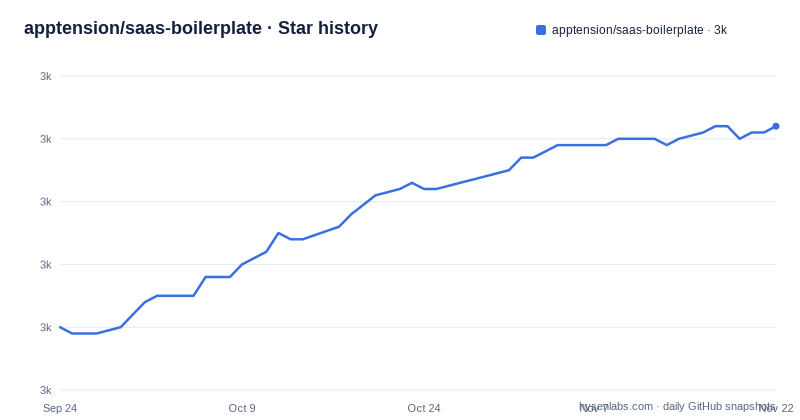
Star history
- apptension/saas-boilerplate3,032 ★ · +32
| Repository | 2026-09-24 | 2026-11-22 |
|---|---|---|
| apptension/saas-boilerplate | 3k | 3k |
32 Stars in the last 59 days, measured from the daily GitHub snapshot. Compare with other projects
Editorial analysis
What apptension/saas-boilerplate actually removes from a new SaaS build
Every SaaS product repeats the same first month of work: sign-up, email verification, password reset, an admin view, a background job runner, and a deployment pipeline that can hold more than one environment. The README frames the project as a starter kit that "eliminates the need for extensive configuration and development work", and the repository layout backs that up. There is a packages/ directory holding a backend, a workers package and a CLI, plus docker-compose.yml, docker-compose.local.yml, docker-compose.prod.yml and docker-compose.ci.yml at the root. That is the shape of a project that has already made the boring decisions.
The intended audience is narrow and specific: a team that has settled on React for the frontend, Django for the API, and AWS for hosting, and wants the glue written before the first feature. If your team has not settled on those three, the boilerplate is not saving you anything, because the cost of the starter kit is the cost of adopting its stack. The README's own headline, "Build SaaS products faster in React, Django and AWS", is a constraint as much as a promise.
The project is MIT licensed, which matters if you intend to strip it down and ship it as a closed product. The README does not discuss relicensing or attribution requirements beyond the licence file itself.
How the React, Django and AWS pieces fit together
The running system is a set of containers defined in docker-compose.yml. A postgres:16.1-alpine service provides the database, with PGUSER, POSTGRES_USER, POSTGRES_PASSWORD and POSTGRES_DB all set to backend in the local compose file, and a pg_isready healthcheck that the backend waits on. A redis:7.2.4-alpine service sits alongside it with its own healthcheck. The backend container is built from ./packages/backend with the target backend and starts through ./scripts/runtime/run_local.sh, listening on port 5001. Celery is split into two additional containers, celery_beat and celery_default, which reuse the same backend image and run different scripts.
That split is the part worth noticing. The backend image is built once and reused for the web API and both Celery processes, so a change to Python dependencies rebuilds one image rather than three. The workers package is separate, built from ./packages/workers/Dockerfile with the repository root as its build context, which suggests it needs files outside its own directory. The README lists a Workers trigger server on http://localhost:3005, separate from the Celery containers, so there appear to be two distinct background execution paths rather than one.
On the frontend side, the root package.json shows a pnpm workspace with an Nx 19.6.0 toolchain, Vite as the build tool through @vitejs/plugin-legacy, Apollo Client 4 for GraphQL, and Tailwind with a workspace preset. The API is GraphQL: the repository carries a .graphqlconfig file and @graphql-codegen/cli, so types are generated from the schema rather than hand-written. A stripemock service in the compose file means billing code can be exercised locally without touching Stripe.
Installing apptension/saas-boilerplate and running it locally
The README lists four prerequisites: Docker, Node.js 20 or above, pnpm 9 or above, and WSL 2 on Windows. Python 3.11 and uv are optional and only needed if you want to run uv sync inside packages/backend or packages/workers outside a container. Check the versions before you start, because pnpm workspaces and the Nx toolchain will fail in ways that are hard to read on older runtimes.
The fastest path is the CLI, which clones the repository and sets up the environment. The README warns that the target directory must be empty or non-existent, and that the CLI creates it for you.
pnpm create saas-boilerplate my-saas-appAfter the CLI finishes, the project directory contains a full checkout. If you cloned manually instead, install the workspace dependencies from the repository root with one command, which is the point of using pnpm workspaces here.
pnpm installThe README notes that you need .env files from your team, and that you can copy the shared templates when you do not have them. Both copies are needed, one at the root and one inside packages/backend.
cp .env.shared .env
cp packages/backend/.env.shared packages/backend/.env
Now start everything. The pnpm saas command is the wrapper the project uses for all local lifecycle operations, and up starts the backend and the web app together.
pnpm saas upThe README lists what should be reachable afterwards: the web app on http://localhost:3000, the Django and GraphQL API on http://localhost:5001, the Django admin on http://admin.localhost:5001, Mailcatcher on http://localhost:1080, local docs on http://localhost:3006 and the workers trigger server on http://localhost:3005. The first-run sequence in the README is to create an account on port 3000, read the verification email in Mailcatcher on port 1080, then sign in to the admin panel using credentials from your .env file. If the verification email never appears in Mailcatcher, the mail configuration is the first thing to check. To stop everything, run pnpm saas down. The README also documents pnpm saas backend up, pnpm saas webapp up and pnpm saas docs up for starting services individually.
Where the boilerplate stops helping you
The trade-off is stack lock-in, and it is larger than the README's marketing tone suggests. You are adopting a pnpm workspace, an Nx workspace, a Python backend with Celery, and an AWS deployment path built on CDK, all at once. Removing any one of those later is not a configuration change. A team that wants a single-language TypeScript codebase will spend more time deleting the Python side than they would have spent writing the features themselves.
The second limitation is operational. The README documents how to start services locally and how to stop them with pnpm saas down, but it does not document rollback for the AWS deployment, nor does it describe what happens to in-flight Celery tasks during a deploy. The compose file shows celery_beat and celery_default both set to restart: always, which keeps them alive on the host, but that says nothing about the deployed environment. Treat deployment behaviour as something you verify against the CDK code in the repository rather than something the README explains.
The third is that the boilerplate makes product decisions for you. Billing runs against a stripemock container locally, which is convenient, but the README does not describe how plan limits, seat counts or subscription state are modelled. If your pricing model is unusual, you will be reading Django code rather than following a guide. There is also a release cadence to weigh: 5.0.0 shipped on 2026-03-05, while 4.1.0 and 4.1.1 both shipped in September 2024, so the gap between those lines was roughly eighteen months. The last push to the repository was on 2026-09-02.
apptension/saas-boilerplate compared with a Next.js-only starter
The obvious alternative is a TypeScript-only SaaS starter in the style of ixartz's Next.js boilerplate, which people search for alongside this project. The difference is architectural, not cosmetic. A Next.js starter keeps the frontend and the API in one deployable, usually with a hosted Postgres and an ORM, and background work tends to run as scheduled functions or a queue service rather than as long-lived Celery processes. There is one runtime to reason about and one language in the repository.
apptension/saas-boilerplate takes the opposite position. Django gives you a mature ORM, migrations, an admin panel that exists without you writing it, and a Python ecosystem for anything data-shaped. Celery gives you real worker processes with a beat scheduler, which is a better fit than serverless functions for long jobs. The cost is that you now operate Postgres, Redis, Celery beat, Celery workers, a workers trigger server and a Django API, and you need Docker to run any of it locally. The README requires Docker outright; a Next.js starter typically does not.
Neither is better in the abstract. If your team is Python-first and expects background processing to grow, the Django side is an asset. If your team is small, TypeScript-only, and would rather not run Redis and a scheduler, the extra containers are pure overhead.
Maintenance cost, licence and what to check before you commit
The project is MIT licensed, so you can modify it and ship it commercially. The README does not add conditions on top of the licence file, and it does not discuss how the maintainers handle security reports beyond the presence of a SECURITY.md at the repository root. Read that file if you plan to depend on upstream fixes.
Upgrade cost is the real ongoing expense. The root package.json pins the Nx packages to 19.6.0 across eight @nx/* entries, sets packageManager to [email protected], and pins @types/node to 20.12.12. Those pins are consistent, which is good, but it means an Nx major upgrade touches the whole toolchain at once. The 4.1.x to 5.0.0 gap suggests the maintainers are willing to make a major release after a long quiet period rather than shipping incremental ones, so plan for larger, less frequent upgrades.
There is also a postinstall script, node packages/internal/cli/scripts/build.js, which runs automatically after pnpm install. That is how the pnpm saas command becomes available. It also means installs do work beyond fetching packages, which matters in locked-down CI environments. Before adopting, verify three things: that pnpm saas up brings up every service listed in the README table on your machine, that the verification email actually lands in Mailcatcher, and that the AWS deployment described in the CDK code matches the environments you need. The README does not answer the third one for you.
Editorial conclusion
Adopt apptension/saas-boilerplate if your team already writes Django and React and you want the account, admin, worker and deployment scaffolding in place on day one. Do not adopt it if you want a single-language codebase, a serverless-only footprint, or a stack you can fully read in an afternoon: the repository carries an Nx workspace, a pnpm workspace, several Docker Compose files and a Python backend, and the README does not document a rollback path for the AWS deployment. Before committing, run the CLI into a scratch directory, start the stack, and confirm that the services listed in the README respond on ports 3000, 5001 and 1080 on your machine.
Frequently asked questions
What is apptension/saas-boilerplate?
It is an MIT licensed SaaS starter kit that combines a React frontend, a Django and GraphQL backend, Celery workers and an AWS deployment path. The README describes it as a complete starter kit based on a battle-tested stack with features every SaaS should have.
What do I need installed before running apptension/saas-boilerplate?
Docker, Node.js 20 or above, and pnpm 9 or above. On Windows, WSL 2 is mandatory for the dependency and run commands. Python 3.11 and uv are optional and only needed to run uv sync in packages/backend or packages/workers outside a container.
How do I start apptension/saas-boilerplate locally?
Run pnpm saas up from the project root to start the backend and web app together, or pnpm saas backend up and pnpm saas webapp up separately. The README lists the web app on port 3000, the API on port 5001 and Mailcatcher on port 1080 once the services are running.
Is apptension/saas-boilerplate free to use commercially?
The repository is licensed under MIT, which permits commercial use and modification. The README does not state any additional conditions beyond the licence file.
Does apptension/saas-boilerplate work without Docker?
The README lists Docker as a requirement, and the local stack is defined in docker-compose.yml with Postgres, Redis, the backend, Celery beat and Celery workers. Python and uv are optional, but only for running backend or workers commands outside the container.
Official sources
Add this badge to your README
If you maintain this project, the badge below links readers to this analysis and shows its maintenance status from the daily GitHub snapshot. Paste the markdown into your README; add ?metric=license or ?metric=stars to the image URL for a different field.

[](https://hysenlabs.com/projects/apptension-saas-boilerplate)Star history chart for your README
[](https://hysenlabs.com/projects/apptension-saas-boilerplate)Was this useful?