peaceiris/actions-hugo: Hugo setup for GitHub Actions
GitHub Actions for Hugo ⚡️ Setup Hugo quickly and build your site fast. Hugo extended, Hugo Modules, Linux (Ubuntu), macOS, and Windows are supported.
At a glance
- What is it?
- peaceiris/actions-hugo installs Hugo inside GitHub Actions runners, including the extended edition and Hugo Modules support. It is aimed at maintainers who want reproducible site builds across Ubuntu, macOS, and Windows without maintaining a Hugo Docker image.
- Who is it for?
- Repository maintainers that build Hugo sites in GitHub Actions can adopt v3 after checking their Hugo edition, version policy, module cache, and deployment action. Projects that need custom tool installation outside GitHub Actions should use another mechanism.
- Can I use it commercially?
- Yes. MIT is a permissive licence: you can use, modify and sell software built on it, as long as you keep its copyright and licence notices.
- Is it still maintained?
- Yes. The repository last received commits 20 days ago.
- What is it written in?
- Mainly TypeScript, according to GitHub's language statistics.
Answers come from the project's GitHub data, last synced on November 7, 2026, and from our analysis. They are not legal advice.
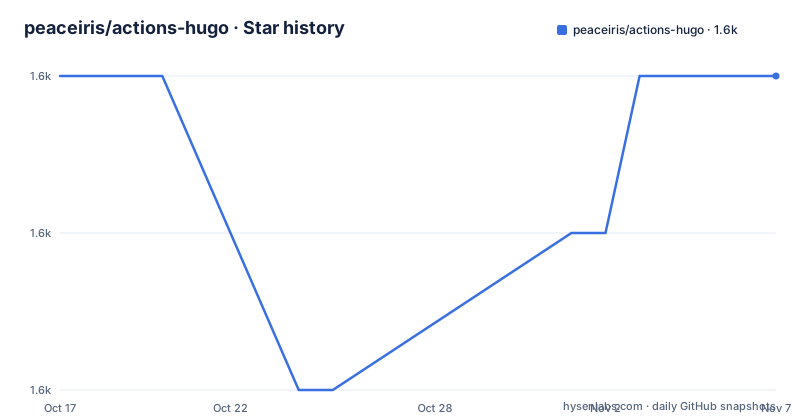
Star history
- peaceiris/actions-hugo1,577 ★ · +0
| Repository | 2026-10-17 | 2026-11-07 |
|---|---|---|
| peaceiris/actions-hugo | 1.6k | 1.6k |
0 Stars in the last 21 days, measured from the daily GitHub snapshot. Compare with other projects
Editorial analysis
Why peaceiris/actions-hugo exists in a Hugo workflow
peaceiris/actions-hugo solves a narrow CI problem: a GitHub Actions job needs a Hugo executable before it can build a static site. The repository supports Hugo extended, Hugo Modules, and runners based on Ubuntu, macOS, or Windows. That makes it relevant to maintainers who keep Hugo configuration in GitHub but do not want every workflow to implement its own download and runner setup process.
The action became more direct with its move from a Docker-based action to JavaScript with TypeScript in version 2. The README says the project no longer builds or pulls a Hugo Docker image for normal action execution. It presents this as a way to complete setup in less time, while noting that a Docker base action previously took about one minute or more to build and pull an image. That is a design comparison from the project documentation, not a claim about current execution time.
The action does not build or publish a Hugo site by itself. It prepares the runner so a later command such as `hugo --minify` can execute. Deployment remains a separate workflow concern. The documented example pairs this setup action with `peaceiris/actions-gh-pages@v3`, which receives `./public` after the build. This separation keeps the setup focused, but it also means a complete publishing workflow needs another tested component.
TypeScript runner setup behind peaceiris/actions-hugo@v3
The repository identifies its implementation language as TypeScript. Its `package.json` names `lib/index.js` as the package entry point, while the build command compiles `./src/index.ts` into `lib` with `@vercel/ncc`. The top-level repository also contains `src/`, `__tests__/`, and `action.yml`, confirming that this is an action distribution rather than a Hugo theme or site generator.
The declared runtime dependencies show the main categories used by the setup implementation: `@actions/tool-cache`, `@actions/io`, `@actions/exec`, and `@actions/core`, plus `node-fetch` for HTTP access. This supports a runner-oriented design in which Hugo is fetched or resolved, managed as a cached tool, and exposed to subsequent workflow steps.
Hugo versions can be pinned, such as `0.119.0`, or selected with `latest`. For `latest`, the README states that the action fetches the version information from the Homebrew formulae page for Hugo. Pinning is the more predictable choice for a repeatable deployment because the workflow file records the intended version. Selecting `latest` saves a version edit when Hugo releases a new release, but it changes the toolchain used by later workflow runs without a corresponding repository change.
The extended edition is controlled by `extended: true`. This matters for sites that depend on Hugo extended capabilities rather than the standard executable. The README explicitly supports both the extended edition and Hugo Modules.
Installing Hugo and building a first GitHub Pages site
There is no package installation step for users of the published action. The README directs users to reference `peaceiris/actions-hugo@v3` from a GitHub Actions workflow. The following first step checks out the repository and includes submodules, which allows a site that keeps its theme in a Git submodule to fetch that theme.
- uses: actions/checkout@v4
  with:
    submodules: true
    fetch-depth: 0
The checkout step creates the local working tree used by the rest of the job. The `fetch-depth: 0` setting fetches all history, which the example associates with `.GitInfo` and `.Lastmod`. After checkout, add the Hugo setup step with a pinned version:
- name: Setup Hugo
  uses: peaceiris/actions-hugo@v3
  with:
    hugo-version: '0.119.0'
    # extended: true
This is the action's first direct use. It installs the requested Hugo version on the selected runner. Uncomment `extended: true` if the site needs Hugo extended. Once setup finishes, the build step calls Hugo and writes its output to the default `public` directory:
- name: Build
  run: hugo --minify
The README's full example runs this job on `ubuntu-22.04`. Its deployment condition is restricted to the `main` branch, and `peaceiris/actions-gh-pages@v3` publishes `./public` with `GITHUB_TOKEN`. For a first deployment, the README also points maintainers to the first-deployment procedure documented by `peaceiris/actions-gh-pages`.
Choosing pinned, latest, or extended Hugo builds
The `hugo-version` input controls reproducibility. A fixed value makes the selected Hugo release visible in the workflow, so a maintainer can review version changes in the repository. That is the safer starting point for a production site because an action update and a Hugo update do not happen invisibly at the same time.
To follow the newest available Hugo release instead, the documented input is `latest`:
- name: Setup Hugo
  uses: peaceiris/actions-hugo@v3
  with:
    hugo-version: 'latest'
According to the README, `latest` is obtained through the Homebrew Formulae entry for Hugo. This can reduce version maintenance, but it also means a successful deployment may later run with a different Hugo binary. If Hugo output, templates, or deprecated configuration behavior changes, the workflow can fail without a repository commit identifying the cause.
Hugo extended is a separate choice rather than a different action:
- name: Setup Hugo
  uses: peaceiris/actions-hugo@v3
  with:
    hugo-version: '0.119.0'
    extended: true
The README advertises Hugo extended and Hugo Modules support, but it does not state in the shown workflow that `extended: true` is mandatory for every site using modules. Treat it as an explicit edition selection. Projects should confirm which Hugo edition their templates require rather than enabling it by assumption.
Caching Hugo Modules with peaceiris/actions-hugo
Sites that use Hugo Modules can cache downloaded module data between workflow runs. The README recommends defining `HUGO_CACHEDIR` at the job level because Hugo's cache directory has changed across versions. Giving it one fixed location makes the cache path independent of the selected Hugo version.
jobs:
  deploy:
    runs-on: ubuntu-22.04
    env:
      HUGO_CACHEDIR: /tmp/hugo_cache
Place the cache step immediately before the site build. The key includes the runner operating system and a hash of `go.sum`, so a dependency file change produces a different primary cache entry:
- uses: actions/cache@v4
  with:
    path: ${{ env.HUGO_CACHEDIR }}
    key: ${{ runner.os }}-hugomod-${{ hashFiles('**/go.sum') }}
    restore-keys: |
      ${{ runner.os }}-hugomod-
The build then uses the same environment variable and command shown in the documentation:
- name: Build
  run: hugo --minify
This setup reduces repeated module download work when a suitable cache entry exists. It does not cache the Hugo executable itself; that is the setup action's responsibility. The documentation also does not describe a required post-job save step, because `actions/cache@v4` handles cache interaction in the workflow.
Keeping Docker Compose and GitHub Actions on one Hugo version
The README offers a concrete method for projects that already declare `HUGO_VERSION` in a `.env` file. Committing that file lets local or container-oriented development and CI share one version declaration. The documented file is a plain environment assignment:
HUGO_VERSION=0.119.0The workflow loads the file and writes the value to a step output. This is useful because the setup action can then consume an expression rather than requiring maintainers to copy the version into a second location:
    - name: Read .env
      id: hugo-version
      run: |
        . ./.env
        echo "HUGO_VERSION=${HUGO_VERSION}" >> "${GITHUB_OUTPUT}"
Pass that output to `hugo-version`, along with `extended: true`, as shown here:
    - name: Setup Hugo
      uses: peaceiris/actions-hugo@v3
      with:
        hugo-version: '${{ steps.hugo-version.outputs.HUGO_VERSION }}'
        extended: true
The limitation is direct. Because `.env` affects both development and CI, changing it can alter local builds and hosted workflows together. The README does not document validation, fallback behavior, or rollback for a missing or malformed `HUGO_VERSION`, so the example assumes that the file exists and is usable before the setup step runs.
Maintenance, licensing, and the boundary of the setup action
The repository is not archived, and its last push was on 2026-10-12. Recent releases include `v3.2.1` on 2026-05-10, `v3.2.0` on 2026-05-10, and `v3.1.0` on 2026-05-10. These records support treating the TypeScript action as receiving project updates, although release adoption remains the workflow owner's decision.
The repository is licensed under the MIT License. That permits use, modification, distribution, and sublicensing subject to the license's notice and disclaimer terms. This is a statement about the declared license, not legal advice about a particular deployment or organization. Contributors and organizations that copy code into a private workflow should preserve the applicable license notice and review their own compliance process.
Upgrade cost is centered on action inputs and Node packaging rather than a Hugo Docker image. The workflow's `uses` value should move from the documented `peaceiris/actions-hugo@v3` reference to the desired major or exact release, and Hugo itself may need a separate version update through `hugo-version`. The repository includes `CHANGELOG.md` for release notes, while the README does not provide a documented rollback procedure for a site already published through `actions-gh-pages`.
This action is the wrong tool for a local Hugo installation, a CI provider other than GitHub Actions, or a job that needs unrelated Node, Python, and browser tooling installed. It also does not replace deployment. Teams using this project should inspect the workflow YAML, select the Hugo edition, and confirm the generated `public` directory before adding publishing steps.
Editorial conclusion
Repository maintainers that build Hugo sites in GitHub Actions can adopt v3 after checking their Hugo edition, version policy, module cache, and deployment action. Projects that need custom tool installation outside GitHub Actions should use another mechanism. For this action specifically, verify that `hugo-version` selects the intended release and that the workflow performs its expected build before deployment.
Frequently asked questions
How do I install Hugo in GitHub Actions with peaceiris/actions-hugo?
Add `peaceiris/actions-hugo@v3` to the workflow and provide `hugo-version`, for example `0.119.0`. The action installs Hugo on the GitHub Actions runner before a later build step runs `hugo --minify`.
Does peaceiris/actions-hugo support Hugo extended and Hugo Modules?
Yes. The README lists Hugo extended and Hugo Modules as supported, and `extended: true` selects the extended edition. It also documents a cache pattern for Hugo Modules.
Should I use `latest` or a fixed Hugo version in peaceiris/actions-hugo?
A fixed `hugo-version` makes the workflow's Hugo selection explicit. The README also supports `hugo-version: 'latest'`, which obtains the latest version through the Homebrew Formulae page for Hugo.
Official sources
Add this badge to your README
If you maintain this project, the badge below links readers to this analysis and shows its maintenance status from the daily GitHub snapshot. Paste the markdown into your README; add ?metric=license or ?metric=stars to the image URL for a different field.

[](https://hysenlabs.com/projects/peaceiris-actions-hugo)Star history chart for your README
[](https://hysenlabs.com/projects/peaceiris-actions-hugo)Was this useful?