aqua keeps CLI versions in a YAML file, not in your shell
Declarative CLI Version manager written in Go. Support Lazy Install, Registry, and continuous update with Renovate. CLI version is switched seamlessly
At a glance
- What is it?
- aqua is a Go program that installs and pins command line tools from a declarative YAML file, with a registry supplying the download recipes. It suits teams that want the same tool version on a laptop and in CI, and it costs you a second layer between the binary and your PATH.
- Who is it for?
- aqua earns its place in a team that has already hit the problem of a laptop running a different tool version than its pipeline, and it earns nothing in a single-machine setup where installing binaries directly is fast enough. Check first what your chosen tool's registry entry actually pins, because aqua delegates download URLs and checksums to the registry rather than resolving them itself, and a project that has no registry entry cannot be managed by it.
- Can I use it commercially?
- Not without permission. GitHub finds no licence file in the repository, and without a licence all rights are reserved by default: you may read the code but not reuse it. Check the README, or ask the authors, before using it.
- Is it still maintained?
- Yes. The repository last received commits 1 day ago.
- What is it written in?
- Mainly Go, according to GitHub's language statistics.
Answers come from the project's GitHub data, last synced on November 7, 2026, and from our analysis. They are not legal advice.
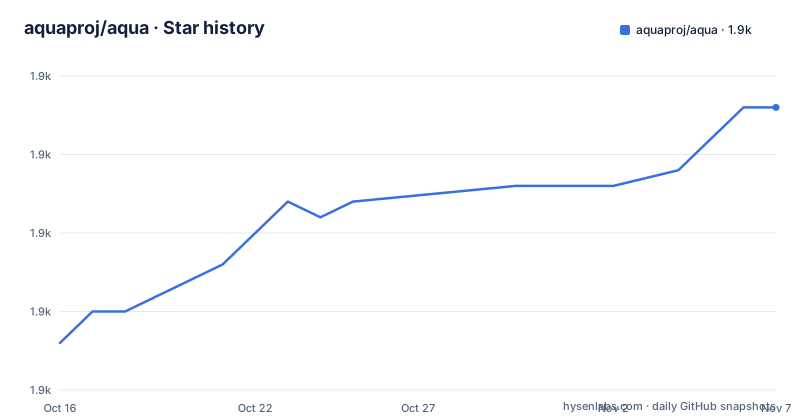
Star history
- aquaproj/aqua1,883 ★ · +15
| Repository | 2026-10-16 | 2026-11-07 |
|---|---|---|
| aquaproj/aqua | 1.9k | 1.9k |
15 Stars in the last 22 days, measured from the daily GitHub snapshot. Compare with other projects
Editorial analysis
The registry is where the version pinning actually happens
aqua does not know how to install Terraform, or tflint, or tfcmt. That knowledge lives in a registry, which aqua reads to learn where a release artifact lives and which checksum to expect. The README lists "Ecosystem by Registry" as a feature, and the user list shows what that means in practice: tfaction is described as using aqua heavily to install tools "such as Terraform, tfsec, tflint, tfcmt, and so on".
This is the single most important architectural fact about the tool. aqua is the resolver and the launcher; the registry is the catalogue. The consequence is that aqua's coverage is bounded by what the registry has entries for. A tool missing from the registry is a tool aqua cannot manage, and nothing in the README explains how a private or bespoke tool gets an entry. If your toolchain is mostly internal binaries, the value of the declarative model drops sharply before you have written a single line of config.
Lazy Install avoids downloading what a build never calls
The "Lazy Install" bullet in the README describes the behaviour that makes aqua tolerable in CI: tools are fetched when a command actually needs them, rather than up front for every entry in the manifest. In a repository that declares twenty tools but whose pipeline touches three, the other seventeen cost nothing.
That choice has a mirror image on the developer machine. The first invocation of a pinned tool pays the download, and in a script that calls several tools in sequence the delay lands on the earliest one rather than on setup. Teams that care about a visible, predictable provisioning step will find that implicit fetching sits badly with their runbooks, because the point at which a network call happens is decided by which line of a shell script runs first.
The README does not document a flag to prefetch everything, and it does not document a cache command or an offline mode. That is a gap for air-gapped runners, where a lazily fetched tool simply fails at the moment of use.
Renovate closes the loop the YAML file opens
Writing tool versions into a repository is only half the job. Someone, or something, has to propose the upgrade when a new release appears, or the pinned version becomes a museum piece. aqua's answer is to hand that job to Renovate, and the README lists "Continuous update by Renovate" as a feature in its own right.
The split of responsibility is worth spelling out because it is not aqua's job alone. The README identifies Renovate as the tool for continuous updates. The repository even ships renovate.json5 at the top level, so the integration is configured in-tree.
The trade-off is a dependency on a second tool in the chain. A team that wants lock-step upgrades with its language dependencies, or that has standardised on a different bot, has to make that work itself.
The Dockerfile shows the path aqua puts on your machine
aqua's own Dockerfile is the clearest statement of its runtime layout, because it sets the same environment variable in both of its base images. In the Ubuntu 24.04 stage and again in the Alpine 3.23.4 stage, the line is identical:
ENV PATH=/home/foo/.local/share/aquaproj-aqua/bin:$PATHThe user is a non-root account named foo, created with uid 900, and the working directory is /home/foo/workspace. So the managed binaries are shims that live in a user-local directory ahead of the rest of PATH, not replacements installed into /usr/local/bin. That is the right shape for an unprivileged container, and it is also why aqua needs no root on a developer machine.
The file shows the same prefetch strategy appearing twice: a prebuilt stage downloads aqua-installer at a pinned tag and checks it against a fixed sha256 string before running it.
RUN curl -sSfL -O https://raw.githubusercontent.com/aquaproj/aqua-installer/v4.0.4/aqua-installer
RUN echo "acd21cbb06609dd9a701b0032ba4c21fa37b0e3b5cc4c9d721cc02f25ea33a28  aqua-installer" | sha256sum -c -
RUN ./aqua-installer
Pinning the installer version and verifying the digest in the build is a good pattern to copy. Note that the README itself does not give an install command; it points to the documentation site at aquaproj.github.io for that, so the exact one-line installer invocation is not in this repository.
A deep dependency tree is the price of the standalone binary
aqua ships as a self-contained binary built with goreleaser, which is the right call for a tool that has to run before anything else in a build environment. The cost shows in go.mod, where the module requires urfave/cli v3.14.0, sprig for templating, go-github v92.0.0 for the GitHub API, hashicorp/go-version, gomoji for emoji handling, mholt/archives for archive extraction, progressbar, and both go.yaml.in/yaml/v2 and v3.
Two details stand out. The module path is github.com/aquaproj/aqua/v2, matching the v2 release line, and the go directive reads go 1.27.2, which sets the floor for anyone building from source. For end users none of this matters; for anyone auditing the source or vendoring it, it is the list you read.
The shim layer also implies an indirect cost at runtime. Every managed command runs through a program aqua generated, so process listings, signal handling and exit codes all pass through a layer that a directly installed binary does not have. The Makefile-equivalent checks are absent here, so the repository does not tell you how much that layer costs.
Where aqua is the wrong tool
Three cases stand out. First, single-user machines with one or two tools: a version manager that installs a shim directory, reads a manifest and consults a registry is more moving parts than curl and a tarball.
Second, environments with no outbound network at run time. Lazy install converts a provisioning problem into a failure at the moment a tool is invoked, and the README documents no prefetch-all command or offline mode.
Third, toolchains that are not in the registry. aqua's model is registry-driven, and a company-internal binary has no entry, so the team falls back to the install method aqua was meant to replace.
One more caveat is about adoption rather than function. The MIT licence covers the code, and the README notes that the logo is licensed separately, so anyone rebranding a derivative needs to read logo/README.md rather than assume the MIT file covers the artwork.
Editorial conclusion
aqua earns its place in a team that has already hit the problem of a laptop running a different tool version than its pipeline, and it earns nothing in a single-machine setup where installing binaries directly is fast enough. Check first what your chosen tool's registry entry actually pins, because aqua delegates download URLs and checksums to the registry rather than resolving them itself, and a project that has no registry entry cannot be managed by it.
Frequently asked questions
How do I install aqua?
The README does not carry an install command; it links to the documentation at aquaproj.github.io. The repository's own Dockerfile shows the alternative path, fetching the pinned aqua-installer release from GitHub and verifying its sha256 before running it.
What is lazy install in aqua?
It is the behaviour where a managed tool is downloaded when the command is first used rather than when the manifest is read. The README lists Lazy Install as a feature but does not document a command to prefetch every tool in advance.
Does aqua work with tools that are not in its registry?
The README describes aqua as an ecosystem built on a registry, and the registry supplies the download recipes for each tool. The README does not describe how to register a private or custom tool, so tools outside the catalogue are outside what the documented setup covers.
How does aqua keep pinned tool versions up to date?
The README lists continuous update by Renovate as a feature. The repository includes a renovate.json5 file at the top level for that integration.
Official sources
Add this badge to your README
If you maintain this project, the badge below links readers to this analysis and shows its maintenance status from the daily GitHub snapshot. Paste the markdown into your README; add ?metric=license or ?metric=stars to the image URL for a different field.

[](https://hysenlabs.com/projects/aquaproj-aqua)Star history chart for your README
[](https://hysenlabs.com/projects/aquaproj-aqua)Was this useful?