Archi ships a headless command line next to every graphical module
Archi: ArchiMate Modelling Tool
At a glance
- What is it?
- Archi is a Java and Maven modelling editor for ArchiMate, and the interesting part is its module layout: CSV, reports, model import and XML exchange each have a corresponding `.commandline` bundle. That pairing is what lets a modelling tool run in a pipeline.
- Who is it for?
- Adopt Archi if you need an ArchiMate model you can edit visually and also generate, report on or convert in an automated pipeline, since the paired command line bundles are what make that possible. Skip it if you need a modelling language implementation in code, because Archi is a desktop application rather than a library.
- Can I use it commercially?
- Yes. MIT is a permissive licence: you can use, modify and sell software built on it, as long as you keep its copyright and licence notices.
- Is it still maintained?
- Yes. The repository received new commits within the last day.
- What is it written in?
- Mainly Java, according to GitHub's language statistics.
Answers come from the project's GitHub data, last synced on November 7, 2026, and from our analysis. They are not legal advice.
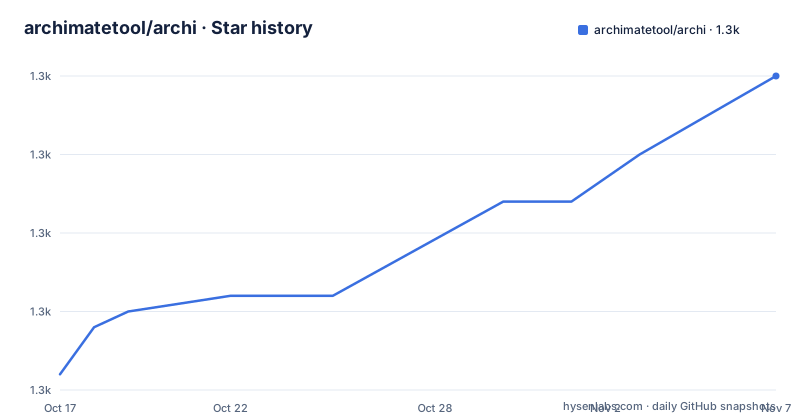
Star history
- archimatetool/archi1,305 ★ · +19
| Repository | 2026-10-17 | 2026-11-07 |
|---|---|---|
| archimatetool/archi | 1.3k | 1.3k |
19 Stars in the last 21 days, measured from the daily GitHub snapshot. Compare with other projects
Editorial analysis
What it is for, and who it targets
Archi is described as a free, open source, cross-platform tool and editor to create ArchiMate models, and the README says it is targeted toward all levels of Enterprise Architects and Modellers.
The audience description is unusually specific, and it names two groups. There is the person making their first steps in the ArchiMate modelling language, who needs a low cost to entry. And there is an organisation that wants a free, cross-platform tool for its company or institution and wishes to engage with the language within a TOGAF or other Enterprise Architecture framework.
That second group is the reason the tool is open source at all. Enterprise architecture modelling tools are conventionally commercial and expensive, and Archi's pitch is that a modelling language which is an open standard, hosted by The Open Group and fully aligned with TOGAF, should not require a commercial editor.
The README explains that framing directly: ArchiMate is an open and independent Enterprise Architecture modelling language supporting the description, analysis and visualization of architecture within and across business domains, and it is one of the open standards hosted by The Open Group.
So the positioning is coherent. Archi is the free editor for an open standard, aimed at both learners and organisations, and the project site is archimatetool.com rather than the repository.
The licence file at the root is `License.txt` and the recorded licence is MIT, which is permissive for commercial use and for the models people create with it.
Every feature has a command line twin
The top-level directory listing is the most useful thing in this repository, because it names every module and the names encode the architecture.
The listing shows several capabilities with command line counterparts. There is `com.archimatetool.canvas` and `com.archimatetool.commandline`, which looks like the canvas and its headless counterpart, though the naming is not perfectly symmetric. Then there are four pairs that are unambiguous:
- `com.archimatetool.csv` and `com.archimatetool.csv.commandline` - `com.archimatetool.jasperreports` and `com.archimatetool.jasperreports.commandline` - `com.archimatetool.modelimporter` and `com.archimatetool.modelimporter.commandline` - `org.opengroup.archimate.xmlexchange` and `org.opengroup.archimate.xmlexchange.commandline`
The CSV pair is for importing and exporting models from and to spreadsheets, which is how people get data into a model from a source system or take a model out to someone who does not have the editor.
The JasperReports pair is for document output, and it is the one that surprises people: the reports module is a reporting engine integration, so an ArchiMate model can produce a printable document rather than only a diagram.
The model importer pair handles bringing existing models in, and the XML exchange pair handles the exchange format, both of which need to run in a build.
That last observation is the design. A modelling tool is usually a desktop application that a person opens, and a graphical application cannot be scheduled. By shipping a command line bundle beside every capability, Archi can render diagrams, produce reports and convert files from a server or a pipeline without anyone clicking anything.
So if you are evaluating Archi for a documentation pipeline rather than for drawing, the `.commandline` modules are the reason it is a candidate at all.
A canvas, a zest and an SVG exporter
The graphical side is more than one module, and the names describe the parts of an editor.
`com.archimatetool.editor` is the editor itself, with `com.archimatetool.editor.product` for the product definition, the manifest that determines what is in a distribution, `com.archimatetool.editor.feature` for feature composition, and `com.archimatetool.editor.themes` for themes.
Then there is `com.archimatetool.editor.browser`, which is a browser-based editor, and its presence in the same tree as the desktop editor says the project is not tied to one packaging model. A browser editor changes what you can distribute, since a model can then be edited without installing anything.
Two more modules are worth naming on their own. `com.archimatetool.export.svg` is an SVG exporter, which matters more than it sounds: SVG is the format you need if the diagram has to go into a document, a wiki or a web page rather than into the editor. `com.archimatetool.zest` is for diagram layout in the Zest style, where the arrangement can be computed automatically rather than placed by hand.
The supporting modules fill in the rest. `com.archimatetool.hammer` is named after the model element, which suggests a tool for creating and manipulating those objects. `com.archimatetool.model` is the model itself, `com.archimatetool.templates` holds model templates, `com.archimatetool.help` the documentation, `com.archimatetool.markdown` documentation in Markdown format, `com.archimatetool.jdom` an XML document object model library, and `com.archimatetool.widgets` the shared UI controls.
Build instructions are not in the README
The README's development section is two links and no commands.
All developer resources are on the Developer Documentation wiki page, and the contributing section points at a separate wiki page titled How can I contribute code to Archi.
That is a deliberate choice rather than an omission, and the directory listing explains why. The project is a Maven multi-module build: there is a `pom.xml` at the root and a `.mvn/` directory beside it, which is where the Maven wrapper and its configuration live, so the wrapper is part of the repository.
A `tests/` directory and an `other/` directory also appear at the root. At this size, a README section would drift, so the wiki is the maintainable place for it.
The practical consequence is that you cannot get started from this README alone. Clone, find the developer documentation, and expect the build to be Maven-driven with the wrapper.
The project site is archimatetool.com and the repository itself carries no downloads section, no screenshots section and no version information. There are no GitHub releases, so there is no version number in the repository to pin, and the last push was on 2026-10-14.
For a desktop application distributed as builds rather than as a package, that is normal. It does mean you are installing a binary from the website, and checking the provenance of that binary is on you.
Where Archi is the wrong choice
Three cases.
If you need to read or write ArchiMate models programmatically inside a running application, this is the wrong artefact. The modules here are bundles of a desktop application, not a library with a published API and a version. The command line bundles are for scripting the application, not for embedding it.
If your modelling needs are covered by a diagram tool you already have and the model is going to be consumed as an image, Archi is a lot of installation for a picture. The SVG exporter exists, but so does every diagramming tool.
If you need collaborative editing of a model by several people at once, nothing in this repository describes that. The browser editor module is not the same as multi-user editing, and treating it as such would be a mistake.
Where Archi does fit is specific. An organisation that has adopted ArchiMate as its modelling language, wants a tool everyone can install without a procurement process, and needs to generate diagrams, spreadsheets and documents from a pipeline as well as by hand.
That last combination is the one worth checking, because it is where the duplicated `.commandline` modules pay off and where most free alternatives would not go. If you only draw diagrams by hand, the same care would buy you a simpler tool.
Editorial conclusion
Adopt Archi if you need an ArchiMate model you can edit visually and also generate, report on or convert in an automated pipeline, since the paired command line bundles are what make that possible. Skip it if you need a modelling language implementation in code, because Archi is a desktop application rather than a library. Verify first which distribution you want, since the repository also contains `editor.browser` for a browser-based editor and the wiki's developer documentation, rather than the README, holds the build instructions.
Frequently asked questions
What is Archi used for?
It is a free, open source, cross-platform editor for creating ArchiMate models, targeted at enterprise architects and modellers at any level, including people taking their first steps in the modelling language and organisations working within a TOGAF or other enterprise architecture framework.
Can Archi run without a graphical interface?
The repository contains `.commandline` bundles for the CSV, JasperReports, model importer and XML exchange capabilities, alongside their editor counterparts, which is what allows diagram rendering, report generation and model conversion to run in a pipeline.
How do I build Archi from source?
The README contains no build commands and points to the Developer Documentation wiki page instead. The repository has a root `pom.xml` and a `.mvn/` directory, so it is a Maven multi-module build using the wrapper.
Official sources
Add this badge to your README
If you maintain this project, the badge below links readers to this analysis and shows its maintenance status from the daily GitHub snapshot. Paste the markdown into your README; add ?metric=license or ?metric=stars to the image URL for a different field.

[](https://hysenlabs.com/projects/archimatetool-archi)Star history chart for your README
[](https://hysenlabs.com/projects/archimatetool-archi)Was this useful?