argoverse-api: the loader code behind the Argoverse 1 datasets
Official GitHub repository for Argoverse dataset
At a glance
- What is it?
- Argo AI's argoverse-api repository is the Python package that indexes the Argoverse 1 tracking, forecasting and HD map archives once you have downloaded them yourself. It is a loader layer, not a data service, and its dependency pins and missing Windows support shape what you can actually run.
- Who is it for?
- argoverse-api fits engineers who already hold the Argoverse 1 archives and want working loaders, evaluation utilities and notebooks rather than raw file parsing. It does not fit teams that need a managed dataset feed, Windows support, or the Argoverse 2 generation, since the successor API lives in a separate repository.
- Can I use it commercially?
- Check first. The repository uses a licence we do not classify automatically, so read its LICENSE file before any commercial use.
- Is it still maintained?
- Yes. The repository last received commits 24 days ago.
- What is it written in?
- Mainly Python, according to GitHub's language statistics.
Answers come from the project's GitHub data, last synced on November 7, 2026, and from our analysis. They are not legal advice.
Star history
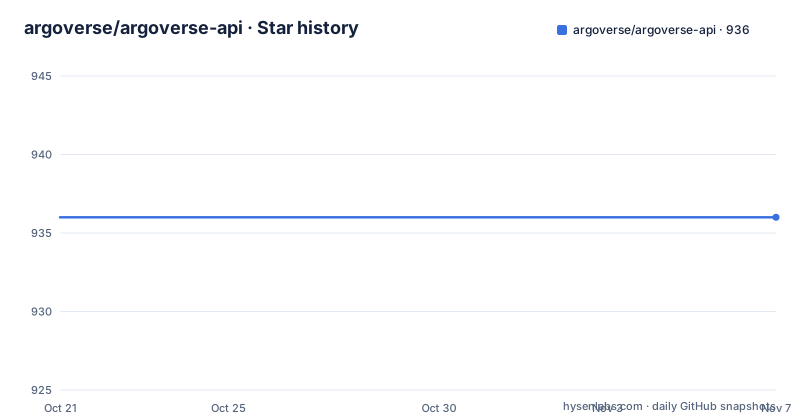
- argoverse/argoverse-api936 ★ · +0
| Repository | 2026-10-21 | 2026-11-07 |
|---|---|---|
| argoverse/argoverse-api | 936 | 936 |
0 Stars in the last 17 days, measured from the daily GitHub snapshot. Compare with other projects
Editorial analysis
A loader library that ships no data
The repository description calls it the official GitHub repository for the Argoverse dataset, but the package itself contains no sensor data. It contains code that reads data you have already fetched from argoverse.org. The top-level layout makes the split plain: an `argoverse/` package with `data_loading`, `evaluation`, `map_representation`, `utils` and `visualization` subpackages, alongside `demo_usage/`, `tests/`, `integration_tests/`, `docs/`, `sphinx/` and the packaging files `setup.py`, `setup.cfg`, `pyproject.toml`, `tox.ini` and `MANIFEST.in`. A separate `Argoverse-Terms_of_Use.txt` sits at the root next to the `LICENSE` file. If your goal is to pull a scenario into memory and iterate on it, this is the useful part. If your goal is to obtain the scenario in the first place, the README routes you to the Argoverse website for download links, and the API is silent on any programmatic or bulk retrieval path.
One map dependency behind all three loaders
The documented entry point builds three objects, and the asymmetry between them is the first thing worth understanding. `ArgoverseMap()` takes no argument, while the two dataset loaders take a directory path. The map object therefore has to find the HD map files through some other means, which the README resolves by demanding that `hd_maps.tar.gz` be extracted into the root directory of the repo. The tracking and forecasting loaders are freer: they receive a path string and can point anywhere on your machine. That constraint is stated plainly in the installation notes, which say you need HD map data extracted into the project root for the API to function properly, while the data itself can be extracted to any location. In practice this means one hard directory rule and one free-form rule, and mixing them up usually produces a loader that constructs successfully and then fails to resolve map geometry.
Clone, extract, then install in editable mode
Installation is a four step sequence, and only the third step is a package manager call. Start by cloning the repository:
git clone https://github.com/argoai/argoverse-api.gitNext, download `hd_maps.tar.gz` from the Argoverse website and extract it into the repo root. Then download either Argoverse-Tracking, Argoverse-Forecasting, or both. The README is explicit that you can select either dataset depending on what you need, and that the sample archives `tracking_sample.tar.gz` and `forecasting_sample.tar.gz` exist for testing. Finally install the package in editable mode so the code follows your working tree:
pip install -e /path_to_root_directory_of_the_repo/The README then gives a one line sanity check, which you can run from any directory once the install has completed:
python -c "import argoverse"Editable mode is the right choice here because the map files and datasets are expected to sit next to the source tree. A regular site install would decouple the package from the `map_files` directory the loader expects to find relative to the repository.
Dependency pins that date the codebase
The install requirements are not a modern, flexible set. `setup.py` pins `numpy==1.19`, `hydra-core==1.1.0`, `omegaconf==2.1.0` and `motmetrics==1.1.3` with exact equality, alongside unpinned entries such as `colour`, `descartes`, `h5py`, `imageio`, `lapsolver`, `matplotlib`, `numba`, `pandas`, `pillow`, `pyntcloud`, `scipy`, `shapely` and `sklearn`. The package declares `python_requires=">= 3.7"`, and the README badges call out Python 3.7 and Python 3.8. A strict equality pin on a library this old means pip either finds a matching wheel or tries to build it from source, and that is where installation tends to stall on a newer interpreter. The dependency list also explains part of the setup: `hydra-core` and `omegaconf` point to a configuration-driven design for the evaluation and forecasting code, while `shapely` and `descartes` belong with the map representation and geometry work. The `argoverse` package name in `setup()` collides with the import namespace inside the repo, which is why the check is `import argoverse` rather than a namespaced import path.
Notebooks carry most of the learning material
The README treats the Jupyter notebooks in `demo_usage/` as the primary tutorial path rather than a supplement. It asks you to install Jupyter with `pip install jupyter`, then start a server from the repo directory with `jupyter notebook`, which opens a browser automatically and prints a link in the terminal if you lose the page. Three named tutorials exist: an Argoverse map tutorial, an Argoverse-Tracking tutorial and an Argoverse-Forecasting tutorial. Running the tracking and forecasting ones requires the sample data extracted into the root of the repo. There is also a stereo tutorial that pulls in three extra libraries, Open3D, OpenCV contrib and Plotly, each with its own installation link. Optional tooling follows the same pattern: `mayavi` for some visualisations and `ffmpeg` for others, both with external setup instructions. The practical consequence is that the demo experience has two optional dependency tracks, and a fresh environment will hit at least one of them.
Dataset scale, splits and a script for label repair
The dataset descriptions are unusually specific about scale. Argoverse-Tracking provides track annotations, egovehicle poses and undistorted raw camera data at 30hz and lidar at 10hz, plus two stereo cameras at 5hz, spread over 113 scenes or logs split into 65 for training, 24 for validation and 24 for testing. Argoverse-Forecasting contains 327790 sequences, where each sequence follows the main agent for 5 seconds while tracking surrounding actors, and those are split into 208272 training, 40127 validation and 79391 test sequences. Training data is deliberately broken into smaller files for download convenience, but the README insists you extract them all into a single folder. One maintenance tool is worth knowing: the `track_labels_amodal` folders hold object-oriented labels, unlike the per-frame labels in `per_sweep_annotations_amodal`, and a script regenerates them.
python3 argoverse/utils/make_track_label_folders.py argoverse-tracking/train/The same script is documented for the `val/` folder.
Where this API stops working
Three constraints define the edges of the project. First, Windows is refused at install time: `setup.py` checks `platform.system()` and, on Windows, prints a message that Argoverse currently does not support Windows and asks for Linux or Mac OS, then exits with status 1. Linux and MacOS are the only listed platforms, and the classifiers say the same. Second, the API cannot fetch data, so a full workflow means manually visiting the Argoverse website, downloading several archives, and matching their layout to what the loaders expect. Third, visualisation is not self-contained: cuboid rendering from a birds-eye-view is done by a top-level script rather than the package API, and it runs from the repo root.
python visualize_30hz_benchmark_data_on_map.pyThe map data must already be in place for that script to draw anything. A team that expects `pip install` to give it a dataset, or that works on Windows, will hit a wall before it reaches any modelling code.
The Argoverse 2 API is the successor to reach for
The first thing the README shows is a banner announcing that the Argoverse 2 API has been released in a separate repository, with a pointer to the NeurIPS 2021 Datasets and Benchmarks publication for background on the newer datasets. The difference in approach is generational rather than cosmetic: this repository exposes the Argoverse 1 assets, with separate tracking and forecasting datasets and a shared HD map layer, while Argoverse 2 is published and documented elsewhere, so code written against `argoverse` here does not transfer. For a project started now, that matters more than the maintenance cadence. The tagged release v1.1.0 dates to 2021-06-30, and the last push was on 2026-10-14, so the tree still receives work without the package having published a newer version. Recent commits on a package whose release tag is five years old mean the code moves while the version number stays put, and pinning to 1.1.0 gives you the state of a 2021 release rather than the state of the working tree.
Editorial conclusion
argoverse-api fits engineers who already hold the Argoverse 1 archives and want working loaders, evaluation utilities and notebooks rather than raw file parsing. It does not fit teams that need a managed dataset feed, Windows support, or the Argoverse 2 generation, since the successor API lives in a separate repository. Before adopting it, verify that the hd_maps archive has been extracted into the repository root, that your interpreter can satisfy the numpy 1.19 and hydra-core 1.1.0 pins, and that the Argoverse 2 API is not the target you actually need.
Frequently asked questions
How do I install the argoverse Python package?
Clone the repository, download and extract hd_maps.tar.gz into the repo root, then run pip install -e against the repository root and confirm with python -c "import argoverse". The tracking and forecasting sample archives are optional but needed for the demo notebooks.
Does argoverse-api run on Windows?
No. setup.py checks the operating system at install time and exits with a message that Argoverse currently does not support Windows, asking for Linux or Mac OS instead.
Do I need the HD map data to use the tracking and forecasting loaders?
Yes. The README states you need HD map data extracted into the project root folder for the API to function properly. You can download either Argoverse-Tracking or Argoverse-Forecasting, or both, depending on the data you need.
Which Python version does argoverse-api support?
The package declares python_requires of 3.7 or newer, and the README badges reference Python 3.7 and 3.8. Dependencies are pinned tightly, with numpy at 1.19, hydra-core at 1.1.0, omegaconf at 2.1.0 and motmetrics at 1.1.3.
Official sources
Add this badge to your README
If you maintain this project, the badge below links readers to this analysis and shows its maintenance status from the daily GitHub snapshot. Paste the markdown into your README; add ?metric=license or ?metric=stars to the image URL for a different field.

[](https://hysenlabs.com/projects/argoverse-argoverse-api)Star history chart for your README
[](https://hysenlabs.com/projects/argoverse-argoverse-api)Was this useful?