Aseanic Radio: A Kodi-Only Playlist Project for Southeast Asian Channels and VOD
Kodi online radio for South East Asia countries.
At a glance
- What is it?
- Aseanic is a set of Kodi playlists that bring back discontinued Southeast Asian TV channels and add a large VOD library. It works only with Kodi, not with generic IPTV apps, and carries a clear legal warning.
- Who is it for?
- Adopt Aseanic if you are a Kodi user who wants to watch discontinued Southeast Asian channels or a large VOD library without manual EPG setup. Do not use it if you rely on OTT Navigator, Tivimate, or other IPTV apps, because the playlists are built specifically for Kodi and will fail elsewhere.
- Can I use it commercially?
- Not without permission. GitHub finds no licence file in the repository, and without a licence all rights are reserved by default: you may read the code but not reuse it. Check the README, or ask the authors, before using it.
- Is it still maintained?
- Yes. The repository last received commits 3 days ago.
- What is it written in?
- GitHub does not report a main language for this repository.
Answers come from the project's GitHub data, last synced on October 21, 2026, and from our analysis. They are not legal advice.
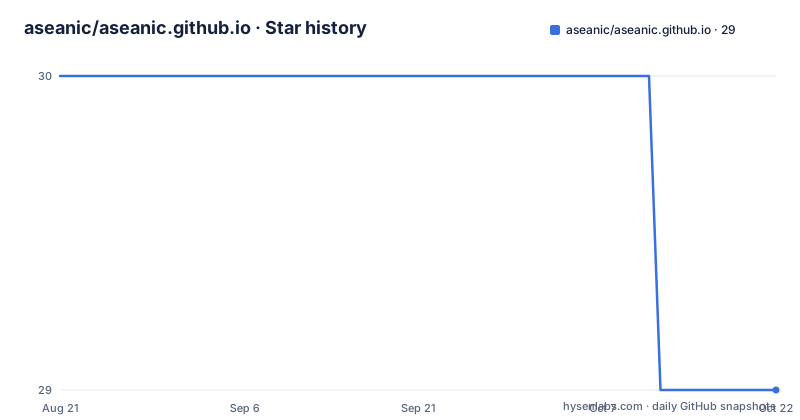
Star history
- aseanic/aseanic.github.io29 ★ · -1
| Repository | 2026-08-21 | 2026-10-21 |
|---|---|---|
| aseanic/aseanic.github.io | 30 | 29 |
-1 Stars in the last 61 days, measured from the daily GitHub snapshot. Compare with other projects
Editorial analysis
What Aseanic Actually Provides
Aseanic is a set of playlists for Kodi, the media center software, focused on South East Asia. The README is short but specific: it brings discontinued channels back online, with examples like Warna and Sensasi still streaming via Singapore's Starhub network. It also adds a VOD section with more than 3000 movies, grouped by language. The target user is someone who already runs Kodi and wants a single playlist source for regional TV and classic films. The project does not pretend to be a general IPTV service. The disclaimer is blunt: the playlists are for educational purposes only and are not permanently working. That is a clear boundary from the start.
The Kodi-Only Constraint and Why It Matters
The README contains a warning in capital letters: all channels are compiled specifically for Kodi and will not work on OTT Navigator, Tivimate, PerfectTV, OKTV, or other IPTV apps. This is the most important technical fact about the project. Most IPTV playlists use standard M3U formats that any player can read. Aseanic evidently relies on Kodi-specific features, likely in the playlist header or in how the streams are structured. The warning suggests the author tested or at least observed failures on those other apps. If you are not a Kodi user, this project is not for you. If you are a Kodi user, this constraint is actually a benefit: the playlist is tuned to one environment, which can reduce compatibility surprises.
How the Playlist Works: Integrated EPG and VOD as Recordings
The README explains that no manual EPG input is required because the EPG is already integrated inside the playlist header. That means the playlist file itself carries the electronic program guide data, so when you add the URL to Kodi's IPTV Simple Client, the channel guide populates automatically. For the VOD section, the movies appear under 'recordings' in Kodi IPTV Simple Client, not as a separate library. This is an unusual design choice. The README notes that the group-logo parameter is not supported in Kodi, so the widget appears blank unless you use the Arctic Fuse Mod skin and a specific widget path: pvr://recordings/tv/active?view=grouped. The VOD also supports fanart, wallart, synopsis, multi-channel audios, and subtitles. YouTube AutoTrailer is not supported, but trailers work fine. This mechanism is clever but also a workaround: it treats VOD as if it were recorded TV, which is why it lands in the recordings section.
Getting It Running: Commands and Configuration
The setup is minimal. You need Kodi, the IPTV Merge addon from slyguy.uk, and optionally the Arctic Fuse Mod skin. The README gives no direct URLs for the playlists, only the homepage https://aseanic.github.io/radio. You would open that page in a browser to find the playlist URLs. The instruction is simple: input the URLs into IPTV Merge and you are done. No EPG configuration is needed. For the VOD widget, you would add a widget to Arctic Fuse Mod with the path pvr://recordings/tv/active?view=grouped and rename it to 'VOD' if you like. There are no command-line steps because this is a Kodi addon workflow, not a server install. The dependency on IPTV Merge suggests that the playlists may be multiple separate files, and IPTV Merge combines them into one list for Kodi.
Maintenance and Upgrade Cost: What the Material Shows
The README is the only evidence of maintenance. It states that Warna and Sensasi are still streaming on Starhub, which implies the author checks channel availability. It also promises more classic movies on Mustika and Maya, indicating active content updates. However, there are no release notes, no commit history, and no license information in the provided material. The project is not archived, but the last push date is unknown. The warning that channels are 'working at the time this playlist was posted' is a honest admission that streams can die without notice. For a user, the maintenance cost is low: you just refresh the playlist in Kodi. But the project's future is uncertain. There is no formal support channel mentioned, only a forum thread for the skin. The legal disclaimer is a real cost if you ignore it: commercial resale is explicitly threatened with legal action.
Limitations and Failure Modes
The most obvious limitation is the Kodi-only restriction. If you try to use these playlists on a non-Kodi app, they will fail. The README says so directly. Another failure mode is stream downtime. The disclaimer says the playlists are not permanently working, so any channel can disappear at any time. The VOD section has its own quirk: because it is exposed as recordings, the widget appears blank unless you use the exact Arctic Fuse Mod path. The group-logo parameter not being supported means you lose visual branding in the widget. Also, YouTube AutoTrailer is not supported for VOD, which limits the movie browsing experience. The project is also wrong for anyone who wants a legal, licensed IPTV service. The educational purpose disclaimer suggests the streams may not be officially authorized. That is a risk you take on yourself.
Alternative Approaches: Standard IPTV and Legal Streaming
The obvious alternative is a standard IPTV service that works on any player. Services like Tivimate-compatible providers offer M3U playlists with EPG and VOD, but they usually require a subscription and may not focus on Southeast Asian content. Another alternative is to use official streaming apps from broadcasters, like Starhub's own app for Singapore channels. The difference in approach is that Aseanic is a free, community-curated playlist that depends on publicly available streams, while a commercial IPTV service has a server infrastructure and customer support. Aseanic is also different from a legal streaming platform because it has no licensing guarantees. If you need reliability and legal certainty, those alternatives are better. If you want a quick way to get discontinued channels back on Kodi without paying, Aseanic is a unique option.
Editorial conclusion
Adopt Aseanic if you are a Kodi user who wants to watch discontinued Southeast Asian channels or a large VOD library without manual EPG setup. Do not use it if you rely on OTT Navigator, Tivimate, or other IPTV apps, because the playlists are built specifically for Kodi and will fail elsewhere. Before relying on it, verify that the channels you need are still streaming, since the README states they are not permanently working. Also check the legal disclaimer: commercial redistribution is explicitly prohibited and may lead to legal action. The project is active enough to promise new classic movies on Mustika and Maya, but there is no release history or license information, so treat it as a hobbyist resource with no formal support.
Frequently asked questions
What do I need before the aseanic playlists will play?
Three separate downloads: the Kodi application, the IPTV Merge addon from an external site, and a modified Arctic Fuse skin linked from a community forum thread. Nothing is bundled in this repository. Once all three are in place you enter the playlist URLs, and no separate guide input is needed because the guide data is already inside the playlist header.
Will these channels work in TiviMate, PerfectTV or OTT Navigator?
The page warns that most of them will not. Every channel was compiled specifically for Kodi and verified only at the moment the playlist was posted, and OTT Navigator, Tivimate, PerfectTV and OKTV are named as applications where the streams are expected to fail. Evaluate the playlists inside Kodi.
Why does my Kodi movie widget show a blank logo?
Because the group logo parameter is not supported in Kodi, so the grouped widget renders without its image. The films themselves are more than three thousand grouped by language, found under the recordings entry of the IPTV Simple Client, and the page notes you can rename that entry to any label you prefer.
Official sources
Add this badge to your README
If you maintain this project, the badge below links readers to this analysis and shows its maintenance status from the daily GitHub snapshot. Paste the markdown into your README; add ?metric=license or ?metric=stars to the image URL for a different field.

[](https://hysenlabs.com/projects/aseanic-aseanic-github-io)Star history chart for your README
[](https://hysenlabs.com/projects/aseanic-aseanic-github-io)