PMTiles ships three licences and a reuse manifest
Pyramids of map tiles in a single file on static storage
At a glance
- What is it?
- A single-file archive format for map tiles, designed so a whole tile pyramid sits in one object on commodity storage and a map application needs no tile server at all. The specification is versioned inside the repository next to seven language directories, and the licence story is split three ways with a machine-readable manifest that most tooling ignores.
- Who is it for?
- Adopt this if your tile serving is the part of your map stack you do not want to operate, because a single file on object storage with byte range requests removes the tile server, the cache and the scaling question in one move. Three things to know.
- Can I use it commercially?
- Check first. The repository uses a licence we do not classify automatically, so read its LICENSE file before any commercial use.
- Is it still maintained?
- Yes. The repository last received commits 37 days ago.
- What is it written in?
- Mainly TypeScript, according to GitHub's language statistics.
Answers come from the project's GitHub data, last synced on October 23, 2026, and from our analysis. They are not legal advice.
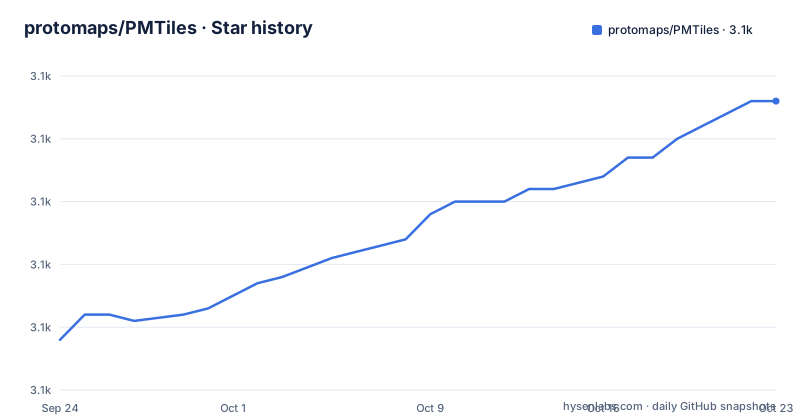
Star history
- protomaps/PMTiles3,096 ★ · +38
| Repository | 2026-09-24 | 2026-10-23 |
|---|---|---|
| protomaps/PMTiles | 3.1k | 3.1k |
38 Stars in the last 29 days, measured from the daily GitHub snapshot. Compare with other projects
Editorial analysis
Three licences and a reuse manifest
The licence section splits one project into three answers. The reference implementations are published under a three clause BSD licence. The specification itself is public domain, or under a CC0 dedication where that applies. And the repository carries both a licence file and a machine-readable reuse manifest at the root, which is the standard way to declare per path licence and copyright metadata for files that cannot carry a header of their own. That is a carefully constructed answer, and it is the right structure for a format where the specification and several independent implementations need different terms. The wrinkle is at the outside: the repository's metadata field reports no identifiable licence at all, which means any tool that reads the field rather than the file sees a project with no terms. That is a tooling limitation rather than a legal one, but it is the value a consumer reads first, and it is why the licence file is worth opening before the metadata.
The hosted viewer needs CORS for one specific origin
The viewer is the fastest way to inspect an archive, local or remote, and the file links it twice with a caveat attached to the remote case: archives on cloud storage may require CORS for the viewer's own origin. That is the single most useful operational sentence in the file, and it is easy to miss because it is a subordinate clause under a link. The reason is structural. A tiled map on object storage works by issuing range requests for individual byte ranges of one file, which is what removes the need for a server. A browser page served from one origin making range requests to a bucket on another is a cross origin request, so the bucket has to answer with the right permission header for that page. Get it wrong and the archive is fine, the bucket is fine, and the viewer shows an empty map. Nothing else in the documentation mentions cross origin behaviour, and the fix is on the bucket, not in the viewer.
The creating path is a binary in another repository
Nothing in this repository creates a file. The instruction to make one is to download the command line tool for your system from the Go implementation's releases, and that tool is a separate project. Two commands do the work, and the first takes an existing tile archive in the older format as its input:
pmtiles convert INPUT.mbtiles OUTPUT.pmtiles
pmtiles upload OUTPUT.pmtiles s3://my-bucket?region=us-west-2 // requires AWS_ACCESS_KEY_ID, AWS_SECRET_ACCESS_KEY env vars to be set
The input is therefore the older tile format and the file states that version three is current, so the spec directory is a first class citizen here alongside the implementations. That is an unusual and healthy arrangement: the document a tile compiler has to be written against lives next to the reference code, and the version number in the readme tells you which one you are reading.
The documented upload puts cloud credentials in environment variables
The upload command takes a destination written as a storage URL with a region, and carries an inline comment saying it requires two named environment variables to be set, holding the access key and the secret. So the documented happy path is long-lived cloud credentials in the process environment, which on a build machine or in a container image is a thing to think about. What makes that acceptable rather than careless is the second half of the file. There are four ways to get the same file onto object storage, and the other three are better: the same tool accepts an endpoint parameter in the URL, so any storage service that speaks the protocol works and a development endpoint can be used instead of a production one; a general purpose copy tool is documented with explicit chunk size and upload concurrency settings; and there are two serverless directories showing how to serve the format from a function and from an edge worker. Storage agnosticism is the design goal here, not an accident, and the credential note is the one place the abstraction leaks.
The Python side is a bin directory, not a library
Four language bindings are documented and they are not equally packaged. The JavaScript side has a directory with its own readme and an examples directory, and a separate directory for another mapping library's integration, so there are two documented JavaScript entry points rather than one. The Go side is not in this repository at all; the readme points at the Go project's own repository, which is also where the command line tool comes from. The Python side is a directory of scripts under a binary-named subdirectory inside the Python tree, and the readme describes it as library usage and points at the scripts. Meanwhile the badges at the top link to two published Python packages, one of them named for a different geospatial library entirely. So if your language is Python the packaging story is the part to verify, since what is described here is a set of scripts and what is advertised on a package index is something this repository does not contain.
Two of the seven directories are never mentioned
The top level is eleven entries: a workflows directory, a licence file, the readme, the reuse manifest, and seven directories. The seven are an application directory, a C++ directory, the JavaScript directory, an OpenLayers directory, the Python directory, a serverless directory with two subdirectories for two serverless platforms, and the specification directory. The readme names the JavaScript, OpenLayers, Go, Python and serverless paths explicitly, and the specification path. It says nothing about the application directory or the C++ directory, and neither appears anywhere in the visible text. That is two of seven top level directories whose purpose you have to infer from their names, in a repository whose pitch is that it is a format rather than an application. For a reader deciding whether a binding exists for their language, the directory list is the answer and the prose is not, so read the tree before the readme.
The recipe writes the format straight out of the tile compiler
The worked recipe is the best evidence that the format is genuinely a first class output rather than a conversion this project performs. It takes a shapefile from a census boundary dataset, converts it to GeoJSON with the standard geospatial conversion tool, and then runs a tile compiler with a flag that enables the maximum zoom, an explicit projection, an output filename with this extension and a layer name, producing the archive in one step. No intermediate tile directory, no conversion pass, no custom script. That matters because the compiler is maintained by a different organisation, which means this format's practical reach depends on a tool outside the repository, and any change to how that compiler writes archives is a change to this format's behaviour. The file also points at cloud optimised GeoTIFFs as the equivalent idea for raster, which is the clearest signal that the format described here is vector and that raster users should look elsewhere.
Editorial conclusion
Adopt this if your tile serving is the part of your map stack you do not want to operate, because a single file on object storage with byte range requests removes the tile server, the cache and the scaling question in one move. Three things to know. The format is storage agnostic by design and the upload path that puts credentials in environment variables is only one of four, so pick the one that matches how you already manage secrets. If you serve from a bucket and open the hosted viewer against it, set up CORS for that viewer's origin or the viewer will appear to fail on an archive that is perfectly reachable. And the repository is a specification plus seven implementation directories rather than a library you depend on, so check which language binding actually ships the version you need, because the Python side here is a directory of scripts rather than an installable package.
Frequently asked questions
What are PMTiles?
A single-file archive format for tiled data, designed so a whole tile pyramid can sit in one file on commodity object storage and be read with byte range requests. That removes the custom tile backend or third party provider from the architecture, which is what the file calls a serverless map application. The specification is versioned in the repository, currently at version three.
How to view PMTiles?
With the hosted viewer linked from the readme, which inspects and previews local or remote archives. For an archive on cloud storage you will likely need cross origin permissions for the viewer origin, otherwise the viewer shows nothing on an archive that is perfectly reachable. Demos in the readme also require a mapping library at version 1.15 or later.
What is the difference between MBTiles and PMTiles?
The readme never states it. It implies the relationship through the creating command, which takes an archive in the older format as its input, and through the pitch that this one needs no tile server. Everything more specific than that has to come from the specification or the other project.
Which languages does PMTiles support?
Four are documented: JavaScript with two integration directories for two different mapping libraries, Go through a separate project that also provides the command line tool, Python through a directory of scripts rather than an installable package, and two serverless platforms. Two more top level directories, one of them a C++ binding, are present in the repository and never mentioned in the readme.
What licence is PMTiles under?
Two answers in one repository. The reference implementations are under a three clause BSD licence, and the specification is public domain or under a CC0 dedication where applicable. The repository also carries a machine-readable reuse manifest, though its metadata field reports no identifiable licence.
Official sources
Add this badge to your README
If you maintain this project, the badge below links readers to this analysis and shows its maintenance status from the daily GitHub snapshot. Paste the markdown into your README; add ?metric=license or ?metric=stars to the image URL for a different field.

[](https://hysenlabs.com/projects/protomaps-pmtiles)Star history chart for your README
[](https://hysenlabs.com/projects/protomaps-pmtiles)Was this useful?