AutoGluon 1.6: What the Three-Line Predictor Actually Does
Fast and Accurate ML in 3 Lines of Code
At a glance
- What is it?
- AutoGluon wraps model selection, training and ensembling behind three predictor classes for tabular, time series and multimodal data. The three-line quickstart is real, but you should measure fit time, disk footprint and the resolved dependency list on your own data.
- Who is it for?
- Adopt AutoGluon when you have a labelled table or a regular time series and want a strong baseline before committing engineering time to a hand-built model. Do not adopt it when inference latency, artifact size or a minimal dependency tree are hard constraints, and do not treat the three-line example as the whole API.
- Can I use it commercially?
- Yes. Apache-2.0 is a permissive licence: you can use, modify and sell software built on it, as long as you keep its copyright and licence notices.
- Is it still maintained?
- Yes. The repository last received commits 5 days ago.
- What is it written in?
- Mainly Python, according to GitHub's language statistics.
Answers come from the project's GitHub data, last synced on November 13, 2026, and from our analysis. They are not legal advice.
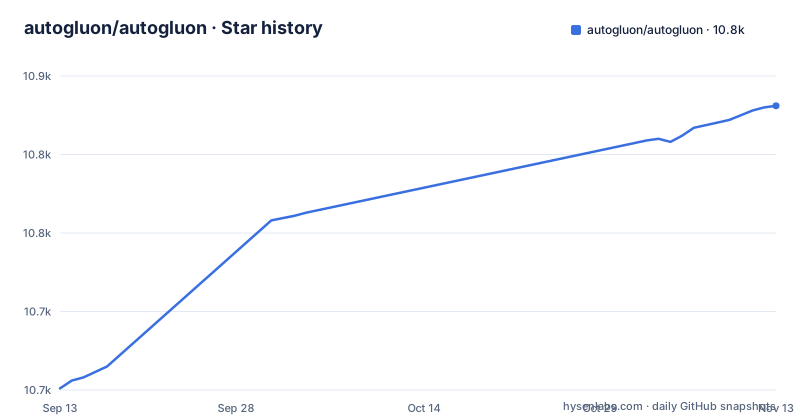
Star history
- autogluon/autogluon10,831 ★ · +180
| Repository | 2026-09-13 | 2026-11-13 |
|---|---|---|
| autogluon/autogluon | 10.7k | 10.8k |
180 Stars in the last 61 days, measured from the daily GitHub snapshot. Compare with other projects
Editorial analysis
The problem AutoGluon removes is model selection, not model building
Most tabular work does not fail because nobody can call fit on a gradient boosted tree. It fails because choosing among a linear model, a tree ensemble, a neural network and a stack of the three takes a week of cross-validation that nobody budgets for. AutoGluon's claim, in the README's own words, is that it finds the combination of models that works best for your use case, and that it automates machine learning on data such as tables and time series. The audience is the engineer or analyst who has a DataFrame and a label column and needs a defensible baseline, not a researcher tuning a novel architecture. The README frames the motivation plainly: from classic ML algorithms to foundation models, the options keep multiplying. AutoGluon's answer is to search that space for you and return a predictor object rather than a leaderboard you have to interpret yourself.
Three predictor classes, one fit-predict shape
The public surface is deliberately narrow. The README lists TabularPredictor, TimeSeriesPredictor and MultiModalPredictor, each with its own quickstart tutorial and API reference page. The tabular example is the one people quote: import TabularPredictor, construct it with label="class", call fit on "train.csv" with presets="best", then call predict on "test.csv". The README describes the goal as finding the combination of models that works best for your use case. The README links a quickstart and API page for each of the three predictors.
Installation choices that change what you get
The base install is one command: pip install autogluon. The README states support for Python 3.10 through 3.13 on Linux, macOS and Windows, and points to an installation guide for GPU support, Conda installs and optional dependencies. That last phrase matters. If you are pinning dependencies for a production image, check the installation guide for optional dependencies and measure the dependency list pip resolves.
Where the automatic search becomes the wrong tool
The design trades control and time for accuracy, and that trade is not always correct. The README documents no figures for fit time, predictor size or inference latency, so treat each as something to measure: a fit call with presets="best" looks for a combination of models, which can cost more time and disk than one directly fitted estimator, and you are debugging a combination you did not assemble yourself. If your requirement is a model you can explain line by line, or an inference path with a hard latency budget, AutoGluon is the wrong layer and a directly fitted estimator is the right one.
How it differs from scikit-learn's model_selection and from a hand-built stack
The obvious comparison is scikit-learn. The difference is where the search lives. With scikit-learn you write the loop: pick candidates, run GridSearchCV or RandomizedSearchCV, compare scores, then decide whether to stack. AutoGluon moves that decision inside fit and returns the assembled result. The consequence is that scikit-learn gives you the search as explicit code you can read, modify and interrupt, while AutoGluon gives you the search as a preset string. That is a real trade in both directions. If you need to constrain the search to models your team can maintain, or to stop after twenty minutes, the scikit-learn path is more direct. If you want a strong baseline today and are willing to accept an opaque ensemble, AutoGluon removes the loop. A hand-built stack sits between the two: more control than AutoGluon, more work than scikit-learn's search utilities alone.
Release cadence, upgrade cost and the Apache-2.0 terms
The release list shows v1.6.1 on 2026-08-06, v1.6.2 on 2026-09-14 and v1.6.3 on 2026-09-18, so patch releases are frequent enough that you should read the release notes before pinning. Because the predictors wrap many learners, an upgrade can change which model family wins on your data even when your own code is untouched. That is the upgrade cost specific to this library: your source diff may be empty while your predictions move. Apache-2.0 permits commercial use and modification and includes an explicit patent grant, with the usual requirements around preserving notices and stating changes. This is a description of the licence identifier in the repository, not legal advice; have counsel review it if the terms matter to your distribution model.
What to verify on your own data before adopting
Three measurements decide whether AutoGluon fits your project. First, run the tabular quickstart against your own train.csv with presets="best" and time the fit call end to end, because that number is the price of the automatic search. Second, inspect the size of the directory the predictor writes, since that is what you will ship and load. Third, capture the dependency list that pip resolves from a clean environment, because the umbrella package covers tabular, time series and multimodal tasks and may pull in more than you need. If all three numbers are acceptable, the three-line API is a genuine shortcut to a baseline. If any one of them is not, a directly fitted model with a validation loop you control is the alternative.
Editorial conclusion
Adopt AutoGluon when you have a labelled table or a regular time series and want a strong baseline before committing engineering time to a hand-built model. Do not adopt it when inference latency, artifact size or a minimal dependency tree are hard constraints, and do not treat the three-line example as the whole API. Before committing, run fit with presets='best' on your own data and record wall-clock time, the size of the predictor directory and the dependency list pip resolves, because those three numbers decide whether the trade is worth it.
Frequently asked questions
What is AutoGluon used for?
AutoGluon automates machine learning on data such as tables and time series, aiming at strong predictive performance with a few lines of code. It finds the combination of models that works best for your use case.
Is AutoGluon open source?
Yes. AutoGluon is released under the Apache-2.0 license and its source is hosted on GitHub at the autogluon/autogluon repository.
how to install autogluon
Run pip install autogluon. AutoGluon supports Python 3.10 to 3.13 and runs on Linux, MacOS, and Windows; GPU support, Conda installs, and optional dependencies are covered by the separate Installation Guide.
What are the key differences between AutoGluon and AutoML?
AutoGluon is a concrete tool that implements automated machine learning. It bundles model selection, training, and ensembling behind one fit call, as shown in its three-line TabularPredictor quickstart, so users apply AutoML rather than building the search themselves.
autogluon vs xgboost
XGBoost is a single gradient boosting algorithm you call directly, while AutoGluon is a wrapper that trains and combines many candidate models and ensembles them, including classic algorithms and foundation models, then picks the combination that works best. The README frames this as AutoGluon choosing among the multiplying options for you.
Official sources
Add this badge to your README
If you maintain this project, the badge below links readers to this analysis and shows its maintenance status from the daily GitHub snapshot. Paste the markdown into your README; add ?metric=license or ?metric=stars to the image URL for a different field.

[](https://hysenlabs.com/projects/autogluon-autogluon)Star history chart for your README
[](https://hysenlabs.com/projects/autogluon-autogluon)Was this useful?