Greplica: persistent engineering memory for Codex and Claude Code
Persistent, searchable engineering memory for AI coding agents. Saves ~50% tokens and ~30% time while planning
At a glance
- What is it?
- Greplica stores repo context in local SQLite and lets a coding agent query it before exploring. It targets repeated context-building across sessions, and ships a managed mode for shared team memory.
- Who is it for?
- Adopt Greplica if your agent sessions repeatedly rebuild the same repository context and you are willing to run Node.js 22 to 26 and keep a local SQLite store per repository. Skip it if you want a hosted service with no CLI, or if your code cannot leave your machine and you also need cross-clone sharing: managed mode keeps graph data on a server.
- Can I use it commercially?
- Yes. MIT is a permissive licence: you can use, modify and sell software built on it, as long as you keep its copyright and licence notices.
- Is it still maintained?
- Yes. The repository last received commits 119 days ago.
- What is it written in?
- Mainly TypeScript, according to GitHub's language statistics.
Answers come from the project's GitHub data, last synced on November 25, 2026, and from our analysis. They are not legal advice.
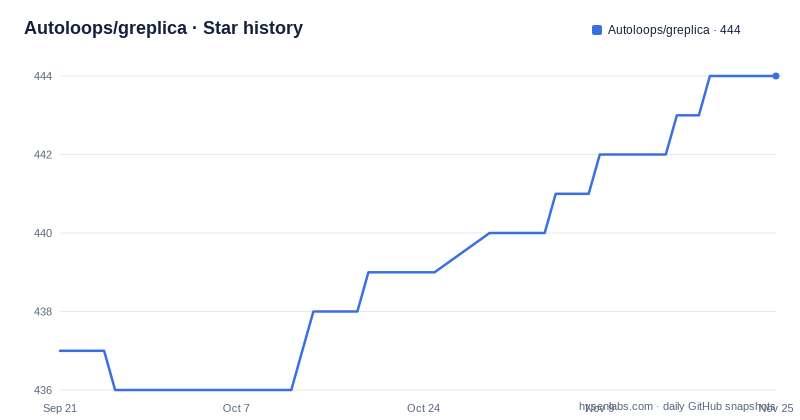
Star history
- Autoloops/greplica444 ★ · +7
| Repository | 2026-09-21 | 2026-11-25 |
|---|---|---|
| Autoloops/greplica | 437 | 444 |
7 Stars in the last 65 days, measured from the daily GitHub snapshot. Compare with other projects
Editorial analysis
The repeated-context problem Greplica is built around
The README opens with a specific complaint: a coding agent spends minutes grepping around on a complex task because it is re-learning context it already had in a previous session. The stated cost is tokens and time spent rebuilding that context, plus facts the agent still misses.
The intended user is someone running an agent such as Codex or Claude Code against a repository they return to often. Greplica explores repo structure, code and session transcripts, then exposes the result as memory the agent can query before it starts exploring. That ordering matters: the value only appears if the agent asks first. An agent that ignores the memory and greps anyway gets no benefit, and the README's own framing is that most users should not install Greplica by hand but paste an install prompt into their coding agent.
This is not a general documentation generator. It is a cache for engineering context, and like any cache it is only worth its maintenance cost when the same questions recur.
Local SQLite versus managed memory: how the two modes differ
Greplica has two storage shapes. The README says local mode stays on the machine with no telemetry; this is a project claim, not an independent audit of every agent or provider used alongside it. Managed mode connects an authorized repository to shared team memory, so contributors on different clones and forks can query the same repository memory. Managed mode requires Greplica 0.2.0 or later and access to a managed Greplica server.
The split is visible in what each side stores. Managed graph data stays on the server. Local SQLite keeps only the repository binding, role cache, hook policy and runtime session metadata. So even in managed mode, the local database is an index of relationships, not a copy of the graph.
Retrieval defaults are worth reading closely. Managed retrieval defaults to canonical main plus your own persistent working memory, and other contributors are added explicitly:
npm install -g greplica@latest
cd /path/to/your/repository-or-fork
greplica login --api-url https://memory.autoloops.ai
greplica install --mode managed --platform codex
greplica repo status
greplica graph context "What should I know before changing this subsystem?"
To pull in another person's drafts, the README shows `--with-working alice --with-working bob` on the context command. Roles are coarse: organization admins and members inherit read access to every organization repository, guests read only explicitly granted repositories, a contributor writes proposals to a personal working scope, and memory_admin additionally manages repository memory access.
Installing Greplica and running a first query
Greplica requires Node.js 22 to 26, and package.json narrows that to `>=22.0.0 <27.0.0` with a preinstall check that fails on other versions. The README's recommended path is not a manual install. It is a prompt you paste into your coding agent from inside the repository you want remembered:
Install Greplica for this repo using https://raw.githubusercontent.com/Autoloops/greplica/refs/heads/main/docs/agent-install-prompt.md.The project says the prompt guides setup and can install local or managed mode. Review the prompt, commands and requested permissions before allowing an agent to execute them. If you prefer to drive it yourself, the package is `greplica` on npm and the binary is `greplica`.
Once memory exists, the README's visualization command opens the current memory in a browser:
greplica graph viewWhat you should see is a graph view of the stored memory. The repository also ships offline-browser checks for that view, which suggests the view is expected to work without a live server, though the README does not spell out the offline behaviour. For a first real use, the managed example above is the clearest: install with `--platform codex`, then ask `greplica graph context` a question about a subsystem you already understand, and judge the answer against what you know.
What the reconcile workflow actually enforces
The README describes a reusable GitHub workflow for reconciling managed memory against a specific default-branch commit. It recommends pinning the workflow to a full commit SHA, using read-only repository content permission and GitHub OIDC. The complete workflow includes a job invoking the reusable workflow; copy the current full example from the project documentation rather than using only a trigger and permissions fragment.
The project documents limits and exclusions for repair evidence, including omission of certain sensitive or unsupported files. Treat these as documented design constraints, not a guarantee that every secret or incorrect claim will be detected. Review the workflow, server behavior and data-handling policy before enabling managed mode.
Where Greplica is the wrong tool
The first limitation is the one the README itself concedes: most users should not install it by hand. If your workflow does not give a coding agent permission to run install commands, the primary onboarding path is closed to you.
The second is scope. Managed memory requires a managed Greplica server. The README documents `https://memory.autoloops.ai` and a login flow, but it does not document running your own managed server, so a team that wants shared memory without that dependency has no path described here. Local mode avoids the server, but local memory is per repository binding and does not give contributors on different clones the same answers.
Third, the reconciliation guarantees are only as good as the workflow pinning. The README explicitly warns against a branch or movable tag. A team that pins to `main` gets whatever the upstream action does that day, and the attestation story weakens. Similarly, the evidence packet deliberately refuses to scan the whole repository, which means a claim whose anchors are not among the selected versions simply will not be verified. That is a defensible design, but it is a boundary, not a bug.
Finally, the README does not document rollback or uninstall. If you install Greplica into a repository and later want the hooks and binding gone, there is no command for that in the documentation.
AGENTS.md and the alternative it replaces
package.json describes Greplica as a long-term, searchable AGENTS.md for coding agents. That is the clearest statement of the alternative: a hand-maintained AGENTS.md or CLAUDE.md file checked into the repository.
The difference in approach is retrieval. A markdown context file can be loaded by an agent and maintained by people or automation; loading behavior depends on the agent and its configuration. Greplica explores repo structure, code and session transcripts, stores the result in a queryable memory, and answers a specific question such as how authentication works. A static file cannot answer a question it was not written to answer, and it drifts silently as code changes. Greplica's reconcile workflow exists precisely because the memory can drift too, but it at least attempts to prove that a stored claim still matches the code at a specific commit.
The trade is operational weight. A markdown file needs no Node.js version, no SQLite store, no GitHub OIDC permissions and no hourly schedule. Greplica needs all of those in managed mode. For a small repository with a stable architecture, the markdown file is probably the better choice.
Maintenance, licence and upgrade cost
The repository is not archived, and the last push was on 2026-07-30. Releases are frequent and small: v0.2.1 on 2026-07-22, v0.2.0 on 2026-07-21, and v0.1.51 on 2026-06-30. The 0.2.x line is where managed mode and shared memory arrive, and the README states that managed mode requires 0.2.0 or later, so anyone on 0.1.x is on a different feature set.
The licence is MIT, declared in both LICENSE and package.json. MIT is permissive: it allows use, modification and redistribution with the copyright notice and without warranty. That is a statement about the licence text, not advice about your situation; if you are folding Greplica into a product, read the licence yourself.
Upgrade cost concentrates in the managed path. The reusable workflow must be pinned to a full 40-character commit SHA, and the README notes that older servers retain the prior attestation shape. That means a server upgrade and a workflow pin bump can be coupled. The package also enforces a Node.js range at install time through `scripts/check-node-version.js`, so an environment on Node.js 20 will fail before anything else runs. The test script in package.json is a long chain of individual check scripts, which tells you the maintainers rely on many narrow assertions rather than a single broad suite; a failing check names one behaviour.
Editorial conclusion
Adopt Greplica if your agent sessions repeatedly rebuild the same repository context and you are willing to run Node.js 22 to 26 and keep a local SQLite store per repository. Skip it if you want a hosted service with no CLI, or if your code cannot leave your machine and you also need cross-clone sharing: managed mode keeps graph data on a server. Before rolling it out, verify three things: that `greplica install` produces the binding you expect for your platform, that `greplica graph context` returns useful answers on a subsystem you already know well, and, for managed mode, which commit SHA you pin the reusable reconcile workflow to, since the README says not to use a branch or movable tag.
Frequently asked questions
What Node.js version does Greplica need?
The README states Greplica requires Node.js 22 to 26, and package.json declares an engines range of >=22.0.0 <27.0.0 with a preinstall version check. An install on an unsupported version fails at that check.
Does Greplica store my code on a server?
The project says local mode stores memory locally and has no telemetry. Managed mode stores shared graph data on a server and keeps binding and session metadata locally. Review the current implementation, configuration and agent or provider data flows before using sensitive repositories.
How do I install Greplica for a repository?
The README recommends pasting an install prompt into your coding agent from inside the repository, pointing at docs/agent-install-prompt.md. That prompt runs a setup questionnaire and installs Greplica in local or managed mode.
Can several contributors share the same Greplica memory?
Yes, through managed mode, which requires Greplica 0.2.0 or later and access to a managed Greplica server. Contributors on different clones and forks query the same repository memory, and an admin can create a reusable repository-scoped invite link that works for multiple GitHub users until it is revoked.
Official sources
Add this badge to your README
If you maintain this project, the badge below links readers to this analysis and shows its maintenance status from the daily GitHub snapshot. Paste the markdown into your README; add ?metric=license or ?metric=stars to the image URL for a different field.

[](https://hysenlabs.com/projects/autoloops-greplica)Star history chart for your README
[](https://hysenlabs.com/projects/autoloops-greplica)Was this useful?