Jetpack's GitHub repo stopped shipping releases in January 2021
Security, performance, marketing, and design tools — Jetpack is made by WordPress experts to make WP sites safer and faster, and help you grow your traffic.
At a glance
- What is it?
- The Automattic/jetpack repository is the Jetpack monorepo: source for the plugins plus the Composer and JavaScript packages they use, licensed GPL-2.0-or-later. It is not where you install Jetpack, and it has not published a tagged release since 9.3.2 in 2021, which is the first thing an evaluator needs to know.
- Who is it for?
- Adopt this repository when you are contributing to Jetpack or building one of its packages, while the README documents the build and plugin-linking steps for running monorepo code in a WordPress install. Do not adopt it as your Jetpack distribution source, because the README directs users to pre-built sources elsewhere and the tags stopped here in 2021.
- Can I use it commercially?
- Check first. The repository uses a licence we do not classify automatically, so read its LICENSE file before any commercial use.
- Is it still maintained?
- Yes. The repository last received commits 1 day ago.
- What is it written in?
- Mainly PHP, according to GitHub's language statistics.
Answers come from the project's GitHub data, last synced on November 7, 2026, and from our analysis. They are not legal advice.
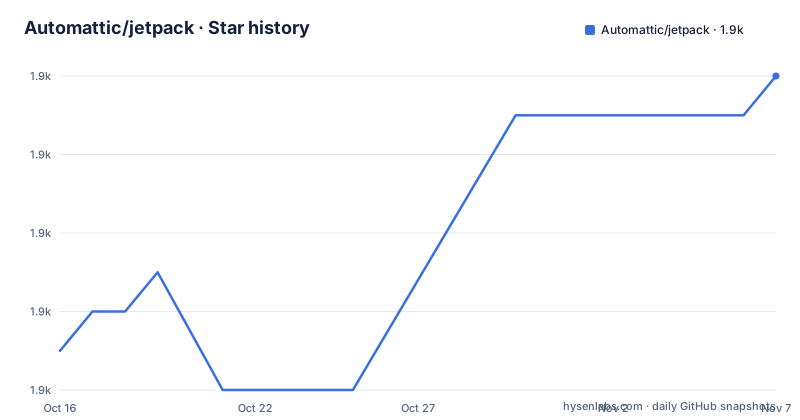
Star history
- Automattic/jetpack1,858 ★ · +7
| Repository | 2026-10-16 | 2026-11-07 |
|---|---|---|
| Automattic/jetpack | 1.9k | 1.9k |
7 Stars in the last 22 days, measured from the daily GitHub snapshot. Compare with other projects
Editorial analysis
This is the source monorepo, not the plugin
The first line of the README settles what kind of repository this is: it is the Jetpack monorepo, containing source code for the different Jetpack plugins, the Composer and JavaScript packages used by those plugins, and related tooling. The root package.json agrees, naming the private package `@automattic/_jetpack_monorepo` and describing Jetpack as a set of WordPress plugins that add WordPress.com cloud power to a self-hosted site.
The plugin you would actually install is not built from a release of this repository. The README says that if you are not developing with Jetpack you should install it from pre-built sources, and points to a separate repository, jetpack-production, for details. The two exist because a monorepo and a distributable plugin are different artifacts: the monorepo has to be built, and the shipped plugin does not.
So the audience is contributors and integrators, not site operators. If you are running a WordPress site and want Jetpack, this repository is the wrong starting point and the README says so in one sentence.
The tree shows the shape of the effort: `projects/` holds the plugins and packages, `tools/` the build and version tooling, `docs/` the contributor documentation, and there are separate tool configurations for PHP and JavaScript at the root, including `.phpcs.xml.dist`, `stylelint.config.mjs`, `eslint.config.mjs` and `.shellcheckrc`.
The release tags stopped in 2021
The release history is the single most useful fact on this page for anyone deciding what they are looking at. The latest entries are 9.3.2 dated 2021-01-19, then 9.3.1 on 2021-01-14, and a tag called `9.3.2-repo-moved` on 2021-01-30 whose title is a notice that tagged versions of Jetpack have moved.
That is not an abandoned repository. The last push was on 2026-10-16 and the project is not archived. What happened is that version tagging left this repository, so commit activity here continues while the tags do not. Anyone pinning `Automattic/jetpack` to a version number is working from repository tags that stopped updating in 2021.
The practical consequence is that you cannot tell from this repository which Jetpack version corresponds to a given commit. If you need that mapping, the release tags and the pre-built plugin source live elsewhere, and the README's first instruction is to go there.
Running monorepo code inside a WordPress install
Development needs a build step before anything appears in WordPress. The README routes you to `docs/development-environment.md` for the build, and offers a Docker development environment as the recommended route.
The part that trips people up is what comes after. You cannot clone the monorepo into your WordPress plugins directory: WordPress will show a warning saying that the Jetpack Monorepo is not a plugin and should not be installed as one. Instead you build first, then create a symbolic link from the plugin's real path inside the monorepo into `wp-content/plugins`:
ln -s /path/to/jetpack-monorepo/projects/plugins/jetpack /path/to/wordpress/wp-content/plugins/jetpackOn Windows, Vista and later, the equivalent is an Administrator Command Prompt and `mklink /D`.
This design is not incidental. A monorepo contains many packages, and WordPress plugins are directories in a specific location with a specific header. The symlink makes the built plugin appear in the right place while the source stays where the tooling expects it, and the warning in the plugins page exists so nobody works around it by copying files in.
There is a second linking step on the CLI side, separate from WordPress:
pnpm install && jetpack cli linkThat is what the `cli-setup` script runs, alongside `cli-link` and `cli-unlink` for moving between projects.
The toolchain is pinned harder than most PHP projects
Jetpack's monorepo is a hybrid codebase, and the requirements reflect that. The root package.json declares both a package manager and a Node version:
"devEngines": {
    "packageManager": {
        "name": "pnpm",
        "version": "^11.5.0"
    }
},
"engines": {
    "node": "^24.15.0",
    "pnpm": "^11.5.0"
}
Node 24 and a current pnpm are the floor. On the JavaScript side, linting is eslint with a changed-files variant (`lint-changed`), a required-lint mode using `ESLINT_IGNORE_REQUIRED=1` with `--max-warnings=0`, and stylelint with gitignored paths excluded. Formatting is prettier, and husky is installed through the `prepare` script to wire git hooks.
On the PHP side the entry points are Composer scripts rather than pnpm ones: `composer phpcs:lint`, `composer phpcs:fix` and `composer phpcs:compatibility`. The compatibility target is the interesting one, since PHP compatibility checking is what keeps a plugin installable across the range of WordPress PHP versions users actually run.
Release versioning is scripted too, through `bash ./tools/version-packages.sh` behind the `version-packages` script.
Security reporting and licensing
For a plugin that runs on other people's servers, the security channel is documented explicitly. The README directs vulnerability reports to automattic.com/security and to Automattic's bug bounty program on HackerOne at hackerone.com/automattic, and the repository carries its own SECURITY.md and CODE-OF-CONDUCT.md.
Licensing is straightforward to state and worth stating accurately: Jetpack is licensed under GNU General Public License v2 or later, and the root package.json declares `GPL-2.0-or-later`. The license badge in the README points at gnu.org's GPL-2.0 page. Because the plugin is copyleft, a site that modifies Jetpack and serves the modification has obligations under that license. That is a reading of the license text rather than legal advice, but for a plugin embedded in a commercial site it is a question to raise early rather than at launch.
One naming detail that catches readers: GitHub reports the repository license as one it cannot classify, while the LICENSE.txt file and the package.json field both state GPL-2.0-or-later. The files are the authority here, not the metadata badge.
The project also runs a beta testing program documented at `docs/testing/beta-testing.md`, which is the route for testing a release candidate before it goes to the general public, and a translation guide for contributing locales.
Editorial conclusion
Adopt this repository when you are contributing to Jetpack or building one of its packages, while the README documents the build and plugin-linking steps for running monorepo code in a WordPress install. Do not adopt it as your Jetpack distribution source, because the README directs users to pre-built sources elsewhere and the tags stopped here in 2021. Verify first that your Node is ^24.15.0 and pnpm is ^11.5.0, since both are declared in `engines`, and read LICENSE.txt before shipping anything derived from the plugin, since it is GPL-2.0-or-later.
Frequently asked questions
How do I install Jetpack on my WordPress site?
Not from this repository. The README says that if you are not developing with Jetpack you should install it from pre-built sources, and points to the separate jetpack-production repository for details.
Why do the latest Jetpack releases on GitHub date from 2021?
Tagged versions moved out of this repository. The most recent release entry is a tag called 9.3.2-repo-moved dated 2021-01-30 whose title states that tagged versions of Jetpack have moved, even though commits to the monorepo continue.
How do I run the Jetpack monorepo inside WordPress for development?
Build the monorepo first, following docs/development-environment.md, then symlink the plugin into wp-content/plugins with `ln -s /path/to/jetpack-monorepo/projects/plugins/jetpack /path/to/wordpress/wp-content/plugins/jetpack`. On Windows use `mklink /D` from an Administrator Command Prompt. Cloning the monorepo directly into the plugins directory is not supported.
What Node and pnpm versions does the Jetpack monorepo need?
The root package.json declares node ^24.15.0 and pnpm ^11.5.0 in both the engines and devEngines fields, so those are the supported versions for working in the repository.
Where do I report a Jetpack security vulnerability?
Through automattic.com/security or the Automattic bug bounty program at hackerone.com/automattic, rather than in a public GitHub issue.
Official sources
Add this badge to your README
If you maintain this project, the badge below links readers to this analysis and shows its maintenance status from the daily GitHub snapshot. Paste the markdown into your README; add ?metric=license or ?metric=stars to the image URL for a different field.

[](https://hysenlabs.com/projects/automattic-jetpack)Star history chart for your README
[](https://hysenlabs.com/projects/automattic-jetpack)Was this useful?