react-native-restart: restart a React Native app from inside it
React Native Package With One Purpose: To Restart Your React Native Project
At a glance
- What is it?
- react-native-restart is a small native module that lets a React Native app reload its JavaScript bundle or fully restart the process at runtime, with an optional reason that survives the restart. It suits an app that has to change locale or recover from a broken JS state, and it behaves differently on Android than on iOS.
- Who is it for?
- Adopt react-native-restart when your app has to apply a change that only a fresh runtime can pick up, such as an RTL or LTR locale switch, and you want the reset to happen without asking the user to kill and reopen the app. Do not adopt it as a development reload, because the Metro dev server already does that, and remember the platform difference, since Android does a full process restart while iOS and Windows reload the bundle in process.
- Can I use it commercially?
- Yes. MIT is a permissive licence: you can use, modify and sell software built on it, as long as you keep its copyright and licence notices.
- Is it still maintained?
- Yes. The repository last received commits 76 days ago.
- What is it written in?
- Mainly JavaScript, according to GitHub's language statistics.
Answers come from the project's GitHub data, last synced on November 6, 2026, and from our analysis. They are not legal advice.
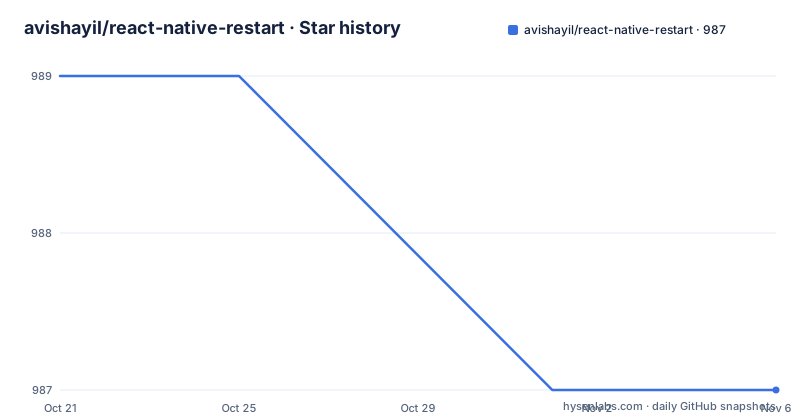
Star history
- avishayil/react-native-restart987 ★ · -2
| Repository | 2026-10-21 | 2026-11-06 |
|---|---|---|
| avishayil/react-native-restart | 989 | 987 |
-2 Stars in the last 16 days, measured from the daily GitHub snapshot. Compare with other projects
Editorial analysis
The restart means two different things depending on the platform
react-native-restart is a React Native package whose single purpose is to restart the app, and the mechanism table is the part that has to be understood before you use it.
| Platform | Restart mechanism | Old Arch | New Arch | | --- | --- |:---: |:---: | | iOS | Reloads the JS bundle (`RCTTriggerReloadCommandListeners`) | yes | yes | | Android | Full process restart (`ProcessPhoenix`) | yes | yes | | Windows | Reloads the instance (`ReactNativeHost.ReloadInstance`) | yes | yes |
On iOS and Windows the JavaScript bundle is reloaded in process, and the named API calls show exactly which mechanism is used: RCTTriggerReloadCommandListeners on iOS and ReactNativeHost.ReloadInstance on Windows. On Android the whole process is restarted, so native state and the JS runtime are both reinitialised.
That difference is not a footnote. On Android a restart is a heavier operation than on iOS, and it happens through ProcessPhoenix. If your app holds native state you want to survive, Android will not keep it, because the whole process is restarted.
The README also states that both the new architecture, TurboModule and Fabric, and the legacy architecture are supported on every platform, so the module is not tied to one generation of React Native.
The package is MIT licensed, the current version is 0.0.29 published on 2026-08-15, and the last push to the master branch was on 2026-08-23.
Installing it, and matching the version to your React Native
The install is a normal package add, with a yarn alternative:
npm install react-native-restart
# or
yarn add react-native-restart
The part that needs care is the version table, because this package is versioned against React Native releases rather than independently.
| React Native | Install | | --- | --- | | `>= 0.85` | `react-native-restart@latest` | | `0.72 to 0.84` | `[email protected]` | | `0.62 to 0.71` | `[email protected]` | | `< 0.62` | `[email protected]` |
So a project on React Native 0.80 wants 0.0.28, and a project on 0.70 wants 0.0.24, and only a project on 0.85 or newer should take the latest tag. This is the sort of table that only exists because native modules compile against the React Native headers of a particular release, and taking the wrong one produces a build failure rather than a runtime bug.
The requirements for the current line are listed too. For React Native 0.85 and above: React 19.2 or newer, Node 20.19 or 22.13 or 24.3, iOS 15.1 with Xcode 16.1, Android API 24 with SDK 36, Java 17 and Gradle 9.3, and for Windows react-native-windows 0.84 or newer as an optional peer dependency.
Linking is handled by autolinking for React Native 0.60 and above. On iOS you run `cd ios && pod install`, on Android there are no extra steps, and on Windows you run `npx react-native autolink-windows`, which the README says runs automatically as part of run-windows.
One call, and a reason that survives the restart
The API is three methods, and the third one is the interesting one.
import RNRestart from 'react-native-restart';

// Restart the app (reloads the JS bundle; full process restart on Android)
RNRestart.restart();

// Optionally attach a reason, then read it back after the restart
RNRestart.restart('language-change');
const reason = await RNRestart.getReason(); // => 'language-change'
The table of methods gives the exact signatures: restart(reason?: string): void is the preferred entry point, getReason(): Promise<string | null> returns the reason passed to the last restart or null, and there is a deprecated Restart(reason?: string): void alias kept for backward compatibility.
The reason is the feature that turns this from a trick into a mechanism. A restart destroys the JS runtime, so anything the app wanted to remember across the restart has to be carried through the native layer. Passing a short string and reading it back on the next launch gives the app a one-shot channel across the restart, and the README states that the optional restart reason survives the restart and is returned by getReason() on the next launch.
That is what makes the locale use case work. You set the reason to language-change, restart, and on the next launch the app reads the reason, knows the direction setting changed, and re-applies it. The same channel can carry a sign out signal, so the app knows to clear the session on the other side of the restart.
The white flash, and the native fix for it
There is a known visual artefact and the README gives both the cause and the fix, which is more than most packages do.
Because restart() tears down the view hierarchy and remounts the app, there is a brief gap before the new instance renders, and on iOS this can look like a white flash.
The fix is to set the root view's background color natively in AppDelegate:
- (UIView *)createRootViewWithBridge:(RCTBridge *)bridge
                          moduleName:(NSString *)moduleName
                           initProps:(NSDictionary *)initProps {
  UIView *rootView = [super createRootViewWithBridge:bridge moduleName:moduleName initProps:initProps];
  rootView.backgroundColor = [UIColor blackColor]; // your app's background color
  return rootView;
}
The idea is straightforward. The gap is not a loading state, it is a moment with no view at all, so whatever the window behind it shows is what the user sees. Setting the root view's background to your app's own colour means the gap is invisible because the flash matches the app.
A full splash screen for the duration of the restart needs additional app-side native code, a native launch screen shown on app launch, and the README points at issue 238 for that.
That distinction is the point. The white flash is a two-line native override. The full splash is a feature you build. Deciding which one you need is part of integrating this package, and the README is explicit that the second is not something the library provides.
A thin bridge with a native cost on every platform
The Architecture section describes the shape of the code, and it is the reason the release table exists.
A thin JS bridge, src/index.tsx plus the TurboModule spec src/NativeRNRestart.ts, over native RNRestart modules on iOS in ios/, Android in android/ and Windows in windows/. And then the sentence that tells you what a contribution costs: any public-API change must be made across the JS layer and every native platform together.
Three native implementations for a package whose whole surface is two methods is the trade you accept when you want a cross platform restart with the same semantics. A JavaScript only implementation could not do it, because reloading the bundle and restarting the process are native operations, and on Android the process restart is a feature of ProcessPhoenix rather than of the React Native bridge.
The repository shows the supporting infrastructure. There is a.maestro/ directory for end to end tests, an Example/ application with its own iOS and Android projects and a Jest config, a react-native-restart.podspec, a NuGet.config for the Windows side, and a badges/ directory that the test script writes coverage badges into. The build uses bob, and the release is driven by release-it with dotenv loading the environment, where the.env.example holds a single GITHUB_TOKEN.
The test story is documented separately. The library is tested across JS, native iOS, native Android and end to end with Maestro, with each layer exercising the full restart and refresh flow, and TESTING.md says exactly what runs where. The Credits section thanks the Microsoft CodePush library for the original bundle reload logic, which is a nice piece of history for a package that looks like it does something new.
Editorial conclusion
Adopt react-native-restart when your app has to apply a change that only a fresh runtime can pick up, such as an RTL or LTR locale switch, and you want the reset to happen without asking the user to kill and reopen the app. Do not adopt it as a development reload, because the Metro dev server already does that, and remember the platform difference, since Android does a full process restart while iOS and Windows reload the bundle in process. Before you install, match the package version to your React Native version using the table in the README, since the package ships separate versions for the 0.85 line, the 0.72 to 0.84 line, the 0.62 to 0.71 line and anything older.
Frequently asked questions
What does react-native-restart actually do on each platform?
On iOS it reloads the JS bundle using RCTTriggerReloadCommandListeners, and on Windows it reloads the instance with ReactNativeHost.ReloadInstance, both in process. On Android it performs a full process restart using ProcessPhoenix, so native state and the JS runtime are both reinitialised. Both the new architecture and the legacy architecture are supported.
Which version of react-native-restart should I install?
Match it to your React Native version. For React Native 0.85 or newer use react-native-restart@latest, for 0.72 to 0.84 use 0.0.28, for 0.62 to 0.71 use 0.0.24, and for anything below 0.62 use 0.0.17. The current line needs React 19.2, Node 20.19 or newer, iOS 15.1 with Xcode 16.1, and Android API 24 with Java 17 and Gradle 9.3.
How do I pass a message across a restart with react-native-restart?
Call RNRestart.restart('language-change') and then read it back with await RNRestart.getReason(), which returns the reason passed to the last restart or null. The README states the optional restart reason survives the restart and is returned on the next launch.
How do I avoid the white flash when the app restarts?
The flash happens because restart tears down the view hierarchy and remounts, leaving a brief gap with no view. The README recommends setting the root view's background color natively in AppDelegate, overriding createRootViewWithBridge and assigning rootView.backgroundColor. A full splash screen for the duration of the restart needs additional app-side native code.
Official sources
Add this badge to your README
If you maintain this project, the badge below links readers to this analysis and shows its maintenance status from the daily GitHub snapshot. Paste the markdown into your README; add ?metric=license or ?metric=stars to the image URL for a different field.

[](https://hysenlabs.com/projects/avishayil-react-native-restart)Star history chart for your README
[](https://hysenlabs.com/projects/avishayil-react-native-restart)Was this useful?