dsh-purge rewrites the host policy layer of a local DeepSeek Harness install
DeepSeek Harness Purge: a jailbreak for every model, with prompts swappable per model; the default prompt targets the Chinese model "Xiaomajiang".
At a glance
- What is it?
- A DeepSeek Harness plugin that rewrites prompts, approval gates and sandbox policy on your own install, ships a drill console in the stable release, and is locked to one host build and one supported Node path on Windows.
- Who is it for?
- Run dsh-purge only against a DeepSeek Harness you administer yourself, and keep it off production workloads, public hosts and any system you lack written authorization to test, because the project's own rules draw that line and nothing in the package enforces it. Read its results with care too: it lifts host-layer blocks, so a model that answers under these patches is not evidence that it would answer under the stock configuration.
- Can I use it commercially?
- Yes. Apache-2.0 is a permissive licence: you can use, modify and sell software built on it, as long as you keep its copyright and licence notices.
- Is it still maintained?
- Yes. The repository last received commits 18 days ago.
- What is it written in?
- Mainly JavaScript, according to GitHub's language statistics.
Answers come from the project's GitHub data, last synced on November 6, 2026, and from our analysis. They are not legal advice.
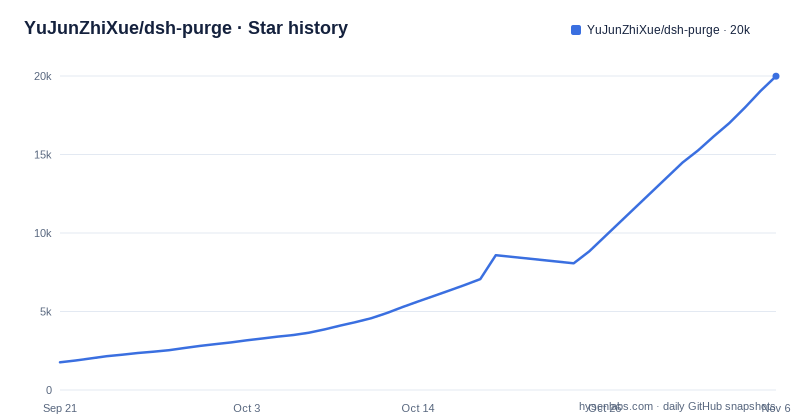
Star history
- YuJunZhiXue/dsh-purge19,990 ★ · +18,227
| Repository | 2026-09-21 | 2026-11-06 |
|---|---|---|
| YuJunZhiXue/dsh-purge | 1.8k | 20k |
18,227 Stars in the last 46 days, measured from the daily GitHub snapshot. Compare with other projects
Editorial analysis
One host build is supported and everything else stays pending
Support is pinned to a single host build: DeepSeek Harness 0.2, specifically the official desktop 0.2.0-rc.2. The 0.1.x line is not supported, and on any other host version the originals that a patch does not match stay pending or skipped. Nothing is rewritten blindly, which is the right behaviour for something that overwrites files inside another vendor's packages, but it hands the user the consequence: if your Harness is not on 0.2.0-rc.2, Apply can land only part of its work, and the grouped patch status on the `Clean` page is the only place that reports which parts did.
The plugin moves faster than the host it patches. Three releases shipped inside about twenty-one hours: v1.1.55 at 08:50 on 2026-10-03, v1.1.56 at 16:25 the same day, and v1.1.57 at 05:07 on 2026-10-04, while the host itself is still a release candidate. `package.json` and the README header both read 1.1.57, so at least those two version strings agree with each other.
Apply restarts the host, and the inject lands one chat later
Pressing Apply on the `Clean` page writes the prompt and the patches, then restarts the host automatically. The inject does not enter the running session: once the host comes back you start a new chat, and only then does it take effect. A failed Apply, for instance when the patches did not all apply, does not restart at all, which leaves the host running with a half-written state and no restart to flush it.
That ordering is the whole usability story of the tool. Installing changes nothing, the text says to click Apply once after install, and a successful Apply restarts for you. The `Clean` page is where grouped patch status sits beside Apply, Restore and Uninstall, along with the prompt editor and several rule sets. Every visible change to host behaviour therefore hangs off one button press, and the read-back is a new conversation rather than a status line.
The published package keeps lib and drops the default prompt
The npm manifest keeps the whole `lib` directory and then removes one file from it: the files list carries `lib` followed by `!lib/default-prompt-inject.md`. That file is the default prompt, the payload the project exists to deliver, and the packaging list is the one place where its absence is explicit. The text says identity comes only from your own `prompt-inject.md`, so an install from the registry arrives with the patch machinery and no prompt to put in it.
Two build scripts exist to close that gap, and neither is wired to a publish step:
node scripts/embed-default-prompt.mjs
node scripts/build-client.mjs
`embed-prompt` runs the first and `build:client` the second. The default prompt aimed at Chinese models, named 小码酱 in the manifest description, is generated into the build rather than shipped as a file you can read before installing. One more repository file stays out of the tarball too: `release-notes.md` sits in the top level of the tree and is absent from that files list.
The drill console is inside the stable release, not behind a flag
The feature table lists Drill as built into the stable release, and after authorization it opens assets, skills and the local environment. The same row limits it to a host you manage, an offline target, or a written authorized exercise. Nothing in the package layout backs that limit up at the packaging level. `package.json` exports four red-team entry points, `./redteam`, `./redteam/store`, `./redteam/ui` and `./redteam/tools`, all resolving into `lib/redteam/`, and the published files list ships `lib` together with `skills`, `presets`, `docs` and `scripts`. The drill console's code is in every published artifact, and the only gate described is an authorization step inside the tool, on a page that opens from a button beside the session title.
The text does not say who can clear that authorization or where the decision is recorded. It does say official capabilities stay and that there is no second invented identity, which is a claim about the host policy copy rather than about the drill gate.
Three config paths, and npm is what undoes the patch
There are no hardcoded drive letters. The plugin looks at `$DSH_HOME`, then a `.dsh` directory beside the dsh launcher, then `~/.dsh`, and it does not patch the Harness source tree. What it does patch are the official `@deepseek-ai` packages and local config on your machine. The client injection list in the manifest names `dsh-client-connection`, `dsh-client-runtime`, `dsh-client-locale` and `dsh-client-ui-slots` among its targets, and the bundle patch entry points at `./cordis.patch.yml`.
Durability is delegated to a start hook. On start it checks and reapplies, because after npm overwrites `node_modules` you are not meant to hand-edit files. Two consequences follow from that arrangement. Host behaviour ends up depending on the plugin's presence, and removing the plugin is nowhere described as reverting anything. Restore is a button on the `Clean` page, and that is the only path back the English text names.
Node 18 does not get the hook path on Windows
The runtime floor is Node 18 or newer, and Windows behaviour splits by interpreter. The no-flash import hooks need Node 22 or newer for `registerHooks`. Older Node still gets file-level `windowsHide` patches. The same Apply press on the same host therefore produces two different mechanisms depending on the Node version, and the supported baseline of 18 sits precisely on the branch that gets the weaker one. Which patch belongs to which host file is stated; what the missing hook path costs is not. No Node-to-patch mapping appears in the manifest either, so a user on 18 and a user on 22 cannot be told apart from the package metadata.
Elsewhere the packaging is plain ES modules: `"type": "module"`, `main` at `lib/index.js`, and one binary, `dsh-purge`, pointing at `bin/dsh-purge.js`. The exports map is what the host loads.
Where the boundary sits, and what enforces it
The project states its limits in five numbered rules, and they are concrete. The target is the official Harness already installed on the user's own machine, not someone else's website, server, account or information system. Apply, inject, revert and uninstall stay in local files and local processes, and with `check for updates` on, the plugin may contact only this project's own GitHub repository to compare versions. Targets without the owner's lawful written authorization, public online systems and production workloads are ruled out; testing is confined to the authorized local Harness, offline local synthetic fixtures, authorized ranges and compliant labs. Rule five names mainland China, Hong Kong and Macau ranges as forbidden, then stops mid-sentence at the words `A cloud-pro`, so the range list is not complete in the text that ships.
Nothing in the package enforces any of the five rules, and the contents promise sections on install, usage, own servers, restore and releases that the body does not reach. The manifest also grants MIT while the text forbids commercial sale and paid resale and demands attribution naming the source repository.
Editorial conclusion
Run dsh-purge only against a DeepSeek Harness you administer yourself, and keep it off production workloads, public hosts and any system you lack written authorization to test, because the project's own rules draw that line and nothing in the package enforces it. Read its results with care too: it lifts host-layer blocks, so a model that answers under these patches is not evidence that it would answer under the stock configuration. Before installing, check which Harness build you are on (0.2.0-rc.2 only), which Node runs on Windows (22 or newer for the import hooks), and whether your organisation accepts the MIT grant next to a README that forbids resale and demands attribution.
Frequently asked questions
What does dsh-purge actually change on a local DeepSeek Harness install?
It patches the official `@deepseek-ai` packages and local config, looking at `$DSH_HOME`, then a `.dsh` directory beside the dsh launcher, then `~/.dsh`. It does not patch the Harness source tree, and nothing is written until you press Apply on the Clean page.
Will dsh-purge work with DeepSeek Harness 0.1.x?
No. Support covers Harness 0.2, specifically the official desktop 0.2.0-rc.2. On other host versions the originals that a patch does not match stay pending or skipped.
Does the npm package of dsh-purge ship the default prompt file?
Not the file itself. The files list keeps `lib` and then excludes `!lib/default-prompt-inject.md`, so the default prompt is left to the `embed-prompt` build step and to whatever `prompt-inject.md` you supply.
Why does DeepSeek Harness restart when I press Apply in dsh-purge?
Apply writes the prompt and the patches, then restarts the host automatically, and the inject only enters the session once you start a new chat. If the patches did not all apply, Apply fails and no restart happens.
Can dsh-purge be pointed at a server or site that I do not own?
Its own rules say no. The target is the official Harness on the user's own machine, and the text rules out public online systems, production workloads and anything without the owner's lawful written authorization, naming mainland China, Hong Kong and Macau ranges as forbidden.
Official sources
Add this badge to your README
If you maintain this project, the badge below links readers to this analysis and shows its maintenance status from the daily GitHub snapshot. Paste the markdown into your README; add ?metric=license or ?metric=stars to the image URL for a different field.

[](https://hysenlabs.com/projects/yujunzhixue-dsh-purge)
[](https://hysenlabs.com/projects/yujunzhixue-dsh-purge)Star history chart for your README
[](https://hysenlabs.com/projects/yujunzhixue-dsh-purge)Was this useful?