diagram-as-code renders AWS diagrams from YAML without a browser
Diagram-as-code for AWS architecture.
At a glance
- What is it?
- A Go CLI that turns YAML into AWS architecture diagrams by drawing them itself, so there is no headless browser in CI. It also reads CloudFormation templates, exports them back to diagram YAML, and ships as a Go library and an MCP server.
- Who is it for?
- Adopt diagram-as-code if your AWS diagrams need to live in git next to your infrastructure code, because the output is a PNG produced by the binary itself with no browser dependency, which is what makes it usable in a CI pipeline. Do not adopt it expecting multi-cloud coverage out of the box: the AWS icon set is what it ships with, and non-AWS diagrams require writing your own definition files.
- Can I use it commercially?
- Yes. Apache-2.0 is a permissive licence: you can use, modify and sell software built on it, as long as you keep its copyright and licence notices.
- Is it still maintained?
- Yes. The repository last received commits 4 days ago.
- What is it written in?
- Mainly Go, according to GitHub's language statistics.
Answers come from the project's GitHub data, last synced on November 7, 2026, and from our analysis. They are not legal advice.
Star history
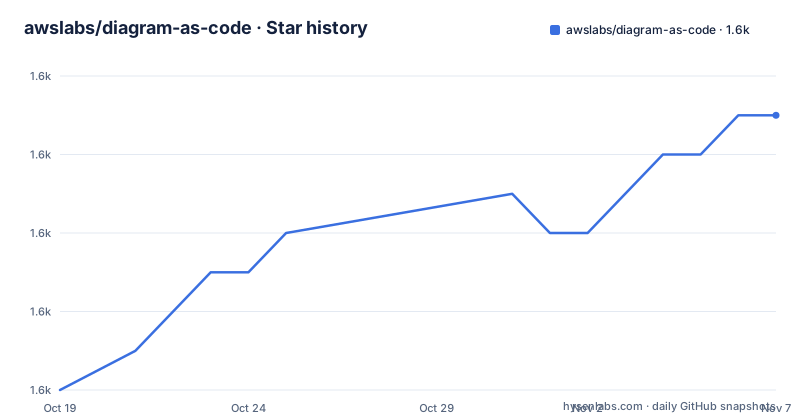
- awslabs/diagram-as-code1,595 ★ · +7
| Repository | 2026-10-19 | 2026-11-07 |
|---|---|---|
| awslabs/diagram-as-code | 1.6k | 1.6k |
7 Stars in the last 19 days, measured from the daily GitHub snapshot. Compare with other projects
Editorial analysis
Drawing its own vectors is the architectural decision
Most diagram-as-code tools render through a browser: write HTML or SVG, then screenshot it with a headless Chrome. That is why they need a browser binary in CI and why they break when a font renders differently.
This tool takes the other approach. The README states that the CLI facilitates diagram-as-code without relying on image libraries, and lists being lightweight and CI/CD friendly with no dependency on a headless browser or GUI as a feature.
The repository layout confirms it. internal/vector/ handles vector operations and internal/font/ handles font management, with github.com/golang/freetype in the dependency list for text rendering.
The cost of that choice is that the icon set has to be defined as data rather than imported from SVG artwork. That is what the definitions/ directory and the --override-def-file flag are for.
The definition files are the extension point
The extensibility claim in the feature list is phrased as adding definition files to create non-AWS diagrams, and that is the mechanism to understand first if you are evaluating the tool for anything other than plain AWS.
A definition file describes the resources and icons available to the YAML. The CLI has a flag to override them, and its help text says plainly that it is for testing purposes and takes a URL or a local file. So the intended production path is to depend on the bundled definitions, and the override exists so you can iterate on one without replacing the whole set.
That makes the composition model a little unusual compared with tools where you import an SVG by path. Here you get a fixed catalogue plus the ability to supply your own, and the catalogue is where the AWS architecture icon guidelines compliance comes from, since the README ties that feature to the AWS icons page.
Anyone extending this for a second cloud needs to supply both the resource types and the artwork, which is more work than adding an SVG import would be.
One flag draws, one flag converts, both are beta
The CLI usage block is short and the two CloudFormation flags are marked beta in the help text itself.
awsdac examples/alb-ec2.yaml
awsdac privatelink.yaml -o custom-output.png
The default output name is output.png and -o sets it. -v enables verbose logging, --version prints the version, and -h prints help.
The interesting pair is -c and -d. -d, --dac-file, generates a YAML file in diagram-as-code format from a CloudFormation template. -c, --cfn-template, creates a diagram from a CloudFormation template. Read in that order, -d is the intermediate representation and -c is the rendered result.
That two-step path is more useful than it first appears: it means you can convert a template into YAML, review and edit the layout by hand, and then render. A template alone carries no layout information, so the diagram you get from -c alone is a first draft.
-t, --template, is separate from all of this and processes the input file as a text/template, so the YAML can be generated from Go template syntax before it is drawn.
Layout features exist because hand-placed diagrams rot
The documentation list is where the real feature set lives, and several entries address the same problem: a diagram that was readable once, then drifted as resources were added.
Automatic positioning adjusts the position and size of groups, which is what the top-level feature list calls flexible. UnorderedChildren handles automatic child reordering for optimal layouts. Auto-positioning covers smart link positioning, and link grouping offset is documented as preventing link overlap.
That last one is the feature that separates a diagram people read from a diagram they squint at. An offset that pushes parallel links apart can make diagrams easier to read.
BorderChildren places resources on borders, which is how you draw a resource that straddles a boundary, such as a gateway attached to the edge of a VPC. Between those four and the templates feature, the tool is explicitly trying to keep diagrams maintainable rather than merely renderable.
Two binaries, one of them an MCP server
The project structure section lists the CLI tools under cmd/ as awsdac and awsdac-mcp-server. The second one is what the MCP Server documentation page covers.
An MCP server for diagram generation means an assistant can produce or revise a diagram from a described architecture, which is a different workflow from a human editing YAML. The dependency list supports that reading: github.com/mark3labs/mcp-go is a direct dependency, and the indirect set includes uuid, terminfo and uritemplate, which are typical of an MCP server rather than of an image renderer.
The remaining internal packages describe the pipeline. cache/ handles caching of definition files, which matters because the definition set is fetched or overridden from a URL. definition/ handles definition file handling. ctl/ holds core control logic and types/ holds the core types, while internal/ generally is the implementation.
cmd/ and test/ at the top level, with integration tests under test/ and development helpers under tools/, is a conventional Go layout with no unusual build machinery.
Integration with CloudFormation comes from a real library
go.mod includes github.com/aws-cloudformation/rain v1.8.6 as a direct dependency.
The rest of the dependency set is small and unremarkable for this kind of tool. cobra and pflag for the CLI, logrus for logging, gopkg.in/yaml.v3 for parsing, golang.org/x/net and golang.org/x/image for the network and imaging parts, and golang.org/x/exp for experimental standard library pieces.
One thing to check before you build against it: go.mod declares go 1.25.0, while the README's getting-started section still says go 1.21 or higher for the go install path. The module directive is the binding constraint for a modern toolchain, and the documentation and the manifest disagree about it.
The module is github.com/awslabs/diagram-as-code, so importing it as a library is a normal Go dependency, and the feature list explicitly positions that use case, naming integration with other IaC tools, AI, or drawing GUI tools.
Examples, not a getting started tutorial
The examples directory is the fastest way to understand the YAML format, and it is worth reading before the introduction guide because it shows the shape rather than explaining it.
Each example pairs a YAML file with a rendered PNG, which makes them diffable: alb-ec2.yaml next to alb-ec2.png, privatelink.yaml next to privatelink.png, multi-region, span-resources, expand-align, tgw-nwfw-tmpl and vpc-natgw. There is also vpc-subnet-ec2-cfn.yaml with its PNG, which is the CloudFormation conversion example, and an examples/README.md explaining the set.
Having the expected output committed next to the source is what makes the tool reviewable. A change to the renderer that alters a diagram shows up as a different PNG in a pull request, which is a far better review signal than a description of the change.
For a broader picture the README points to the Introduction Guide, described as a ten minute quick start with core concepts, and separately to a troubleshooting page for common issues.
Releases, licence and what awslabs means for support
The repository is not archived and the last push was on 2026-09-16. Recent tags are v0.24 on 2026-08-26, v0.23 on 2026-04-08 and v0.22.4 on 2025-11-27.
Two observations. The recent tags use a zero major version, so users should check release details before upgrading.
The licence is Apache-2.0, stated in the README and in the LICENSE and NOTICE files at the root. For a tool whose output is documentation images and whose input is YAML you already own, that is a straightforward grant with a patent clause.
There is a CODE_OF_CONDUCT.md, a CONTRIBUTING.md with its own security issue notification section, and scripts/ at the root for development automation.
Editorial conclusion
Adopt diagram-as-code if your AWS diagrams need to live in git next to your infrastructure code, because the output is a PNG produced by the binary itself with no browser dependency, which is what makes it usable in a CI pipeline. Do not adopt it expecting multi-cloud coverage out of the box: the AWS icon set is what it ships with, and non-AWS diagrams require writing your own definition files. Verify first that the CloudFormation path is acceptable for you, since both -c and -d are labelled beta in the CLI help, and check the Go floor, which go.mod sets at 1.25.0 even though the README still says Go 1.21 or higher.
Frequently asked questions
Does diagram-as-code need a headless browser in CI?
No. The README states the CLI works without relying on image libraries and lists being lightweight and CI/CD friendly with no dependency on a headless browser or GUI as a feature. The repository has internal/vector/ and internal/font/ packages for drawing and text.
Can diagram-as-code read a CloudFormation template?
Yes, through the -c or --cfn-template flag, which is marked beta in the help text. There is also -d or --dac-file, which generates the YAML in diagram-as-code format from a template so you can edit the layout before rendering.
Can I use diagram-as-code for non-AWS diagrams?
The feature list says you can add definition files to create non-AWS diagrams as well. The CLI has an --override-def-file flag, described as for testing purposes, that takes a URL or a local file.
How do I install diagram-as-code?
On Go 1.21 or higher, go install github.com/awslabs/diagram-as-code/cmd/awsdac@latest. On macOS, brew install awsdac. Note that go.mod declares go 1.25.0, which is a higher floor than the README states.
Official sources
Add this badge to your README
If you maintain this project, the badge below links readers to this analysis and shows its maintenance status from the daily GitHub snapshot. Paste the markdown into your README; add ?metric=license or ?metric=stars to the image URL for a different field.

[](https://hysenlabs.com/projects/awslabs-diagram-as-code)Star history chart for your README
[](https://hysenlabs.com/projects/awslabs-diagram-as-code)Was this useful?