Intlayer: A Per-Component i18n Approach With AI Translation and a Visual Editor
Per-component Internationalisation solution for JS application. Type-Safe. Translate with AI. Edit Visually.
At a glance
- What is it?
- Intlayer is a TypeScript-based internationalization library that pairs per-locale content files with a compiler, AI translation, and a visual editor. It targets developers who want type-safe dictionaries and a CMS workflow, but its tooling overhead and framework integrations deserve scrutiny.
- Who is it for?
- Adopt Intlayer if you manage a JavaScript or TypeScript app with multiple locales and want to move translation work into a CMS-like workflow with AI assistance. Its per-locale content files and compiler fit teams that can tolerate a build step and a learning curve.
- Can I use it commercially?
- Yes. Apache-2.0 is a permissive licence: you can use, modify and sell software built on it, as long as you keep its copyright and licence notices.
- Is it still maintained?
- Yes. The repository last received commits 10 days ago.
- What is it written in?
- Mainly TypeScript, according to GitHub's language statistics.
Answers come from the project's GitHub data, last synced on October 21, 2026, and from our analysis. They are not legal advice.
Star history
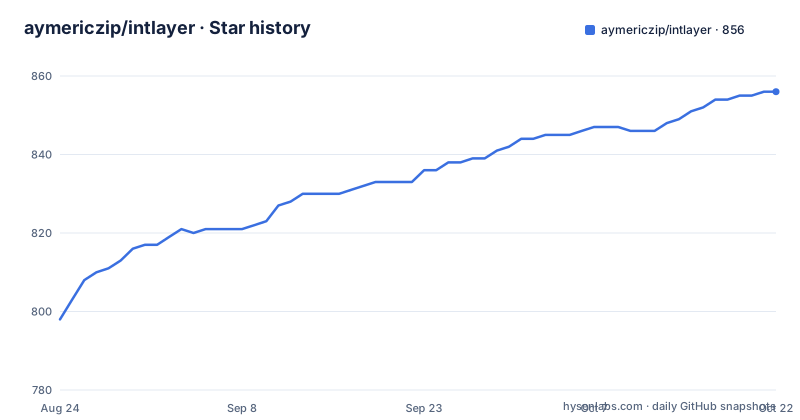
- aymericzip/intlayer856 ★ · +58
| Repository | 2026-08-24 | 2026-10-21 |
|---|---|---|
| aymericzip/intlayer | 798 | 856 |
58 Stars in the last 58 days, measured from the daily GitHub snapshot. Compare with other projects
Editorial analysis
The Problem Intlayer Solves
Traditional i18n libraries force you to call a translation function like t('key') for every string, which scatters content across your components and makes it hard to see the full picture. Intlayer addresses this by letting you declare content once in per-locale files, then retrieve it with a single hook. The README positions it as a modern solution for web and mobile apps, specifically for teams that find existing libraries either too complex or too rigid. It is built for developers who want type safety and autocompletion in their dictionaries, and who are willing to adopt a compiler and a visual editor to get those benefits. The target user is a JavaScript or TypeScript developer working in a framework like Next.js, React, Vite, Vue, or Express, where content management and translation workflows are part of the application itself.
Core Mechanism: Per-Locale Files and a Compiler
Intlayer's architecture centers on per-locale content declaration files. You define your content in JavaScript or TypeScript, one file per locale, and the Intlayer compiler extracts content from your components and generates dictionary files. This is a different model from runtime key-value lookups. The compiler runs as part of your build, scanning your code for content declarations and producing a structured dictionary that the runtime consumes. The README emphasizes that you can declare content once, before auto generation, which speeds up development. The compiler also enables tree-shakable dictionaries, meaning only the content actually used by a component is included in the final bundle. That is a concrete performance benefit, but it depends on the compiler correctly identifying all content usages. If your content is dynamic or constructed at runtime, the compiler may miss it, which is a limitation worth testing.
Type Safety and Autocompletion as a Differentiator
Most i18n libraries give you a plain object with string values, and typos in keys fail silently. Intlayer claims to leverage TypeScript to ensure content definitions and code are error-free, with IDE autocompletion. The per-locale files are typed, so when you reference a content key in a component, the type checker validates that the key exists and that the shape matches. This is a genuine advantage over untyped approaches like react-i18next, where you often need custom type augmentation to get similar safety. The README points to a TypeScript configuration guide for Vite and React, indicating that setup requires a specific tsconfig adjustment. That setup cost is real, but it pays off in large codebases where a mistyped key could otherwise break a production build. However, the type safety only extends to content declared in the files; if you use the visual editor to modify content outside those files, you need to verify whether the type definitions stay in sync.
Getting Started: Commands and Configuration
The README does not include a quick-start command block, but it links to dedicated environment guides for Next.js and React with Vite. Based on the repository layout and the npm package name, you would install the intlayer package and its framework-specific adapter, such as intlayer for core and react-intlayer for React. The documentation mentions configuring TypeScript, internationalization routing, and AI settings. A typical setup would involve creating a intlayer.config.ts file to specify locales and dictionary output paths, then running a compiler command like intlayer build to generate dictionaries. The README's mention of CI/CD integration suggests you can run the compiler in a pipeline, which is useful for ensuring dictionaries are up to date. Without a concrete command list in the README, you should consult the environment-specific docs to get exact commands. The absence of a one-liner install in the README is a minor friction point, but the documented integration paths are explicit.
Visual Editor and CMS: The Double-Edged Sword
Intlayer includes a free CMS and visual editor, which is a rare feature for an open-source i18n library. The editor lets non-developers edit translations directly in a visual interface, which can reduce the bottleneck of developers handling every string change. The README calls it a multilingual CMS, implying that you can manage content across locales in one place. This is appealing for product teams, but it introduces a new dependency: the editor needs to be served or embedded, and it must communicate with your content store. The trade-off is that you now have two sources of truth: your per-locale files and the CMS database. If the editor writes back to the files, that's fine, but if it stores overrides separately, you need to manage reconciliation. The README does not clarify this data flow, so you should test it before committing. For a small team, the editor might be overkill, but for a product with frequent copy changes, it could justify the setup cost.
AI Translation: Convenience With Caveats
The README lists AI-powered translation as a key benefit, and the tagline says 'Translate with AI.' This likely means you can send source content to an AI service to generate translations for other locales, rather than doing it manually. The documentation mentions adjusting AI settings in the configuration, so you probably need to provide an API key for a translation provider. The convenience is obvious: you can bootstrap a new locale in minutes. But the caveat is that AI translations are not always accurate, especially for idiomatic expressions or domain-specific terminology. You would still need a human review step. Also, sending your content to an external AI service raises data privacy concerns, which the README does not address. If your application handles sensitive user data, you need to verify what is sent and where it is stored. The AI feature is a differentiator, but it is not a replacement for professional translation review.
Framework Support and the Cost of Abstraction
Intlayer claims compatibility with Next.js, React, Vite, Vue, Nuxt, Preact, Express, and more. That breadth is attractive, but it also suggests a layer of abstraction that could introduce bugs or performance overhead. The README mentions a simplified content retrieval method where you get all content for a component with a single hook, instead of calling a t function repeatedly. That hook likely uses React context or a similar mechanism, which means you need to wrap your app in a provider. The framework-specific guides imply that each integration has its own nuances, such as routing for Next.js. The cost is that you are tied to Intlayer's API and its release cycle. If a new framework version breaks the adapter, you depend on the maintainers to fix it. The repository shows active development with recent releases, but that is not a guarantee of long-term maintenance. You should evaluate whether the abstraction saves enough time to justify the dependency.
Limitations and When Not to Use It
Intlayer is not the right tool for every project. If you have a simple static site with two locales and a handful of strings, the compiler and CMS are overkill. The per-locale file model forces you to think about content structure upfront, which may slow down prototyping. If your content is already managed in a separate headless CMS, integrating Intlayer would create a parallel system, and you would need to decide which one is authoritative. Another limitation is the reliance on a build step. The compiler must run before your app bundles, so your deployment pipeline needs to include that step. If you use a serverless platform with limited build time, that could be a constraint. Also, the README does not mention how it handles runtime locale switching, which is a common requirement. If you need to change languages without a full page reload, verify that the hook and provider support that. For a high-traffic production app, test the runtime performance of the generated dictionaries, as tree-shaking only helps if the compiler is accurate.
Alternatives and the Real Difference
The most direct alternative is react-i18next, which uses a runtime translation function and a JSON resource file. The difference in approach is fundamental: react-i18next resolves keys at runtime, so you have no compiler and no type safety out of the box. You can add TypeScript type augmentation to get key checking, but it is a manual effort. Intlayer moves the work to build time, generating typed dictionaries that the compiler validates. Another alternative is FormatJS, which also uses a runtime message catalog and focuses on ICU message syntax. FormatJS gives you a standardized message format that works across many frameworks, but it does not include a visual editor or AI translation. Intlayer's value is the integrated tooling: you get type safety, a compiler, a CMS, and AI in one package. The trade-off is that you adopt a more opinionated workflow. If you prefer to piece together your own stack, react-i18next with a separate CMS like Lokalise gives you more control but more integration work.
Editorial conclusion
Adopt Intlayer if you manage a JavaScript or TypeScript app with multiple locales and want to move translation work into a CMS-like workflow with AI assistance. Its per-locale content files and compiler fit teams that can tolerate a build step and a learning curve. Skip it if you need a minimal runtime-only solution or if your content is already centralized in a headless CMS; the tooling overhead will outweigh the benefits. Before adopting, verify that your framework's integration guide covers your exact setup, test the compiler's extraction on a non-trivial component, and confirm that the AI translation service meets your privacy and cost requirements. The Apache-2.0 license is permissive, but check the dependency tree for any copyleft surprises.
Frequently asked questions
How does intlayer compare with i18next?
The repository ships six compatibility example apps, one per competing library: next-i18next, next-intl, ngx-translate, nuxtjs-i18n, svelte-i18n and vue-i18n. The visible page does not restate a feature-by-feature comparison.
What is intlayer?
A per-component internationalisation solution for JavaScript applications, framework-agnostic, with per-locale content declaration files, a compiler that extracts content into dictionary files, TypeScript typing, and a visual editor and CMS described as free.
Does intlayer need a translation call for every string?
No. The documented approach retrieves a component's content through a single hook rather than calling a translation function per string, and the dictionaries are described as tree-shakable.
How is the intlayer repository laid out?
A workspace monorepo rooted at package.json covering docs, apps, packages, utils, examples, plugins and a compat layer, built with Turborepo and locked with Bun. A root src/ directory exists but is not listed as a workspace.
How are intlayer versions released?
Two tag series run in parallel: v9.6.0 for the packages and vscode-extension-v9.6.0 for the editor extension. Three tags appeared on 2026-09-30, and the root manifest sits at 9.6.0.
What license is intlayer under?
Apache-2.0, with the LICENSE file at the repository root and the same identifier declared in the root manifest.
Official sources
Add this badge to your README
If you maintain this project, the badge below links readers to this analysis and shows its maintenance status from the daily GitHub snapshot. Paste the markdown into your README; add ?metric=license or ?metric=stars to the image URL for a different field.

[](https://hysenlabs.com/projects/aymericzip-intlayer)Star history chart for your README
[](https://hysenlabs.com/projects/aymericzip-intlayer)