Excali Local: An Offline Excalidraw Extension That Keeps Drawings in Your Browser
a offline excalidraw editor wrapped as chrome extension
At a glance
- What is it?
- Excali Local wraps Excalidraw into a Chrome extension for offline diagramming, screenshot annotation, and local gallery storage. It adds hostless collaboration and agent-driven editing, but you must weigh its browser-bound data model against your workflow.
- Who is it for?
- Adopt Excali Local if you need a no-account, offline Excalidraw workflow with local storage and are comfortable managing your own relay for collaboration. Skip it if you require cross-device sync without manual ZIP exports or if your team cannot run a Cloudflare Worker.
- Can I use it commercially?
- Yes. MIT is a permissive licence: you can use, modify and sell software built on it, as long as you keep its copyright and licence notices.
- Is it still maintained?
- Yes. The repository last received commits 7 days ago.
- What is it written in?
- Mainly TypeScript, according to GitHub's language statistics.
Answers come from the project's GitHub data, last synced on October 21, 2026, and from our analysis. They are not legal advice.
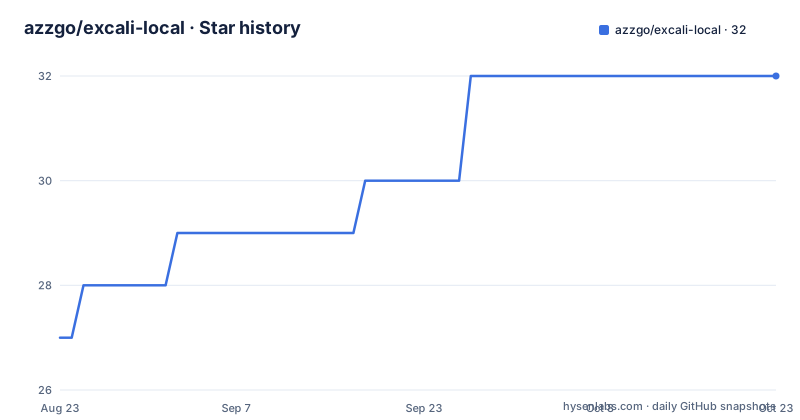
Star history
- azzgo/excali-local32 ★ · +5
| Repository | 2026-08-23 | 2026-10-21 |
|---|---|---|
| azzgo/excali-local | 27 | 32 |
5 Stars in the last 59 days, measured from the daily GitHub snapshot. Compare with other projects
Editorial analysis
What Excali Local Actually Solves
Excali Local addresses a specific gap: Excalidraw's web app works online, but many users want the same editing experience without a network connection or an account. This extension bundles a fully offline fork of Excalidraw 0.18 into a browser extension, so you can annotate screenshots, edit diagrams, and store them locally in IndexedDB. The target user is someone who already uses Excalidraw but needs privacy, portability, or just a tool that works on a plane. It also adds features the online version lacks: a private gallery with collections, ZIP import/export, custom font support, and presentation mode. The key distinction is that every drawing stays in your browser, which means no server-side storage and no uploads by default. That is a real constraint, not a marketing line, because it changes how you back up and share your work.
How the Offline Mechanism Works
The core architecture is a browser extension that loads a local webapp. The README describes a monorepo built with pnpm, and the development commands show separate builds: `pnpm page:dev` runs the editor webapp, `pnpm page:build` builds it, and `pnpm local:build` produces the extension in `.output/chrome-mv3` for unpacked loading. The editor is a fork of Excalidraw 0.18, meaning the full drawing surface runs client-side. Data persistence uses IndexedDB, the browser's local database, which the README explicitly names as the storage layer for every drawing. Screenshot annotation works by capturing a full page or a selected area, then injecting that capture into the editor. Direct `.excalidraw` file opening is handled through a button that appears on recognized files, which then imports the file into the editor. The extension also supports custom fonts by uploading `.ttf`, `.woff`, or `.woff2` files, or using system fonts. Nothing in this flow requires a network connection, which is the central design decision.
Getting It Running: Install and Build Commands
For end users, installation is straightforward: the README links to the Chrome Web Store, Firefox Add-ons, and Edge Add-ons. You install the extension like any other browser add-on, and it appears as a toolbar icon. For developers who want to build from source, the repository provides a pnpm-based workflow. After cloning, run `pnpm install` to install dependencies. Then `pnpm page:dev` starts the editor webapp for development. To produce a production build of the extension, run `pnpm local:build`, which outputs an unpacked extension in `.output/chrome-mv3`. You then load that folder via chrome://extensions in developer mode. There is also `pnpm local:tar` to archive build assets. The README does not mention signing or packaging for the Web Store, so you would need to handle that yourself if you plan to distribute a custom build. The commands are simple enough for a developer with pnpm experience, but a non-technical user should stick to the store installs.
The v1.8.0 Collaboration Feature: Hostless but Not Trivial
The newest feature, introduced in v1.8.0, is realtime collaboration. It is described as hostless and end-to-end-encrypted, but it is not a managed service. You must deploy a relay yourself, with a reference implementation of about 150 lines on Cloudflare Workers. The relay forwards only ciphertext, so Excali Local has no backend of its own. The documentation mentions two room types: team rooms are E2E to your organization, and private rooms are E2E per room. File sync is included. This is a significant departure from the offline-only default, because it introduces a network dependency and a deployment responsibility. The trade-off is clear: you get realtime collaboration without a central account, but you must operate the relay and trust that the E2E implementation is correct. The README points to an ADR (ADR 0003) for the design rationale, which is a good sign for transparency, but it also means you need to read that document before relying on it for sensitive work. For a single user, this feature is irrelevant; for a team, it is the main reason to consider the extension.
Agent-Driven Editing: A Local-Only WebSocket Bridge
Version 1.7.0 added an agent bridge that lets you drive the active canvas from a CLI or an AI agent. The mechanism is a local-only WebSocket daemon called `excali-bridge`, and you enable agent access in the extension. You then install a Skill using the command `npx skills add azzgo/excali-local --skill excali-local -y`. This opens a path for programmatic drawing, which is useful for automation or for AI agents that need to produce diagrams. The README references two projects that were consulted: `smart-excalidraw-next` and `excalidraw-diagram-skill`. This feature is niche; most users will never touch it. But for developers who want to script diagram generation, it is a concrete integration point. The local-only nature keeps the data private, but it also means the bridge only works on the machine where the extension is running. There is no mention of authentication or authorization for the WebSocket, so you should assume it is open to any local process. That is a limitation worth noting before you enable it.
Gallery, Import/Export, and the ZIP Workflow
The gallery is a central component. It stores drawings and collections in IndexedDB, and you can search and manage them. The v1.7.0 release added ZIP import, which lets you bring a previously exported archive back into the gallery, even if it was edited outside the app. This is the only documented way to move drawings between browsers or machines, because there is no cloud sync. The export/import cycle is your backup strategy. The README does not specify the ZIP format details, so you need to test round-trips to ensure your drawings survive. This is a real limitation: if you lose your browser profile or clear site data, you lose your drawings unless you exported them. The gallery also supports collections, which is a simple organizational layer. For users who need to share drawings, the primary path is to export a ZIP and send it, or use the collaboration feature if you set up a relay. The ZIP workflow is simple but manual, and it is the main cost of the local-first approach.
Presentation Mode and Custom Fonts: Nice Extras with Limits
Presentation mode turns any drawing into a slide-based presentation, which is a useful addition for people who use Excalidraw for whiteboarding and then want to present the result without switching tools. The README describes it as simple navigation, so do not expect advanced slide transitions or speaker notes. Custom fonts are another add-on: you can upload `.ttf`, `.woff`, or `.woff2` files, or use system fonts. This is a practical feature for teams with brand guidelines. However, the README does not explain how fonts are stored or whether they are applied to exported images or only within the editor. That is a gap in the documentation. These features are not core to the offline editing promise, but they make the extension more self-contained. The limitation is that they are browser-bound; if you switch browsers, you must re-upload fonts and re-import drawings. That is the cost of local-first.
Maintenance, License, and the Cost of Local-First
The repository is under the MIT license, which is permissive and allows commercial use, modification, and redistribution, with the usual disclaimer. The project has a recent release cadence, with v1.8.0 pushed in August 2026, so it is actively maintained. The monorepo structure with pnpm suggests a moderate build complexity. For maintenance, you need to keep the extension updated via the browser store, and if you build from source, you must track upstream Excalidraw changes, since the editor is a fork of 0.18. That fork may lag behind the latest Excalidraw features, which is a trade-off for offline capability. The collaboration relay is a separate deployment that you must maintain if you use it; the README gives a reference implementation, but it is your responsibility to host and secure it. The biggest cost is data portability: your drawings live in IndexedDB, which is browser-specific. Exporting ZIPs is the only escape hatch, and it is manual. If you need multi-device sync, this extension is the wrong tool unless you build your own sync layer on top of the export format.
Editorial conclusion
Adopt Excali Local if you need a no-account, offline Excalidraw workflow with local storage and are comfortable managing your own relay for collaboration. Skip it if you require cross-device sync without manual ZIP exports or if your team cannot run a Cloudflare Worker. Before adopting, verify your browser version supports the extension, test the ZIP import/export round-trip with a real drawing, and confirm the relay's E2E model matches your threat model, especially for private rooms.
Frequently asked questions
Can you run Excalidraw locally?
Yes, through Excali Local, a browser extension on the Chrome Web Store, Firefox Add-ons and Edge Add-ons that runs a fully-offline fork of Excalidraw 0.18 with no backend, no account and no uploads. Drawings live in your browser's IndexedDB and can be exported as ZIP archives.
What is Excalidraw used for?
In this project it covers screenshot annotation of a full page or a selected area, offline editing, a local gallery with collections and search, turning any drawing into a slide presentation, uploading .ttf, .woff or .woff2 fonts, and opening .excalidraw files directly from a website or local folder.
What are some open-source alternatives to Excalidraw?
The README names two reference projects it consulted for the agent-drive feature: smart-excalidraw-next, a Next.js Excalidraw app with agent-driven canvas control, and excalidraw-diagram-skill, an agent skill for drawing Excalidraw diagrams. It also points at workerd as an alternative to Cloudflare Workers for hosting the collaboration relay.
Why is everyone using Excalidraw?
The README does not address that question. What it describes is the feature set: screenshot annotation of a full page or a selected area, an offline editor, a local gallery with collections and search, presentation mode, custom .ttf, .woff and .woff2 fonts, direct .excalidraw file opening, and keyboard shortcuts with dark mode.
Official sources
Add this badge to your README
If you maintain this project, the badge below links readers to this analysis and shows its maintenance status from the daily GitHub snapshot. Paste the markdown into your README; add ?metric=license or ?metric=stars to the image URL for a different field.

[](https://hysenlabs.com/projects/azzgo-excali-local)Star history chart for your README
[](https://hysenlabs.com/projects/azzgo-excali-local)