warp-yg: a shell installer that pipes itself into bash and ships a Windows binary
A multi-function one-click Warp script supporting switching between warp-go and wgcf, unlimited Warp config generation, upgrading to Warp+ or Warp team accounts, and checking the VPS's local IP and Netflix/ChatGPT unlock status.
At a glance
- What is it?
- warp-yg is a single script that installs Cloudflare WARP on a Linux VPS through warp-go or wgcf, plus a Windows executable and a Replit page for generating WireGuard configurations. The install is one line of piped shell, the repository has no licence file, and the README warns about the failure modes it can cause.
- Who is it for?
- warp-yg fits someone with a Linux VPS who wants WARP installed in one command and can read a Chinese status page when it goes wrong, and who is willing to treat a script with no declared licence as something to read rather than something to build on. It does not fit a team that needs to audit what it installs or a machine you cannot reinstall.
- Can I use it commercially?
- Not without permission. GitHub finds no licence file in the repository, and without a licence all rights are reserved by default: you may read the code but not reuse it. Check the README, or ask the authors, before using it.
- Is it still maintained?
- Yes. The repository last received commits 165 days ago.
- What is it written in?
- Mainly Shell, according to GitHub's language statistics.
Answers come from the project's GitHub data, last synced on November 13, 2026, and from our analysis. They are not legal advice.
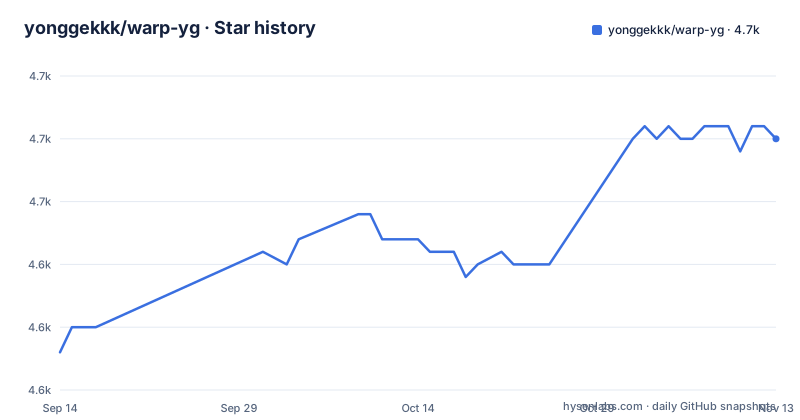
Star history
- yonggekkk/warp-yg4,655 ★ · +17
| Repository | 2026-09-14 | 2026-11-13 |
|---|---|---|
| yonggekkk/warp-yg | 4.6k | 4.7k |
17 Stars in the last 60 days, measured from the daily GitHub snapshot. Compare with other projects
Editorial analysis
The install is one piped shell line
There are two supported ways in, and they differ only in the download tool:
bash <(wget -qO- https://raw.githubusercontent.com/yonggekkk/warp-yg/main/CFwarp.sh)bash <(curl -Ls https://raw.githubusercontent.com/yonggekkk/warp-yg/main/CFwarp.sh)The whole repository is that script. The top level holds `CFwarp.sh`, a `version` file, `README.md`, `english.md`, `ygkkkkeys.txt`, a `warp.exe` and a zip archive whose name carries its own version, `WIN端warp自选IP-v23.11.15.zip`. There is no package manifest, no build file and no test directory.
Read what the line actually does, because the form matters. `bash <(...)` runs process substitution, so the script is fetched into a pipe and handed straight to bash. Nothing is written to disk, nothing is inspected, and the script is running with whatever privilege you invoked it with, typically root on a VPS.
The stated scope is Linux servers with either pure IPv4 or pure IPv6 connectivity, across mainstream distributions.
Two backends means two different stop commands
The script installs WARP through either warp-go or wgcf, and the README's recovery instructions split along that line. To stop warp-go:
kill -15 $(pgrep warp-go)To stop wgcf:
systemctl stop wg-quick@wgcfThe asymmetry is the practical point. warp-go runs as a process you signal, while wgcf registers as a systemd unit named after the interface, so the second command needs systemd and the first needs `pgrep`. If you are not sure which one the script chose, neither command is guaranteed to be the right one.
The context for those commands is a warning worth reading before installing rather than after. The README states that if you see a lost IP address, a VPS running sluggishly, the script failing to download something, or an interface you cannot get into, you should stop WARP with those commands and then restart or reinstall.
That is a candid admission that installing a VPN client can take the network it depends on down with it, which is why having the stop command written down before you need it is worth the ten seconds.
Endpoint selection is a separate download from another host
Picking a preferred WARP endpoint and generating WireGuard configurations is not the same script and does not come from the same host. The command downloads a file from a GitLab repository, not from GitHub:
curl -sSL https://gitlab.com/rwkgyg/CFwarp/raw/main/point/endip.sh -o endip.sh && chmod +x endip.sh && bash endip.shThat form is the more careful of the two. It saves the script to disk, makes it executable and runs it as a separate step, so you can read `endip.sh` before executing it. Compare that with the installer above, which never touches your filesystem.
The README recommends running this on a local network from an iPhone or an Android phone, which tells you what the output is for: a WireGuard configuration you import into the phone's VPN client.
The same capability is offered on Replit at a page for WARP-Wireguard-Register, with the stated condition that you must be logged in and have forked the project before it will run.
A committed executable and a versioned zip
Two entries in the top level deserve a second look. The first is `warp.exe`, a Windows executable committed to the repository rather than built from source or released as an asset.
The second is `WIN端warp自选IP-v23.11.15.zip`. Its name carries a version, v23.11.15, inside the filename rather than in a release tag, and the repository has no GitHub releases at all. So the version a Windows user gets is discoverable only by reading a file name in the tree, and there is no release history to compare it against.
The README's instructions for that archive are correspondingly thin: unzip the downloaded file and follow the usage method and video tutorial it contains. It also notes that by default the tool only works on the C drive or on the desktop.
None of this is a criticism of the code. It is a description of the distribution model: a shell script for servers, a prebuilt binary and a versioned zip for Windows, all delivered from the repository tree rather than from a release pipeline.
Credits name three upstream projects and a chatbot
The acknowledgement section is the clearest account of what the code is. The wgcf backend is credited to the ViRb3 wgcf project on GitHub. The warp-go backend is credited to the CoiaPrant warp-go project on GitLab. The WARP script approach and the endpoint selection and registration programs are credited as references from P3terx's warp.sh, fscarmen's warp, and a community member.
Then the final line, which is not boilerplate: all code is described as an integration of the GitHub community and ChatGPT.
For a reader deciding how to treat this repository, that statement sets expectations honestly. It is a consolidation of existing projects and generated code rather than a from-scratch implementation.
What it means practically is that when something breaks, the fix may belong upstream in wgcf or warp-go rather than here, and that a security review of this repository alone is not a review of what it installs.
No licence file sits next to the installer
The repository carries no licence. The tree lists `CFwarp.sh`, `README.md`, `english.md`, `version`, `ygkkkkeys.txt`, `warp.exe` and the zip archive, and no `LICENSE` file appears among them.
There is also a `ygkkkkeys.txt` in the root, whose purpose the README does not describe. Its name suggests key data, and shipping a file with that name inside an unaudited installer is worth pausing on: it may hold a public key, a client identifier, or something that only matters to the author's own account, and nothing in the repository says which.
The practical position is straightforward. Without a licence you have no grant to copy, modify or redistribute this script, which makes it something to run rather than something to build on or vendor into your own provisioning. If you need the behaviour in an automated pipeline, that is a question for the author rather than a default you can assume.
The last push was four months ago
The repository is not archived, and the last push is dated 2026-06-02, which is roughly five months before today. There are no GitHub releases, so the only version information in the project is the `version` file and the date embedded in that zip archive name.
WARP moves faster than that. The Windows artefact in the tree carries the version v23.11.15, while the repository was last pushed in June 2026, so the two halves of the repository are on different clocks. Anyone reading the README for current behaviour is reading notes written against whichever backend was current at the time.
The documentation has the same shape. Instead of a changelog in the repository, the README points to a playlist of WARP videos and to a changelog hosted on a personal blog. That is a reasonable choice for a single maintainer, and it also means the record of what changed lives outside the project and outside version control.
Editorial conclusion
warp-yg fits someone with a Linux VPS who wants WARP installed in one command and can read a Chinese status page when it goes wrong, and who is willing to treat a script with no declared licence as something to read rather than something to build on. It does not fit a team that needs to audit what it installs or a machine you cannot reinstall. Verify two things before running it: which of the two backends you are running, since the stop command differs, and whether you have the kill commands ready, because the README warns that lost IPs, a sluggish VPS and failed downloads can happen.
Frequently asked questions
How do I install Cloudflare WARP with warp-yg on a Linux VPS?
Run `bash <(wget -qO- https://raw.githubusercontent.com/yonggekkk/warp-yg/main/CFwarp.sh)` or the curl equivalent. The README states it supports servers with pure IPv4 or pure IPv6 connectivity across mainstream Linux distributions.
How do I stop WARP if the installation breaks my connection?
The README gives one command per backend: `kill -15 $(pgrep warp-go)` to stop warp-go, and `systemctl stop wg-quick@wgcf` to stop wgcf. It advises stopping WARP and then restarting or reinstalling it after a lost IP, a sluggish VPS or a failed download.
How do I pick a preferred WARP endpoint for my phone?
Use the separate endpoint script from the project's GitLab host: `curl -sSL https://gitlab.com/rwkgyg/CFwarp/raw/main/point/endip.sh -o endip.sh && chmod +x endip.sh && bash endip.sh`. The README recommends running it on a local network with an iPhone or Android phone.
Does warp-yg have a release history I can check?
No. The repository has no GitHub releases. The only version markers are the `version` file and the version string inside the name of the committed Windows archive, `WIN端warp自选IP-v23.11.15.zip`, and the changelog is hosted on the author's blog rather than in the repository.
Can I redistribute or modify the warp-yg script?
The repository contains no licence file, so there is no stated grant to copy, modify or redistribute it. Run it if it fits your use, and ask the author if you need to vendor the behaviour into your own automation.
What projects is the warp-yg script built on?
It is credited as an integration of the GitHub community and ChatGPT, drawing on the ViRb3 wgcf project for the wgcf side, the CoiaPrant warp-go project for warp-go, and reference sources from P3terx's warp.sh and fscarmen's warp.
Official sources
Add this badge to your README
If you maintain this project, the badge below links readers to this analysis and shows its maintenance status from the daily GitHub snapshot. Paste the markdown into your README; add ?metric=license or ?metric=stars to the image URL for a different field.

[](https://hysenlabs.com/projects/yonggekkk-warp-yg)Star history chart for your README
[](https://hysenlabs.com/projects/yonggekkk-warp-yg)Was this useful?