voicy: a Telegram bot that turns voice messages into text
@voicybot Telegram bot main repository
At a glance
- What is it?
- voicy is the main repository behind @voicybot, a Telegram bot that automatically converts audio messages to text when it is added to a group chat, with a worker API so transcription can run on local GPU hardware instead of a cloud service. It is aimed at people who want group chats to be searchable and audible to the people who cannot listen.
- Who is it for?
- Adopt voicy when you run a Telegram community where voice messages are the norm and you want transcripts posted back automatically, and you are willing to operate a bot, a Mongo instance and, for local transcription, a Windows GPU machine. Skip it if you need a hosted transcription product with a support contract, since the voice recognition and payments services are separate repositories.
- Can I use it commercially?
- Yes. MIT is a permissive licence: you can use, modify and sell software built on it, as long as you keep its copyright and licence notices.
- Is it still maintained?
- Yes. The repository last received commits 1 day ago.
- What is it written in?
- Mainly JavaScript, according to GitHub's language statistics.
Answers come from the project's GitHub data, last synced on November 7, 2026, and from our analysis. They are not legal advice.
Star history
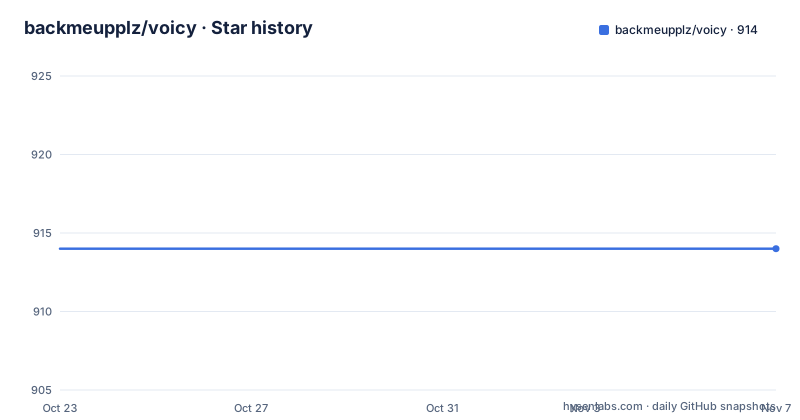
- backmeupplz/voicy914 ★ · +0
| Repository | 2026-10-23 | 2026-11-07 |
|---|---|---|
| backmeupplz/voicy | 914 | 914 |
0 Stars in the last 15 days, measured from the daily GitHub snapshot. Compare with other projects
Editorial analysis
A bot that speaks when a group goes quiet
voicy is the main repository for @voicybot, a Telegram bot whose behaviour is described in one sentence in the README: it automatically converts all the audio messages to text when added to a group chat.
The use case is specific and worth stating before the implementation, because it explains most of the design decisions in the repository. Telegram groups where people speak rather than type are hard to search, hard to moderate and inaccessible to people who are deaf or who cannot play audio at work. A bot that posts a transcript turns that stream back into text.
The bot interface is maintained in English and Russian in the `locales` folder, which is a clue about the user base and the practical reality of running a Telegram bot at scale: the primary audience reads Russian, and the original author, backmeupplz, is the same author behind borodutch.com, a service for turning voice messages into text.
The repository is JavaScript and TypeScript, and the language pair is visible in the layout. There is a `src/` directory, a `locales/` directory, a `docs/` directory, `scripts/` with the Windows worker installer and the proof scripts, a `tsconfig.json`, a `yarn.lock`, an `.nvmrc`, an `nixpacks.toml` and a `.env.sample` that is effectively the configuration reference for the whole system.
Four repositories, because a bot is not one process
The README lists the repositories that make up the project, and the split is the clearest description of its architecture.
The `voicy` repository is the main bot code. The `voicy-payments` repository is a payments service that used Stripe to process payments for the Google Speech seconds of recognition, and is currently retired as the stats server for voicybot.com. The `voicy-landing` repository is the borodutch.com landing page. And the `voicy-recognition` repository is the recognition service for voicybot.com.
Read as a system, the design separates three concerns that would otherwise be tangled. The bot itself handles Telegram updates, permissions and quotas. The recognition service is where speech to text happens. The payments service is where money and usage accounting happen, and it is the piece that has been repurposed into a statistics server, which tells you the payment flow is no longer the centre of the product.
That separation is also why the worker API exists. If recognition lives in its own service, then the code path from a Telegram audio message to a transcript can be swapped for a local GPU worker without changing the bot. The queue in Mongo is the seam between the two halves.
Continuous integration is short to describe. Any commit pushed to main gets deployed to @voicybot via CI Ninja, so the deployment story is push to main and nothing else to remember.
Running it locally needs Mongo, ffmpeg and an env file
The installation section is six steps, and two of them are easy to skim past.
Clone the repo, launch a Mongo database locally, create a `.env` file with the listed environment variables, install ffmpeg on machines that run local transcription workers, run `yarn` in the root folder, and run `yarn start`.
The ffmpeg step is conditioned on the worker role, which tells you the bot itself does not decode audio. The bot receives a Telegram audio message, stores the job, and hands the work off. That is the split that lets transcription happen on a GPU box in another room.
The environment variables are short and the `.env.sample` file is the reference:
MONGO=mongodb://localhost:27017/voicy
TOKEN=123456789:ABCDEFGHIJKLMNOPQRSTUVWXYZ
SALT=1234567890
ADMIN_ID=1234567890
ENVIRONMENT=development
`MONGO` is the database URI, `TOKEN` is the Telegram bot token, `SALT` is a random salt used to generate various encrypted things, `ADMIN_ID` is the chat id of the person who should receive valuable logs, and `ENVIRONMENT` can be `development` and defaults to `production`. That last default is worth noticing, because a local run that forgets the variable behaves like a production run in terms of which code path is taken.
The `.env.sample` also shows the commercial and quota side of the system: Stripe keys and fixed price points, Telegram Stars amounts, a donation wall flag, and a set of `VOICY_TRANSCRIPTION_*` window settings. The chat window allows 20 jobs per 10 minutes and 10 active jobs, while the user window allows 5 jobs per 10 minutes. Those numbers are the actual anti-abuse policy, and they are configuration rather than code, which is the right place for them.
The worker API authenticates with a hashed token
Voicy queues incoming Telegram audio in Mongo and expects one or more authenticated worker clients to process those jobs. The Windows GPU worker is described as the supported local setup, and the API is mounted at `/worker/v1` and requires `Authorization: Bearer <VOICY_WORKER_TOKEN>` on every request.
The token lifecycle is the part worth copying. You create a worker token from a trusted backend shell after building the TypeScript output:
yarn build-ts
MONGO='mongodb://...' yarn worker:create-client windows-4070-ti
The command prints the token, and the README is explicit about handling: store the printed token only in the Windows worker environment as `VOICY_WORKER_TOKEN`, because the backend stores only its SHA-256 hash. The plaintext exists exactly once, at creation.
The recovery path is documented too. If a token is lost or exposed, create a replacement token and disable the old `WorkerClient` record in Mongo by setting `enabled` to `false`. That is a deliberate soft-delete rather than a hard removal, so an in-flight job tied to the old client does not break in a confusing way.
The broader pattern is worth naming. A hash-only token store, an explicit disable flag, and a bearer header on every request is a materially different design from a long-lived shared secret in an environment variable that the backend can read back.
A Windows GPU worker with a checked-in supervisor
The Windows machine needs FFmpeg, Node.js 20 or newer, Python 3.11, current NVIDIA drivers and a CUDA capable transcription stack such as faster-whisper. The worker polls the backend worker API, downloads the queued audio source, runs a local transcription command on CUDA and uploads the final transcript back to Voicy.
The configuration is a block of environment variables, and the transcription command itself is a template:
$env:VOICY_WORKER_API_URL = "https://<voicy-host>/worker/v1"
$env:VOICY_WORKER_TOKEN = "voicy_worker_..."
$env:VOICY_WORKER_WORK_DIR = "C:\voicy-worker\jobs"
$env:VOICY_WORKER_ENGINE = "faster-whisper"
$env:VOICY_WORKER_MODEL = "large-v3"
$env:VOICY_WORKER_RESTART_DELAY_MS = "10000"
$env:VOICY_WORKER_TELEGRAM_BOT_TOKEN = "<telegram-bot-token>"
$env:VOICY_WORKER_TELEGRAM_API_URL = "http://127.0.0.1:8081"
$env:VOICY_WORKER_DOWNLOAD_CONCURRENCY = "2"
$env:VOICY_WORKER_TRANSCRIPTION_CONCURRENCY = "1"
$env:VOICY_WORKER_TRANSCRIBE_EXECUTABLE = "C:\voicy-worker\.venv\Scripts\python.exe"
$env:VOICY_WORKER_TRANSCRIBE_ARGS_JSON = '["C:\\voicy-worker\\transcribe.py","{input}","{output}","{language}","{model}"]'
yarn worker:run
Two details are worth calling out. `VOICY_WORKER_TRANSCRIBE_ARGS_JSON` is a JSON array of arguments with placeholders for input, output, language and model, which means the transcription engine is a command you swap rather than a hardcoded dependency. And the download and transcription concurrency are separate settings, so you can pull audio faster than you transcribe it, which is the right shape when the two stages have very different costs.
For production on Windows, the README asks you to install the checked-in scheduled task supervisor with `scripts/install-windows-worker.ps1` rather than leaving the worker in an interactive terminal. It writes a local env file, starts `scripts/run-windows-worker.ps1`, logs crashes and restarts, and lets Task Scheduler restart the wrapper if the process is killed.
The activity stream may not carry message text
The optional live activity stream is the part of the README with the sharpest rule in it, and the rule is about what may leave the system.
Four variables configure it: `VOICY_ACTIVITY_STREAM_URL`, which takes a Symphony activity stream base URL or a full `/activity/v1/events` URL, `VOICY_ACTIVITY_STREAM_TOKEN`, sent as `Authorization: Bearer ...`, `VOICY_ACTIVITY_STREAM_ANONYMIZATION_SECRET`, an optional HMAC secret for deterministic chat and user labels that defaults to the submit token, and `VOICY_ACTIVITY_STREAM_TIMEOUT_MS`, a submit timeout with a default of 750.
When the stream URL or token is missing, activity emitters are no-ops, so the feature is genuinely optional and fails closed.
Then the constraint. Events are fire-and-forget and contain only anonymized chat labels, command names, media source kinds, and runtime or job milestones. Telegram message text, raw chat ids, raw user ids, file ids, tokens, emails and phone numbers must not be sent.
That is a narrow definition of what an activity stream may contain, and it is the reason to read this section carefully if you enable it. A stream that carries command names and job milestones is an operational feed: you can see that transcription happened, how long it took and whether it failed, without the transcript leaving the deployment. Enabling it with different expectations, or wiring a different emitter into the same URL, is how that constraint gets broken.
Deploys drop stale updates on purpose
The last piece of production behaviour in the README is about what happens to messages that arrive while the bot is down.
Production long polling deliberately drops Telegram's pending update backlog before startup by default, with `VOICY_DROP_PENDING_UPDATES_ON_STARTUP=true`. The stated reason is that it prevents old voice and audio messages from being replayed into new transcription jobs after deploys, restarts or downtime.
There is a second, finer filter. Message updates are ignored when their Telegram `date` is older than the current bot process startup cutoff, or older than `VOICY_MAX_TELEGRAM_UPDATE_AGE_SECONDS` seconds, which defaults to 300.
The consequence for operators is explicit and worth planning for. Before restarting production, you pause local transcription workers if there are active claimable jobs, you deploy or restart the bot, you confirm the logs include the pending update drop, and only then do you restart the workers once the backend is accepting fresh updates. The README also warns that voice messages sent while the bot was down are discarded, and the sentence is cut off in the version of the README available here, but the direction is clear.
That is a deliberate trade. Duplicate or stale transcripts are usually worse than a missing one, especially in a busy group, and a bot that silently works through a backlog after a deploy is a well known way to flood a chat.
Editorial conclusion
Adopt voicy when you run a Telegram community where voice messages are the norm and you want transcripts posted back automatically, and you are willing to operate a bot, a Mongo instance and, for local transcription, a Windows GPU machine. Skip it if you need a hosted transcription product with a support contract, since the voice recognition and payments services are separate repositories. Verify first that your voice message languages are covered by the locale and recognition setup, and that your rate limits suit your group, since the per user and per chat windows are configured in `.env` and default to tight values. The licence field on the repository says MIT, the last push was on 2026-10-18, and the project deploys from main on every push.
Frequently asked questions
What does the voicy Telegram bot do?
It automatically converts all the audio messages to text when it is added to a group chat. The bot interface is maintained in English and Russian in the `locales` folder, and the main repository also publishes the worker API used for local transcription.
How do I run voicy locally?
Clone the repository, launch a Mongo database locally, create a `.env` file with the listed variables, install ffmpeg on machines that run local transcription workers, then run `yarn` and `yarn start` in the root folder. The `.env.sample` file shows example values for `MONGO`, `TOKEN`, `SALT`, `ADMIN_ID` and `ENVIRONMENT`.
How does the voicy worker API authenticate?
The API is mounted at `/worker/v1` and requires `Authorization: Bearer <VOICY_WORKER_TOKEN>` on every request. You create a token with `MONGO='mongodb://...' yarn worker:create-client windows-4070-ti`, the backend stores only its SHA-256 hash, and a lost token is replaced by creating a new one and setting `enabled` to `false` on the old `WorkerClient` record.
What does the Windows GPU worker for voicy need?
FFmpeg, Node.js 20 or newer, Python 3.11, current NVIDIA drivers and a CUDA capable transcription stack such as faster-whisper. The worker polls the backend API, downloads queued audio, runs a local transcription command on CUDA and uploads the transcript back, and for production the README asks you to install the checked-in scheduled task supervisor with `scripts/install-windows-worker.ps1`.
What may the voicy activity stream contain?
Events are fire-and-forget and contain only anonymized chat labels, command names, media source kinds, and runtime or job milestones. Telegram message text, raw chat ids, raw user ids, file ids, tokens, emails and phone numbers must not be sent, and the emitters are no-ops when the stream URL or token is missing.
What licence is voicy released under and how is it deployed?
The package.json declares MIT, with a LICENSE file in the repository. Any commit pushed to main gets deployed to @voicybot via CI Ninja, the last push was on 2026-10-18, and the repository has no GitHub releases of its own.
Official sources
Add this badge to your README
If you maintain this project, the badge below links readers to this analysis and shows its maintenance status from the daily GitHub snapshot. Paste the markdown into your README; add ?metric=license or ?metric=stars to the image URL for a different field.

[](https://hysenlabs.com/projects/backmeupplz-voicy)Star history chart for your README
[](https://hysenlabs.com/projects/backmeupplz-voicy)Was this useful?