pstack: engineering playbooks and skills for AI coding agents
Skills and principles for rigorous AI-assisted engineering
At a glance
- What is it?
- pstack is a MIT-licensed collection of SKILL.md files that add rigorous engineering workflows to AI coding agents like Claude Code, Cursor and Codex. Its core command, /poteto-mode, selects from twenty-three playbooks covering bug diagnosis, performance tracing and overnight autonomous runs.
- Who is it for?
- pstack is a practical choice for engineers who run AI coding agents on multi-step work: bug diagnosis, performance tracing, refactoring and overnight autonomous runs. Skip it for single-prompt edits where the overhead of /setup-pstack and model configuration adds more process than the task justifies, or in agent setups with a single model API where the multi-model routing produces no practical benefit.
- Can I use it commercially?
- Yes. MIT is a permissive licence: you can use, modify and sell software built on it, as long as you keep its copyright and licence notices.
- Is it still maintained?
- Yes. The repository last received commits 3 days ago.
- What is it written in?
- Mainly TypeScript, according to GitHub's language statistics.
Answers come from the project's GitHub data, last synced on October 21, 2026, and from our analysis. They are not legal advice.
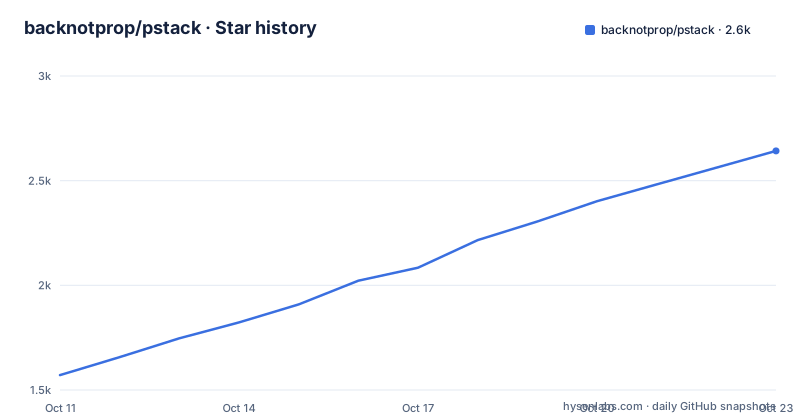
Star history
- backnotprop/pstack2,482 ★ · +911
| Repository | 2026-10-11 | 2026-10-21 |
|---|---|---|
| backnotprop/pstack | 1.6k | 2.5k |
911 Stars in the last 10 days, measured from the daily GitHub snapshot. Compare with other projects
Editorial analysis
Skills stored as SKILL.md files, loaded by any supported agent harness
pstack is a folder of plain-text files. Each skill lives as a SKILL.md file inside a named subdirectory under skills/, and an agent harness such as Claude Code, Cursor or Codex reads those files to gain a slash command for each skill. No compiled code and no binary is involved; the skills are instructions the agent follows when you invoke the command.
backnotprop/pstack describes itself as a standalone mirror of the Cursor plugin at cursor/plugins/pstack. It was created because the original skills were written for Cursor specifically, and many used Cursor-only features that do not work in other harnesses. All of those skills have been rewritten to work in any agent. Claude Code, Codex and Pi are named in the README alongside Cursor and OpenCode as supported targets.
A look at the top-level entries makes the layout clear: a skills/ directory holds one subdirectory per skill, a docs/ folder holds the guide, and agents/ and automations/ directories are present as well. Reading the SKILL.md for any skill you plan to use tells you exactly what the agent will do when you invoke that command, because the files hold the agent's instructions in full.
A companion repository, backnotprop/bro, is referenced by the /bro skill. Installing pstack does not include bro, and the README points to that separate repository if you want it.
Two install paths: the skills CLI for any agent, and /add-plugin for Cursor
Installing the standalone mirror goes through the skills CLI, which handles harness selection interactively:
npx skills add backnotprop/pstackOpening that command brings up a searchable list of skills organized by repository. After picking the skills you want, you specify which agents to target. Inside the Cursor UI, the original plugin uses a different command:
/add-plugin pstackAfter installing, the README describes a 2-step start: run /setup-pstack to pick a reasoning budget and choose models, then use /poteto-mode for any task requiring rigor. docs/guide/README.md is the starting point for a first real task, walking through setup, prompting, verification and overnight run patterns.
No version number or release tag exists in the repository, and its last push was on 2026-10-04. Anyone who needs a reproducible install must record the commit hash manually, since no release tag is available to pin.
/poteto-mode reads your request and routes it through one of twenty-three playbooks
/poteto-mode is the main skill. According to the README, it reads your request, selects one playbook from a set of twenty-three, and runs the other skills as the task demands. You pass it a plain description of the work:
/poteto-mode this pr has a subtle bug where the scroll drifts every 750ms even when idle. repro first, then fix and verify.Each of the twenty-three playbooks targets a specific kind of engineering work. Among those named in the README are investigation, bug fix, perf, hillclimb, runtime forensics, trace forensics, feature, refactoring, prototype, visual parity, authoring a skill, eval, babysit, shipping, autonomous run and orchestrate. Each lives as a separate file under skills/poteto-mode/playbooks/.
Scope runs from a focused single bug fix to a long task left to complete overnight:
/poteto-mode i'm going to bed. land the stack even if ci flakes. i want everything merged by morning.hillclimb is iterative: it formulates a hypothesis, measures before and after, then commits the change only if the metric improved. babysit sits at the other end of the task range, covering all the friction between an open PR and a green merge: conflict resolution, review comment threads and CI. /poteto-mode picks between all twenty-three based on how you phrase the request, without requiring you to name a playbook directly.
Thirteen skills that run alone, and several that need companion installs
Dependency structure in pstack divides into two tiers. Thirteen skills have no cross-dependencies and install cleanly on their own: unslop, bro, how, tdd, typescript-best-practices, arena, swarm, interrogate, reflect, show-me-your-work, figure-it-out, automate-me and correct. None of those thirteen call other skills, so adding any one of them does not pull in anything else.
Several others call additional skills and must be installed alongside their companions. teach requires both how and why. why requires only how. technical-writing requires unslop. architect requires arena and how. blast-radius requires 4 companions: arena, how, why and unslop together.
poteto-mode has the widest dependency footprint of all, requiring all principle-* skills and most of the others in the repository. Adding poteto-mode to an agent without those companions installs a mode whose playbooks will attempt to invoke skills that are not present, producing failures at invocation time rather than during install. Skills CLI selection is interactive, so during install is the natural point to confirm those dependencies rather than discovering missing skills later during a run.
opus 5.5 / sol / grok is the default panel, with code going to grok and judgment to opus
pstack is built around multi-model workflows. According to the README, the default panel is opus 5.5 / sol / grok. Work is divided by difficulty in the default configuration: 5 code-focused task types (feature, refactoring, bug fixing, performance and hillclimb) route to grok, while prose and the most difficult judgment calls go to opus 5.5. Running /setup-pstack changes the reasoning budget and model panel, so neither assignment is fixed after install.
This design requires simultaneous access to multiple frontier models. For an agent setup connected to a single model API, routing logic in each playbook still runs, but every sub-task goes to that one model regardless of routing decisions. No documentation covers what the skills do in that case, and none of them describe a single-model fallback path.
Splitting code versus judgment work across different models is the design assumption behind the default panel. /setup-pstack is the tool for changing that assignment to match whatever models you have access to, including overriding all 3 positions in the default panel.
No versioned releases, and the mirror syncs manually via MIRROR.md
This repository is a mirror, not the primary source. Its source lives at cursor/plugins/pstack inside the Cursor plugins monorepo, and MIRROR.md at the repository root describes how to pull upstream changes into this standalone copy. That process is manual rather than automated, so the mirror may fall behind the Cursor plugin when upstream changes arrive. No date or frequency appears in the README to indicate how often syncs happen.
MIT licence coverage comes from a file at the repository root. All skills are plain-text SKILL.md files with no binary components, and MIT permits modification and redistribution without restrictions beyond attribution. Installing runs through the skills CLI at skills.sh, which is an external service that pstack itself does not own or maintain, and no documentation in the repository describes what happens if skills.sh becomes unavailable.
No versioned releases or changelog exist in the repository. Its last push was on 2026-10-04, and it is not archived.
One-off prompts and single-model setups gain little from pstack's overhead
Among the goals stated in the README is producing fewer lines of higher-quality code, rather than maximizing output. That framing assumes quality and rigor are the bottleneck, not throughput on small tasks. For a single one-off prompt, running /setup-pstack, configuring the model panel and confirming all skill dependencies are present adds setup cost the task does not justify.
Single-model setups also lose the main benefit of the routing logic. Playbook routing splits work by task type across different models, and collapsing all routes to one model still applies those routing rules but produces no practical difference in output compared to invoking that model directly.
A third gap is internal documentation on how skills work. The README describes what each skill does from the outside but does not explain how SKILL.md files are parsed, what formatting instructions they accept, or how conflicts between invoked skills are resolved when poteto-mode runs several at once. Engineers who want to write a new skill or modify an existing one have to work from reading existing SKILL.md files, since no format specification appears anywhere in the repository.
Editorial conclusion
pstack is a practical choice for engineers who run AI coding agents on multi-step work: bug diagnosis, performance tracing, refactoring and overnight autonomous runs. Skip it for single-prompt edits where the overhead of /setup-pstack and model configuration adds more process than the task justifies, or in agent setups with a single model API where the multi-model routing produces no practical benefit. Before adopting, install the companion skills alongside any skill listed in the dependency table, confirm your reasoning budget in /setup-pstack, and read docs/guide/README.md to see what a first real task looks like under this system.
Frequently asked questions
What is pstack?
pstack is a MIT-licensed collection of SKILL.md files that add engineering workflows to AI coding agents. The standalone mirror at backnotprop/pstack works in Claude Code, Codex, Pi and other harnesses, not only Cursor.
How do I install pstack in Claude Code?
Run npx skills add backnotprop/pstack, which opens an interactive CLI for selecting skills and choosing your agent. After installation, run /setup-pstack inside your agent session to pick a reasoning budget and configure the model panel.
What does /poteto-mode do?
It reads your request, selects one of twenty-three engineering playbooks, and runs the appropriate pstack skills for that task type. The README recommends using it whenever the agent needs to do rigorous engineering work.
Can I use individual pstack skills without installing everything?
Thirteen skills work standalone without any companions: unslop, bro, how, tdd, typescript-best-practices, arena, swarm, interrogate, reflect, show-me-your-work, figure-it-out, automate-me and correct. Skills like blast-radius and poteto-mode require companion skills, and the README lists exactly what each one needs.
Does pstack work with any AI model?
Running /setup-pstack lets you change the model panel from the default of opus 5.5 / sol / grok to any model you have access to. The default routing sends code delegate tasks to grok and judgment tasks to opus 5.5.
Official sources
Add this badge to your README
If you maintain this project, the badge below links readers to this analysis and shows its maintenance status from the daily GitHub snapshot. Paste the markdown into your README; add ?metric=license or ?metric=stars to the image URL for a different field.

[](https://hysenlabs.com/projects/backnotprop-pstack)Star history chart for your README
[](https://hysenlabs.com/projects/backnotprop-pstack)Was this useful?