nuxt-security: OWASP defaults for a Nuxt application
🛡 Automatically configure your app to follow OWASP security patterns and principles by using HTTP Headers and Middleware
At a glance
- What is it?
- nuxt-security is a Nuxt module that registers route rules and server middleware to apply security headers, request size and rate limits, XSS validation and CORS handling, with basic auth and CSRF available as options. It suits a Nuxt team that wants a defensible baseline, and it changes the response headers of every route it touches.
- Who is it for?
- Adopt nuxt-security if you run Nuxt and want a security baseline applied consistently rather than assembled by hand across route rules, because the module registers the route rules and the server middleware globally. Do not adopt it as a complete security posture, since it configures headers and middleware and leaves the application code to you, and check what a Content Security Policy does to your own pages before shipping it.
- Can I use it commercially?
- Yes. MIT is a permissive licence: you can use, modify and sell software built on it, as long as you keep its copyright and licence notices.
- Is it still maintained?
- Yes. The repository last received commits 15 days ago.
- What is it written in?
- Mainly TypeScript, according to GitHub's language statistics.
Answers come from the project's GitHub data, last synced on November 7, 2026, and from our analysis. They are not legal advice.
Star history
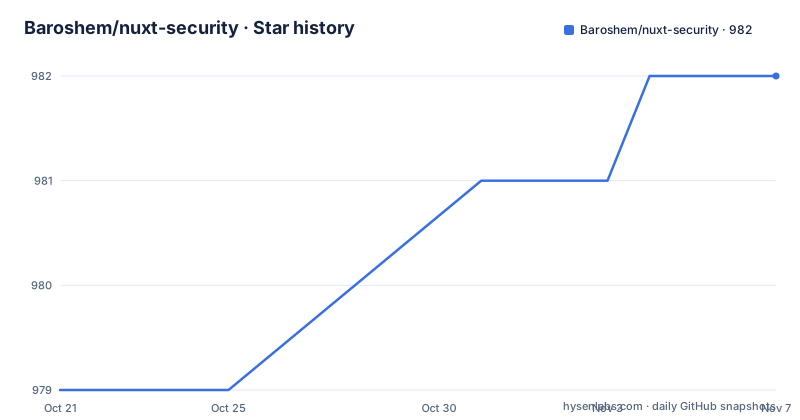
- Baroshem/nuxt-security982 ★ · +3
| Repository | 2026-10-21 | 2026-11-07 |
|---|---|---|
| Baroshem/nuxt-security | 979 | 982 |
3 Stars in the last 17 days, measured from the daily GitHub snapshot. Compare with other projects
Editorial analysis
A module that registers route rules for you
nuxt-security is a Nuxt module that automatically configures your app to follow OWASP security patterns and principles by using HTTP headers and middleware. The README notes that it works with Nuxt 3.X and newer, including 4.X.
The installation is one command:
npx nuxi@latest module add securityAnd the README says that is it, because the module then registers route rules and server middlewares globally so that the application is more secured. That word globally is the important part of the design. The alternative to this module is a per-route configuration, and a per-route configuration is a configuration that gets forgotten on the route somebody added last week.
The feature list is what the module actually does. Security response headers, including CSP for SSG apps. Request size and rate limiters. Cross Site Scripting validation. Cross-Origin Resource Sharing support. Hiding the X-Powered-By header and removing console logger utilities. And then the optional items, marked as optional in the list: allowed HTTP methods, basic auth and CSRF.
The distinction between the default and optional features is the one to keep in mind when reading the documentation, because basic auth in particular is not something you want switched on across a whole application by accident.
The primary language is TypeScript, the licence is MIT, and the last push to the main branch was on 2026-08-09, with v2.6.0 published on 2026-05-12.
The configuration block and what it maps onto
Configuration goes into the nuxt.config.ts under a security key, and the shape is the standard Nuxt module pattern:
export default defineNuxtConfig({
  modules: ["nuxt-security"],
  security: {
    // options
  }
})
The README points at the configuration page in the documentation for all available options, and the keywords in the package manifest give a good list of what is configurable: nuxt, vue, security, owasp, helmet, basic-auth, rate-limit, xss, cors, request-size-limit, allowed-http-methods, csrf and content-security-policy.
The helmet entry is worth noting, because it tells you where the header defaults come from. Helmet is the Express middleware that sets the conventional security headers, and the keyword points at that familiar header baseline. Helmet itself is not among the dependencies, so the header set is implemented inside the module.
The CSP for SSG apps is the other headline item. A statically generated site has no server runtime, so a middleware-only approach to a Content Security Policy would have nothing to run on. Handling that case is what the parenthesis in the feature list is pointing at.
The dependencies line up with the features one for one. basic-auth is there for the optional auth, nuxt-csurf for the CSRF support, xss for the validation, and unplugin-remove for the console logger utilities that get stripped out. defu and pathe are the standard Nuxt module helpers for merging defaults and for cross-platform path handling.
The dependencies, and what each one is doing for you
The runtime dependency list is seven packages and each maps onto a feature in the list, which makes it possible to see what the module is actually doing rather than guessing.
@nuxt/kit at 4.2.1 or newer is the module toolkit, so the module is built with the current Nuxt conventions rather than an older interface. basic-auth at 2.0.1 handles the optional HTTP basic authentication. nuxt-csurf at 1.6.5 provides the CSRF token support. And xss at 1.0.15 is the library doing the Cross Site Scripting validation, which means the validation is a well known library rather than a bespoke regular expression.
unplugin-remove at 1.0.3 is the one that explains the console logger removal in the feature list, since that plugin strips code from the build rather than from the response. defu at 6.1.4 handles the default merging, and pathe at 2.0.3 gives the module a path helper that works the same on every platform.
Two things are absent from the runtime dependencies and worth noticing. There is no helmet package, despite the keyword, so the header set is implemented in the module itself rather than delegated. And there is no rate limiting library, so the request size and rate limiters are also the module's own work.
That is a reasonable choice for a module that wants to behave identically on every Nuxt deployment rather than pulling a server-oriented middleware into a runtime that is not an Express server. It also means the module is responsible for the behaviour of those features, and the documentation is where you find out what it actually enforces.
The manifest also declares the module as ESM with type set to module, exports a single entry point with its types at ./dist/types.d.mts, and ships only the dist directory, so the playground and the tests are not part of the published package.
The project layout, the playground and the release script
The repository layout shows a module with a playground, documentation and a test suite, which is the standard arrangement for something that has to be tried in a real application before it is trusted.
There is a playground/ directory, and the npm scripts are organised around it. dev runs the module build in stub mode, prepares the module, prepares the playground and starts it with nuxi dev. There are separate scripts for the other playground states: dev:build, dev:start, dev:generate and dev:preview, so you can test the module against a generated static build and not only a running server. That matters for the CSP for SSG apps case, since a static build is exactly where the header handling differs.
The docs have their own script, dev:docs, which removes dist and runs the docs in the docs/ directory, and the repository includes a .stackblitz/ directory with a stackblitz script, so the playground can be opened in a browser-based environment without a local install.
The release script is a single line that shows how the maintainer works:
"release": "yarn lint && yarn test && yarn prepack && changelogen --release && npm publish && git push --follow-tags"Lint, test, build, changelog, publish and push, in that order, with the publish gated on the first three passing. The test script is vitest run --silent with a test:watch variant, and lint is eslint.
The rest of the layout is standard for a Nuxt module: src/, test/, docs/, a CHANGELOG.md, a CODE_OF_CONDUCT.md, a SECURITY.md, a .nuxtrc, an .npmrc, a .prettierrc and an .eslintrc with an .eslintignore, a yarn.lock with yarn 1.22.19 pinned as the package manager, and a tsconfig.json.
The Node requirement is stated in the engines field, node 24.0.0 or newer, which is the one thing to check before anything else.
Editorial conclusion
Adopt nuxt-security if you run Nuxt and want a security baseline applied consistently rather than assembled by hand across route rules, because the module registers the route rules and the server middleware globally. Do not adopt it as a complete security posture, since it configures headers and middleware and leaves the application code to you, and check what a Content Security Policy does to your own pages before shipping it. Before you deploy, read the configuration reference rather than relying on the defaults, and check the Node requirement, since the manifest asks for 24.0.0 or newer.
Frequently asked questions
What does the nuxt-security module actually do?
It registers route rules and server middleware globally so your Nuxt application follows OWASP patterns. Concretely it sets security response headers including CSP for SSG apps, adds request size and rate limiters, performs XSS validation, supports CORS, hides the X-Powered-By header and removes console logger utilities. Allowed HTTP methods, basic auth and CSRF are available as optional features.
How do I install nuxt-security?
Run `npx nuxi@latest module add security`, which installs the module and adds it to your configuration. The module works with Nuxt 3.X and newer, including 4.X, and the manifest requires Node 24.0.0 or newer.
How do I configure nuxt-security?
Add it to the modules array in nuxt.config.ts and pass options under a security key, for example `modules: ["nuxt-security"]` with a `security` object beside it. The full list of options is on the configuration page of the documentation site, and the package keywords list the configurable areas including helmet style headers, basic auth, rate limit, xss, cors, request size limit, allowed http methods, csrf and content security policy.
How do I run the nuxt-security playground?
The dev script builds the module in stub mode, prepares it, prepares the playground and starts it with nuxi dev, and there are separate scripts for dev:build, dev:start, dev:generate and dev:preview so you can test against a built or statically generated site. The playground can also be opened through the .stackblitz/ directory in a browser-based environment.
Official sources
Add this badge to your README
If you maintain this project, the badge below links readers to this analysis and shows its maintenance status from the daily GitHub snapshot. Paste the markdown into your README; add ?metric=license or ?metric=stars to the image URL for a different field.

[](https://hysenlabs.com/projects/baroshem-nuxt-security)Star history chart for your README
[](https://hysenlabs.com/projects/baroshem-nuxt-security)Was this useful?