DragSortListView: A capable Android drag-and-drop list, abandoned in 2013
GitHub describes it as Android ListView with drag and drop reordering.. The repository metadata lists Java as its primary language. This article stays within the project description and details documented in the GitHub repository README.
At a glance
- What is it?
- DragSortListView extends Android's ListView with animated drag-and-drop reordering, but the project was explicitly abandoned by its author. This review covers its mechanism, setup, limitations, and what to check before adopting it.
- Who is it for?
- Adopt DragSortListView if you need a proven drag-and-drop ListView for an Android app that targets older API levels and you are willing to fork or vendor the code. Do not adopt it if you expect ongoing maintenance, official releases, or compatibility with modern AndroidX and Kotlin.
- Can I use it commercially?
- Not without permission. GitHub finds no licence file in the repository, and without a licence all rights are reserved by default: you may read the code but not reuse it. Check the README, or ask the authors, before using it.
- Is it still maintained?
- Probably not. The repository last received commits 87 months ago, on August 2, 2019.
- What is it written in?
- Mainly Java, according to GitHub's language statistics.
Answers come from the project's GitHub data, last synced on October 21, 2026, and from our analysis. They are not legal advice.
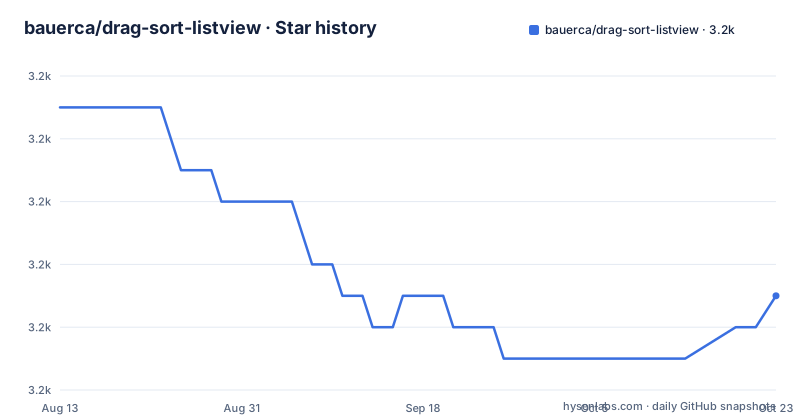
Star history
- bauerca/drag-sort-listview3,192 ★ · -7
| Repository | 2026-08-13 | 2026-10-21 |
|---|---|---|
| bauerca/drag-sort-listview | 3.2k | 3.2k |
-7 Stars in the last 69 days, measured from the daily GitHub snapshot. Compare with other projects
Editorial analysis
What DragSortListView actually gives you
DragSortListView (DSLV) is a Java class that extends Android's ListView to add drag-and-drop reordering of list items. The README describes it as a complete rewrite of the TouchInterceptor from the Android music app, with the goal of a polished feel. It supports animated sorting, heterogeneous item heights, and a floating view that follows your finger. The intended use cases are prioritized lists: favorites, playlists, checklists. The library does not reorder your data for you. You must implement listeners to update the underlying data source. That separation is the core design: the widget handles the visuals and gestures, your code handles the model.
The drag-sort mechanism: three moving parts
The README defines three major elements. First, data reordering: you provide a listener that receives the new position of an item after a drag, and you update your array or cursor. Second, drag start and stop: you call startDrag() and stopDrag() on the DSLV instance, or you use the convenience class DragSortController, which implements common patterns like long-press to drag. Third, the floating view: an implementation of the FloatViewManager interface controls what the dragged item looks like and where it appears on each touch event. DragSortController also implements this interface, giving you a snapshot of the list item with a configurable background color. The separation means you can customize the floating view heavily, but it also means more code to write if you skip the controller.
Getting it running: XML attributes and the controller
You declare DragSortListView in an XML layout just like a ListView. The README lists many XML attributes. For a basic setup, set use_default_controller to true and provide drag_handle_id, which points to a child view inside your list item layout that must be touched to start a drag. The default controller reads attributes like float_background_color, drag_start_mode (onDown or onDrag), sort_enabled, and remove modes like click_remove and fling_remove. You can tune drag_scroll_start (fraction of the list height where auto-scroll kicks in), max_drag_scroll_speed (pixels per millisecond), slide_shuffle_speed (0 means animation always in progress, 1 means items snap), and drop_animation_duration. The README points to demo layout files in the repository, so the real setup is best learned from those examples. The project was Mavenized in November 2012, so you could add it as a dependency, but with no releases listed, you would likely build from source.
A real limitation: it is abandoned and aging
The most concrete limitation is in the README's first line: 'No longer maintained.' The author says they do not have time and are dropping support. That was written in 2013. Android has changed dramatically since then: the platform moved to AndroidX, Kotlin became common, and ListView itself is often replaced by RecyclerView. DragSortListView has no recent releases and no archived status, but the absence of maintenance means no fixes for new Android versions, no compatibility with modern build tools, and no guarantee it works on current devices. The README also notes a debugging option, track_drag_sort, which suggests the library had performance or visual issues that needed tracking. For a production app today, this library is a risky dependency unless you fork it and fix issues yourself.
The alternative: RecyclerView with ItemTouchHelper
The natural alternative is RecyclerView with the ItemTouchHelper class from the AndroidX library. ItemTouchHelper provides drag-and-drop and swipe-to-dismiss with a callback-based API. The difference in approach is significant: DragSortListView is a ListView subclass that manages the entire drag process internally and asks you to update data via listeners. ItemTouchHelper is a separate helper that attaches to a RecyclerView and delegates the actual item movement to the adapter, which moves items in the data list and notifies the adapter. RecyclerView is the modern standard, actively maintained by Google, and designed for performance with view recycling. It does not have the same XML attribute convenience, but it gives you more control and longevity. If you are starting a new project, ItemTouchHelper is the obvious choice.
Maintenance and upgrade cost: what you inherit
The README does not specify a license, so the legal status is unclear. That is a serious issue for commercial use. You would need to contact the author or inspect the repository files for a license file, which the provided material does not show. The last push date is unknown, but the news entries stop in April 2013. There are no recent releases. The code is Java, so it will not compile in a Kotlin-first project without a Java interop layer, which is fine but adds a dependency on legacy Android APIs. Upgrade cost is high: you would have to fork the repository, fix any compatibility issues with current Android SDK levels, and maintain it yourself. The demo app is on Google Play, but that does not help with maintenance. If you adopt it, plan to vendor the source and treat it as your own code.
What to verify before you commit
First, check the repository for a license file; the README does not state one. Second, look at the demo layouts and the DragSortController source to understand the exact gesture handling. Third, test on your target devices, especially older ones, because the library was written for Android circa 2012. Fourth, search the GitHub issues for known bugs and unmerged pull requests; the README invites pull requests, so there may be fixes that never made it into the master branch. The README mentions a public API documentation at bauerca.github.com, but that URL may be dead. Verify it before relying on it. Finally, decide whether you can accept the risk of an unmaintained library in your app. For a hobby project or a prototype, DragSortListView might still work. For a commercial app, the missing license alone is a dealbreaker until you resolve it.
Editorial conclusion
Adopt DragSortListView if you need a proven drag-and-drop ListView for an Android app that targets older API levels and you are willing to fork or vendor the code. Do not adopt it if you expect ongoing maintenance, official releases, or compatibility with modern AndroidX and Kotlin. Before integrating, verify the exact API level requirements from the source, check the demo app's behavior on your target devices, and inspect the repository for any unmerged pull requests that fix known issues. The project's own README states it is no longer maintained, so plan to own the code yourself.
Frequently asked questions
How do I add drag reordering to a ListView with DragSortListView?
Declare the widget in a layout file the same way a ListView is declared, give it a drag handle resource id pointing at a view inside each item so a touch there starts the drag, and let the default controller handle the gesture and the floating view. The widget reorders the views only; applying the new order to your data is your job through the listener interfaces it provides.
What XML attributes does DragSortListView support?
Thirteen, each documented with a type and a default: collapsed height, drag-scroll start fraction, maximum drag-scroll speed, floating view transparency, shuffle speed, drop animation duration, remove animation duration, a drag-tracking debug flag, a flag that makes the widget create the helper controller, the floating view background colour, the drag handle resource id, a flag enabling sorting, and the gesture mode that starts a drag.
Is DragSortListView still maintained?
No, and the readme says so in its second line: the project is no longer maintained because the author does not have much time to devote to it, and support is dropped for the time being. The repository is not archived, but the most recent commit is dated 2019-08-02, the final news entry is dated April 2, 2013, and there are no releases to install.
What is DragSortController and when do I need it?
It is the helper class that supplies boiler-plate for the common drag patterns, long-press to drag and fling-to-remove, and it also implements the floating view interface. The widget creates one for you by default; if you set the default-controller attribute to false you build your own, and the attributes that depend on that controller, including the drag handle, the background colour, and the gesture mode, no longer apply.
How does the floating View work in DragSortListView?
Its appearance and behaviour are controlled by an implementation of the view-manager interface, so you can display any view as the floating item and update its appearance or location on every touch event. With the default controller in use, the floating view is a snapshot of the list item drawn over the configured background colour.
Official sources
Add this badge to your README
If you maintain this project, the badge below links readers to this analysis and shows its maintenance status from the daily GitHub snapshot. Paste the markdown into your README; add ?metric=license or ?metric=stars to the image URL for a different field.

[](https://hysenlabs.com/projects/bauerca-drag-sort-listview)Star history chart for your README
[](https://hysenlabs.com/projects/bauerca-drag-sort-listview)