GNOME Web (Epiphany): A Small, Opinionated Browser for the GNOME Desktop
Read-only mirror of https://gitlab.gnome.org/GNOME/epiphany
At a glance
- What is it?
- GNOME Web, codename Epiphany, is a WebKit-based browser that prioritizes simplicity, standards compliance, and software freedom. It is built for GNOME and similar desktops, targeting nontechnical users by design.
- Who is it for?
- Adopt GNOME Web if you are a GNOME or elementary OS user who values a clean, minimal interface and wants a browser that avoids proprietary components. Do not adopt it if you rely on Chrome extensions, need a browser for web development, or expect support for nonstandard web features.
- Can I use it commercially?
- Yes, with conditions. GPL-3.0 is a copyleft licence: if you distribute software that includes it, you must release that software's source code under the same licence. Running it internally without distributing it does not trigger that obligation.
- Is it still maintained?
- Yes. The repository received new commits within the last day.
- What is it written in?
- Mainly C, according to GitHub's language statistics.
Answers come from the project's GitHub data, last synced on November 15, 2026, and from our analysis. They are not legal advice.
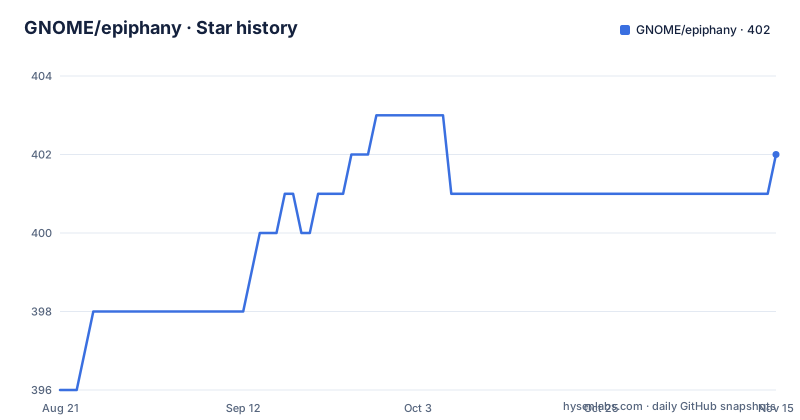
Star history
- GNOME/epiphany402 ★ · +6
| Repository | 2026-08-21 | 2026-11-15 |
|---|---|---|
| GNOME/epiphany | 396 | 402 |
6 Stars in the last 86 days, measured from the daily GitHub snapshot. Compare with other projects
Editorial analysis
The Problem: A Browser That Refuses to Be Everything
GNOME Web, also known as Epiphany, solves a problem that most browsers ignore: feature bloat. The README states that "feature bloat and user interface clutter is evil." The browser is designed for the web, not for mail, newsgroups, file management, instant messaging, or coffeemaking. This is a deliberate rejection of the trend where browsers become full platforms. The target audience is nontechnical users, who make up 90 percent of the user population according to the project. Technical details are not exposed in the interface, and the browser follows the GNOME Human Interface Guidelines. If you find modern browsers overwhelming, Epiphany offers a smaller, simpler alternative. It is not aimed at web developers, though a web inspector is included as a non-obtrusive feature.
How It Works: WebKitGTK Under a GNOME Shell
Epiphany is based on the WebKit rendering engine, specifically the WebKitGTK port. The browser is written in C and uses the Meson build system. The architecture is straightforward: Epiphany is a thin shell around WebKitGTK, providing the browser UI, tab management, and GNOME integration. The README mentions that the main goal is integration with GNOME and similar desktops like elementary OS. It does not aim to be usable outside these environments. This means the browser relies on GNOME services and conventions. The rendering engine handles HTML, CSS, and JavaScript, while Epiphany manages the user experience. The project's manifesto emphasizes standards compliance, arguing that nonstandard features can lead to a single browser dominating the market. This is a political stance as much as a technical one.
Getting It Running: Flatpak Is the Recommended Path
The recommended way to install Epiphany is via Flatpak. The README points to the Flathub page for the latest stable version. For testing, there is a Technology Preview that is explicitly not stable, and a Canary build that is even more unstable because it tracks WebKit's git main branch and Epiphany's master branch. The Canary build can be installed with this command: `flatpak --user install https://nightly.gnome.org/repo/appstream/org.gnome.Epiphany.Canary.flatpakref`. The README warns that OS package manager versions are often outdated and insecure, so Flatpak is preferred. For developers, the easy way to build from source is using GNOME Builder with the `org.gnome.Epiphany.json` manifest, which handles dependencies. Manual builds use Meson: `mkdir build && cd build`, then `meson ..`, `ninja`, and `sudo ninja install`. Missing dependencies produce errors like `Native dependency 'hogweed' not found`, and you can install them with `sudo dnf install 'pkgconfig(hogweed)'` on Fedora or `sudo apt install $(apt-file search --package-only hogweed)` on Debian-based systems.
The Manifesto: Simplicity, Standards, and Freedom
The README includes a manifesto that defines Epiphany's principles. Simplicity means a minimal interface, but not necessarily less power. Standards compliance is about ensuring freedom of choice, so that websites do not rely on nonstandard features. Software freedom is a core value: Epiphany is fully free software, and the README explicitly criticizes Google Chrome for including proprietary components. This is not a neutral position. The manifesto frames Epiphany as opposing the dominance of proprietary web browsers. This affects the user experience in concrete ways. For example, you should not expect support for proprietary codecs or DRM that might be present in other browsers. The project is opinionated, as the README says, and that opinion extends to the web platform itself. If you want a browser that takes a political stance on web standards, Epiphany is one of the few that does.
Limitations: Where Epiphany Is the Wrong Tool
The most obvious limitation is that Epiphany is designed for GNOME and similar desktops. If you use a different desktop environment, the README says the project does not aim to be usable there. Another limitation is the target audience: nontechnical users. Web developers will find the web inspector, but the interface hides technical details by design. The browser is also small, which means it lacks the feature set of mainstream browsers. It does not aim to support mail, newsgroups, or file management, but it also likely lacks extensions and other power-user features. The README does not mention extension support at all. Standards compliance means that websites using nonstandard features may not work. The README warns that such features could make it difficult to use alternative products. If a site relies on a Chrome-specific API, Epiphany might not render it correctly. This is a real risk for users who depend on specific websites.
Alternatives: Firefox and Chromium Take Different Paths
The obvious alternative is Firefox, which is also open source but takes a different approach. Firefox aims to be a full-featured browser with a large extension ecosystem, while Epiphany deliberately avoids feature bloat. Firefox is not tied to a specific desktop environment, whereas Epiphany is GNOME-centric. Another alternative is Chromium, the open-source base for Chrome. Chromium is not fully free software according to the README, because it includes proprietary components. Epiphany explicitly opposes that model. The difference in approach is fundamental: Epiphany prioritizes simplicity and freedom over features, while Firefox and Chromium prioritize compatibility and extensibility. If you need a browser that works everywhere and supports every website, Firefox or Chromium are safer choices. If you want a browser that is small, fast, and integrated with GNOME, Epiphany is the unique option.
Maintenance and Upgrade Cost: Flatpak Is the Key
The README stresses that Flatpak is the best distribution mechanism for Linux, and that OS packages are often outdated and insecure. This implies that maintaining Epiphany requires keeping the Flatpak updated. The Flatpak version is likely maintained by the GNOME project, so the upgrade cost is low for users. For developers, building from source is more involved. The README warns that rebuilding dependencies like WebKit is complicated and recommends Toolbox or JHBuild. The example shows how to build WebKit with JHBuild, which requires running cmake with specific flags like `-DPORT=GTK` and `-DDEVELOPER_MODE=ON`. This is a significant time investment. The project is licensed under GPL-3.0, which means any derivative work must also be GPL-3.0. This is a license implication to consider if you plan to fork or embed code. The README does not mention a specific release cadence, but the existence of stable, technology preview, and canary channels suggests a regular update cycle.
Editorial conclusion
Adopt GNOME Web if you are a GNOME or elementary OS user who values a clean, minimal interface and wants a browser that avoids proprietary components. Do not adopt it if you rely on Chrome extensions, need a browser for web development, or expect support for nonstandard web features. Before adopting, verify that your critical websites work with WebKitGTK, since some sites may not function correctly. Also check whether your distribution's package is up to date or if you should use the Flatpak from Flathub.
Frequently asked questions
What is Epiphany the browser?
GNOME Web, codenamed Epiphany, is a GNOME web browser built on the WebKit rendering engine. Its three stated principles are simplicity, standards compliance and software freedom, and it targets GNOME and similar desktops such as elementary OS.
How do I install Epiphany on Linux?
Through Flatpak, with the stable build from Flathub as the recommended route. Epiphany Technology Preview packages the next release and is marked not stable. Epiphany Canary installs from a flatpakref and is built from WebKit's git main branch, so it is the most volatile of the three.
How do I build Epiphany from source?
With Meson: run mkdir build && cd build, then meson .., ninja and sudo ninja install. GNOME Builder does the same work from the org.gnome.Epiphany.json flatpak-builder manifest, which supplies every required dependency instead of making you install them.
What happens when Meson reports a missing dependency for Epiphany?
Configuration stops with a message naming the missing pkg-config library, for example Native dependency 'hogweed' not found. On RPM systems you install it with dnf install 'pkgconfig(hogweed)', and on Debian-derived systems with apt install $(apt-file search --package-only hogweed).
Where do I report bugs for Epiphany?
The GitHub repository is a read-only mirror of gitlab.gnome.org/GNOME/epiphany and shows zero open issues. Discussion happens on the GNOME discourse forum at discourse.gnome.org/tag/epiphany.
Official sources
Add this badge to your README
If you maintain this project, the badge below links readers to this analysis and shows its maintenance status from the daily GitHub snapshot. Paste the markdown into your README; add ?metric=license or ?metric=stars to the image URL for a different field.

[](https://hysenlabs.com/projects/gnome-epiphany)Star history chart for your README
[](https://hysenlabs.com/projects/gnome-epiphany)Was this useful?