JSXGraph for Interactive Geometry and Web Data Visualization
JSXGraph is a cross-browser library for interactive geometry, function plotting, charting, and data visualization in a web browser.
At a glance
- What is it?
- JSXGraph is a JavaScript library for interactive geometry, function plotting, charting, and data visualization in browsers. It supports SVG, canvas, and VML rendering, offers a standalone browser distribution, and is licensed under LGPL-3.0-or-later or MIT.
- Who is it for?
- JSXGraph suits teams building interactive mathematics, geometry exercises, function plots, or browser charts that need a self-contained JavaScript library. It is less suitable when a conventional charting package, server-side rendering, or a very small application-specific visual abstraction is the priority.
- Can I use it commercially?
- Yes, with conditions. LGPL-3.0 is a weak copyleft licence: you can use it inside commercial and closed-source software, but if you distribute changes to its own files, you must publish those changes under the same licence.
- Is it still maintained?
- Yes. The repository last received commits 1 day ago.
- What is it written in?
- Mainly JavaScript, according to GitHub's language statistics.
Answers come from the project's GitHub data, last synced on October 23, 2026, and from our analysis. They are not legal advice.
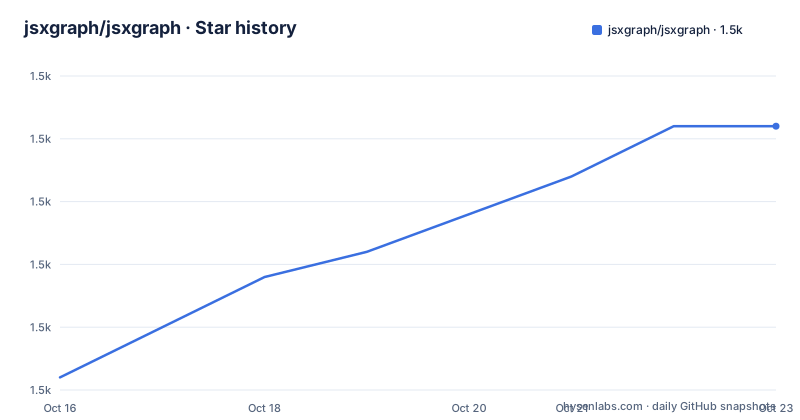
Star history
- jsxgraph/jsxgraph1,483 ★ · +10
| Repository | 2026-10-16 | 2026-10-23 |
|---|---|---|
| jsxgraph/jsxgraph | 1.5k | 1.5k |
10 Stars in the last 7 days, measured from the daily GitHub snapshot. Compare with other projects
Editorial analysis
What JSXGraph Is Designed to Render
JSXGraph addresses browser-based mathematical and graphical content rather than general-purpose business dashboards. Its documented use cases include interactive geometry, function plotting, charting, and data visualization. That makes it relevant to mathematics education, teaching environments, exercise interfaces, and pages where a point, line, curve, or coordinate system must respond to direct manipulation. The library is implemented completely in JavaScript and does not depend on another library according to the README.
The visual model is broader than a plotting function attached to a chart container. A JSXGraph board can contain mathematical elements such as points and other geometry objects, and the repository includes examples for angle construction, Bézier curves, bar charts, board events, and L-systems. A project can therefore use the same board for coordinate geometry and charting, provided the chosen element types match the application. The library supports multi-touch events and is documented as running on major browsers.
JSXGraph is not positioned as a replacement for every visualization tool. Its scope is clearest when the page needs mathematical coordinates, geometric relationships, or interactive construction. The repository's Moodle filter, Jupyter integration, and STACK assessment references also show that it is used in environments where mathematical expressions and browser interaction are central. Those integrations are not required for a standalone page.
Board Initialization and Rendering Paths
The basic flow is visible in the README template. The page loads `jsxgraphcore.js` and `jsxgraph.css`, creates an HTML element for the board, and calls `JXG.JSXGraph.initBoard` with the element identifier and a bounding box. The returned `board` object is then used to create elements with methods such as `create`.
The library can render through SVG, canvas, or VML. This choice affects which browser-facing drawing path is used, while the JavaScript board model remains the central abstraction. The README says that SVG and canvas are supported, and it also calls VML venerable. The documentation excerpt does not give a configuration example for selecting a renderer, so an application should confirm the current API documentation for its browser and deployment requirements instead of assuming that every renderer has identical behavior.
The bounding box in the template is `[-8, 8, 8, -8]`. It defines the coordinate range used by the example board. Elements receive coordinates through JavaScript arrays, as shown by the point declaration. This design keeps the page's HTML container separate from the mathematical board configuration, which is useful when the same visualization is reused across different document layouts.
CDN Embedding and First Browser Example
The shortest documented setup uses the jsDelivr CDN. Include the stylesheet in the document head and load the core script with `charset="UTF-8"`. The example then initializes a board in a `div` and adds a named point. The reader should see a square board with coordinates spanning the configured bounding box and a point at coordinates `[1, 3]`.
Use this complete HTML template as the first working page:
<!doctype html>
<html lang="en">
  <head>
    <meta charset="UTF-8">
    <title>JSXGraph template</title>
    <meta content="text/html; charset=utf-8" http-equiv="Content-Type">
    <link href="https://cdn.jsdelivr.net/npm/jsxgraph/distrib/jsxgraph.css" rel="stylesheet" type="text/css">
    <script src="https://cdn.jsdelivr.net/npm/jsxgraph/distrib/jsxgraphcore.js" charset="UTF-8"></script>
  </head>

  <body>
  <div id="jxgbox" class="jxgbox" style="max-width:800px; aspect-ratio: 1/1;"></div>
  <script>
    var board = JXG.JSXGraph.initBoard('jxgbox', {boundingbox: [-8, 8, 8, -8]});
    var p = board.create('point', [1, 3], {name: 'point'});
  </script>

  </body>
</html>
The `jxgbox` class comes from `jsxgraph.css`, so omitting the stylesheet can leave the board without the intended sizing or layout behavior. The CDN URLs use the package's current npm distribution. For production deployments, pinning a specific version is a sensible operational choice, although the README's CDN example does not specify a versioned URL. The repository also documents Cloudflare's CDN format, including a `[versionnumber]` placeholder that must be replaced by the actual release.
Building From Source for Contributors
The development instructions require cloning the repository or downloading its zip file, installing npm dependencies, and building the distributable files. The repository's package metadata identifies the package as `jsxgraph`, version `1.14.0`. The README says that `npm install` creates `node_modules` in the project root, and that `npm run buildCore` produces `jsxgraphsrc.js` and `jsxgraphcore.js` in `distrib`.
A contributor can install dependencies with:
npm installThe documented build command is:
npm run buildCoreAfter the build, the non-minified `jsxgraphsrc.js` and minified `jsxgraphcore.js` should be present in `distrib`. The repository's Makefile also exposes build targets such as `core`, `readers`, `docs`, `test`, `eslint`, and `prettier`, but the README gives npm commands as the main development path. A contributor changing files under `src` is expected to add or update tests under `test`.
The documented quality commands are specific:
npm run eslint
npm run test
npm run check-format
These commands check errors, run tests, and check source formatting according to the README. The package metadata includes ESLint, Jasmine, Karma, Prettier, and browser-launcher development dependencies, which aligns with a JavaScript build and test workflow. The repository does not provide a claim about test coverage or runtime performance, so those properties should not be inferred from the tooling list.
License, Distribution, and Maintenance Boundaries
JSXGraph is dual licensed under the GNU Lesser General Public License or the MIT License. The package metadata records the license as `(MIT OR LGPL-3.0-or-later)`. The README says that the project may be redistributed or modified under the terms of the LGPL, version 3 or later, or under the MIT License. This is a licensing choice, not a blanket statement that every deployment has identical obligations. A project owner should read the repository's `LICENSE.LGPL` and `LICENSE.MIT` files and assess how the library will be bundled or distributed.
The repository is not archived. Its last push was on 2026-10-15, and the release list includes `v1.14.0` on 2026-10-05, `v1.13.3` on 2026-09-07, and `v1.13.2` on 2026-08-17. These facts establish recent release and repository activity, but they do not establish compatibility for a particular application. Upgrades can affect the selected renderer, browser behavior, element options, or build output, so release notes and changelog review remain part of adoption work.
The README's build process also creates separate source and minified files. Applications that need to reproduce a deployed artifact should record which distribution they use and avoid assuming that a local development build and a CDN build are byte-for-byte equivalent.
Limitations and the Alternative to a General Chart Library
The first limitation is scope. JSXGraph is designed for interactive mathematical visualizations, so a team needing a conventional chart with standard business-chart options may find that its coordinate-based model does not answer the project's requirements. The repository includes `examples/barchart.html` and `examples/barchart2.html`, but the README does not describe a complete catalogue of chart types, legends, aggregation options, or dashboard-specific APIs. It would be incorrect to assume that those examples cover a general analytics product.
The second limitation is documentation depth in this excerpt. The README points to the wiki, tutorials, API reference, examples, and Stack Overflow search, but it does not document rollback, accessibility guarantees, server-side rendering, or a formal browser support matrix beyond saying that major browsers are supported. None of those topics should be presented as implemented features without checking the linked documentation and repository source.
A real alternative approach is to use a general-purpose browser chart library whose API is organized around datasets, axes, legends, and chart types. JSXGraph instead starts with a board and creates mathematical elements on it. That difference matters when the desired output is a plotted function or a draggable geometric construction rather than a business chart. Another alternative is custom SVG, canvas, or WebGL code, which can reduce dependency weight for a narrowly defined graphic but transfers interaction, coordinate transforms, event handling, and element lifecycle to the application.
Editorial conclusion
JSXGraph suits teams building interactive mathematics, geometry exercises, function plots, or browser charts that need a self-contained JavaScript library. It is less suitable when a conventional charting package, server-side rendering, or a very small application-specific visual abstraction is the priority. Before adoption, verify browser behavior with the required SVG, canvas, or VML renderer, confirm that the selected license fits the distribution model, and check whether the API documentation covers the exact element types and events needed. For a small browser visualization, the CDN template and `JXG.JSXGraph.initBoard` example provide the first implementation decision point.
Frequently asked questions
How do I install JSXGraph in a browser?
The README gives a CDN-based setup: include `jsxgraphcore.js` and `jsxgraph.css` in the HTML page, then initialize a board with `JXG.JSXGraph.initBoard`. For source development, clone the repository, run `npm install`, and run `npm run buildCore`.
What renderers does JSXGraph support?
The README states that JSXGraph can use SVG, canvas, or VML. It does not provide a renderer-selection example in the README usage template, so the API documentation should be checked before configuring a specific renderer.
Can I use JSXGraph for interactive geometry and function plotting?
Yes. The README explicitly lists interactive geometry, function plotting, charting, and data visualization as supported uses. The repository also includes examples for geometry constructions, Bézier curves, bar charts, and board events.
Official sources
Add this badge to your README
If you maintain this project, the badge below links readers to this analysis and shows its maintenance status from the daily GitHub snapshot. Paste the markdown into your README; add ?metric=license or ?metric=stars to the image URL for a different field.

[](https://hysenlabs.com/projects/jsxgraph-jsxgraph)Star history chart for your README
[](https://hysenlabs.com/projects/jsxgraph-jsxgraph)Was this useful?