Peaks.js draws waveforms on canvas and still has to load the whole file
JavaScript UI component for interacting with audio waveforms
At a glance
- What is it?
- Peaks.js is the BBC's client-side audio waveform component, built on Konva, that renders zoomable and overview views, handles point and segment markers and works on mono, stereo or multi-channel audio. Its own README now points development at a Codeberg repository, and the 16-bit waveform data path is unsupported.
- Who is it for?
- Adopt Peaks.js when you need annotation over long-form audio in the browser and you are willing to pre-compute waveform data with audiowaveform on a server. Do not adopt it for short clips where downloading the whole file is acceptable, and do not assume this GitHub repository is where work continues: the README states that ongoing development has moved to codeberg.org/chrisn/peaks.js.
- Can I use it commercially?
- Yes, with conditions. LGPL-3.0 is a weak copyleft licence: you can use it inside commercial and closed-source software, but if you distribute changes to its own files, you must publish those changes under the same licence.
- Is it still maintained?
- Yes. The repository last received commits 2 days ago.
- What is it written in?
- Mainly JavaScript, according to GitHub's language statistics.
Answers come from the project's GitHub data, last synced on October 23, 2026, and from our analysis. They are not legal advice.
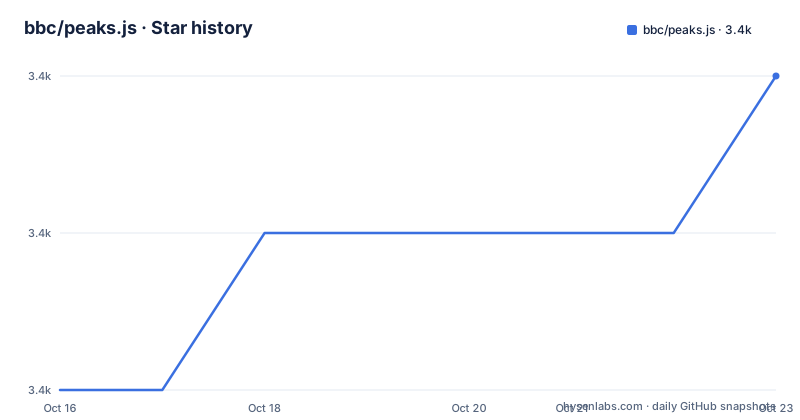
Star history
- bbc/peaks.js3,410 ★ · +2
| Repository | 2026-10-16 | 2026-10-23 |
|---|---|---|
| bbc/peaks.js | 3.4k | 3.4k |
2 Stars in the last 7 days, measured from the daily GitHub snapshot. Compare with other projects
Editorial analysis
Where development now happens
The first line of the README is a redirect in prose: ongoing development of this project has moved to codeberg.org/chrisn/peaks.js. That is the single most important fact for anyone evaluating the project, because it decides which issue tracker, which release line and which review process you are dealing with.
The GitHub repository has not been archived and the last push was on 2026-10-12, four days before this article. So the mirror is alive, but a live mirror is not the same as the place changes land.
The published npm version is 4.0.0-beta.2, released 2025-05-13, following beta.1 in April 2025 and beta.0 in November 2024. A beta version that has sat for about a year on npm is a fact worth weighing before you make it a dependency: you are pinning a release from a line that has not reached 4.0.0 stable, while the source of truth for further work is on a different forge.
The install needs three packages, not one
Peaks.js is not self-contained. Konva and waveform-data are peer dependencies, so a module install is three commands:
npm install --save peaks.js
npm install --save konva
npm install --save waveform-data
The README recommends a module bundler such as Webpack, Rollup or Parcel. The alternative is a UMD bundle from a CDN:
<script src="https://unpkg.com/peaks.js/dist/peaks.js"></script>The bundle is also on cdnjs. Note the package publishes several entry points: a CommonJS main, an ES module build, an extension build, minified and sourcemapped variants of each, plus a hand-written peaks.js.d.ts. Node 20.0.0 or newer is required, and the browserslist target is the last two versions above 0.2 percent, excluding IE 11.
Empty containers and a media element are the whole markup contract
Peaks.js renders into container elements you provide, and it needs a media element to bind playback to. The README is explicit that the divs stay empty, because their contents are replaced by the waveform canvas elements, and that they must be sized in CSS:
<div id="zoomview-container"></div>
<div id="overview-container"></div>
<audio id="audio">
  <source src="sample.mp3" type="audio/mpeg">
  <source src="sample.ogg" type='audio/ogg codecs="vorbis"'>
</audio>#zoomview-container, #overview-container {
width: 1000px;
height: 100px;
}Two view types are configured separately. The zoomview is the scrollable, zoomable detail view and the overview is the fixed width view of the whole file. Initialisation passes both containers, the media element and a Web Audio context:
const options = {
  zoomview: {
    container: document.getElementById('zoomview-container')
  },
  overview: {
    container: document.getElementById('overview-container')
  },
  mediaElement: document.getElementById('audio'),
  webAudio: {
    audioContext: new AudioContext()
  }
};

Peaks.init(options, function(err, peaks) {
  if (err) {
    console.error('Failed to initialize Peaks instance: ' + err.message);
    return;
  }
});
The callback style is worth noting for a modern codebase: there is no promise to await here, and errors arrive as the first argument.
Pre-compute the data or download the audio, there is no middle
Waveform data comes from one of two places, and the README is blunt about the trade-off. Either you pre-compute peaks with the BBC's audiowaveform tool and serve the result, or Peaks.js computes them in the browser through the Web Audio API.
Browser computation works well for short files but involves downloading the entire audio file to the browser and is CPU intensive. For anything long form, the audio element itself is still needed for playback, but the waveform display can come from a small data file instead of the whole track.
Pre-computed files come in binary (.dat) or JSON, and binary is preferred because of the smaller file size, which still holds after gzip or Brotli. There is a hard constraint: use the -b 8 option when generating, because Peaks.js does not currently support 16-bit waveform data files. Feed it a 16-bit file and you get no waveform, with no specific error documented for that case.
Both the demo directory and the test data show the pattern in practice, with a .dat, a .json and matching audio files sitting next to each other.
Markers and channels are what you get for the effort
The interaction model is the reason to use this component at all. Users can zoom and scroll the zoomview, and can create point markers for a single instant or segment markers for a range, which the README describes as the way to mark content to clip or to separate music from speech or distinguish tracks.
Mono, stereo and multi-channel waveform views are supported, and there is a demo page dedicated to multi-channel rendering. Interaction covers mouse, touch, scroll wheel and keyboard, so an annotation tool does not have to be mouse-only.
The visualisation is customizable through configuration options for the waveform views, and the demo directory shows the shape of that: separate pages for custom markers, overlay segments, a scrollbar, setting the source, an external player, cue events, multi-channel audio and a Web Audio only setup. Reading those files is the fastest way to see which options exist, since the API documentation lives in doc/API.md rather than the README.
Where it stops being the right tool
Three limits are concrete. The 16-bit restriction above means your audiowaveform invocation must match, and nothing in the README describes a graceful fallback. The initialization API is callback based rather than promise based, which means integrating it into a codebase built on async control flow needs a wrapper.
More seriously, if your users are on an old browser or a restrictive WebView without the Web Audio API, the browser-side path disappears and you are entirely dependent on pre-computed data. And the licensing is LGPL-3.0, which is the main practical constraint on embedding it in a product: dynamic linking with your own code is the safe pattern, while statically bundling Peaks.js into a single script raises the question of whether you owe source for the combined work. That is a licensing question rather than a technical one, so take your own advice on it.
There is also a distribution risk in the version story: a year-old beta on npm plus development on a different forge is a combination that can change under you without a major bump.
How it compares to drawing the waveform yourself
The alternative approaches are writing your own canvas rendering, or using a general-purpose audio visualiser.
Writing it yourself means you own the zoom, the pixel-to-time mapping and the marker hit testing, and you get exactly the interaction you need. You also take on the resampling behaviour on zoom, which is where waveform viewers usually go wrong, and the multi-channel layout work.
A general-purpose visualiser is built for looking at audio, not for editing it. It has no markers, no segment ranges and no model for annotation, so it does not compete with this component for the same job.
Peaks.js sits in between: it has already solved the resampling and channel layout, and it ships the annotation model the README describes. The pre-computed data path is the part that makes it practical for long audio, and that is the part that costs you a server-side build step.
Editorial conclusion
Adopt Peaks.js when you need annotation over long-form audio in the browser and you are willing to pre-compute waveform data with audiowaveform on a server. Do not adopt it for short clips where downloading the whole file is acceptable, and do not assume this GitHub repository is where work continues: the README states that ongoing development has moved to codeberg.org/chrisn/peaks.js. Before you pin a version, check that plan against the Codeberg repository, generate waveform files with -b 8 since 16-bit data is not supported, and confirm your build runs Node 20 or newer.
Frequently asked questions
Where is Peaks.js currently developed?
The README states that ongoing development has moved to codeberg.org/chrisn/peaks.js. This GitHub repository is not archived and was pushed to on 2026-10-12, but new work lands on Codeberg.
Which npm packages do I need to install for Peaks.js?
Three: peaks.js, konva and waveform-data. Konva and waveform-data are peer dependencies, so they have to be installed explicitly alongside the main package.
How do I generate waveform data for Peaks.js?
Use the BBC's audiowaveform tool on your server and serve the resulting .dat or JSON file. Use the -b 8 option, because Peaks.js does not currently support 16-bit waveform data files, and prefer binary format for its smaller size.
Does Peaks.js work without pre-computed waveform data?
Yes, it can compute the waveform in the browser through the Web Audio API, which is what the webAudio option with an audioContext does. The README notes this works well for short audio but downloads the entire file and is CPU intensive.
What licence is Peaks.js under and what Node version does it need?
The package is published under LGPL-3.0. The package.json sets engines to node >= 20.0.0, and the browserslist target is the last two versions above 0.2 percent with IE 11 excluded.
Official sources
Add this badge to your README
If you maintain this project, the badge below links readers to this analysis and shows its maintenance status from the daily GitHub snapshot. Paste the markdown into your README; add ?metric=license or ?metric=stars to the image URL for a different field.

[](https://hysenlabs.com/projects/bbc-peaks-js)Star history chart for your README
[](https://hysenlabs.com/projects/bbc-peaks-js)Was this useful?