BigBlueButton 4.0: a self-hosted virtual classroom spread across many services
A complete web conferencing system for virtual classes and more!
At a glance
- What is it?
- BigBlueButton is an LGPL-3.0 web conferencing system built for teaching. Its repository shows a platform of cooperating components, a default branch that trails the current 4.0 release, and an install path that names one operating system.
- Who is it for?
- BigBlueButton fits schools, universities and training teams that can run their own Ubuntu 24.04 server and want classroom tools such as breakout rooms, polling, recording and a moderator analytics dashboard under LGPL-3.0. It does not fit a single teacher who wants a hosted meeting link without running a server, and it will mislead anyone who reads code from the default v3.0.x-develop branch while running 4.0.
- Can I use it commercially?
- Yes, with conditions. LGPL-3.0 is a weak copyleft licence: you can use it inside commercial and closed-source software, but if you distribute changes to its own files, you must publish those changes under the same licence.
- Is it still maintained?
- Yes. The repository last received commits 1 day ago.
- What is it written in?
- Mainly JavaScript, according to GitHub's language statistics.
Answers come from the project's GitHub data, last synced on November 25, 2026, and from our analysis. They are not legal advice.
Star history
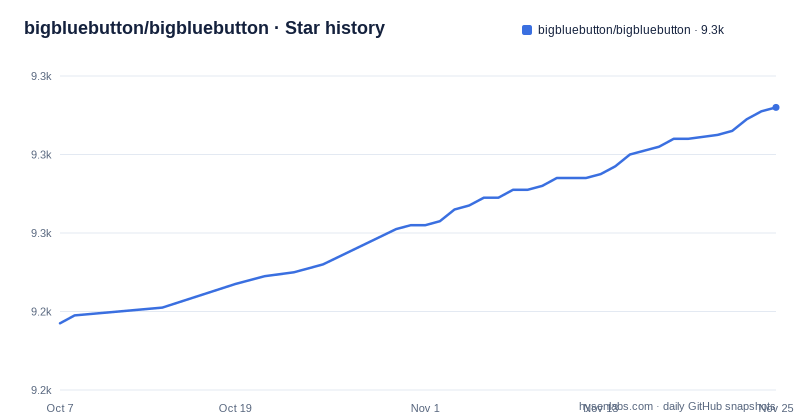
- bigbluebutton/bigbluebutton9,292 ★ · +55
| Repository | 2026-10-07 | 2026-11-25 |
|---|---|---|
| bigbluebutton/bigbluebutton | 9.2k | 9.3k |
55 Stars in the last 49 days, measured from the daily GitHub snapshot. Compare with other projects
Editorial analysis
A classroom assembled from separate services in one repository
BigBlueButton calls itself an open-source virtual classroom designed to help teachers teach and learners learn. In a session it shares audio, video, slides with whiteboard annotations, chat and the screen in real time. The top-level tree makes clear that this is not one program. The repository holds akka-bbb-apps and akka-bbb-fsesl, a bbb-fsesl-client, a set of GraphQL pieces (bbb-graphql-server, bbb-graphql-middleware, bbb-graphql-actions and bbb-graphql-client-test), the browser client in bigbluebutton-html5, bigbluebutton-web, bbb-voice-conference, bbb-livekit, bbb-shared-notes-server, bbb-export-annotations, bbb-libreoffice and bbb-learning-dashboard. Shared code sits in bbb-common-message and bbb-common-web, while bigbluebutton-config, build and scripts hold the glue, and bigbluebutton-tests holds the test suite. For an operator this layout has a direct consequence: a BigBlueButton server is a collection of cooperating processes, and a fault seen in one meeting can originate in any of them. The directory names are the quickest map of where to start looking, since shared notes, the analytics dashboard, annotation export and the voice conference each have a directory of their own.
Several services exist here only as placeholder scripts
Not every component lives in this tree as source. The repository contains freeswitch.placeholder.sh, bbb-webrtc-sfu.placeholder.sh, bbb-webrtc-recorder.placeholder.sh, bbb-webhooks.placeholder.sh, bbb-etherpad.placeholder.sh, bbb-pads.placeholder.sh, bbb-playback.placeholder.sh, bbb-presentation-video.placeholder.sh and bbb-transcription-controller.placeholder.sh. Each is a single script file at the top level rather than a directory of code. The consequence for anyone auditing or patching the platform is that a clone of bigbluebutton/bigbluebutton does not contain every moving part. If a problem involves FreeSWITCH, the WebRTC SFU, webhooks, Etherpad, the pads service, the playback page or the transcription controller, the code you need is not in this checkout, and a search across the repository will come up empty. Plan for that before promising a fix to a team that reports a bug in one of those areas: first find where that component's source is maintained, then work from there. Security reviewers face the same gap, because an audit of this repository alone leaves those services unread.
The default branch is v3.0.x-develop while the current release is 4.0
The latest version is BigBlueButton 4.0, and the release list agrees: v4.0.0 was published on 14 October 2026 and v4.0.1 followed on 29 October 2026. Yet the default branch on GitHub is v3.0.x-develop. Anyone who opens the repository page, browses files, or clones without naming a branch lands on the 3.0 development line, not on the code behind the 4.0 release. That matters when you read source to explain a behavior you see on a 4.0 server, because you can end up studying the wrong generation of the code and drawing the wrong conclusion. The 3.0 line has not been dropped either. v3.0.40 was released on 28 October 2026, two weeks after 4.0.0, so the 3.0 series still receives releases alongside 4.0. The last push to the repository landed on 2 November 2026. Pick the tag that matches your server, v4.0.1 or v3.0.40, before reading, building or filing an issue against anything.
bbb-install.sh names one platform: Ubuntu 24.04
Installation does not start from this repository. The README sends readers to bbb-install.sh in the separate bigbluebutton/bbb-install repository and says BigBlueButton 4.0 installs on Ubuntu 24.04 with it within 30 minutes. That is the only operating system named for the current release. People looking for an install on Ubuntu 22.04 should treat that combination as unconfirmed for 4.0: the 24.04 instruction is the route the project points to, and running the script on another release puts an operator outside it. There is no install command to copy from this repository itself; the script, its options and its prerequisites live in bbb-install, and the full technical documentation, covering architecture, features, the API and GreenLight, is at docs.bigbluebutton.org. The practical cost is that a school with an existing server on another Ubuntu version should plan for an Ubuntu 24.04 host before the 30 minute estimate means anything for them.
Moderator tools: polling, breakout rooms and the Learning Analytics Dashboard
The classroom features go beyond showing faces on a grid. Instructors can run polls, use emojis, open multi-user whiteboards, write shared notes and split a class into breakout rooms. While the session runs, BigBlueButton generates analytics, and those are visible to moderators in the Learning Analytics Dashboard, which has its own directory, bbb-learning-dashboard, in the tree. The design gives the moderator role more visibility than participants: the dashboard is for moderators, not for every attendee. The project names four educational patterns it was built for: one-to-one online tutoring, flipped classrooms where content is recorded ahead of the session, many-to-many group collaboration and one-to-many online classes. It also says it can serve other applications, but every feature it lists is framed around teaching. Teams shopping for a general business meeting product should judge it on those classroom tools, because that is where the project puts its effort.
Recording belongs to presenters and runs through its own pipeline
Presenters can record content and play it back for later sharing with others. That single capability spans a large part of the tree: record-and-playback and bbb-recording-imex are source directories, while the playback page, the WebRTC recorder and presentation video exist here only as placeholder scripts (bbb-playback.placeholder.sh, bbb-webrtc-recorder.placeholder.sh and bbb-presentation-video.placeholder.sh). The flipped classroom use case depends on this chain, since it means content recorded ahead of a session and shared afterwards. The limitation for students asking how to reach a recording is that the repository does not hand out recordings at all; recordings sit on whatever server the institution runs, and the link reaches students through the front end or course system in front of that server. If you operate the server, docs.bigbluebutton.org is the place to learn how recordings are processed and exposed, because part of the recording chain is not in this checkout.
There is no meeting to join until someone hosts one
Anyone looking for a BigBlueButton login, app or join link runs into a basic fact: this repository is the software, not a service with accounts. To join a meeting, a student needs a server that someone has installed and a front end in front of it. GreenLight is named as the default front end, and its documentation sits with the rest at docs.bigbluebutton.org. For Canvas and Moodle, the top-level tree here contains no plugin directory for either, so questions about where the BigBlueButton button sits inside a course belong with whoever administers that learning platform. The consequence for a student is that the access path, the login and whether recordings are visible are decided by the host, not by this project. For a teacher evaluating it alone, the same fact means budgeting time for running a server, not only for learning the interface. Even a quick trial of the classroom depends on a server that someone has already set up.
LGPL-3.0 code, trademarked name
The code is released under LGPL-3.0, so there is no license fee to download and run the software; the cost of using it comes from the server and from the people who keep it running. The README jokes that the 30 minute installation comes with your money back, a joke that works because nothing is charged for the installer. The name and logo are a separate matter. BigBlueButton and the BigBlueButton logo are trademarks of BigBlueButton Inc, and that notice stands apart from the code license. A hosting company or university that modifies the code and offers it to others gets its code terms from LGPL-3.0, while the name and logo belong to BigBlueButton Inc. Anyone planning to ship a modified build under the BigBlueButton name should settle the trademark question with BigBlueButton Inc before launch, because renaming a service after users know it is harder than naming it correctly at the start.
Editorial conclusion
BigBlueButton fits schools, universities and training teams that can run their own Ubuntu 24.04 server and want classroom tools such as breakout rooms, polling, recording and a moderator analytics dashboard under LGPL-3.0. It does not fit a single teacher who wants a hosted meeting link without running a server, and it will mislead anyone who reads code from the default v3.0.x-develop branch while running 4.0. Before committing, confirm the bbb-install.sh requirements and locate the source for the components that exist in this repository only as placeholder scripts.
Frequently asked questions
Is BigBlueButton free to use?
BigBlueButton is open source under LGPL-3.0, so there is no license fee for the software. You run it on your own Ubuntu 24.04 server using bbb-install.sh.
Is BigBlueButton like Zoom?
BigBlueButton is a web conferencing system that shares audio, video, slides with whiteboard annotations, chat and the screen in real time. It is designed for online learning, with polling, breakout rooms, shared notes and a Learning Analytics Dashboard for moderators.
How do I install BigBlueButton?
BigBlueButton 4.0 installs on Ubuntu 24.04 with bbb-install.sh from the bigbluebutton/bbb-install repository, which the project says takes about 30 minutes. Full documentation is at docs.bigbluebutton.org.
Can I install BigBlueButton on Ubuntu 22.04?
The install route given for BigBlueButton 4.0 is Ubuntu 24.04 with bbb-install.sh. Check docs.bigbluebutton.org before trying another Ubuntu release.
How do I access BigBlueButton recordings?
Presenters in BigBlueButton can record content and play it back for later sharing. Recordings live on the server your institution runs, so access comes through its front end, such as GreenLight, the default front end.
Official sources
Add this badge to your README
If you maintain this project, the badge below links readers to this analysis and shows its maintenance status from the daily GitHub snapshot. Paste the markdown into your README; add ?metric=license or ?metric=stars to the image URL for a different field.

[](https://hysenlabs.com/projects/bigbluebutton-bigbluebutton)Star history chart for your README
[](https://hysenlabs.com/projects/bigbluebutton-bigbluebutton)Was this useful?