Figma to Code: A Deterministic, Private Converter for Figma Selections
Project brief: Generate responsive pages and apps on HTML, Tailwind, Flutter and SwiftUI.
At a glance
- What is it?
- Figma to Code turns selected Figma layers into HTML, Tailwind, Flutter, or SwiftUI without AI or network calls. It is a useful scaffold generator for teams with strict privacy rules, but it will not replace a human integration step.
- Who is it for?
- Adopt Figma to Code if you need a fast, private, deterministic way to turn a focused Figma selection into a readable starter scaffold for web or native targets, and if you accept that the output is a starting point, not a finished component. Do not adopt it if you expect AI-driven semantics, existing codebase integration, or production-ready accessibility.
- Can I use it commercially?
- Yes, with conditions. GPL-3.0 is a copyleft licence: if you distribute software that includes it, you must release that software's source code under the same licence. Running it internally without distributing it does not trigger that obligation.
- Is it still maintained?
- Yes. The repository last received commits 100 days ago.
- What is it written in?
- Mainly TypeScript, according to GitHub's language statistics.
Answers come from the project's GitHub data, last synced on November 13, 2026, and from our analysis. They are not legal advice.
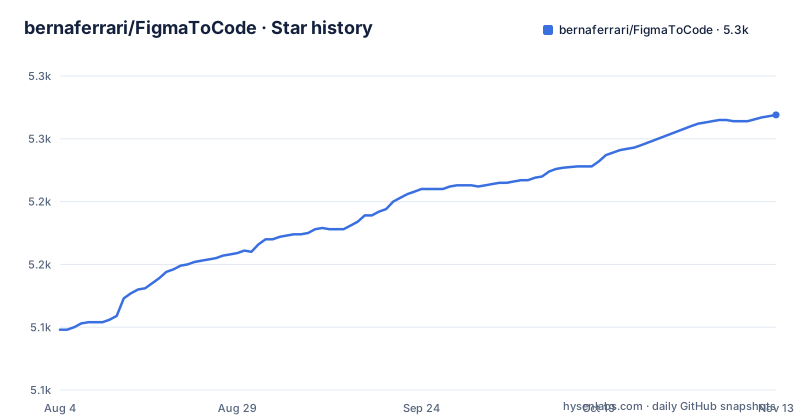
Star history
- bernaferrari/FigmaToCode5,269 ★ · +171
| Repository | 2026-08-04 | 2026-11-13 |
|---|---|---|
| bernaferrari/FigmaToCode | 5.1k | 5.3k |
171 Stars in the last 101 days, measured from the daily GitHub snapshot. Compare with other projects
Editorial analysis
The gap it fills: between design and implementation
Figma to Code targets a specific moment in a design workflow: after a visual design is approved but before a developer writes the real component. The README describes it as a way to get a readable visual scaffold from a frame, component, or smaller group of layers. It is not a screenshot-to-code service. The plugin reads the selected nodes through Figma's Plugin API, normalizes them in memory, and runs framework-specific TypeScript code to produce output. That output is meant to be copied, refined, or downloaded as a starter project. The intended user is a developer or designer who wants a quick, editable starting point without sending design data to an external service. The plugin's own guidance is to convert one reusable section or control at a time, not an entire page, because smaller selections produce better component boundaries.
The mechanism: a small compiler, not an AI model
The conversion pipeline is described as a five-step process: read, normalize, optimize, generate, and explain. First, the plugin inspects the selected Figma nodes and their layout and style metadata. Second, it converts them into an internal tree that can be transformed without modifying the source document. Third, it resolves parent-child relationships, Auto Layout, alignment, sizing, and positioning. Fourth, it sends the normalized tree to the selected output backend. Finally, it returns the code, preview data, extracted assets, and conversion warnings to the interface. This is a deterministic process. The README is explicit that no AI model is called, no repository is inspected, and no selection is sent to another service. The rules are public TypeScript, which means the conversion logic can be inspected and tested. That design choice makes the plugin predictable: the same selection and settings will produce the same output every time.
Getting it running: install, select, and generate
The plugin is installed from the Figma Community, and the README gives a five-step usage flow. You install it, select a frame, component, group, or individual layer, then run the plugin in Figma Design or choose one of its codegen outputs in Dev Mode. After picking a target, you adjust options that apply to that target. Options include including Figma layer names in generated classes, rounding spacing and colors to nearby Tailwind tokens, generating Tailwind 4 syntax, adding a custom class prefix, using Figma color variables, embedding images as Base64, and embedding supported vector shapes as SVG for web output. The interface shows a visual preview with light and dark backgrounds, conversion warnings, extracted colors and gradients, and buttons for copying code or downloading a starter project. Downloads are packaged as dependency-light starters: Vite, Next.js, or static HTML for web; source with pubspec.yaml and assets for Flutter; source with an asset catalog for SwiftUI. These are starting points, not production applications.
Limitations you should know before adopting
The README is honest about what the plugin cannot do. It does not invent semantics, interactions, or prompt-based redesigns. It cannot inspect a repository, map existing components, import an application into Figma, or synchronize generated files. It cannot infer state management, data loading, navigation, backend behavior, or business rules. Accessibility is not invented: semantics, labels, keyboard behavior, dynamic type, and responsive breakpoints still need human review. Some details are target-dependent: vector support is optional for web and limited in native targets, and stars, polygons, lines, gradients, and effects do not always have equivalent APIs. Large selections cost more memory, so focused selections are more reliable. When a detail cannot translate cleanly, the plugin reports a warning instead of pretending the result is exact. That warning behavior is a real strength, but it also means you must read the warnings and adjust the output manually.
The privacy model is the core differentiator
The plugin's privacy claim is based on the repository-level manifest.json, which is the configuration Figma uses for the published plugin. The manifest contains an empty permissions array and a networkAccess block that allows no domains. That means the plugin can make no network requests. The README states that selected nodes are read through Figma's Plugin API, normalized in memory, converted by framework-specific TypeScript, and returned to the plugin interface. There is no telemetry, design upload, external model, or separate user account. This is a narrow claim: Figma itself is a connected product, and the plugin does not add another network destination for the selected design data. For teams where external design processing is not allowed, this architecture is the main reason to choose this plugin over cloud-based converters. The trade-off is that you get no AI assistance, no semantic inference, and no access to a larger training corpus.
Comparing with the alternative: AI-based converters
The obvious alternative is a screenshot-to-code service that uses an AI model to generate code from a design image or a Figma export. Those services often require an account, generation credits, or uploading the design to a remote server. Figma to Code deliberately does none of that. The difference in approach is fundamental: an AI converter tries to infer intent and semantics from pixels or a document, which can produce more flexible output but also introduces nondeterminism and privacy concerns. Figma to Code uses deterministic rules that read the actual layout and style metadata, so it preserves exact spacing and colors unless you choose to round them to Tailwind tokens. The trade-off is that the output is a visual scaffold, not a semantic component. If you need a component that matches your existing codebase's patterns, an AI service might guess closer, but it will also send your design data somewhere. Figma to Code keeps the data local and gives you warnings when a translation is imperfect.
Maintenance, licensing, and what to verify first
The repository is licensed under GPL-3.0, which has implications if you plan to redistribute modified versions of the plugin itself. Check the license text for how its terms apply to generated code. The last push was on 2026-08-05. The project has a homepage on Vercel and a Figma Community page, but the repository has no published GitHub releases. Before relying on it, verify that the plugin works with your current Figma version and that the generated code compiles in your target environment. Check the warnings for unsupported vectors or effects, and test a small selection first. The plugin's value is its deterministic, private conversion pipeline, but it is not a substitute for a human review of the generated code.
Editorial conclusion
Adopt Figma to Code if you need a fast, private, deterministic way to turn a focused Figma selection into a readable starter scaffold for web or native targets, and if you accept that the output is a starting point, not a finished component. Do not adopt it if you expect AI-driven semantics, existing codebase integration, or production-ready accessibility. Before relying on it, verify that the generated code matches your design system, check the warnings for unsupported vectors or effects, and test the output in your actual build environment. The plugin's value is its narrow, inspectable conversion pipeline, not its breadth.
Frequently asked questions
Is the Figma code free?
Yes. The plugin asks for no account, trial, credits or generation limits, and the repository is published under GPL-3.0. Generation runs inside Figma's plugin sandbox, so there is no per conversion billing.
Can I use Figma to code?
You can, in two places: run the plugin from Figma Design, or choose one of its code generation outputs in Dev Mode. Select a frame, component, group or single layer first, pick a target, then copy the code or download a starter project.
Can I convert Figma to HTML?
Yes. The HTML target offers HTML, React as JSX, Svelte and styled components, and the Tailwind CSS target adds Twig with Tailwind 3 or Tailwind 4 support. Web downloads package the result into Vite, Next.js or static HTML projects.
Can I earn money from Figma?
Nothing in the project addresses monetization. It describes a free plugin with no account, credits or generation limits under GPL-3.0, and its exports are described as starting points rather than generated production applications.
Official sources
Add this badge to your README
If you maintain this project, the badge below links readers to this analysis and shows its maintenance status from the daily GitHub snapshot. Paste the markdown into your README; add ?metric=license or ?metric=stars to the image URL for a different field.

[](https://hysenlabs.com/projects/bernaferrari-figmatocode)Star history chart for your README
[](https://hysenlabs.com/projects/bernaferrari-figmatocode)Was this useful?