bin456789/reinstall: a one-click VPS OS reinstall script
One-click script to DD/reinstall an OS on a VPS.
At a glance
- What is it?
- bin456789/reinstall is a Shell script that reinstalls a VPS across Linux and Windows in any direction, using official ISOs and live netboot rather than custom images. It fits small VPS instances with 256 MB of RAM, and its main constraint is that it rewrites the disk you boot from.
- Who is it for?
- Adopt bin456789/reinstall when you manage a VPS whose provider image you want to replace with a clean distribution or with Windows, and when the instance has at least the RAM and disk the README table lists for the target system. Do not adopt it on a machine whose disk contents you cannot lose, or where you have no out-of-band recovery path if the network configuration comes back wrong.
- Can I use it commercially?
- Yes, with conditions. GPL-3.0 is a copyleft licence: if you distribute software that includes it, you must release that software's source code under the same licence. Running it internally without distributing it does not trigger that obligation.
- Is it still maintained?
- Yes. The repository received new commits within the last day.
- What is it written in?
- Mainly Shell, according to GitHub's language statistics.
Answers come from the project's GitHub data, last synced on November 14, 2026, and from our analysis. They are not legal advice.
Star history
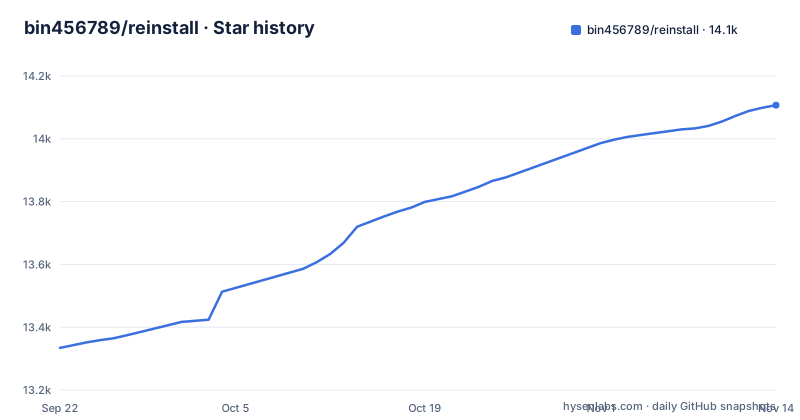
- bin456789/reinstall14,107 ★ · +773
| Repository | 2026-09-22 | 2026-11-14 |
|---|---|---|
| bin456789/reinstall | 13.3k | 14.1k |
773 Stars in the last 53 days, measured from the daily GitHub snapshot. Compare with other projects
Editorial analysis
The problem bin456789/reinstall solves for VPS owners
Most VPS providers ship a small set of install images. If you want a distribution the panel does not offer, or a clean Windows install instead of a vendor-customised one, the usual route is a rescue mode plus manual netboot. bin456789/reinstall turns that into one command. The README describes it as a one-click VPS reinstall script that supports "任意方向重装", meaning any direction: Linux to Linux, Linux to Windows, Windows to Windows, Windows to Linux. It lists around 20 common Linux distributions and Windows installed from official ISOs rather than self-made images. The audience is narrow and specific: people running a VPS they control fully, who are willing to erase the system disk, and who want the target OS installed by the vendor's own media. It is not a migration tool and it does not preserve data. The README's system requirements table is the real filter. Alpine needs 256 MB of RAM and 1 GB of disk, Debian and Kali need 256 MB and roughly 1 to 1.5 GB, while Ubuntu, Anolis, RHEL, AlmaLinux, Rocky, Oracle, OpenCloudOS and CentOS Stream need 512 MB and 2 to 5 GB. Those numbers are what make the project interesting: the README claims it is adapted for low-spec instances and needs less memory than the official netboot.
How the script boots a new OS onto the running machine
The repository layout shows the mechanism. reinstall.sh is the entry point, and the top level contains boot-time helpers: initrd-network.sh, fix-eth-name.initd, fix-eth-name.service and fix-eth-name.sh. The README states that the whole process identifies the disk by partition table ID, so it does not write to the wrong disk. It supports BIOS and EFI boot and ARM servers. It also states that no self-made packages are included and that all resources are fetched from mirrors in real time. The script also carries Windows-side tooling: windows-setup.bat, windows.xml, windows-driver-utils.sh and windows-resize.bat, which line up with the README's claim that it automatically finds ISO links and installs drivers such as VirtIO for public clouds. Network configuration is handled automatically, with the README listing support for /32 and /128 addresses, a gateway outside the subnet range, IPv6-only hosts, and IPv4 and IPv6 on different network interfaces. The visible trade-off is that this is a boot-and-overwrite design, not an in-place upgrade. The disk is repartitioned, and the machine reboots into installer or live media. That is why the disk-identification detail matters more here than in an ordinary installer: a wrong guess is not recoverable from inside the running system.
Installing and running bin456789/reinstall for the first time
The README's quick start links to a download section for the case where the current system is Linux. The script is fetched and run from the shell. Use the command shown in the README's download section rather than a copied variant. Once the script is on the machine, the README's feature list defines the entry points: reinstalling to Linux, DD-ing a raw image to disk, booting an Alpine live OS in memory, booting netboot.xyz, and installing Windows from an ISO. A first run should start with the Alpine live OS path, because it is the least destructive way to confirm the script boots on your hardware before you commit to a reinstall. The README lists Alpine 3.21 through 3.24 with a 256 MB memory and 1 GB disk requirement, the lowest row in its table. Take the exact invocation for that feature from its section in the README. What you should see is the machine rebooting into the live system rather than your original OS. If you need to stop a pending reinstall, the README has a dedicated section titled "取消重装" (cancel reinstall), which is where the documented cancellation procedure lives.
Where bin456789/reinstall is the wrong tool
The script's own design makes it unsuitable for several common situations. It erases the system disk, so any workload with data on that disk is out of scope; the repository layout shows no snapshot or restore tooling. It is also a poor fit for a VPS where you cannot recover from a bad boot. If the automatic network configuration writes an address the provider's switch does not accept, the machine comes back unreachable and you depend on the provider's own console. The requirements table is another boundary: a 256 MB instance can run Alpine or Debian, but Ubuntu and the RHEL family need 512 MB, and the disk minimums run from 1 GB to 5 GB. Below those numbers the install is not supported. Finally, the project is a Shell script that depends on live mirrors. The README states that all resources are obtained from mirrors in real time, which means a slow or blocked mirror can stall an install, and there is no bundled offline payload to fall back on. If your environment cannot reach public mirrors during boot, this is not the tool for you.
How it differs from netboot.xyz and provider rescue modes
netboot.xyz is the closest comparison, and the README treats it as a peer rather than a competitor: one of the five features is booting into netboot.xyz, so the two can be used together. The difference in approach is scope. netboot.xyz is a boot menu that loads installer environments over the network; it does not configure your network stack, does not identify your disk, and does not automate a Windows unattended install. bin456789/reinstall wraps that class of boot with the parts a VPS needs: automatic IP configuration including /32, /128, IPv6-only and split-NIC cases; disk selection by partition table ID; and Windows installation from official ISOs with VirtIO drivers. Provider rescue modes are the other alternative, and they are more conservative. A rescue image leaves your disk intact and gives you a shell, but it does not install an OS for you. The practical split is this: use rescue mode when you need to inspect or repair, use netboot.xyz when you want a manual installer menu, and use bin456789/reinstall when you have already decided to replace the OS and want the network and disk handling automated.
Maintenance, licence and the cost of staying current
The repository is not archived, and the last push was on 2026-11-02, so the project is being changed rather than frozen. There are no published GitHub releases, which fits a Shell script distributed from the default branch: there is no versioned artefact to pin, so an upgrade means pulling the current reinstall.sh and any helper files it references. That has a real cost. Because the README states that resources are fetched from mirrors in real time, a script that works today can fail later if a distribution changes its ISO layout or mirror paths, and a fix arrives as a commit on main rather than as a tagged release you can audit before upgrading. The licence is GPL-3.0. That matters if you plan to redistribute the script or ship a modified version inside a product: GPL-3.0 carries source-disclosure obligations for derivative works. This is not legal advice, and the obligations depend on how you use it. For ordinary use on your own VPS, the licence does not change anything about running the script.
What the repository does not document
There is no snapshot mechanism in the repository layout. The download and invocation commands for each feature are in the README's download and feature sections. The memory figures are target-system requirements, not measurements of the script. The repository does include a deprecated/ directory, which suggests some earlier paths have been retired. Treat the requirements table as the authoritative constraint and the feature headings as the authoritative command surface.
Editorial conclusion
Adopt bin456789/reinstall when you manage a VPS whose provider image you want to replace with a clean distribution or with Windows, and when the instance has at least the RAM and disk the README table lists for the target system. Do not adopt it on a machine whose disk contents you cannot lose, or where you have no out-of-band recovery path if the network configuration comes back wrong. Before running it, verify the target system's row in the requirements table, confirm your provider gives you console or rescue access, and check that the disk you intend to overwrite is the one the script selects.
Frequently asked questions
What is bin456789/reinstall?
It is a Shell script for reinstalling the operating system on a VPS with one command, described in its README as a one-click VPS reinstall script. It supports reinstalling to around 20 Linux distributions or to Windows from official ISOs, in any direction between Linux and Windows.
How do I install bin456789/reinstall on a VPS?
The README's quick start points to a download section for the case where the current system is Linux, and the script is fetched and run from the shell. Take the exact download command from that section of the README.
What are the memory requirements for bin456789/reinstall?
The README's requirements table lists 256 MB of RAM for Alpine, Debian and Kali, and 512 MB for Ubuntu, Anolis, the RHEL family, OpenCloudOS and CentOS Stream. Disk minimums range from 1 GB for Alpine to 5 GB for the RHEL family.
Does bin456789/reinstall support Windows installation?
Yes. One of the five documented features is installing Windows from an ISO, using official original ISOs rather than self-made images. The README states it automatically finds ISO links and installs drivers such as VirtIO for public clouds.
Can I cancel a reinstall started by bin456789/reinstall?
The README includes a dedicated section titled "取消重装" (cancel reinstall), which is where the documented cancellation procedure lives.
Official sources
Add this badge to your README
If you maintain this project, the badge below links readers to this analysis and shows its maintenance status from the daily GitHub snapshot. Paste the markdown into your README; add ?metric=license or ?metric=stars to the image URL for a different field.

[](https://hysenlabs.com/projects/bin456789-reinstall)Star history chart for your README
[](https://hysenlabs.com/projects/bin456789-reinstall)Was this useful?