DiPlay turns a BYD head unit into a CarPlay receiver
Independent CarPlay receiver for compatible Android head units. Wired and wireless public preview.
At a glance
- What is it?
- DiPlay is an independent CarPlay receiver that installs on BYD Android head units rather than on the phone, with wired, Wi-Fi Direct, car hotspot and same-LAN paths from Android 9 upward. It is a public preview whose bundled accessory identity comes from Carlinkit firmware instead of Apple, and whose Android 9 wireless path skips a frequency check that Android 10 performs.
- Who is it for?
- Adopt DiPlay if you own a BYD with DiLink, want CarPlay on the head unit and can accept preview-grade behaviour in exchange for dropping the factory receiver. Keep the stock system if your head unit blocks APK installs, or if losing the session every time you touch a display setting is unacceptable.
- Can I use it commercially?
- Yes, with conditions. GPL-3.0 is a copyleft licence: if you distribute software that includes it, you must release that software's source code under the same licence. Running it internally without distributing it does not trigger that obligation.
- Is it still maintained?
- Yes. The repository received new commits within the last day.
- What is it written in?
- Mainly Kotlin, according to GitHub's language statistics.
Answers come from the project's GitHub data, last synced on October 22, 2026, and from our analysis. They are not legal advice.
Star history
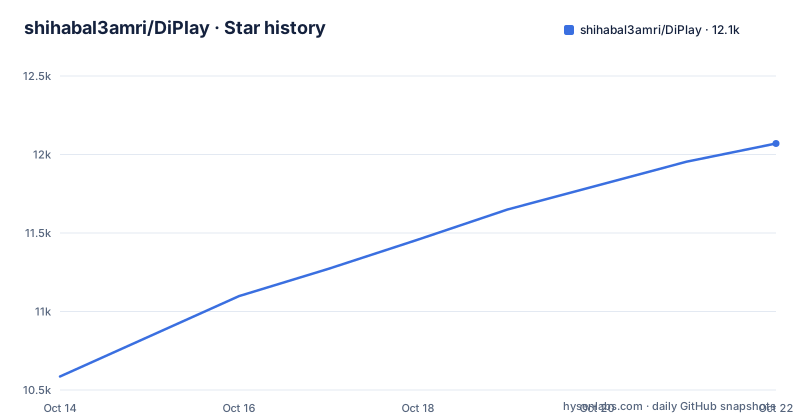
- shihabal3amri/DiPlay12,070 ★ · +1,484
| Repository | 2026-10-14 | 2026-10-22 |
|---|---|---|
| shihabal3amri/DiPlay | 10.6k | 12.1k |
1,484 Stars in the last 8 days, measured from the daily GitHub snapshot. Compare with other projects
Editorial analysis
The APK installs on the car, not the phone
BYD Android head units run DiLink, and on most of them there is no approved CarPlay receiver to buy. DiPlay fills that gap with an independent Kotlin app, `com.shihab.diplay`, that installs onto the head unit itself. No jailbreak, dongle, Mac, account or authentication server is required for use. The only host requirement is that your head unit permit APK installation, and the floor is Android 9, API 28.
Getting the file is a browser step rather than a package manager step. The project points readers at its own download page for the APK and keeps the procedure in `docs/INSTALL.md`, with `docs/BUILD.md` covering how the APK is assembled from source. The layout explains why there is no installer script to run: it is a Gradle project with `gradlew`, `settings.gradle.kts` and separate `common/`, `shared/`, `mobile/` and `automotive/` modules, plus example apps under `samples/home/` and `samples/maphost/`.
docs/INSTALL.md
docs/BUILD.md
One placement rule is easy to miss. DiPlay installs alongside DiAuto, and one projection app runs at a time. Having both on the head unit is fine; expecting both to project at once is not.
Wired USB carries the fragile part of the protocol
Wired and wireless CarPlay both run with local authentication, and the USB path is where the difficult work sits. The 0.2.13 build adds a narrow USBMUX trailer recovery that preserves valid payload replies, which is the careful way to describe a fix: rather than tearing down the whole USB link after a malformed frame, it salvages the reply that already arrived. Switching from wireless to USB is guarded as well, so moving a session between transports does not depend on luck.
Input and output carry their own compromises. Touch events go out as `TCP_NODELAY` events with device-specific performance limits, and the Siri microphone timestamp correction was derived from observation rather than from any published rule. Rendered video has a guarded handoff fallback, and the price of the picture is stated plainly: higher resolutions and large square canvases take more decoder and GPU work.
The setting that surprises an installer is display-related. Icon and text size, resolution and frame rate are all adjustable, and applying any display change reconnects CarPlay. One trip into the settings screen therefore ends the session in progress. Optional live dock and split-screen areas exist too, next to square-canvas rotation and a side panel that stays switched off until you enable it.
Android 9 wireless skips the frequency check Android 10 does
DiPlay supports Android 9 and newer, API 28, and its wireless behaviour forks at exactly that line. On Android 9, Wi-Fi Direct runs a firmware-dependent legacy path that generates group credentials and leaves the requested frequency unverified. From Android 10 upward, the app verifies the group frequency it actually negotiated, and the older route is documented separately in `docs/ANDROID9_WIFI_DIRECT.md`.
That split deserves attention, because the oldest Android version the APK accepts is also the one carrying the weaker radio discipline. Keeping API 28 alive has a cost written into it: the requested frequency goes unchecked and the group credentials are generated on the spot rather than established through a verified negotiation.
The rest of the 0.2.13 wireless work does not settle the question. IPv4-first hotspot endpoints, safer Auto channel ordering, automatic address discovery, fixed-channel fallbacks, memory of a successful configuration and a wireless startup that no longer advertises unused NSD and USB services all ship in the same build as the Android 9 headline, and the project does not say which of them an API 28 head unit actually receives. Anyone on Android 9 should read that page before assuming parity.
The bundled accessory identity is not DiPlay's own
The project's own warning is the most load-bearing sentence in its documentation. DiPlay is not an Apple-certified product, and the APK ships an experimental accessory identity recovered from public Carlinkit firmware rather than an identity provisioned for DiPlay. The bundled private key is described as extractable. Three questions stay open in the project's own words: whether that identity is still accepted after future iOS updates, how reliable it is across head units, and whether it is suitable for general distribution at all.
Placed next to the feature list, this creates a tension worth naming. CarPlay runs here with local authentication, needs no account and no authentication server, and the phone needs no jailbreak. All of that convenience sits on a credential the project does not own and cannot renew. CarPlay and its icon belong to Apple Inc., and no Apple or BYD affiliation or endorsement is implied.
On licensing, the receiver layer is based on `xcertplay` under GPL-3.0, while the home and settings interface adapts DiAuto under AGPL-3.0, with that text kept in `docs/licenses`; the project asks that those notices be preserved when distributing modifications.
Three wireless routes, one deliberately gated repair
Wireless setup has three named routes: Wi-Fi Direct, the car's existing hotspot, or Existing Wi-Fi / Same LAN, which keeps the iPhone and the head unit on an external router. `docs/EXISTING_WIFI.md` carries the steps, the build requirements and the outcome of a BYD DiLink 4.0 / Android 10 clean-install validation. The car hotspot route has become the easiest in practice, since the project reports that the car hotspot now starts CarPlay on its development car.
Discovery is handled for you: the app finds addresses automatically, falls back to fixed Wi-Fi channels and remembers a configuration that worked before. What it will not do is silently repair a broken hotspot join. That repair arrives as a separately confirmed Check/Apply/Restore action, so it cannot fire by itself while the car is moving.
The privacy side is narrow and explicit. Diagnostic reports are exported locally and sent only when you choose to share them, and the project tells reporters never to post a hotspot password.
Diagnostic reports land in different places per Android version
Reporting a fault follows a fixed route. Reproduce the problem on 0.2.13, then use the in-app action below. On Android 10 and later the file normally lands in `Downloads/DiPlay`; on Android 9 the document picker opens instead, so the path you see depends on the version you are running. When neither route works, View report or Share from the confirmation identifies external or private fallback storage.
Settings → Diagnostics → Save diagnostic report
Downloads/DiPlay
A useful report has a fixed shape, which saves a round trip on the issue tracker: vehicle and head-unit model, exact firmware and Android/DiLink version, phone and iOS version, connection backend, relevant settings, the steps and the failure time. The output is a `.txt` file to attach to a matching existing issue, or to open a new one.
Two more documents sit alongside it. `docs/COMPATIBILITY.md` covers compatibility and troubleshooting, and `docs/SMOOTH_WIRELESS.md` covers wireless connection quality.
Compatibility evidence covers two cars, not a matrix
The evidence behind the compatibility claims is narrow and named. Most features were exercised on a development DiLink 5.1 car, where live windshield guidance and street names work, the car hotspot now starts CarPlay, and Wi-Fi Direct performance is substantially improved. Wheel-speed and video contributions were tried on a BYD Tang with DiLink 5.0 and an iPhone 15 Pro on iOS 27. A floating-map test build went onto the same development car, and the feedback it produced became the pinch corrections in 0.2.9.
The gaps are stated with equal precision. Occasional audio cutouts remain and are deferred to a later update, wheel-speed dead reckoning in tunnels is unverified, and general stutter, calls and Siri, decoder behaviour, old-iOS startup and model-specific reports all sit under investigation. BYD HUD navigation with arrows, distance and street names is claimed for verified firmware only, with that scope written down:
docs/VALIDATION.md
docs/BYD_NAVIGATION.md
The cadence is the other warning sign. The last push was on 2026-10-06, and three tags landed inside three days: v0.2.11 on 2026-10-03, v0.2.12 on 2026-10-04 and v0.2.13 on 2026-10-06. A preview moving that fast accumulates fixes and unknowns at the same rate, so a single line in the notes is thinner evidence than the validation record behind it.
BYD only, with DiLink 3 and 4 handled separately
The brand boundary appears in the opening lines: these projects focus on BYD cars, other brands are unsupported, and there are no plans to add support or fix brand-specific incompatibilities. Inside BYD, though, the code branches per DiLink generation. DiLink 4 gains casting and calibration plus live cluster picture controls, while DiLink 3 gets a checked projection entry with compensation. Several features for the older generation sit off by default, among them experimental call keys, dashboard calls and AAC-LC buffered music, and the project asks you to read the firmware, audio and restoration limits before switching them on.
Other additions are as narrow as they sound: a battery-protocol fallback, eligible wheel-service recovery, retention of the recent turn card across a wireless replacement, a finer dashboard map choice, and a clearer settings surface with saved-menu behavior and car-button customization. The app and its website ship in seven languages, English, Arabic, Russian, Ukrainian, Spanish, Simplified Chinese and Traditional Chinese (Taiwan), selected in Settings and, from Android 13 onward, following the system per-app language setting.
Editorial conclusion
Adopt DiPlay if you own a BYD with DiLink, want CarPlay on the head unit and can accept preview-grade behaviour in exchange for dropping the factory receiver. Keep the stock system if your head unit blocks APK installs, or if losing the session every time you touch a display setting is unacceptable. Before installing, check your exact firmware against the verified HUD scope, read the Android 9 Wi-Fi Direct page if you run API 28, and accept that a future iOS update can withdraw the bundled accessory identity at any time.
Frequently asked questions
Which BYD cars and head units does DiPlay support?
DiPlay targets BYD cars with DiLink Android head units, and the project says other brands are unsupported with no plans to add brand-specific fixes. The APK needs Android 9 or newer, API 28, and a head unit that permits APK installation.
Do I need a jailbroken iPhone, a dongle or an Apple account to use DiPlay?
No. No jailbreak, dongle, Mac, account or authentication server is required, and the app installs on the car rather than the phone. Core CarPlay does not need ADB, while the optional dashboard, battery, wheel-speed and parked-video features do.
Is the CarPlay identity bundled in DiPlay certified by Apple?
It is not an Apple-certified product. The APK bundles an experimental accessory identity recovered from public Carlinkit firmware instead of a newly provisioned MFi identity, and the bundled private key is described as extractable, with acceptance after future iOS updates left unresolved.
How do I connect DiPlay wirelessly on a BYD?
Three routes are offered: Wi-Fi Direct, the car's existing hotspot, or Existing Wi-Fi / Same LAN, which keeps the iPhone and head unit on an external router. On Android 9 the Wi-Fi Direct path follows a firmware-dependent legacy route with generated group credentials and an unverified requested frequency, which `docs/ANDROID9_WIFI_DIRECT.md` explains.
How do I send a bug report for DiPlay without leaking my network?
Reproduce on 0.2.13, then use Settings, Diagnostics and Save diagnostic report; on Android 10 and later it normally saves to `Downloads/DiPlay`, while Android 9 uses the document picker. Attach the resulting `.txt` to a matching issue with vehicle model, firmware, phone and iOS version, connection backend, steps and failure time, and never post a hotspot password.
Official sources
Add this badge to your README
If you maintain this project, the badge below links readers to this analysis and shows its maintenance status from the daily GitHub snapshot. Paste the markdown into your README; add ?metric=license or ?metric=stars to the image URL for a different field.

[](https://hysenlabs.com/projects/shihabal3amri-diplay)Star history chart for your README
[](https://hysenlabs.com/projects/shihabal3amri-diplay)